Moments ago, we have announced the release of Mellifera 13, TheHive4py 1.3.0, and Cortex4py. And since we don’t want to leave you wanting for more fun time, you may want to schedule as well a Cortex update shall you need it 😉
Group ownership in Docker image prevents running on OpenShift #42
Fixed Bugs
Cortex removes the input details from failure reports #38
Display a error notification on analyzer start fail #39
Download & Get Down to Work
To update your current Cortex installation, follow the instructions of the installation guide. Before doing so, you may want to save the job reports that were not executed via TheHive. Cortex 1 has no persistence and restarting the service will wipe out any existing reports.
Please note that you can install Cortex using an RPM or DEB package, deploy it using an Ansible script, use Docker, install it from a binary or build it from sources.
Support
Something does not work as expected? You have troubles installing or upgrading? No worries, please join our user forum, contact us on Gitter, or send us an email at support@thehive-project.org. We are here to help.
Version 1.3.0 of the Python API client for TheHive is now available. It is compatible with the freshly released Mellifera 13. This new release includes the changes outlined below.
To update your existing package:
$ sudo pip install thehive4py --upgrade
If you are just getting started with TheHive4py, you can forgo the --upgrade at the end of the command above.
New Features
Add more options to sort, filter and paginate case tasks and observables
Add a find_alerts method to allow querying alerts
Add support to API Key authentication mechanism
Bug Fixes
Added verify parameter to calls
Breaking Changes
The `get_case_tasks` method has been made consistent with all the other methods and now returns a `Response` object instead of a JSON dict.
Houston? Are you There?
Shall you encounter any difficulty, please join our user forum, contact us on Gitter, or send us an email at support@thehive-project.org. As usual, we’ll be more than happy to help!
Following popular demand, the chefs at TheHive Project‘s code kitchen are happy to announce the immediate availability of Cortex4py.
What Is It?
Cortex4py is a Python API client for Cortex, a powerful observable analysis engine where observables such as IP and email addresses, URLs, domain names, files or hashes can be analyzed one by one using a Web interface or en masse through the API.
Cortex4py allows analysts to automate these operations and submit observables in bulk mode through the Cortex REST API from alternative SIRP platforms (TheHive has native support for one or multiple Cortex instances) and custom scripts.
Use It
To install the client, use PIP:
$ sudo pip install cortex4py
How Much Does it Cost?
Cortex4py is released under an AGPL license as all the other products we publish to help the IR community fight the good fight. So apart from the effort it’ll cost you to install and use, the price of our software is nada, zero, rien. But if you are willing to contribute one way or another, do not hesitate to drop us an email at support@thehive-project.org or contact us via Twitter.
Support
Something does not work as expected? You have troubles installing or upgrading? No worries, please join our user forum, contact us on Gitter, or send us an email at support@thehive-project.org. We are here to help.
TheHive Project French Chefs are very happy to announce Mellifera 13 (TheHive 2.13.0), a brand new, all shiny, major version of TheHive.
This new edition of your favorite Security Incident Response Platform (SIRP) has been cooked with great care to bring you a number of key features.
Mellifera 13 now uses ElasticSearch 5.x. We have tested it with v 5.5 but it should work just fine with ES 5.6.
Webhooks
TheHive has now basic support for webhooks. This allows your SIRP to post all the audit trail data to one or multiple webhooks defined in the configuration file. This way, you can listen to any change taking place on the platform and act on it as you see fit: create a ticket in an IT ticketing system, send a message to a Slack channel, display selected events of the audit trail on a screen, wake up your fellow analysts from sleep when a specific type of cases or a given alert is raised & so on. So get some elbow grease and code that Slack bot promptly 😉
Import and Export from Multiple MISP Servers
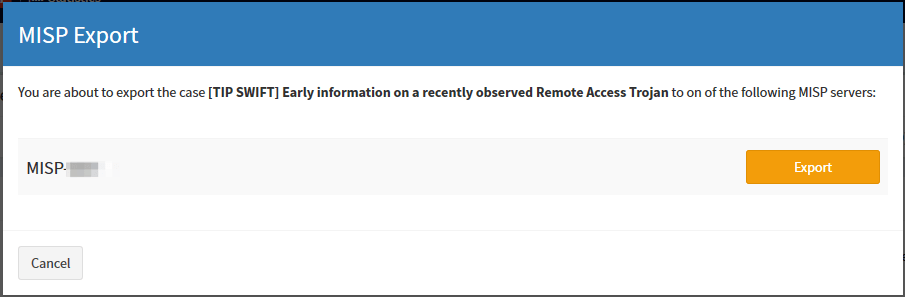
Mellifera 13 can not only import events from multiple MISP servers but also export cases as events to one or several MISP instances. The exported cases will not be published automatically though as they need to be reviewed prior to publishing.
Click on that Share button on the top right cornerSelect the MISP server to which to export the caseSee how the Share counter on the top right corner has now increased
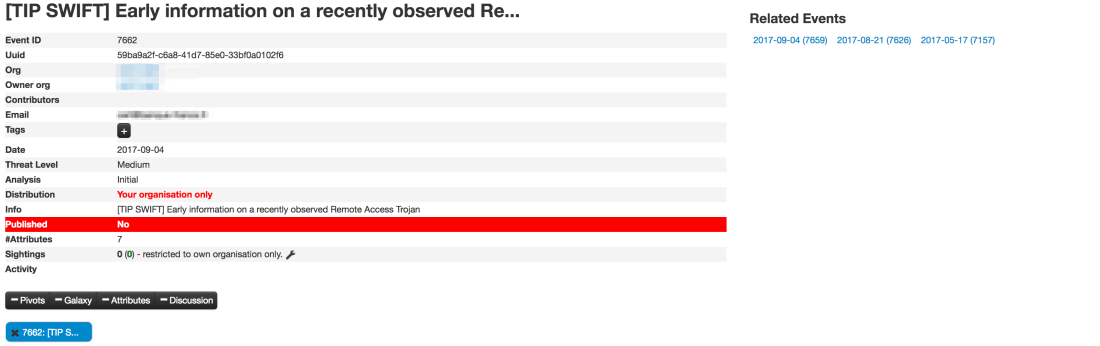
We strongly advise you to review the categories and types of attributes at least, before publishing the corresponding MISP events. Please also note that only and all the observables marked as IOCs will be used to create the MISP event. Any other observable will not be shared. This is not configurable. For further details, check the documentation.
Review and publish the event on MISPReview the categories and types of your attributes
API Keys
Mellifera 13 introduce a new authentication mechanism: API keys. This auth method is recommended for all programs or scripts, including your SIEM, that raise alerts on TheHive. You can, as an administrator, generate and revoke as many API keys as you want. Existing software using the basic authentication method should be modified to use API keys. But do not panic, while the basic authentication mechanism has been disabled by default, you can still enable it in application.conf.
The ‘alert’ role
A new alert role has been added. Only users with this role can create an alert. All existing programs which create alerts must have this role. Otherwise they will no longer work.
Download & Get Down to Work
If you have an existing installation of TheHive, please follow the migration guide. This is paramount to ensure a good transition from earlier versions. You have been warned.
If you are performing a fresh installation, read the installation guide corresponding to your needs and enjoy. Please note that you can install TheHive using an RPM or DEB package, use Docker, install it from a binary or build it from sources.
Support
Something does not work as expected? You have troubles installing or upgrading? No worries, please join our user forum, contact us on Gitter, or send us an email at support@thehive-project.org. We are here to help.
It’s time for us to rest. We are closing* TheHive’s code kitchen for most of August 2017 to enjoy all what France has to offer: wine (obviously), literature, beaches, mountains, gorgeous food, and a unique savoir vivre.
So keep calm and eat croissants.
Source : Pinterest
See you back soon. Au revoir ! —
(*) Bear with us as we will be particularly slow to respond to support and feature requests as well as Gitter queries.
While many are enjoying the summer holidays, the busy bees of TheHive Project have been working hard lately to develop new Cortex analyzers and review few of those submitted by our growing and thriving user community, bringing the grand total to 27. Yes, you read that right. Cortex can leverage 27 analyzers to help you analyze observables very simply in many different ways.
The latest update to the Cortex-analyzers repository contains 3 new analyzers: Yeti, Cuckoo Sandbox and WOT, described below. And your first step to benefit from them should consist of refreshing your master working copy on your Cortex instance:
$ cd where/your/analyzers/are
$ git pull master
Yeti
YETI is a FOSS platform meant to organize observables, indicators of compromise, TTPs, and knowledge on threats in a single, unified repository. It is mainly developed by fellow APT busters Thomas Chopitea and Gael Muller (who said France doesn’t produce good software?).
The new Cortex analyzer for this platform lets you make API calls to YETI and retrieve all available information pertaining to a domain, a fully qualified domain name, an IP address, a URL or a hash.
To be able to use the analyzer edit the Cortex configuration file (/etc/cortex/application.conf) and add the following lines:
Yeti {
    # URL of the Yeti server: example: http://120.0.0.1:5000
    url = ""
}
When called from TheHive, the following output is produced:
TheHive: YETI analyzer — Short and Long Report Samples
CuckooSandox
The Cuckoo Sandbox analyzer has been submitted by Andrea Garavaglia (Thanks!) and you can use it to analyze files and URLs with Cuckoo Sandbox.
By default, we chose to limit analysis to TLP:WHITE and TLP:GREEN observables for OPSEC reasons, in case your Cuckoo server provides Internet access to potentially harmful files. If you want to use it with TLP:AMBER or TLP:RED observables, edit CuckooSanbox_File_analysis.json orCuckooSanbox_URL_analysis.json and change the max_tlp parameter to 2 or 3.
To use the analyzer, edit the Cortex configuration file and add the following lines:
CuckooSandbox {
   url = “http://mycuckoosandbox”
}
When called from TheHive, the following output is produced:
TheHive: Cuckoo Sandbox Analyzer — Short and Long Report Samples
WOT
The WOT analyzer was also submitted by Andrea Garavaglia (kudos!). Use it to check reputation of a given domain on the Web of Trust service. It takes domains and FQDNs as input.
An API key is needed to use this service, and has to be added in the Cortex configuration file:
WOT {
    # API key of the Web of Trust account
    key=“”
}
When called from TheHive, the following output is produced:
TheHive: WOT Analyzer — Short and Long Report Samples
Great, palatable recipes, even if they are cooked by fine French chefs, need to be refined over time and may not be as savoury as intended when they are served in their early days. Quality takes time, although smokeware vendors would have you think otherwise.
Mellifera 12.1 (TheHive 2.12.1) has been released to fix a number of outstanding bugs:
#254: TheHive does not send the file’s name when communicating with Cortex
#255: merging an alert into an existing case does not merge the alert description into the case’s description
#257: while TheHive does not let you add multiple attachments to a single task log, the UI makes you believe otherwise
#259: fix an API inconsistency. GET /api/case/task/:id/log has been fixed.
And a new API call POST /api/case/task/:taskId/log/_search has been added, which accepts a “query” in the request body to filter logs of the task.
#268: cannot create an alert if the IOC field is set for a single alert’s attribute.
#269: closing a case with an open task does not dismiss it from ‘My Tasks’.
This new minor release adds the following enhancements:
#272: in alert preview, similar cases are shown regardless of their status. Merged or deleted ones should not appear in that list.
How About the Test VM?
The test VM has not been updated yet. It still contains Mellifera 12 (TheHive 2.12.0). We will update it in September, probably when Mellifera 13 is released. That version will bring the ability to export cases as MISP events.
Download & Get Down to Work
If you have an existing installation of TheHive, please follow the migration guide.
If you are performing a fresh installation, read the installation guide corresponding to your needs and enjoy. Please note that you can install TheHive using an RPM or DEB package, use Docker, install it from a binary or build it from sources.
Support
Something does not work as expected? You have troubles installing or upgrading? No worries, please join our user forum, contact us on Gitter, or send us an email at support@thehive-project.org. We are here to help.
Rejoice folks! You can now play with TheHive & Cortex thanks to the test VM we created. It includes Mellifera 12, the latest major version of TheHive, Cortex 1.1.3, the latest Cortex analyzers with all dependencies and ElasticSearch installed on top of Ubuntu 16.04 with Oracle JRE 8.
The test VM is intended to be used… well… for testing or training purposes. We strongly encourage you to refrain from using it for production.
Get It
You can download the VM from the following location:
click on Import templates button and select the downloaded package
Plug it with MISP
The test VM does not contain a MISP instance and none is configured in TheHive’s configuration file. To play with MISP, you may want to use the VM our good friends at CIRCL provide. Once you’ve downloaded it or if you have an existing instance, edit /etc/thehive/application.conf and follow the configuration guide.
Restart or Go Mad
After each modification of /etc/thehive/application.conf do not forget to restart the service:
$ sudo service thehive restart
Troubles?
TheHive service logs are located in /var/log/thehive/application.log.
Configure Cortex
All available analyzers are installed with their dependencies, but none is configured. To configure analyzers, edit /etc/cortex/application.conf and follow the configuration guide.
Restart or Go Mad
After each modification of /etc/cortex/application.conf do not forget to restart the service:
$ sudo service cortex restart
Troubles?
Cortex service logs are located in /var/log/cortex/application.log.
Need Help?
Something does not work as expected? No worries, we got you covered. Please join our user forum, contact us on Gitter, or send us an email at support@thehive-project.org. We are here to help.
Correction: July 8, 2017
An earlier version of this post offered to download the VM from Dropbox but they suspended the associated link due to seemingly heavy traffic. The post was updated to replace the Dropbox link with a Google Drive one.
It’s a sunny week in Paris, France (not Texas) barring the tropical rain that washed out the city earlier this morning. And when there’s sun in France, there’s happiness and… coding of course (what else?). The French Chefs of TheHive Project seem to be in a good mood (n’est-ce pas Jérôme ?), thanks to the vitamin D extra charge they got for free from the big star up above.
Version 1.2.2 of the Python API client for TheHive is now available. It mainly fixes issues related to missing Python dependencies and adds support for creating alerts containing files for Python 3.
To update your existing package:
$ sudo pip install thehive4py --upgrade
If you are just getting started with TheHive4py, you can forgo the --upgrade at the end of the command above.
Houston? Are you There?
Shall you encounter any difficulty, please join our user forum, contact us on Gitter, or send us an email at support@thehive-project.org. As usual, we’ll be more than happy to help!
TheHive Project French Chefs are very happy to announce Mellifera 12, a brand new, all shiny, major version of TheHive.
This MAGA (Make Analysis Great Again) edition of your (soon to be?) favorite Security Incident Response Platform (SIRP) contains an awful lot of changes and improvements. While you can read the full changelog while waiting in line for your burger at HopDoddy or for your turn for the latest Disney attraction, we’d like to concentrate on a few features that would make you enjoy Digital Forensics & Incident Response like never before 🙂
Go Short or Go North
The Observables tab can now display the short (a.k.a. mini) reports produced by analyzers. Whenever you run an analysis (or many), the mini-reports will be shown as soon as the corresponding analyzer jobs have successfully finished. That way, you no longer have to click on each observable to access the short report.
Short Reports shown on the Observables Tab
In fact, you don’t even have to click on the observable to access the long reports. You must simply click on the corresponding short report and the long one will be displayed on top of the observables tab as shown in the following screencast. Ain’t that nifty?
A Single Click on the Short Report Shows the Long One
The short reports have been also improved to follow a taxonomy. To get to this stage, we had to review all 24 analyzers and their flavors, add new functionality to the CortexUtils Python library and improve the analyzers to add a summary section to their JSON output which Mellifera 12 interprets and displays according to a color code as described in our previous post. Please make sure to read it as it contains important information on how to update your cortexutils version and the analyzers as well as the report templates.
Is This Alert New or What?
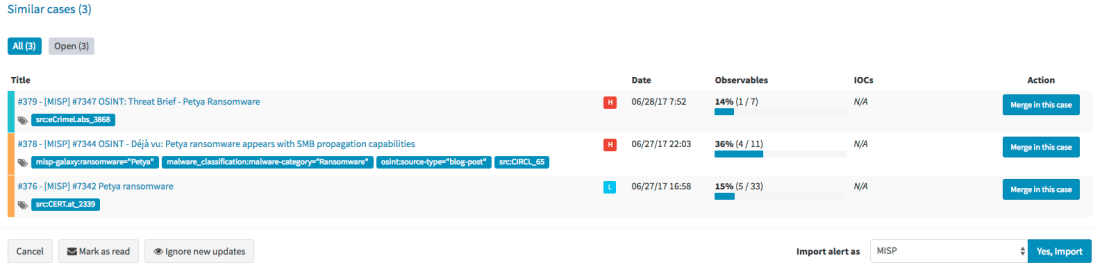
Mellifera 12 introduces an important feature pertaining to alerts. To put it simply, whenever you receive a new alert from MISP, email, SIEM or any other source that you have connected with TheHive, the alert preview page will tell you if there are similarities with existing cases and if so, Mellifera 12 will let you import the new alert in the existing case and any updates made to that alert (think of an ongoing MISP event) will be automatically added to the case.
Alert Preview Page with the new Similar cases Section
Template this, Template that
In addition to the ‘similarity’ feature outlined above, Mellifera 12 lets you choose the case template to use when importing a new alert instead of having to use only a specific case template per alert type/source.
Choose the Template You’d Like to Use to Import an Alert
Custom Fields
We heard our community and implemented a feature that was requested by several users: custom fields.
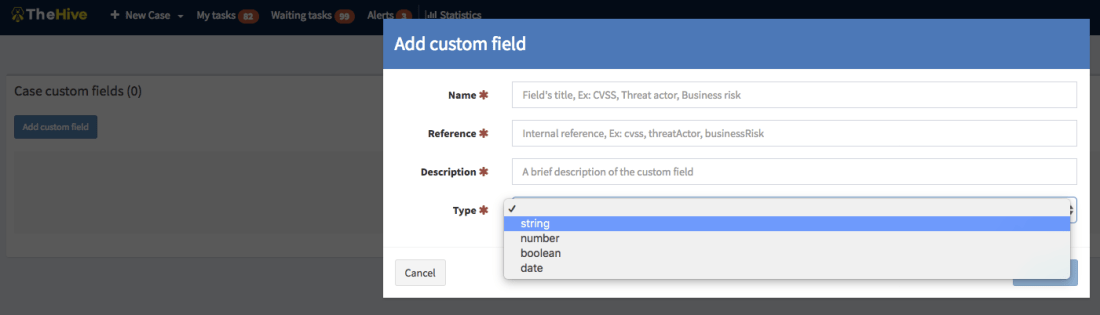
So you’d like to add a business impact to a specific type of cases? Or a set of TTPs? Or a Threat Actor? Or specify a Business Unit? No problem! Ask an admin to create a custom field, associate it with a case template and there you go.
Add a Custom Field
Unlike metrics, custom fields must not be filled to close a case. You can also supercharge a case with custom fields that have not been associated to a case template. We currently support four types of custom fields: strings, numbers, booleans and dates. And you can create lists of acceptable values to limit your analysts’ choices to legitimate data.
If you have an existing installation of TheHive, please follow the migration guide.
If you are performing a fresh installation, read the installation guide corresponding to your needs and enjoy. Please note that you can install TheHive using an RPM or DEB package, use Docker, install it from a binary or build it from sources.
Support
Something does not work as expected? You have troubles installing or upgrading? No worries, please join our user forum, contact us on Gitter, or send us an email at support@thehive-project.org. We are here to help.








 TheHive Project