Train till you Drain: TheHive & Cortex VM

Rejoice folks! You can now play with TheHive & Cortex thanks to the test VM we created. It includes Mellifera 12, the latest major version of TheHive, Cortex 1.1.3, the latest Cortex analyzers with all dependencies and ElasticSearch installed on top of Ubuntu 16.04 with Oracle JRE 8.

The test VM is intended to be used… well… for testing or training purposes. We strongly encourage you to refrain from using it for production.

Get It

You can download the VM from the following location:

https://drive.google.com/file/d/0B3G-Due88gfQYWR6WVlkLWhRemM/view?usp=sharing

To ensure that your download went through nicely, check the file’s SHA256 hash which must be equal to the following value:

17df5989d852583e3046daefb97caadff90d30ecf4402df69cf6036d7ad1cacd

The system’s login is thehive and the associated password is thehive1234.

Use It

You can start using TheHive & Cortex once the VM is started. To access TheHive, point your browser to the following URL:

http://IP_OF_VM:9000

For Cortex, the port is 9999:

http://IP_OF_VM:9999

Configure TheHive

The first time you access TheHive, you’ll need to create the associated database by clicking on the Update Database button as shown below:

Screen_Shot_2017-07-06_at_21_52_46.png
Update TheHive’s Database on First Access

TheHive’s configuration file is located in /etc/thehive/application.conf. For additional configuration, read the docs.

Cortex

TheHive is already configured to use the local Cortex service.

Analyzer and Associated Report Templates

To fully benefit from the analyzers, you should install the associated report templates:

  • download the report template package
  • log in TheHive using an administrator account
  • go to Admin > Report templates menu
  • click on Import templates button and select the downloaded package
Plug it with MISP

The test VM does not contain a MISP instance and none is configured in TheHive’s configuration file.  To play with MISP, you may want to use the VM our good friends at CIRCL provide.  Once you’ve downloaded it or if you have an existing instance, edit /etc/thehive/application.conf and follow the configuration guide.

Restart or Go Mad

After each modification of /etc/thehive/application.conf do not forget to restart the service:

$ sudo service thehive restart

Troubles?

TheHive service logs are located in /var/log/thehive/application.log.

Configure Cortex

All available analyzers are installed with their dependencies, but none is configured. To configure analyzers, edit /etc/cortex/application.conf and follow the configuration guide.

Restart or Go Mad

After each modification of /etc/cortex/application.conf do not forget to restart the service:

$ sudo service cortex restart
Troubles?

Cortex service logs are located in /var/log/cortex/application.log.

Need Help?

Something does not work as expected? No worries, we got you covered. Please join our  user forum, contact us on Gitter, or send us an email at support@thehive-project.org. We are here to help.


Correction: July 8, 2017 
An earlier version of this post offered to download the VM from Dropbox but they suspended the associated link due to seemingly heavy traffic. The post was updated to replace the Dropbox link with a Google Drive one.

TheHive4py 1.2.2 is Here

It’s a sunny week in Paris, France (not Texas) barring the tropical rain that washed out the city earlier this morning. And when there’s sun in France, there’s happiness and… coding of course (what else?). The French Chefs of TheHive Project seem to be in a good mood (n’est-ce pas Jérôme ?), thanks to the vitamin D extra charge they got for free from the big star up above.

After updating CortexUtils and the analyzers, and releasing Mellifera 12, a new, major version of TheHive, why stop there when you can update TheHive4py as well?

Version 1.2.2 of the Python API client for TheHive is now available. It mainly fixes issues related to missing Python dependencies and adds support for creating alerts containing files for Python 3.

To update your existing package:

$ sudo pip install thehive4py --upgrade

If you are just getting started with TheHive4py, you can forgo the --upgrade at the end of the command above.

Houston? Are you There?

Shall you encounter any difficulty, please join our  user forum, contact us on Gitter, or send us an email at support@thehive-project.org. As usual, we’ll be more than happy to help!


Mellifera 12: The MAGA Edition

TheHive Project French Chefs are very happy to announce Mellifera 12, a brand new, all shiny, major version of TheHive.

This MAGA (Make Analysis Great Again) edition of your (soon to be?) favorite Security Incident Response Platform (SIRP) contains an awful lot of changes and improvements. While you can read the full changelog while waiting in line for your burger at HopDoddy or for your turn for the latest Disney attraction, we’d like to concentrate on a few features that would make you enjoy Digital Forensics & Incident Response like never before 🙂

Go Short or Go North

The Observables tab can now display the short (a.k.a. mini) reports produced by analyzers. Whenever you run an analysis (or many), the mini-reports will be shown as soon as the corresponding analyzer jobs have successfully finished. That way, you no longer have to click on each observable to access the short report.

sc-Mellifera12-#131.png
Short Reports shown on the Observables Tab

In fact, you don’t even have to click on the observable to access the long reports. You must simply click on the corresponding short report and the long one will be displayed on top of the observables tab as shown in the following screencast. Ain’t that nifty?


sc-Mellifera12-#191-2.png
A Single Click on the Short Report Shows the Long One

The short reports have been also improved to follow a taxonomy. To get to this stage, we had to review all 24 analyzers and their flavors, add new functionality to the CortexUtils Python library and improve the analyzers to add a summary section to their JSON output which Mellifera 12 interprets and displays according to a color code as described in our previous post. Please make sure to read it as it contains important information on how to update your cortexutils version and the analyzers as well as the report templates.

Is This Alert New or What?

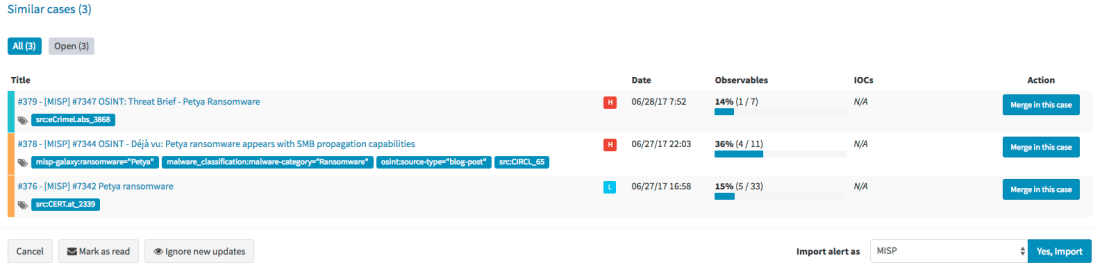
Mellifera 12 introduces an important feature pertaining to alerts. To put it simply, whenever you receive a new alert from MISP, email, SIEM or any other source that you have connected with TheHive, the alert preview page will tell you if there are similarities with existing cases and if so, Mellifera 12 will let you import the new alert in the existing case and any updates made to that alert (think of an ongoing MISP event) will be automatically added to the case.

sc-mellifera12-#232.png
Alert Preview Page with the new Similar cases Section

Template this, Template that

In addition to the ‘similarity’ feature outlined above, Mellifera 12 lets you choose the case template to use when importing a new alert instead of having to use only a specific case template per alert type/source.

sc-mellifera12-#232-2.png
Choose the Template You’d Like to Use to Import an Alert

Custom Fields

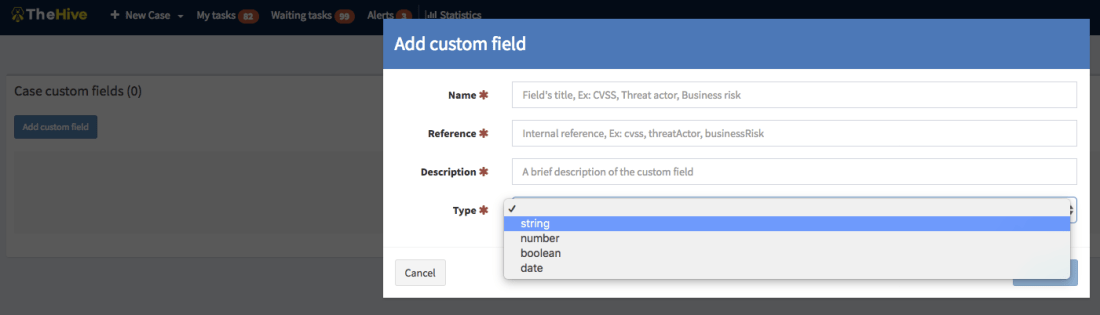
We heard our community and implemented a feature that was requested by several users: custom fields.

So you’d like to add a business impact to a specific type of cases? Or a set of TTPs? Or a Threat Actor? Or specify a Business Unit? No problem! Ask an admin to create a custom field, associate it with a case template and there you go.

sc-mellifera12-#12-customfields2.png
Add a Custom Field

Unlike metrics, custom fields must not be filled to close a case. You can also supercharge a case with custom fields that have not been associated to a case template. We currently support four types of custom fields: strings, numbers, booleans and dates. And you can create lists of acceptable values to limit your analysts’ choices to legitimate data.

Other New Features

Mellifera 12 gives you the ability to reopen closed tasks. And when viewing the related cases tab of the current case, you’ll see the resolution status of the ones that were closed (false positive, true positive, indeterminate). External links will also be opened in a new tab.  Moreover, files included in alerts are no longer limited to 32 KB so you have no longer an excuse to avoid sending user email reports with their attachments to TheHive 😉

Download & Get Down to Work

If you have an existing installation of TheHive, please follow the migration guide.

If you are performing a fresh installation, read the installation guide corresponding to your needs and enjoy. Please note that you can install TheHive using an RPM or DEB package, use Docker, install it from a binary or build it from sources.

Support

Something does not work as expected? You have troubles installing or upgrading? No worries, please join our  user forum, contact us on Gitter, or send us an email at support@thehive-project.org. We are here to help.

All Fresh CortexUtils, New Cortex Analyzers

Ahead of the imminent release of Mellifera 12 (TheHive 2.12.0), a new, major (as in MAJOR) version of your (soon to be?) favorite Security Incident Response Platform, we’ve made rather significant changes to Cortex analyzers and released a new version of the CortexUtils Python library.

TL;DR

If you are in a hurry:

$ sudo pip install cortexutils --upgrade
$ cd where/your/analyzers/are
$ git pull master

Adjust the Cortex configuration for the new MISP 2.0 analyzer and for Hippocampe as shown below if you are using these analyzers then import the corresponding report templates into TheHive:

  • download the updated package
  • log in TheHive using an administrator account
  • go to Admin > Report templates menu
  • click on Import templates button and select the downloaded package

CortexUtils 1.2.0

CortexUtils has been updated to include a new function called build_taxonomy() which is required for analyzers relying on the Python library we released to make their development development easier.

Mini-Reports in The Observable Tabs

Starting from Mellifera 12 (TheHive 2.12.0), mini-reports will be displayed in the observable tab in each case as soon as an analysis has been completed. Now analyzers compute their short/mini reports and put them in the summary section of their JSON output, ready for consumption. TheHive 2.12.0 and up will no longer create them on-the-fly.

Taxonomy

The mini-reports of all the analyzers have been updated to comply with a taxonomy that is similar to the one we were already using for VirusTotal:  VT:Score="14/56”.  A “maliciousness” level was already included in TheHive’s analyzer templates and we used a specific color to display each level. This level is now produced directly by the analyzers:

  • info / blue: the analyzer produced an information, and the short report is shown in blue color in TheHive.
  • safe / green : the analyzer did not find anything suspicious or the analyzed observable is safe (according to the analyzer). TheHive displays the short report in green color.
  • suspicious / orange : the analyzer found that the observable is either suspicious or warrants further investigation. The short report is orange colored in TheHive.
  • malicious / red : the analyzer found that the observable is malicious. The short report is displayed by TheHive in red color as show below:

sc-short-VT.png

The short report is built with the summary() function of an analyzer. The build_taxonomy() of cortexutils mentioned earlier should help building it.

MISP 2.0

The MISP analyzer has been updated to version 2.0 and includes new functionality submitted by our long-term contributor Nils Kuhnert from CERT-Bund (thanks a heap!). Unlike the previous version, v 2.0 will let you search for an observable in multiple MISP servers at the same time.

The analyzer accepts a truckload of datatypes as input. To make it work, install the pymisp Python library. It should already have been installed if you are just updating your current analyzers. You will also have to change Cortex configuration file (application.conf) for this new version:

MISP {
 url=["https://mymispserver_1", "https://mymispserver_2"]
 key=["mykey_1", "mykey_2" ]
 certpath=["", ""]
 name=["MISP_SERVER_NAME_1", "MISP_SERVER_NAME_2"]
}

Important note: You have to adjust your existing configuration to match the one shown above. The certpath variable can be left blank if you are not using a self-signed certificate.

When called from TheHive, the following output is produced:

sc-short-MISP.png

sc-MISP-long.png
TheHive: MISP 2.0 Analyzer – Short and Long Report Samples

The short report will show the number of unique events found in all MISP servers while the long report will show information of each matching event in each MISP server.

CERTatPassiveDNS

The CERTatPassiveDNS analyzer is a new submission by Nils (thanks again). It lets you check the CERT.at PassiveDNS service for a given domain or hostname. It takes domains and FQDN as input.

Access to the CERT.at service is allowed to trusted partners only. If you think you qualify, please contact CERT.at. You do not need to add specific information into the Cortex configuration file to benefit from this analyzer as it calls the whois system command to perform the pDNS requests.

When called from TheHive, the following output is produced:

sc-certatpdns-short.png


sc-long-CERTatPassiveDNS_1_0.png
TheHive: CERTatPassiveDNS Analyzer – Short and Long Report Samples


Miscellaneous

The latest version of the Cortex-analyzers repository also include the following bug fixes and improvements:

  • #61: fix typos in two requirements.txt files – by Michael Salsone
  • #65: update the Joe Sandbox analyzer’s long report to support version 19.0.0
  • #67: fixed mistake in the FireHol analyzer –  by Nils Kuhnert
  • #69: use http://server:port for Hippocampe instead of http://server:port/hippocampe/api/v1.0/

Running Into Trouble?

Shall you encounter any difficulty, please join our  user forum, contact us on Gitter, or send us an email at support@thehive-project.org. We will be more than happy to help!

Correction: July 6, 2017 
An earlier version of this post mispelled Nils Kuhnert’s last name.

Cortexutils 1.1.1 is Here

Lo and behold, The Chefs behind TheHive Project have been pretty busy at the code kitchen, continuously improving some of your favorite recipes. After releasing Mellifera 11.3 and Cortex 1.1.3, here comes the turn of Cortexutils, the Python library containing utility classes for Cortex analyzers.

Version 1.1.1 of the library solves an encoding issue, in fact a regression introduced by the previous release. It also corrects a situation where error reports wouldn’t be generated in case the analyzer did not require configuration (we have a handful of such creatures in store).

You can grab the new Cortexutils release through PIP. To update your existing installation, please run the following command:

 sudo pip install cortexutils --upgrade

Running Into Trouble?

Shall you encounter any difficulty, please join our  user forum, contact us on Gitter, or send us an email at support@thehive-project.org. We will be more than happy to help!

Cortex 1.1.3 Released

Moments ago, we have announced the release of Mellifera 11.3. And since we don’t want to leave you wanting for more update er fun time, you may want to schedule as well a Cortex update shall you need it 😉

Cortex 1.1.3 is now available. This hotfix corrects the deb package  to make it compatible with Ubuntu 16.04 without having to fiddle with OpenJDK. As we did with TheHive, we have repackaged the software to avoid grabbing OpenJDK 9 (which Cortex does not support) and force the installation of version 8. This version also corrects a cryptic error that might be thrown out by Cortex as a result of an improper interpretation of an analyzer failure.

Download & Get Down to Work

To update your current Cortex installation, follow the instructions of the installation guide. Before doing so, you may want to save the job reports that were not executed via TheHive. Cortex 1 has no persistence and restarting the service will wipe out any existing reports.

Please note that you can install Cortex using an RPM or DEB package, deploy it using an Ansible script, use Docker, install it from a binary or build it from sources.

Support

Something does not work as expected? You have troubles installing or upgrading? No worries, please join our  user forum, contact us on Gitter, or send us an email at support@thehive-project.org. We are here to help.

TheHive: June-Dec 17 Roadmap

A new version of TheHive will be released by the end of June. We will take this opportunity to review our release naming and numbering from the ground up.

Months ago, we started giving ‘major’ versions (2.10, 2.11, …) the name of honey bee varieties. 2.10 was called Buckfast. 2.11, the current version, is called Mellifera. And we were supposed to give 2.12 yet another name. However, and after the few hiccups we’ve encountered with our QA as of late, we have decided to change things around in order to make sure new releases are as stable and well-maintained as you should expect them to be.

Starting from the next release (2.12), we will abide by the following numbering scheme:

  • Major versions == X (2, 3, …)
  • Minor versions = X.Y (2.12, 2.13, 3.1, …)
  • Hotfix/maintenance versions = X.Y.Z (2.12.1, 2.13.2, 3.1.1, …)

Only major versions will have corresponding honey bee names. So long as we stay with v2, we’ll keep calling all the minor versions Mellifera N (2.12.0 = Mellifera 12). Version 3 will be called Cerana.

Mellifera 12 – June 29, 2017 (planned date)

Mellifera 12 (v 2.12) will succeed to Mellifera 2 (the current version) to comply with the new naming scheme. It will allow you to see how similar new alerts are to existing cases so you can decide whether you import them into an existing case, create a new one or ignore them altogether. Mellifera 12 will show you the status of all the related cases (#229) to the one you are working on. Finally, you’ll have the ability to change the default case template before importing an alert.

M12 will also support custom fields (#12), a feature that has been requested by numerous users. This version will also add mini-reports to the Observables tab. That way, once a Cortex analysis has been completed, analysts will be able to view part or all the resulting short report in that tab instead of having to navigate to the page of each observable to read the short report.

Mellifera 13 – September 14, 2017

TheHive 2.13 should be the last Mellifera version. It will complete TheHive’s integration with MISP by adding the ability to export all observables or a subset of them to a MISP instance. Please note that TheHive allowed you from the start to import events from multiple MISP instances but since sharing is caring, we wanted to add the ability to export to this very popular threat sharing platform from your Security Incident Response Platform (SIRP). We do not want to rush it though.

Cerana – October 12, 2017

Cerana or TheHive 3.0.0 will bring a complete UI overhaul to make it even easier to work on cases, perform analysis and get your job done, after the interface refreshments Mellifera brought. It will lay the ground for some nifty features we have in mind.

Cerana 1 – November 15, 2017

TheHive 3.1.0 will include dynamic dashboards: the ability to work with the statistics and metrics the way you want and generate customized dashboards to help you drive your activities.

Keep an eye on TheHive’s milestones on GitHub. There are other features and enhancements that we might add as we progress and we will reflect them on that page.

Correction: June 12, 2017
An earlier version mentioned GitHub issue #36 as pertaining to custom fields while it is a request for globally-defined tags that an analyst can choose from.


Cortex 1.1.2 Released

We are glad to announce a new version of your favorite observable analysis engine which corrects bugs introduced by version 1.1.1 and adds a few enhancements. As a reminder, TheHive, our Security Incident Response Platform, can interact with one or several Cortex instances. Moreover, starting from version 1.1.1, Cortex has a two-way integration with MISP.

We highly advise you to upgrade your Cortex in to instance to 1.1.2.

Screen Shot 2017-05-24 at 11.51.54.png
Cortex 1.1.2 – Job Report Example with CERT-SG’s Abuse Finder

Fixed Issues

  • #27: fixed the daunting error 500 that many users of  TheHive encountered when a job is submitted to Cortex.
  • #29: the MISP expansion modules are now disabled by default to avoid another error 500.
  • #31: the web interface was displaying SNAPSHOT (oops!) for the Cortex version.  It now displays the correct version.

Enhancements

  • #28: when you enable the MISP expansion modules, Cortex will not be slowed down and starts without delay.
  • #30: add a page loader mask similar to TheHive’s.

Download & Get Down to Work

To update your current Cortex installation, follow the instructions of the installation guide. Before doing so, you may want to save the job reports that were not executed via TheHive. Cortex 1 has no persistence and restarting the service will wipe out any existing reports.

Please note that you can install Cortex using an RPM or DEB package, deploy it using an Ansible script, use Docker, install it from a binary or build it from sources.

Support

Something does not work as expected? You have troubles installing or upgrading? No worries, please join our  user forum, contact us on Gitter, or send us an email at support@thehive-project.org. We are here to help.