Cortex Hits the 30 Analyzers Mark

Cortex has now 30 analyzers thanks to Daniil Yugoslavskiy, Davide Arcuri and Andrea Garavaglia (from LDO-CERT) as well as our longtime friend Sébastien Larinier. Their contributions, all under an AGPLv3 license, add handy ways to assess observables and obtain invaluable insight to an already solid Threat Intelligence and DFIR toolset.

In addition to these 3 new analyzers, v 1.7.0 of the Cortex-Analyzers repository also fixes a number of bugs and add a few improvements to existing analyzers as well.

To get the new release, go to your existing Cortex-Analyzers folder and run git pull.

HybridAnalysis

The HybridAnalysis analyzer has been contributed by Daniil Yugoslavskiy. It fetches Hybrid Analysis reports associated with hashes and filenames. This analyzer comes in only one flavor called HybridAnalysis_GetReport.

Requirements

You need to have or create a free Hybrid Analysis account.  Follow the instructions outlined on the Hybrid Analysis API page to generate an API key/secret pair. Provide the API key as a value for the key parameter and the secret as a value to the secret parameter, add the lines below to the config section of /etc/cortex/application.conf then restart the cortex service.

HybridAnalysis {
  secret = "mysecret"
  key = "myAPIKEY"
}

When run from TheHive, the analyzer produces short and long reports such as the following:

sc-short-hybridanalysis_1_0.png

TheHive: HybridAnalysis 1.0 Analyzer – Short and Long Report Samples
TheHive: HybridAnalysis 1.0 Analyzer – Short and Long Report Samples

EmergingThreats

The EmergingThreats analyzer has been submitted by Davide Arcuri and Andrea Garavaglia  from LDO-CERT. It leverages Proofpoint’s Emerging Threats Intelligence service to assess the reputation of various observables and obtain additional and valuable information on malware.

The service comes in three flavors:

  • EmergingThreats_DomainInfo: retrieve ET reputation, related malware, and IDS requests for a given domain.
  • EmergingThreats_IPInfo: retrieve ET reputation, related malware, and IDS requests for a given IP address.
  • EmergingThreats_MalwareInfo: retrieve ET details and info related to a malware hash.

Requirements

You need a valid Proofpoint ET Intelligence subscription.  Retrieve the API key associated with your account and provide it as a value to the key parameter, add the lines below to the config section of /etc/cortex/application.conf then restart the cortex service.

 EmergingThreats {
   key="MYETINTELKEYGOESHERE"
 }

When run from TheHive, it produces short and long reports such as the following:

sc-short-ET_1_0.png

sc-long-ET-1_1_0.png

sc-long-ET-2_1_0.png

sc-long-ET-3_1_0.png

sc-long-ET-4_1_0.png

sc-long-ET-5_1_0.png
TheHive: EmergingThreats 1.0 Analyzer – Short and Long Report Samples

Shodan

The Shodan analyzer is the first submission by Sébastien Larinier. It lets you retrieve key Shodan information on domains and IP addresses.

This analyzer comes in two flavors:

  • Shodan_Host: get Shodan information on a host.
  • Shodan_Search: get Shodan information on a domain.

Requirements

You need to create a Shodan account and retrieve the associated API Key. For
best results, it is advised to get a Membership level account, otherwise a free one can be used.

Supply the API key as the value for the key parameter, add the lines below to the config section of /etc/cortex/application.conf then restart the cortex service.

Shodan {
  key= "myawesomeapikey"
}

When run from TheHive, it produces short and long reports such as the following:

sc-short-shodan_1_0.png

sc-long-shodan_1_0.png
TheHive: Shodan 1.0 Analyzer – Short and Long Report Samples

Miscellaneous Fixes and Improvements

  • #100 : support both Cuckoo versions – by Garavaglia Andrea
  • #113 : Cuckoo Analyzer requires final slash – by Garavaglia Andrea
  • #93 : VirusTotal URL Scan Bug
  • #101 : Missing olefile in MsgParser requirements
  • #126 : PhishTank analyzer doesn’t work – by Ilya Glotov

Update TheHive Report Templates

If you are using TheHive, get the last version of  the report templates and import them into TheHive.

Running Into Trouble?

Shall you encounter any difficulty, please join our  user forum, contact us on Gitter, or send us an email at support@thehive-project.org. We will be more than happy to help!

Zerofox2TH: ZeroFOX Alert Feeder for TheHive

Earlier today, the French (but nonetheless happy) Chefs of TheHive’s code kitchen released DigitalShadows2TH, an alert feeder for TheHive that can consume incidents and intel-incidents from Digital Shadows, a Threat Intelligence provider and feed them as alerts to your favorite Security Incident Response Platform.

We are glad to do the same for ZeroFOX, a social media monitoring platform, with Zerofox2TH. If you are a ZeroFOX customer with a valid API subscription and use TheHive for managing your security incidents and investigating them, you can now feed alerts generated by ZeroFOX to TheHive. Ain’t that joli?

Zerofox2TH is released under an AGPLv3 license (read: free and open source). To use it, you’ll need Python 3, the requests and pillow libraries as well as TheHive4py. You also need TheHive 2.13 or better, with an account on your SIRP that can create alerts.

Please read the README file to learn how to install, configure and run this alert feeder.

Need Help?

Something does not work as expected? No worries, we got you covered. Please join our user forum, contact us on Gitter, or send us an email at support@thehive-project.org. We are here to help.

DigitalShadows2TH: Digital Shadows Alert Feeder for TheHive

Thanks to its REST API and alerting framework, TheHive can receive alerts from multiple sources: email notifications, SIEMs, IDS/IPS and, of course, one or several MISP instances.

While the integration with MISP is native and very easy to configure, teams need to develop their own code to feed alerts from other sources to TheHive, leveraging whenever possible TheHive4Py, a very handy Python library to interact with the API.

If you are a TheHive user and a Digital Shadows customer, you can now fetch any incident or intel-incident raised by their Searchlight service using DigitalShadows2TH, a free, open source alert feeder for TheHive freshly cooked by your friendly and so Frenchy Chefs behind TheHive Project.

To use DigitalShadows2TH, you’ll need Python 3, the requests library and TheHive4py. You also need a Digital Shadows subscription and TheHive 2.13 or better with an account on your SIRP that can create alerts.

Please read the README file to learn how to install, configure and run this alert feeder.

Need Help?

Something does not work as expected? No worries, we got you covered. Please join our user forum, contact us on Gitter, or send us an email at support@thehive-project.org. We are here to help.


Training VM Updated with Mellifera 13.2

Two days after the release of  Mellifera 13.2 (TheHive 2.13.2), we have updated the training VM with this version. You can download it from the following location:

https://drive.google.com/file/d/0B3G-Due88gfQMGZ2RjRlc1RfQ2M/view?usp=sharing

To ensure that your download went through nicely, check the file’s SHA256 hash which must be equal to the following value:

15dc0a1d1ef099abd852fefff3a12c1b752573c01b133fc6e643dd2fceb1d46f

The system’s login is thehive and the associated password is thehive1234.

Use It

You can start using TheHive & Cortex once the VM is started. To access TheHive, point your browser to the following URL:

http://IP_OF_VM:9000

For Cortex, the port is 9999:

http://IP_OF_VM:9999

Where to Go from Here?

Please read the associated documentation page to configure the services on your training virtual machine and plug it with MISP.

Need Help?

Something does not work as expected? No worries, we got you covered. Please join our  user forum, contact us on Gitter, or send us an email at support@thehive-project.org. We are here to help.

Mellifera 13.1 Released

Following the release of Mellifera 13 last week, some users reported problems getting the platform working correctly. They couldn’t browse a case’s tasks. TheHive Chefs reproduced the bug and corrected swiftly in Mellifera 13.1 (TheHive 2.13.1), which is now available. Please note that the identified bug happens only when you haven’t upgraded TheHive from an earlier version.

Is ES 2.x still supported?

Mellifera 13 introduced the support of Elasticsearch 5.x and has been thoroughly tested with version 5.5 (5.6 should be probably work just fine). Given the numerous changes between ES 2.x and ES 5.x, we do not support both versions. Hence, and starting from Mellifera 13, only ES 5.x is supported.

Download & Get Down to Work

If you have an existing installation of TheHive, please follow the migration guideThis is paramount to ensure a good transition from earlier versions. You have been warned.

If you are performing a fresh installation, read the installation guide corresponding to your needs and enjoy. Please note that you can install TheHive using an RPM or DEB package, use Docker, install it from a binary or build it from sources.

Support

Something does not work as expected? You have troubles installing or upgrading? No worries, please join our  user forum, contact us on Gitter, or send us an email at support@thehive-project.org. We are here to help.


Training VM Reloaded: Mellifera 13, Cortex 1.1.4 & Other Updates

After the release wagon we unleashed upon the Internet tracks last week, we have updated the training VM to include Mellifera 13 (TheHive 2.13.0), Cortex 1.1.4, TheHive4py 1.3.0, Cortex4py 1.1.0 and the latest Cortex analyzers with all dependencies.

We strongly encourage you to refrain from using it for production.

Get It

You can download the VM from the following location:

https://drive.google.com/file/d/0B3G-Due88gfQajViaS01Ym1hdW8/view?usp=sharing

To ensure that your download went through nicely, check the file’s SHA256 hash which must be equal to the following value:

93176fffdbdd47cb8457efe10fb8c783eddd7895a18c8ca75a7c6bae316b081b

The system’s login is thehive and the associated password is thehive1234.

Use It

You can start using TheHive & Cortex once the VM is started. To access TheHive, point your browser to the following URL:

http://IP_OF_VM:9000

For Cortex, the port is 9999:

http://IP_OF_VM:9999

Where to Go from Here?

Please read the associated documentation page to configure the services on your training virtual machine and plug it with MISP.

Need Help?

Something does not work as expected? No worries, we got you covered. Please join our  user forum, contact us on Gitter, or send us an email at support@thehive-project.org. We are here to help.

TheHive4py 1.3.0 is Here

Version 1.3.0 of the Python API client for TheHive is now available. It is compatible with the freshly released Mellifera 13. This new release includes the changes outlined below.

To update your existing package:

$ sudo pip install thehive4py --upgrade

If you are just getting started with TheHive4py, you can forgo the --upgrade at the end of the command above.

New Features

  • Add more options to sort, filter and paginate case tasks and observables
  • Add a find_alerts method to allow querying alerts
  • Add support to API Key authentication mechanism

Bug Fixes

  • Added verify parameter to calls

Breaking Changes

  • The `get_case_tasks` method has been made consistent with all the other methods and now returns a `Response` object instead of a JSON dict.

Houston? Are you There?

Shall you encounter any difficulty, please join our  user forum, contact us on Gitter, or send us an email at support@thehive-project.org. As usual, we’ll be more than happy to help!

Mellifera 13: Export to MISP, Webhooks, API Keys & ES 5

TheHive Project French Chefs are very happy to announce Mellifera 13 (TheHive 2.13.0), a brand new, all shiny, major version of TheHive.

This new edition of your favorite Security Incident Response Platform (SIRP) has been cooked with great care to bring you a number of key features.

Mellifera 13 now uses ElasticSearch 5.x. We have tested it with v 5.5 but it should work just fine with ES 5.6.

Webhooks

TheHive has now basic support for webhooks. This allows your SIRP to post all the audit trail data to one or multiple webhooks defined in the configuration file. This way, you can listen to any change taking place on the platform and act on it as you see fit: create a ticket in an IT ticketing system, send a message to a Slack channel, display selected events of the audit trail on a screen, wake up your fellow analysts from sleep when a specific type of cases or a given alert is raised & so on. So get some elbow grease and code that Slack bot promptly 😉

Import and Export from Multiple MISP Servers

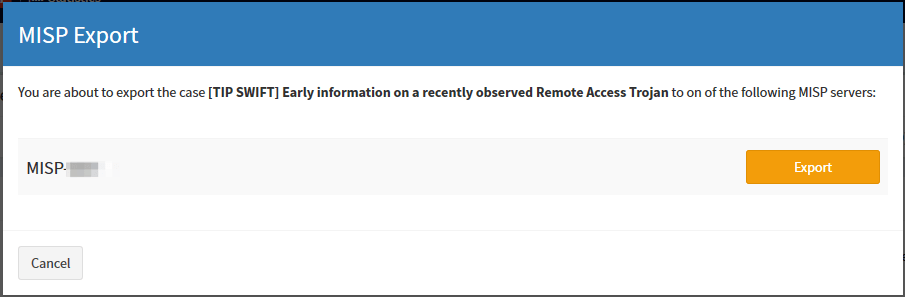
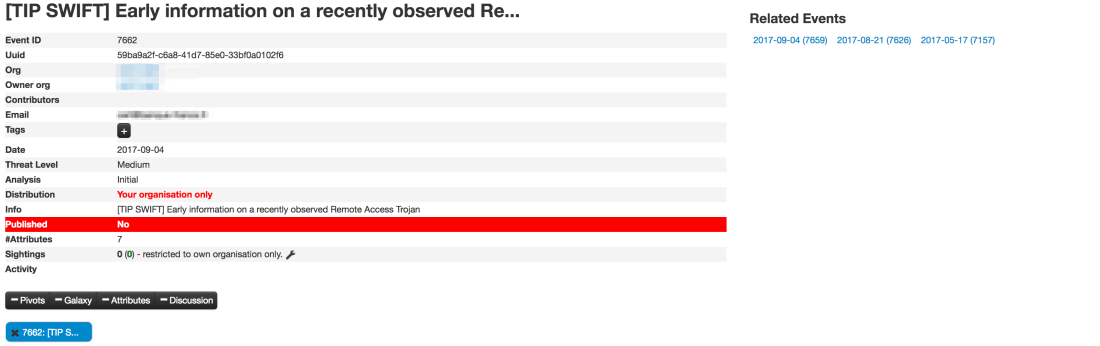
Mellifera 13 can not only import events from multiple MISP servers but also export cases as events to one or several MISP instances. The exported cases will not be published automatically though as they need to be reviewed prior to publishing.

Export_Case_1.png
Click on that Share button on the top right corner
Export_Case_2.png
Select the MISP server to which to export the case
Export_Case_3.png
See how the Share counter on the top right corner has now increased

We strongly advise you to review the categories and types of attributes at least, before publishing the corresponding MISP events. Please also note that only and all the observables marked as IOCs will be used to create the MISP event. Any other observable will not be shared. This is not configurable. For further details, check the documentation.

Export_Case_4.png
Review and publish the event on MISP
Export_Case_5.png
Review the categories and types of your attributes


API Keys

Mellifera 13 introduce a new authentication mechanism: API keys. This auth method is recommended for all programs or scripts, including your SIEM, that raise alerts on TheHive. You can, as an administrator, generate and revoke as many API keys as you want. Existing software using the basic authentication method should be modified to use API keys. But do not panic, while the basic authentication mechanism has been disabled by default, you can still enable it in application.conf.

The ‘alert’ role

A new alert​ role has been added. Only users with this role can create an alert. All existing programs which create alerts must have this role. Otherwise they will no longer work.

Download & Get Down to Work

If you have an existing installation of TheHive, please follow the migration guide. This is paramount to ensure a good transition from earlier versions. You have been warned.

If you are performing a fresh installation, read the installation guide corresponding to your needs and enjoy. Please note that you can install TheHive using an RPM or DEB package, use Docker, install it from a binary or build it from sources.

Support

Something does not work as expected? You have troubles installing or upgrading? No worries, please join our  user forum, contact us on Gitter, or send us an email at support@thehive-project.org. We are here to help.

WOT? Did You See a Yeti Hugging a Cuckoo?

While many are enjoying the summer holidays, the busy bees of TheHive Project have been working hard lately to develop new Cortex analyzers and review few of those submitted by our growing and thriving user community, bringing the grand total to 27. Yes, you read that right. Cortex can leverage 27 analyzers to help you analyze observables very simply in many different ways.

The latest update to the Cortex-analyzers repository contains 3 new analyzers: Yeti, Cuckoo Sandbox and WOT, described below. And your first step to benefit from them should consist of refreshing your master working copy on your Cortex instance:

$ cd where/your/analyzers/are
$ git pull master

Yeti

YETI is a FOSS platform meant to organize observables, indicators of compromise, TTPs, and knowledge on threats in a single, unified repository.  It is mainly developed by fellow APT busters Thomas Chopitea and Gael Muller (who said France doesn’t produce good software?).

The new Cortex analyzer for this platform lets you make API calls to YETI and retrieve all available information pertaining to a domain, a fully qualified domain name, an IP address, a URL or a hash.

To be able to use the analyzer edit the Cortex configuration file (/etc/cortex/application.conf) and add the following lines:

Yeti {
    # URL of the Yeti server: example: http://120.0.0.1:5000
    url = ""
}

When called from TheHive, the following output is produced:

sc-YETI-short.png

sc-YETI-long.png
TheHive: YETI analyzer — Short and Long Report Samples

CuckooSandox

The Cuckoo Sandbox analyzer has been submitted by Andrea Garavaglia (Thanks!) and you can use it to analyze files and URLs with Cuckoo Sandbox.

By default, we chose to limit analysis to TLP:WHITE and TLP:GREEN observables for OPSEC reasons, in case your Cuckoo server provides Internet access to potentially harmful files. If you want to use it with TLP:AMBER or TLP:RED observables, edit CuckooSanbox_File_analysis.json or CuckooSanbox_URL_analysis.json and change the max_tlp parameter to 2 or 3.

To use the analyzer, edit the Cortex configuration file and add the following lines:

CuckooSandbox {
   url = “http://mycuckoosandbox”
}

When called from TheHive, the following output is produced:

sc-CSB-short.png

sc-CSB-long.png
TheHive: Cuckoo Sandbox Analyzer — Short and Long Report Samples

WOT

The WOT analyzer was also submitted by Andrea Garavaglia (kudos!). Use it to check reputation of a given domain on the Web of Trust service. It takes domains and FQDNs as input.

An API key is needed to use this service, and has to be added in the Cortex configuration file:

WOT {
    # API key of the Web of Trust account
    key=“”
}

When called from TheHive, the following output is produced:

sc-WOT-short.png.png

sc-WOT-long.png.png
TheHive: WOT Analyzer — Short and Long Report Samples

Support

Something does not work as expected? No worries, please join our  user forum, contact us on Gitter, or send us an email at support@thehive-project.org. We are here to help.


Mellifera 12.1 Released

About a month ago, we published Mellifera 12 which brought numerous features such as mini-reports on the observable page, custom fields, alert similarity or template selection during alert imports.

Great, palatable recipes, even if they are cooked by fine French chefs, need to be refined over time and may not be as savoury as intended when they are served in their early days. Quality takes time, although smokeware vendors would have you think otherwise.

Mellifera 12.1 (TheHive 2.12.1) has been released to fix a number of outstanding bugs:

  • #249: renaming of users does not work
  • #254: TheHive does not send the file’s name when communicating with Cortex
  • #255: merging an alert into an existing case does not merge the alert description into the case’s description
  • #257: while TheHive does not let you add multiple attachments to a single task log, the UI makes you believe otherwise
  • #259: fix an API inconsistency. GET /api/case/task/:id/log has been fixed.
    And a new API call POST /api/case/task/:taskId/log/_search  has been added, which accepts a “query” in the request body to filter logs of the task.
  • #268: cannot create an alert if the IOC field is set for a single alert’s attribute.
  • #269: closing a case with an open task does not dismiss it from ‘My Tasks’.

This new minor release adds the following enhancements:

  • #267: fix warnings in the DEB package.
  • #272: in alert preview, similar cases are shown regardless of their status. Merged or deleted ones should not appear in that list.

How About the Test VM?

The test VM has not been updated yet. It still contains Mellifera 12 (TheHive 2.12.0). We will update it in September, probably when Mellifera 13 is released. That version will bring the ability to export cases as MISP events.

Download & Get Down to Work

If you have an existing installation of TheHive, please follow the migration guide.

If you are performing a fresh installation, read the installation guide corresponding to your needs and enjoy. Please note that you can install TheHive using an RPM or DEB package, use Docker, install it from a binary or build it from sources.

Support

Something does not work as expected? You have troubles installing or upgrading? No worries, please join our  user forum, contact us on Gitter, or send us an email at support@thehive-project.org. We are here to help.