Cortex Hits the 30 Analyzers Mark

Cortex has now 30 analyzers thanks to Daniil Yugoslavskiy, Davide Arcuri and Andrea Garavaglia (from LDO-CERT) as well as our longtime friend Sébastien Larinier. Their contributions, all under an AGPLv3 license, add handy ways to assess observables and obtain invaluable insight to an already solid Threat Intelligence and DFIR toolset.

In addition to these 3 new analyzers, v 1.7.0 of the Cortex-Analyzers repository also fixes a number of bugs and add a few improvements to existing analyzers as well.

To get the new release, go to your existing Cortex-Analyzers folder and run git pull.

HybridAnalysis

The HybridAnalysis analyzer has been contributed by Daniil Yugoslavskiy. It fetches Hybrid Analysis reports associated with hashes and filenames. This analyzer comes in only one flavor called HybridAnalysis_GetReport.

Requirements

You need to have or create a free Hybrid Analysis account.  Follow the instructions outlined on the Hybrid Analysis API page to generate an API key/secret pair. Provide the API key as a value for the key parameter and the secret as a value to the secret parameter, add the lines below to the config section of /etc/cortex/application.conf then restart the cortex service.

HybridAnalysis {
  secret = "mysecret"
  key = "myAPIKEY"
}

When run from TheHive, the analyzer produces short and long reports such as the following:

sc-short-hybridanalysis_1_0.png

TheHive: HybridAnalysis 1.0 Analyzer – Short and Long Report Samples
TheHive: HybridAnalysis 1.0 Analyzer – Short and Long Report Samples

EmergingThreats

The EmergingThreats analyzer has been submitted by Davide Arcuri and Andrea Garavaglia  from LDO-CERT. It leverages Proofpoint’s Emerging Threats Intelligence service to assess the reputation of various observables and obtain additional and valuable information on malware.

The service comes in three flavors:

  • EmergingThreats_DomainInfo: retrieve ET reputation, related malware, and IDS requests for a given domain.
  • EmergingThreats_IPInfo: retrieve ET reputation, related malware, and IDS requests for a given IP address.
  • EmergingThreats_MalwareInfo: retrieve ET details and info related to a malware hash.

Requirements

You need a valid Proofpoint ET Intelligence subscription.  Retrieve the API key associated with your account and provide it as a value to the key parameter, add the lines below to the config section of /etc/cortex/application.conf then restart the cortex service.

 EmergingThreats {
   key="MYETINTELKEYGOESHERE"
 }

When run from TheHive, it produces short and long reports such as the following:

sc-short-ET_1_0.png

sc-long-ET-1_1_0.png

sc-long-ET-2_1_0.png

sc-long-ET-3_1_0.png

sc-long-ET-4_1_0.png

sc-long-ET-5_1_0.png
TheHive: EmergingThreats 1.0 Analyzer – Short and Long Report Samples

Shodan

The Shodan analyzer is the first submission by Sébastien Larinier. It lets you retrieve key Shodan information on domains and IP addresses.

This analyzer comes in two flavors:

  • Shodan_Host: get Shodan information on a host.
  • Shodan_Search: get Shodan information on a domain.

Requirements

You need to create a Shodan account and retrieve the associated API Key. For
best results, it is advised to get a Membership level account, otherwise a free one can be used.

Supply the API key as the value for the key parameter, add the lines below to the config section of /etc/cortex/application.conf then restart the cortex service.

Shodan {
  key= "myawesomeapikey"
}

When run from TheHive, it produces short and long reports such as the following:

sc-short-shodan_1_0.png

sc-long-shodan_1_0.png
TheHive: Shodan 1.0 Analyzer – Short and Long Report Samples

Miscellaneous Fixes and Improvements

  • #100 : support both Cuckoo versions – by Garavaglia Andrea
  • #113 : Cuckoo Analyzer requires final slash – by Garavaglia Andrea
  • #93 : VirusTotal URL Scan Bug
  • #101 : Missing olefile in MsgParser requirements
  • #126 : PhishTank analyzer doesn’t work – by Ilya Glotov

Update TheHive Report Templates

If you are using TheHive, get the last version of  the report templates and import them into TheHive.

Running Into Trouble?

Shall you encounter any difficulty, please join our  user forum, contact us on Gitter, or send us an email at support@thehive-project.org. We will be more than happy to help!

Cortex 1.1.4 Released

Moments ago, we have announced the release of Mellifera 13, TheHive4py 1.3.0, and Cortex4py. And since we don’t want to leave you wanting for more fun time, you may want to schedule as well a Cortex update shall you need it 😉

Implemented Enhancements

  • Disable analyzer in configuration file #32
  • Group ownership in Docker image prevents running on OpenShift #42

Fixed Bugs

  • Cortex removes the input details from failure reports #38
  • Display a error notification on analyzer start fail #39

Download & Get Down to Work

To update your current Cortex installation, follow the instructions of the installation guide. Before doing so, you may want to save the job reports that were not executed via TheHive. Cortex 1 has no persistence and restarting the service will wipe out any existing reports.

Please note that you can install Cortex using an RPM or DEB package, deploy it using an Ansible script, use Docker, install it from a binary or build it from sources.

Support

Something does not work as expected? You have troubles installing or upgrading? No worries, please join our  user forum, contact us on Gitter, or send us an email at support@thehive-project.org. We are here to help.

Mellifera 12: The MAGA Edition

TheHive Project French Chefs are very happy to announce Mellifera 12, a brand new, all shiny, major version of TheHive.

This MAGA (Make Analysis Great Again) edition of your (soon to be?) favorite Security Incident Response Platform (SIRP) contains an awful lot of changes and improvements. While you can read the full changelog while waiting in line for your burger at HopDoddy or for your turn for the latest Disney attraction, we’d like to concentrate on a few features that would make you enjoy Digital Forensics & Incident Response like never before 🙂

Go Short or Go North

The Observables tab can now display the short (a.k.a. mini) reports produced by analyzers. Whenever you run an analysis (or many), the mini-reports will be shown as soon as the corresponding analyzer jobs have successfully finished. That way, you no longer have to click on each observable to access the short report.

sc-Mellifera12-#131.png
Short Reports shown on the Observables Tab

In fact, you don’t even have to click on the observable to access the long reports. You must simply click on the corresponding short report and the long one will be displayed on top of the observables tab as shown in the following screencast. Ain’t that nifty?


sc-Mellifera12-#191-2.png
A Single Click on the Short Report Shows the Long One

The short reports have been also improved to follow a taxonomy. To get to this stage, we had to review all 24 analyzers and their flavors, add new functionality to the CortexUtils Python library and improve the analyzers to add a summary section to their JSON output which Mellifera 12 interprets and displays according to a color code as described in our previous post. Please make sure to read it as it contains important information on how to update your cortexutils version and the analyzers as well as the report templates.

Is This Alert New or What?

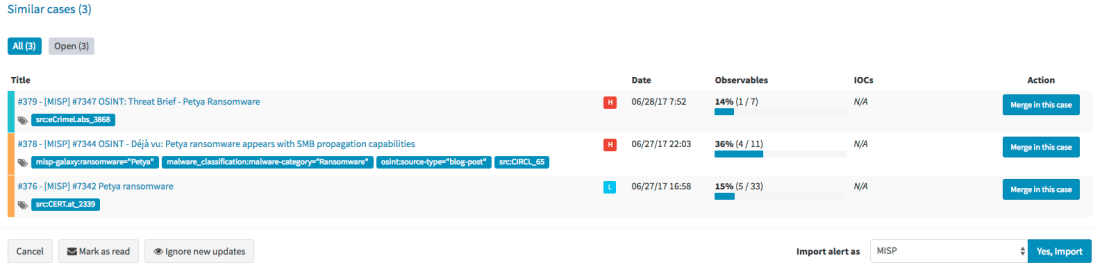
Mellifera 12 introduces an important feature pertaining to alerts. To put it simply, whenever you receive a new alert from MISP, email, SIEM or any other source that you have connected with TheHive, the alert preview page will tell you if there are similarities with existing cases and if so, Mellifera 12 will let you import the new alert in the existing case and any updates made to that alert (think of an ongoing MISP event) will be automatically added to the case.

sc-mellifera12-#232.png
Alert Preview Page with the new Similar cases Section

Template this, Template that

In addition to the ‘similarity’ feature outlined above, Mellifera 12 lets you choose the case template to use when importing a new alert instead of having to use only a specific case template per alert type/source.

sc-mellifera12-#232-2.png
Choose the Template You’d Like to Use to Import an Alert

Custom Fields

We heard our community and implemented a feature that was requested by several users: custom fields.

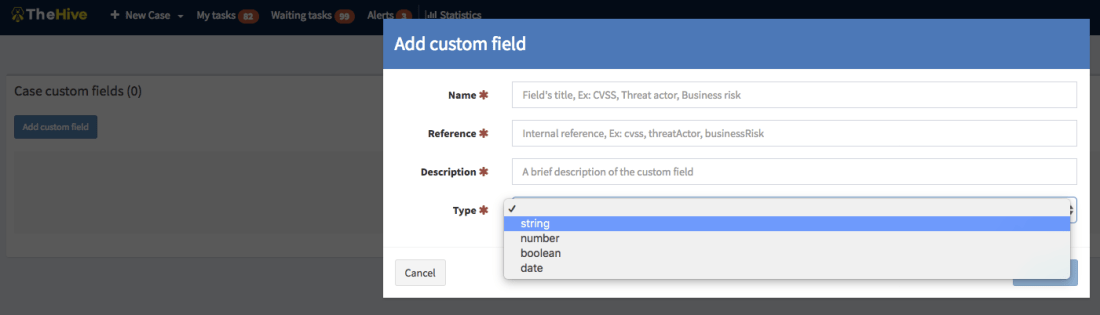
So you’d like to add a business impact to a specific type of cases? Or a set of TTPs? Or a Threat Actor? Or specify a Business Unit? No problem! Ask an admin to create a custom field, associate it with a case template and there you go.

sc-mellifera12-#12-customfields2.png
Add a Custom Field

Unlike metrics, custom fields must not be filled to close a case. You can also supercharge a case with custom fields that have not been associated to a case template. We currently support four types of custom fields: strings, numbers, booleans and dates. And you can create lists of acceptable values to limit your analysts’ choices to legitimate data.

Other New Features

Mellifera 12 gives you the ability to reopen closed tasks. And when viewing the related cases tab of the current case, you’ll see the resolution status of the ones that were closed (false positive, true positive, indeterminate). External links will also be opened in a new tab.  Moreover, files included in alerts are no longer limited to 32 KB so you have no longer an excuse to avoid sending user email reports with their attachments to TheHive 😉

Download & Get Down to Work

If you have an existing installation of TheHive, please follow the migration guide.

If you are performing a fresh installation, read the installation guide corresponding to your needs and enjoy. Please note that you can install TheHive using an RPM or DEB package, use Docker, install it from a binary or build it from sources.

Support

Something does not work as expected? You have troubles installing or upgrading? No worries, please join our  user forum, contact us on Gitter, or send us an email at support@thehive-project.org. We are here to help.

All Fresh CortexUtils, New Cortex Analyzers

Ahead of the imminent release of Mellifera 12 (TheHive 2.12.0), a new, major (as in MAJOR) version of your (soon to be?) favorite Security Incident Response Platform, we’ve made rather significant changes to Cortex analyzers and released a new version of the CortexUtils Python library.

TL;DR

If you are in a hurry:

$ sudo pip install cortexutils --upgrade
$ cd where/your/analyzers/are
$ git pull master

Adjust the Cortex configuration for the new MISP 2.0 analyzer and for Hippocampe as shown below if you are using these analyzers then import the corresponding report templates into TheHive:

  • download the updated package
  • log in TheHive using an administrator account
  • go to Admin > Report templates menu
  • click on Import templates button and select the downloaded package

CortexUtils 1.2.0

CortexUtils has been updated to include a new function called build_taxonomy() which is required for analyzers relying on the Python library we released to make their development development easier.

Mini-Reports in The Observable Tabs

Starting from Mellifera 12 (TheHive 2.12.0), mini-reports will be displayed in the observable tab in each case as soon as an analysis has been completed. Now analyzers compute their short/mini reports and put them in the summary section of their JSON output, ready for consumption. TheHive 2.12.0 and up will no longer create them on-the-fly.

Taxonomy

The mini-reports of all the analyzers have been updated to comply with a taxonomy that is similar to the one we were already using for VirusTotal:  VT:Score="14/56”.  A “maliciousness” level was already included in TheHive’s analyzer templates and we used a specific color to display each level. This level is now produced directly by the analyzers:

  • info / blue: the analyzer produced an information, and the short report is shown in blue color in TheHive.
  • safe / green : the analyzer did not find anything suspicious or the analyzed observable is safe (according to the analyzer). TheHive displays the short report in green color.
  • suspicious / orange : the analyzer found that the observable is either suspicious or warrants further investigation. The short report is orange colored in TheHive.
  • malicious / red : the analyzer found that the observable is malicious. The short report is displayed by TheHive in red color as show below:

sc-short-VT.png

The short report is built with the summary() function of an analyzer. The build_taxonomy() of cortexutils mentioned earlier should help building it.

MISP 2.0

The MISP analyzer has been updated to version 2.0 and includes new functionality submitted by our long-term contributor Nils Kuhnert from CERT-Bund (thanks a heap!). Unlike the previous version, v 2.0 will let you search for an observable in multiple MISP servers at the same time.

The analyzer accepts a truckload of datatypes as input. To make it work, install the pymisp Python library. It should already have been installed if you are just updating your current analyzers. You will also have to change Cortex configuration file (application.conf) for this new version:

MISP {
 url=["https://mymispserver_1", "https://mymispserver_2"]
 key=["mykey_1", "mykey_2" ]
 certpath=["", ""]
 name=["MISP_SERVER_NAME_1", "MISP_SERVER_NAME_2"]
}

Important note: You have to adjust your existing configuration to match the one shown above. The certpath variable can be left blank if you are not using a self-signed certificate.

When called from TheHive, the following output is produced:

sc-short-MISP.png

sc-MISP-long.png
TheHive: MISP 2.0 Analyzer – Short and Long Report Samples

The short report will show the number of unique events found in all MISP servers while the long report will show information of each matching event in each MISP server.

CERTatPassiveDNS

The CERTatPassiveDNS analyzer is a new submission by Nils (thanks again). It lets you check the CERT.at PassiveDNS service for a given domain or hostname. It takes domains and FQDN as input.

Access to the CERT.at service is allowed to trusted partners only. If you think you qualify, please contact CERT.at. You do not need to add specific information into the Cortex configuration file to benefit from this analyzer as it calls the whois system command to perform the pDNS requests.

When called from TheHive, the following output is produced:

sc-certatpdns-short.png


sc-long-CERTatPassiveDNS_1_0.png
TheHive: CERTatPassiveDNS Analyzer – Short and Long Report Samples


Miscellaneous

The latest version of the Cortex-analyzers repository also include the following bug fixes and improvements:

  • #61: fix typos in two requirements.txt files – by Michael Salsone
  • #65: update the Joe Sandbox analyzer’s long report to support version 19.0.0
  • #67: fixed mistake in the FireHol analyzer –  by Nils Kuhnert
  • #69: use http://server:port for Hippocampe instead of http://server:port/hippocampe/api/v1.0/

Running Into Trouble?

Shall you encounter any difficulty, please join our  user forum, contact us on Gitter, or send us an email at support@thehive-project.org. We will be more than happy to help!

Correction: July 6, 2017 
An earlier version of this post mispelled Nils Kuhnert’s last name.

Cortexutils 1.1.1 is Here

Lo and behold, The Chefs behind TheHive Project have been pretty busy at the code kitchen, continuously improving some of your favorite recipes. After releasing Mellifera 11.3 and Cortex 1.1.3, here comes the turn of Cortexutils, the Python library containing utility classes for Cortex analyzers.

Version 1.1.1 of the library solves an encoding issue, in fact a regression introduced by the previous release. It also corrects a situation where error reports wouldn’t be generated in case the analyzer did not require configuration (we have a handful of such creatures in store).

You can grab the new Cortexutils release through PIP. To update your existing installation, please run the following command:

 sudo pip install cortexutils --upgrade

Running Into Trouble?

Shall you encounter any difficulty, please join our  user forum, contact us on Gitter, or send us an email at support@thehive-project.org. We will be more than happy to help!

Cortex 1.1.2 Released

We are glad to announce a new version of your favorite observable analysis engine which corrects bugs introduced by version 1.1.1 and adds a few enhancements. As a reminder, TheHive, our Security Incident Response Platform, can interact with one or several Cortex instances. Moreover, starting from version 1.1.1, Cortex has a two-way integration with MISP.

We highly advise you to upgrade your Cortex in to instance to 1.1.2.

Screen Shot 2017-05-24 at 11.51.54.png
Cortex 1.1.2 – Job Report Example with CERT-SG’s Abuse Finder

Fixed Issues

  • #27: fixed the daunting error 500 that many users of  TheHive encountered when a job is submitted to Cortex.
  • #29: the MISP expansion modules are now disabled by default to avoid another error 500.
  • #31: the web interface was displaying SNAPSHOT (oops!) for the Cortex version.  It now displays the correct version.

Enhancements

  • #28: when you enable the MISP expansion modules, Cortex will not be slowed down and starts without delay.
  • #30: add a page loader mask similar to TheHive’s.

Download & Get Down to Work

To update your current Cortex installation, follow the instructions of the installation guide. Before doing so, you may want to save the job reports that were not executed via TheHive. Cortex 1 has no persistence and restarting the service will wipe out any existing reports.

Please note that you can install Cortex using an RPM or DEB package, deploy it using an Ansible script, use Docker, install it from a binary or build it from sources.

Support

Something does not work as expected? You have troubles installing or upgrading? No worries, please join our  user forum, contact us on Gitter, or send us an email at support@thehive-project.org. We are here to help.

Jigsaw Falling Into Place

While we released TheHive as a free, open source product in November 2016, it must not be chalked off quickly as a young, immature solution.

v1.0.0 was put into production in our environment in October 2014. Yes, October 2014. And we’ve been using it every day and refining it since then. Once we deemed it good enough, we decided to share it with the community under an AGPL license to help incident responders in their mission.

Make no mistake. TheHive is a field-tested, mature Security Incident Response Platform (SIRP) built by people who are passionate about Digital Forensics and Incident Response.

A few months after the first public release (v 2.9.0), we adopted bee-related codenames for new major versions and published Buckfast (v 2.10.0).Cortex, the analysis engine that allowed TheHive to analyze and assess observables at scale was shipped as a separate product.  Buckfast can interface with one or several Cortex instances depending on your performance and OPSEC needs. For example, you may want to install a separate Cortex on your investigation, air-gapped network to interact with your sandbox as you don’t want to be firing those malicious samples on your corporate network.

Buckfast can also create cases out of MISP events. You can configure it to import them from a single or many MISP instances. And to prepare for the next major version, Mellifera, due in early May 2017, we have released TheHive4py, a Python API client for TheHive.

TheHive4py will be improved to fully support Mellifera’s alerting framework. To put it simply, Mellifera will not only let you preview MISP events and import them but also receive SIEM alerts, email incident reports and different other types of alerts depending on your environment thanks to TheHive4py. And if an analyst discards an alert by mistake in Mellifera’s notification area, they can go back to a ‘trash bin’ and fix their error.  Mellifera will also allow you to export cases as MISP events to share IOCs with other teams.

TLP-WHITE-Jigsaw_Falling_Into_Place-2017-03.001.png
Jigsaw Falling Into Place

Now lets’ get back to TheHive’s perfect companion: Cortex. As of this writing, Cortex features 13 analyzers. These analyzers can perform one type of analysis (such as Abuse Finder) or several (such as DomainTools which can do 6). In the very near future, we plan to add at least 10 more analyzers which are shown in the boxes with dotted borders in the picture above. All upcoming analyzers are contributed by our user community whom we wholeheartedly thank. One of the analyzers will allow you to check observables from TheHive against a MISP instance to search for events that may contain them.

We have also begun work on a Python API client for Cortex dubbed… Cortex4py (how creative wink wink). This will allow people who are not using TheHive to summon the power of Cortex from their SIRP, scripts or any other DFIR tool that can import or interact with Python code.

So in the few months since our project was born to the Internet, we have released a solid collaborative SIRP, a simple yet powerful analysis engine to analyze observables and aid teams in their investigations as well as a Python API client for our SIRP. We also have rather ambitious plans to make them even much more useful.

Oh and one more thing! We have released another piece of software around the same time as the first version of TheHive and on which we haven’t said much so far: Hippocampe. Hippocampe can regularly download feeds and exposes a REST API to let you query them from Cortex (or from other tools). You submit an observable and it’ll tell you if it appears in one or several feeds along with a score. The score takes into account the trust you put in the feed sources (which can be adjusted over time) and the number of sources which contain the observable. We’ll cover Hippocampe in more details in an upcoming post.

Before you run away from us
Before you’re lost between the notes
The beat goes round and round
Jigsaw is falling into place
So there is nothing to explain