Rejoice folks! You can now play with TheHive & Cortex thanks to the test VM we created. It includes Mellifera 12, the latest major version of TheHive, Cortex 1.1.3, the latest Cortex analyzers with all dependencies and ElasticSearch installed on top of Ubuntu 16.04 with Oracle JRE 8.
The test VM is intended to be used… well… for testing or training purposes. We strongly encourage you to refrain from using it for production.
Get It
You can download the VM from the following location:
click on Import templates button and select the downloaded package
Plug it with MISP
The test VM does not contain a MISP instance and none is configured in TheHive’s configuration file. To play with MISP, you may want to use the VM our good friends at CIRCL provide. Once you’ve downloaded it or if you have an existing instance, edit /etc/thehive/application.conf and follow the configuration guide.
Restart or Go Mad
After each modification of /etc/thehive/application.conf do not forget to restart the service:
$ sudo service thehive restart
Troubles?
TheHive service logs are located in /var/log/thehive/application.log.
Configure Cortex
All available analyzers are installed with their dependencies, but none is configured. To configure analyzers, edit /etc/cortex/application.conf and follow the configuration guide.
Restart or Go Mad
After each modification of /etc/cortex/application.conf do not forget to restart the service:
$ sudo service cortex restart
Troubles?
Cortex service logs are located in /var/log/cortex/application.log.
Need Help?
Something does not work as expected? No worries, we got you covered. Please join our user forum, contact us on Gitter, or send us an email at support@thehive-project.org. We are here to help.
Correction: July 8, 2017
An earlier version of this post offered to download the VM from Dropbox but they suspended the associated link due to seemingly heavy traffic. The post was updated to replace the Dropbox link with a Google Drive one.
Ahead of the imminent release of Mellifera 12 (TheHive 2.12.0), a new, major (as in MAJOR) version of your (soon to be?) favorite Security Incident Response Platform, we’ve made rather significant changes to Cortex analyzers and released a new version of the CortexUtils Python library.
Adjust the Cortex configuration for the new MISP 2.0 analyzer and for Hippocampe as shown below if you are using these analyzers then import the corresponding report templates into TheHive:
click on Import templates button and select the downloaded package
CortexUtils 1.2.0
CortexUtils has been updated to include a new function called build_taxonomy() which is required for analyzers relying on the Python library we released to make their development development easier.
Mini-Reports in The Observable Tabs
Starting from Mellifera 12 (TheHive 2.12.0), mini-reports will be displayed in the observable tab in each case as soon as an analysis has been completed. Now analyzers compute their short/mini reports and put them in the summary section of their JSON output, ready for consumption. TheHive 2.12.0 and up will no longer create them on-the-fly.
Taxonomy
The mini-reports of all the analyzers have been updated to comply with a taxonomy that is similar to the one we were already using for VirusTotal: VT:Score="14/56”. A “maliciousness” level was already included in TheHive’s analyzer templates and we used a specific color to display each level. This level is now produced directly by the analyzers:
info / blue: the analyzer produced an information, and the short report is shown in blue color in TheHive.
safe / green : the analyzer did not find anything suspicious or the analyzed observable is safe (according to the analyzer). TheHive displays the short report in green color.
suspicious / orange : the analyzer found that the observable is either suspicious or warrants further investigation. The short report is orange colored in TheHive.
malicious / red : the analyzer found that the observable is malicious. The short report is displayed by TheHive in red color as show below:
The short report is built with the summary() function of an analyzer. The build_taxonomy() of cortexutils mentioned earlier should help building it.
MISP 2.0
The MISP analyzer has been updated to version 2.0 and includes new functionality submitted by our long-term contributor Nils Kuhnert from CERT-Bund (thanks a heap!). Unlike the previous version, v 2.0 will let you search for an observable in multiple MISP servers at the same time.
The analyzer accepts a truckload of datatypes as input. To make it work, install the pymispPython library. It should already have been installed if you are just updating your current analyzers. You will also have to change Cortex configuration file (application.conf) for this new version:
Important note: You have to adjust your existing configuration to match the one shown above. The certpath variable can be left blank if you are not using a self-signed certificate.
When called from TheHive, the following output is produced:
TheHive: MISP 2.0 Analyzer – Short and Long Report Samples
The short report will show the number of unique events found in all MISP servers while the long report will show information of each matching event in each MISP server.
CERTatPassiveDNS
The CERTatPassiveDNS analyzer is a new submission by Nils (thanks again). It lets you check the CERT.at PassiveDNS service for a given domain or hostname. It takes domains and FQDN as input.
Access to the CERT.at service is allowed to trusted partners only. If you think you qualify, please contact CERT.at. You do not need to add specific information into the Cortex configuration file to benefit from this analyzer as it calls the whois system command to perform the pDNS requests.
When called from TheHive, the following output is produced:
TheHive: CERTatPassiveDNS Analyzer – Short and Long Report Samples
Miscellaneous
The latest version of the Cortex-analyzers repository also include the following bug fixes and improvements:
#61: fix typos in two requirements.txt files – by Michael Salsone
#65: update the Joe Sandbox analyzer’s long report to support version 19.0.0
#67: fixed mistake in the FireHol analyzer – by Nils Kuhnert
#69: use http://server:port for Hippocampe instead of http://server:port/hippocampe/api/v1.0/
Running Into Trouble?
Shall you encounter any difficulty, please join our user forum, contact us on Gitter, or send us an email at support@thehive-project.org. We will be more than happy to help!
Correction: July 6, 2017
An earlier version of this post mispelled Nils Kuhnert’s last name.
TheHive, Cortex and MISP work nicely together and if you’ve read our June-Dec 17 roadmap post, the integration of our products with the de facto threat sharing platform will get better in a few months.
During the FIRST conference presentation we gave last week, we displayed a picture that we will use here to try to explain how these three open source and free products integrate with one another.
A Picture is Worth a Thousand Words…
TheHive
TheHive is a Security Incident Response Platform (SIRP). It can receive alerts from different sources (SIEM, IDS, email. etc.) via its REST API. This is where alert feeders come into play.
Alert Feeders
Think of an alert feeder as a specialized program which consumes a security event (SIEM alert, email report, IDS alert, and so on), parses it and outputs an alert that its sends to TheHive through TheHive4py, the Python library we provide to interact with TheHive’s REST API.
We do not supply such feeders but developing them should be straightforward. If not, let us know and we’ll do our best to help you out.
Alerts
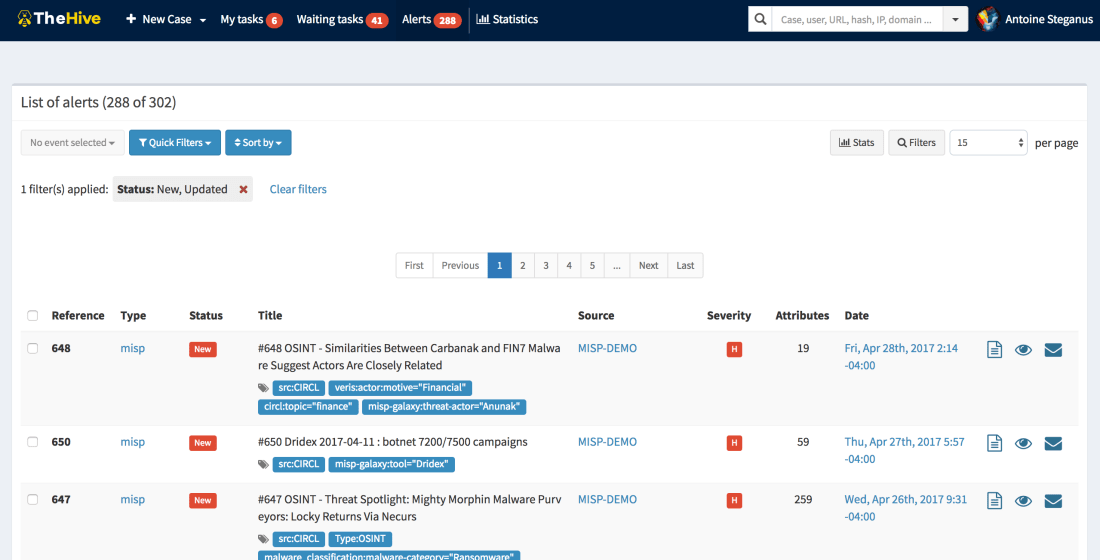
Any alert sent to TheHive will show up in its Alerts pane. In addition to the sources mentioned above, new or updated MISP events will show up as well in that area if you configured TheHive to connect to one or several MISP instances. If so, TheHive will poll those MISP instance(s) at every interval looking for new or updated events. If there are any, TheHive will generate an alert which will end up in the Alerts pane.
The Alerts Pane
Alerts can be ignored, mark as read, previewed and imported. When an alert is imported, it becomes a case that needs to be investigated.
Cases
The Workflow that is at the Heart of TheHive
A case can be generated from an alert or created from scratch. It is subdivided into tasks (think identification, containment, eradication, check proxy logs, and so on) and observables (IP addresses, hashes, email addresses, domain names, URLs…). When analysts are working on tasks, they add logs as they go. In TheHive’s terminology, logs are text entries which may contain attachments to help analysts record what they have been doing. Logs can be written using Markdown or a rich-text editor.
Case Templates
You don’t need to add the same tasks over and over when working on cases belonging to a given category (DDoS, Malspam, APT, …). You can create custom templates to which you add tasks as shown below. This is very useful when you are dealing with alerts so that when you import them, you can select which case template you’d like to apply and there you go!
A Sample Case Template
Observables
Observables can be tagged, flagged as IOCs, and analyzed. When the investigation is well in progress or completed, you may want to share the resulting IOCs or a subset of those with partners and peers. TheHive will support the ability to export that data to MISP in September 2017. Until then, you can still export your IOCs as text, CSV or as a MISP-compatible format that you can use to add them to your MISP instance using the freetext editor. TheHive can export IOCs/observables in protected (hxxps://www[.]somewhere[.]com/) or unprotected mode.
Every observable must have a TLP (Traffic Light Protocol) level. By default, any added observable is considered TLP:AMBER. Please note that the TLP is taken into account by some analyzers. Wait! Analyzers?
Cortex
Cortex is our standalone analysis engine and a perfect companion for TheHive and MISP. Analysts can use it to analyze observables using its Web UI, in which case they can be submitted only one at a time. The Web UI should really be limited to quick assessments of observables before creating a case in TheHive (or in an alternate SIRP). The power of Cortex really comes into play when you use its REST API. TheHive speaks natively to Cortex (as MISP does). Moreover, TheHive can leverage one or several Cortex servers.
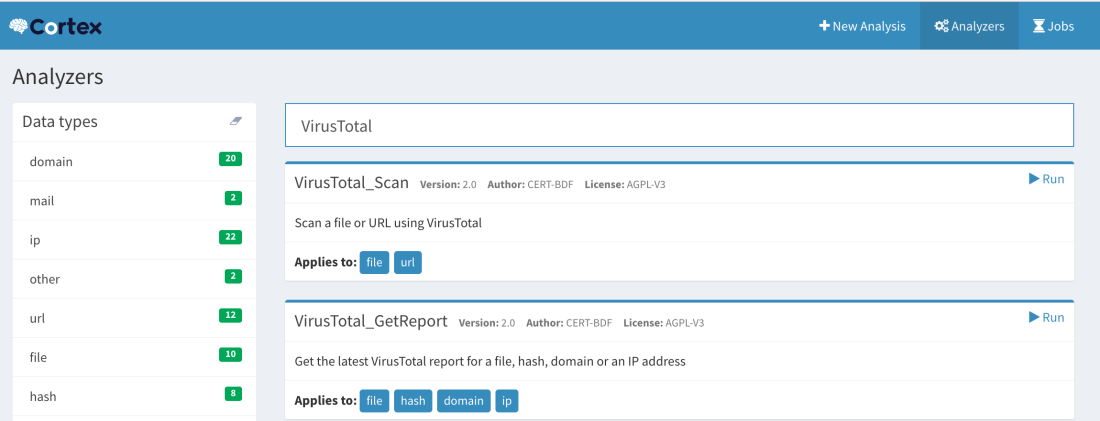
Observable Page and List of Analyzers
Analyzers
As of this writing, Cortex has 23 analyzers which come in a total of 39 flavors and more will be available soon.
An analyzer can be written in any programming language supported by Linux though all of our current analyzers are written in Python. This is because we provide a Python library called Cortexutils which contains a set of utility classes that make it easier to write an analyzer in Python.
Flavors
Analyzers such as VirusTotal, PassiveTotal or DomainTools can provide different analysis services. Let’s take VirusTotal as an example. You can scan a file or URL. That’s one flavor. You can also obtain the latest available report on VirusTotal.com for a file, hash, domain or IP address. That’s a second flavor. So the VirusTotal analyzer has two flavors.
How about PassiveTotal? It has 8 flavors: unique resolutions lookup, SSL certificate history lookup, malware lookup, passive DNS lookup, data enrichment lookup, SSL certificate details lookup, OSINT lookup and WHOIS data lookup.
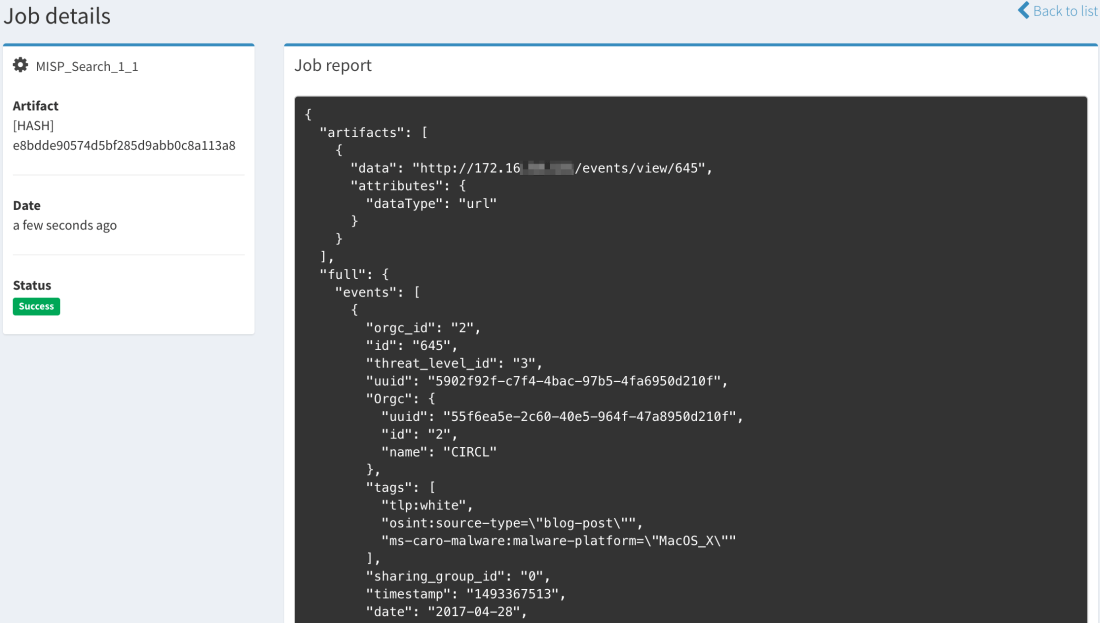
The MISP Search Analyzer
At this point, we need to mention a special analyzer that may create some confusion if not understood correctly: the MISP Search analyzer. Thanks to it, Cortex has the ability to search observables within a MISP instance as represented by the arrow that goes from the Analyzers to MISP.
Search for MISP Events Containing a Given Observable
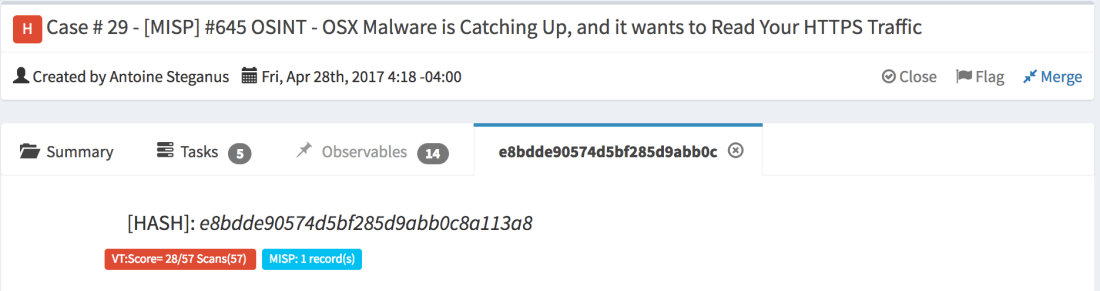
When an observable is found in an event, Cortex will return the number of records found (i.e. the number of events where the observable has been found) and a list of links to those events with additional data.
Searching for a Hash Using the MISP Search Analyzer from the Cortex Web UIThe Same Search Conducted from TheHive: Long ReportMini-Report
The current version of the MISP Search analyzer can only search within a single MISP instance but in the near future, it will be able to support multiple ones.
MISP Expansion Modules
Besides its own analyzers (which include MISP Search described above), Cortex can also invoke MISP expansion modules. These are normally used by MISP to enrich attributes within events but Cortex can also take advantage of them to analyze observables.
There is some overlap between the native Cortex analyzers and MISP expansion modules. When choosing between a native analyzer or an expansion module, we highly recommend you select the former. The expansion modules are deactivated in the default Cortex configuration.
Jobs
When you submit an observable for analysis, Cortex will create a job and, if successful, it will generate an analysis report in JSON format. TheHive has the ability to parse those results and present them in a human-friendly fashion thanks to report templates we offer for free. So when you’ll submit an observable to Cortex from TheHive, you’ll get back a short (or mini) report and a long one. The first can be thought of as a really tiny Exec Analyst Summary while the second provides more insight and details.
Calling Cortex from MISP
In addition to the expansion modules we have just mentioned, MISP 2.4.73 and up can enrich attributes using Cortex analyzers. The configuration is pretty straightforward. So if all you are concerned about is threat intelligence and sharing, you may augment your visibility into a given threat represented as a MISP event by leveraging all current 23 Cortex analyzers and any future ones.
Conclusion
TheHive, Cortex and MISP are three open source and free products that can highly aid you combat threats and keep the ‘monsters’ at bay.
TheHive, as a SIRP, allows you to investigate security incident swiftly in a collaborative manner. Several analysts can work simultaneously on tasks & cases . While cases can be created from scratch, TheHive can receive alerts from different sources thanks to alert feeders which consume security events generated by multiple sources and feed them into TheHive using TheHive4py Python library. TheHive can also sync to one or several MISP instances to receive new and updated events which will appear in the alert pane with all the other alerts generated by other sources. Analysts can then preview new alerts to decide whether they need to be acted upon. If so, they can transform them into investigation cases using templates.
To analyze the observables collected in the course of an investigation and/or imported from a MISP event, TheHive can rely on one or several Cortex analysis engines. Cortex is another standalone product that we have developed which sole purpose is to allow you to analyze observables at scale thanks to its large number of analyzers, MISP expansion modules and any analyzer you might have developed on the side. Cortex has a REST API that can be used to empower other security products such as ‘analytics’ software, alternate SIRPs or MISP.
The highly popular threat sharing platform can indeed enrich attributes thanks to Cortex as it has a native integration with it. And in a few months, you will also be able to export cases from TheHive as MISP events that you can share with peers and partners.
If you do share, you do care about our collective mission to defend thedigital assets that are under our watch from harm. So let us fight together as one.
A new version of TheHive will be released by the end of June. We will take this opportunity to review our release naming and numbering from the ground up.
Months ago, we started giving ‘major’ versions (2.10, 2.11, …) the name of honey bee varieties. 2.10 was called Buckfast. 2.11, the current version, is called Mellifera. And we were supposed to give 2.12 yet another name. However, and after the few hiccups we’ve encountered with our QA as of late, we have decided to change things around in order to make sure new releases are as stable and well-maintained as you should expect them to be.
Starting from the next release (2.12), we will abide by the following numbering scheme:
Only major versions will have corresponding honey bee names. So long as we stay with v2, we’ll keep calling all the minor versions Mellifera N (2.12.0 = Mellifera 12). Version 3 will be called Cerana.
Mellifera 12 – June 29, 2017 (planned date)
Mellifera 12 (v 2.12) will succeed to Mellifera 2 (the current version) to comply with the new naming scheme. It will allow you to see how similar new alerts are to existing cases so you can decide whether you import them into an existing case, create a new one or ignore them altogether. Mellifera 12 will show you the status of all the related cases (#229) to the one you are working on. Finally, you’ll have the ability to change the default case template before importing an alert.
M12 will also support custom fields (#12), a feature that has been requested by numerous users. This version will also add mini-reports to the Observables tab. That way, once a Cortex analysis has been completed, analysts will be able to view part or all the resulting short report in that tab instead of having to navigate to the page of each observable to read the short report.
Mellifera 13 – September 14, 2017
TheHive 2.13 should be the last Mellifera version. It will complete TheHive’s integration with MISP by adding the ability to export all observables or a subset of them to a MISP instance. Please note that TheHive allowed you from the start to import events from multiple MISP instances but since sharing is caring, we wanted to add the ability to export to this very popular threat sharing platform from your Security Incident Response Platform (SIRP). We do not want to rush it though.
Cerana – October 12, 2017
Cerana or TheHive 3.0.0 will bring a complete UI overhaul to make it even easier to work on cases, perform analysis and get your job done, after the interface refreshments Mellifera brought. It will lay the ground for some nifty features we have in mind.
Cerana 1 – November 15, 2017
TheHive 3.1.0 will include dynamic dashboards: the ability to work with the statistics and metrics the way you want and generate customized dashboards to help you drive your activities.
Keep an eye on TheHive’s milestones on GitHub. There are other features and enhancements that we might add as we progress and we will reflect them on that page.
Correction: June 12, 2017
An earlier version mentioned GitHub issue #36 as pertaining to custom fields while it is a request for globally-defined tags that an analyst can choose from.
The Chefs behind TheHive Project’s delicious code are happy to announce the availability of Mellifera 2 (TheHive v2.11.2), the scalable, free and open source Security Incident Response Platform. This minor version fixes two irking issues related to MISP and adds a few enhancements detailed below.
Mellifera – The New Alerting Panel
Fixed Issues
#220: alerts related to MISP events are not properly updated.
#221: in some edge cases, alerts related to MISP events are created with no attribute.
Enhancements
#188: display the case severity in the My tasks and the Waiting tasks pages to let analysts prioritize their work.
#218: show the description of an alert in the alerting panel.
#224: visually distinguish between analyzed and non-analyzed observables.
Download & Get Down to Work
If you have an existing TheHive installation, please follow the new migration guide.
If you are performing a fresh installation, read the installation guide corresponding to your needs and enjoy. Please note that you can install TheHive using an RPM or DEB package, deploy it using an Ansible script, use Docker, install it from a binary or build it from sources.
Support
Something does not work as expected? You have troubles installing or upgrading? No worries, please join our user forum, contact us on Gitter, or send us an email at support@thehive-project.org. We are here to help.
Correction: May 26, 2017
A copy/paste error from a previous blog post was fixed.
We are glad to announce a new version of your favorite observable analysis engine which corrects bugs introduced by version 1.1.1 and adds a few enhancements. As a reminder, TheHive, our Security Incident Response Platform, can interact with one or several Cortex instances. Moreover, starting from version 1.1.1, Cortex has a two-way integration with MISP.
We highly advise you to upgrade your Cortex in to instance to 1.1.2.
Cortex 1.1.2 – Job Report Example with CERT-SG’s Abuse Finder
Fixed Issues
#27: fixed the daunting error 500 that many users of TheHive encountered when a job is submitted to Cortex.
#29: the MISP expansion modules are now disabled by default to avoid another error 500.
#31: the web interface was displaying SNAPSHOT (oops!) for the Cortex version. It now displays the correct version.
Enhancements
#28: when you enable the MISP expansion modules, Cortex will not be slowed down and starts without delay.
To update your current Cortex installation, follow the instructions of the installation guide. Before doing so, you may want to save the job reports that were not executed via TheHive. Cortex 1 has no persistence and restarting the service will wipe out any existing reports.
Please note that you can install Cortex using an RPM or DEB package, deploy it using an Ansible script, use Docker, install it from a binary or build it from sources.
Support
Something does not work as expected? You have troubles installing or upgrading? No worries, please join our user forum, contact us on Gitter, or send us an email at support@thehive-project.org. We are here to help.
Our good friends at Randorisec, joined by other pentesting professionals (see below), performed a fully fledged pentest of Buckfast 0 (TheHive 2.10.0) and Cortex 1.0.0 during 4 man-days spanning several weeks, starting from February 9, 2017 and ending on March 21, 2017.
They have identified several security issues detailed in their report which they privately shared with us prior to publication. As a result, we are happy to announce the immediate availability of Buckfast 2 (TheHive 2.10.2) which fixes the following vulnerabilities:
Stored XSS (ref. AP1 in the report) and Reflected XSS (AP2): malicious JavaScript code can be injected. It will be then executed on the victim’s browser. See issue #159 for more details.
Vertical privilege escalation (AP3): an authenticated simple user can have access to some admin menus. See issue #160 and issue #161.
CSRF (AP8): As no anti-CSRF tokens are used, TheHive is vulnerable to CSRF attacks. See issue #158.
Cortex 1.0.0 and 1.0.1 are also affected by AP2. A new Cortex version will be released very shortly to fix it.
Additionally, Buckfast 2 fixes the following bugs:
Issue #152: pagination does not work with 100 results per page.
Issue #169: error when importing some MISP events due to their unexpected JSON format. This has also been fixed in MISP v2.4.71.
We have also added the following features:
Issue #157: add persistence for task viewing options.
Issue #174: run all analyzers on multiple observables from the observables view.
Randorisec identified 4 more security issues rated low which aren’t fixed by this release:
Concurrent sessions allowed (AP4): we do not deem this a security vulnerability and hence we won’t fix it unless our user community request a patch.
No account lockout policy (AP5): if you use the local authentication system, it can be brute-forced. We are going to fix this in Mellifera 1 (TheHive 2.11.1) due at the end of May 2017. In the meantime, you can use LDAP, Active Directory or both and configure a password policy on those systems.
No password policy (AP6): as no password policy is enforced when using the local database for storing user credentials, users can set weak passwords (e.g.: containing only one character). We are going to fix this in Mellifera 1 (TheHive 2.11.1) due at the end of May 2017. In the meantime, you can use LDAP, Active Directory or both and configure a password policy on those systems.
Information leakage (AP7): information such as installed software versions (TheHive, ElasticSearch) is publicly available. TheHive should be not be publicly accessible and access should be filtered by a firewall or a similar device for authorized IP addresses only.
If you are running Buckfast 1 or a previous version, please follow the updating instructions to update to Buckfast 2. It is actually an extremely simple operation. If you are doing a fresh installation, we have you covered as well.
Please note that Randorisec and the pentesting professionals that joined it for this pentest have no contract with TheHive Project and did not receive any compensation of any sort to perform this work. They worked on their free time as a way to contribute to the security of Free, Open Source Software projects. We’d like to wholeheartedly thank Davy Douhine, Randorisec’s CEO, ArtsSEC, Frédéric Cikala, Nicolas Mattiocco, Florent Montel and Mohamed Mrabah for their invaluable contribution.
Correction: April 21, 2017
An earlier version of this article mentioned Maximilano Soler among the professionals who joined Randorisec to perform a pentest on our products. At his request, we have removed his name and replaced it by ArtsSEC.
We are thrilled to announce that Cortex has two new analyzers: Joe Sandbox and MISP Search. Moreover, we have produced new analyzer report templates for TheHive and improved existing ones.
Joe Sandbox
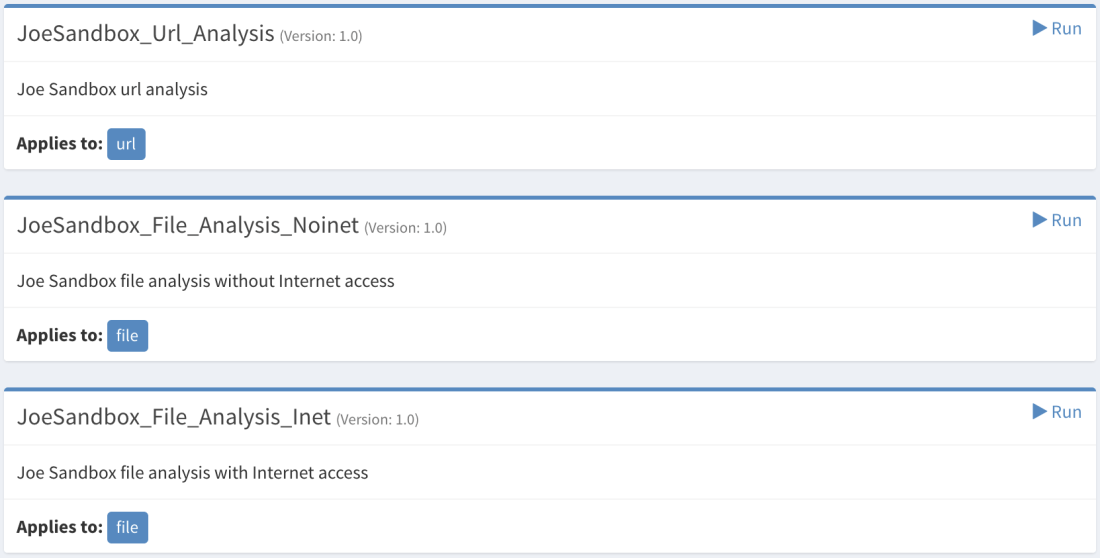
Cortex: New Joe Sandbox Analyzer
Joe Sandbox, by Joe Security LLC, is a very powerful malware analysis platform that has been around for many years and comes in two flavors: cloud and on-premises. The Joe Sandbox Cortex analyzer has been tested using an on-prem Joe Sandbox Ultimate version and can process URLs and files. The analyzer can process files with or without Internet access.
To use the analyzer, you must provide the API key of your Joe Sandbox instance. You must log in to Joe Sandbox, click on your account name, then on Settings and on the API Key tab.
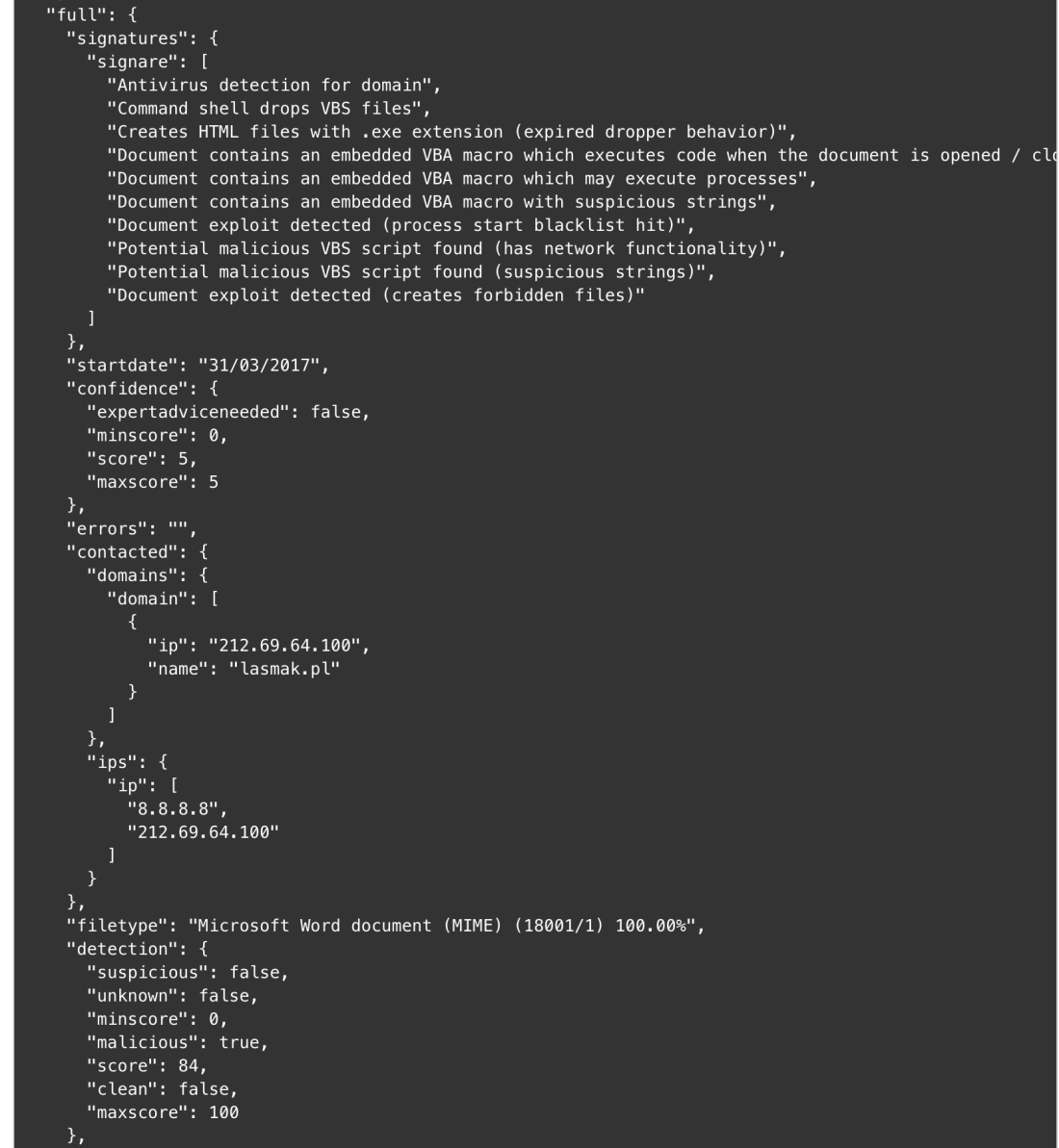
Cortex: Joe Sandbox Output Example
We have produced a report template for the Joe Sandbox analyzer output resulting from file analysis. The URL analysis report template is not yet available but it should be in a few days.
TheHive: Joe Sandbox Analyzer – Short and Long Report Samples
MISP Search
Cortex: New MISP Search Analyzer
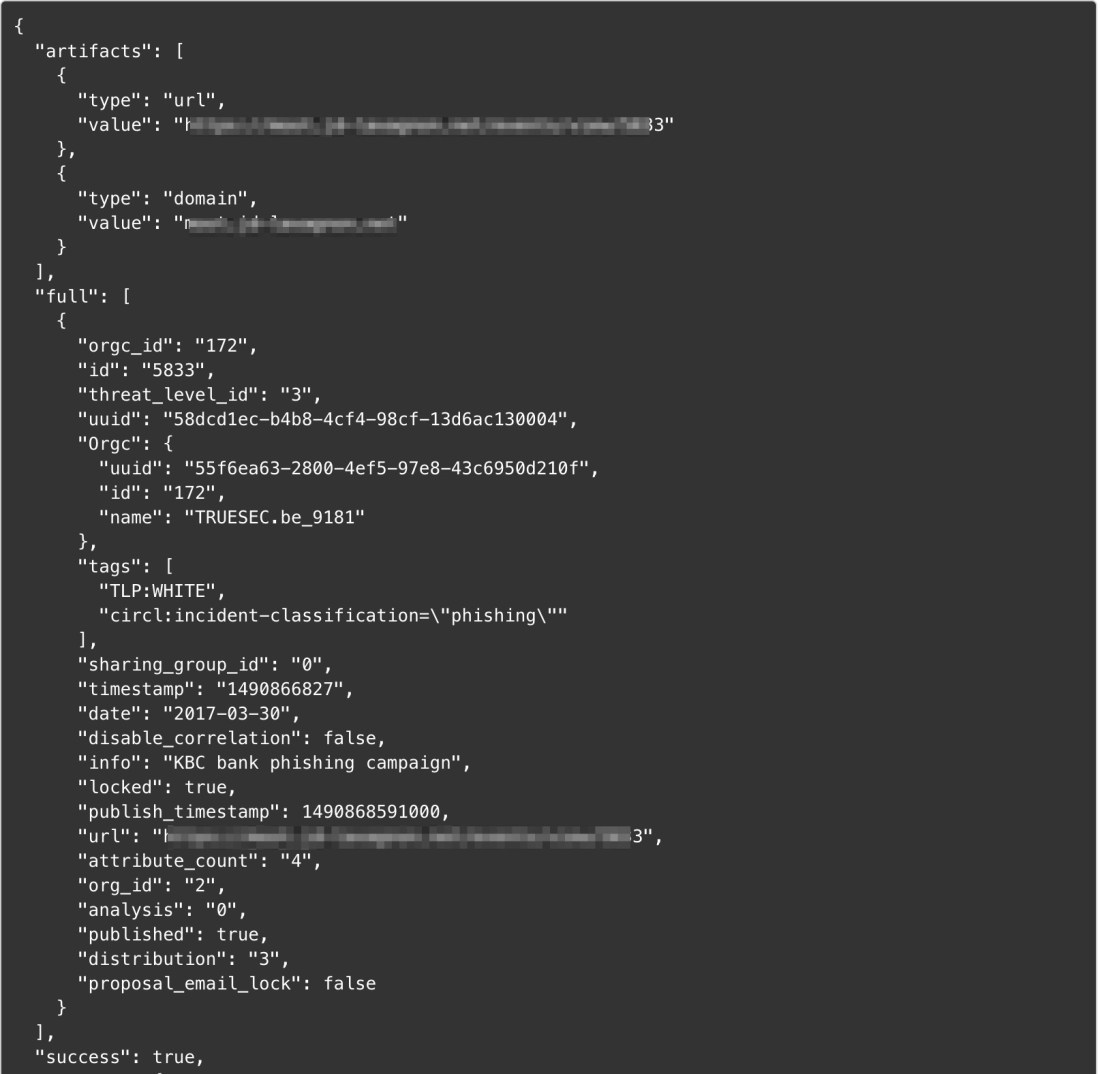
It is no longer necessary to present MISP, the de facto standard of threat sharing. The new MISP Search analyzer will let you search events containing the observable you provide as an input. It applies to a lot of observable types as you can see in the screenshot above.
To use it, you’ll need to supply the API key available in the MISP UI interface.
Cortex: MISP Analyzer Output Sample
Nils Kuhnert created an alternate MISP Search analyzer which has the ability to query multiple MISP instances. We are currently reviewing his submission along with several other analyzers he contributed before improving the newly released MISP Search analyzer.
PassiveTotal Report Templates
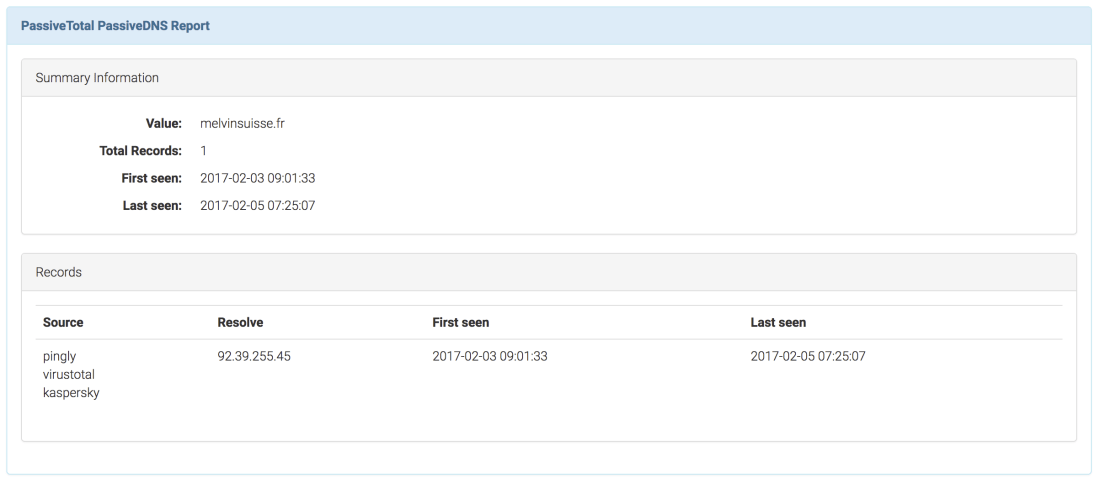
While we published the PassiveTotal analyzer weeks ago, TheHive didn’t have report templates for it at the time. We have now new, shiny short and long report templates for most of the services provided by the PT analyzer.
TheHive: PassiveTotal PassiveDNS – Long Report Sample
DomainTools Whois Lookup Report Template
The short report templates of the DomainTools Whois Lookup analyzer has been improved. We now use a taxonomy to provide more context and differentiate between the DomainTools and PassiveTotal Whois results.
VirusTotal Get Report and VirusTotal Scan Report Templates
The short report templates for both services have also been improved to use a taxonomy to provide additional context and distinguish their results from the PassiveTotal Malware service.
Get the new analyzers
To install the new analyzers, grab the Cortex-Analyzers repository and unpack its content (or git pull the master branch) in your existing /path/to/cortex-analyzers.
The Joe Sandbox analyzer does not need any additional Python library if you have already installed Cortex and the analyzers following the guide we provide. To use it, edit your Cortex configuration file (/path/to/cortex/application.conf) and add the following lines in the analyzer section:
 JoeSandbox {
     apikey="..."
     url="..."
 }
By default, Joe Sandbox will time out the analysis after 30*60 seconds (30 minutes). Additionally, the analyzer will wait for the Joe Sandbox server to respond within 30 seconds. If no response is received within this period, it will time out. If you want to override these values, you’ll need to add the following lines in the analyzer section:
The MISP Search analyzer requires pymisp. Use the following command line to install the required library:
sudo pip install pymisp
Then edit your Cortex configuration file (/path/to/cortex/application.conf) and add the following lines in the analyzer section:
MISP {
     api_key="..."
     url="..."
}
Please note that you must restart Cortex to take the changes into account. The current version has no persistence so you’ll lose all your existing jobs.
click on Import templates button and select the downloaded package
Running Into Trouble?
Shall you encounter any difficulty, please join our user forum, contact us on Gitter, or send us an email at support@thehive-project.org. We will be more than happy to help you!
While we released TheHive as a free, open source product in November 2016, it must not be chalked off quickly as a young, immature solution.
v1.0.0 was put into production in our environment in October 2014. Yes, October 2014. And we’ve been using it every day and refining it since then. Once we deemed it good enough, we decided to share it with the community under an AGPL license to help incident responders in their mission.
Make no mistake. TheHive is a field-tested, mature Security Incident Response Platform (SIRP) built by people who are passionate about Digital Forensics and Incident Response.
A few months after the first public release (v 2.9.0), we adopted bee-related codenames for new major versions and published Buckfast (v 2.10.0).Cortex, the analysis engine that allowed TheHive to analyze and assess observables at scale was shipped as a separate product. Buckfast can interface with one or several Cortex instances depending on your performance and OPSEC needs. For example, you may want to install a separate Cortex on your investigation, air-gapped network to interact with your sandbox as you don’t want to be firing those malicious samples on your corporate network.
Buckfast can also create cases out of MISP events. You can configure it to import them from a single or many MISP instances. And to prepare for the next major version, Mellifera, due in early May 2017, we have released TheHive4py, a Python API client for TheHive.
TheHive4py will be improved to fully support Mellifera’s alerting framework. To put it simply, Mellifera will not only let you preview MISP events and import them but also receive SIEM alerts, email incident reports and different other types of alerts depending on your environment thanks to TheHive4py. And if an analyst discards an alert by mistake in Mellifera’s notification area, they can go back to a ‘trash bin’ and fix their error. Mellifera will also allow you to export cases as MISP events to share IOCs with other teams.
Jigsaw Falling Into Place
Now lets’ get back to TheHive’s perfect companion: Cortex. As of this writing, Cortex features 13 analyzers. These analyzers can perform one type of analysis (such as Abuse Finder) or several (such as DomainTools which can do 6). In the very near future, we plan to add at least 10 more analyzers which are shown in the boxes with dotted borders in the picture above. All upcoming analyzers are contributed by our user community whom we wholeheartedly thank. One of the analyzers will allow you to check observables from TheHive against a MISP instance to search for events that may contain them.
We have also begun work on a Python API client for Cortex dubbed… Cortex4py (how creative wink wink). This will allow people who are not using TheHive to summon the power of Cortex from their SIRP, scripts or any other DFIR tool that can import or interact with Python code.
So in the few months since our project was born to the Internet, we have released a solid collaborative SIRP, a simple yet powerful analysis engine to analyze observables and aid teams in their investigations as well as a Python API client for our SIRP. We also have rather ambitious plans to make them even much more useful.
Oh and one more thing! We have released another piece of software around the same time as the first version of TheHive and on which we haven’t said much so far: Hippocampe. Hippocampe can regularly download feeds and exposes a REST API to let you query them from Cortex (or from other tools). You submit an observable and it’ll tell you if it appears in one or several feeds along with a score. The score takes into account the trust you put in the feed sources (which can be adjusted over time) and the number of sources which contain the observable. We’ll cover Hippocampe in more details in an upcoming post.
Before you run away from us
Before you’re lost between the notes
The beat goes round and round Jigsaw is falling into place
So there is nothing to explain


















 TheHive Project