TheHive Project French Chefs are very happy to announce Mellifera 12, a brand new, all shiny, major version of TheHive.
This MAGA (Make Analysis Great Again) edition of your (soon to be?) favorite Security Incident Response Platform (SIRP) contains an awful lot of changes and improvements. While you can read the full changelog while waiting in line for your burger at HopDoddy or for your turn for the latest Disney attraction, we’d like to concentrate on a few features that would make you enjoy Digital Forensics & Incident Response like never before 🙂
Go Short or Go North
The Observables tab can now display the short (a.k.a. mini) reports produced by analyzers. Whenever you run an analysis (or many), the mini-reports will be shown as soon as the corresponding analyzer jobs have successfully finished. That way, you no longer have to click on each observable to access the short report.
Short Reports shown on the Observables Tab
In fact, you don’t even have to click on the observable to access the long reports. You must simply click on the corresponding short report and the long one will be displayed on top of the observables tab as shown in the following screencast. Ain’t that nifty?
A Single Click on the Short Report Shows the Long One
The short reports have been also improved to follow a taxonomy. To get to this stage, we had to review all 24 analyzers and their flavors, add new functionality to the CortexUtils Python library and improve the analyzers to add a summary section to their JSON output which Mellifera 12 interprets and displays according to a color code as described in our previous post. Please make sure to read it as it contains important information on how to update your cortexutils version and the analyzers as well as the report templates.
Is This Alert New or What?
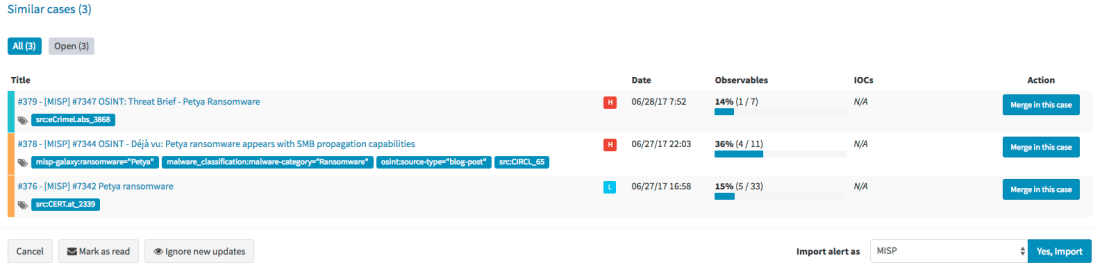
Mellifera 12 introduces an important feature pertaining to alerts. To put it simply, whenever you receive a new alert from MISP, email, SIEM or any other source that you have connected with TheHive, the alert preview page will tell you if there are similarities with existing cases and if so, Mellifera 12 will let you import the new alert in the existing case and any updates made to that alert (think of an ongoing MISP event) will be automatically added to the case.
Alert Preview Page with the new Similar cases Section
Template this, Template that
In addition to the ‘similarity’ feature outlined above, Mellifera 12 lets you choose the case template to use when importing a new alert instead of having to use only a specific case template per alert type/source.
Choose the Template You’d Like to Use to Import an Alert
Custom Fields
We heard our community and implemented a feature that was requested by several users: custom fields.
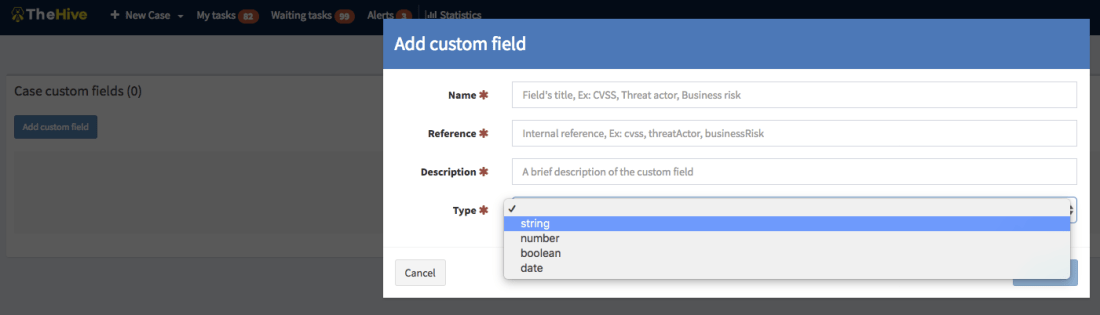
So you’d like to add a business impact to a specific type of cases? Or a set of TTPs? Or a Threat Actor? Or specify a Business Unit? No problem! Ask an admin to create a custom field, associate it with a case template and there you go.
Add a Custom Field
Unlike metrics, custom fields must not be filled to close a case. You can also supercharge a case with custom fields that have not been associated to a case template. We currently support four types of custom fields: strings, numbers, booleans and dates. And you can create lists of acceptable values to limit your analysts’ choices to legitimate data.
If you have an existing installation of TheHive, please follow the migration guide.
If you are performing a fresh installation, read the installation guide corresponding to your needs and enjoy. Please note that you can install TheHive using an RPM or DEB package, use Docker, install it from a binary or build it from sources.
Support
Something does not work as expected? You have troubles installing or upgrading? No worries, please join our user forum, contact us on Gitter, or send us an email at support@thehive-project.org. We are here to help.
TheHive, Cortex and MISP work nicely together and if you’ve read our June-Dec 17 roadmap post, the integration of our products with the de facto threat sharing platform will get better in a few months.
During the FIRST conference presentation we gave last week, we displayed a picture that we will use here to try to explain how these three open source and free products integrate with one another.
A Picture is Worth a Thousand Words…
TheHive
TheHive is a Security Incident Response Platform (SIRP). It can receive alerts from different sources (SIEM, IDS, email. etc.) via its REST API. This is where alert feeders come into play.
Alert Feeders
Think of an alert feeder as a specialized program which consumes a security event (SIEM alert, email report, IDS alert, and so on), parses it and outputs an alert that its sends to TheHive through TheHive4py, the Python library we provide to interact with TheHive’s REST API.
We do not supply such feeders but developing them should be straightforward. If not, let us know and we’ll do our best to help you out.
Alerts
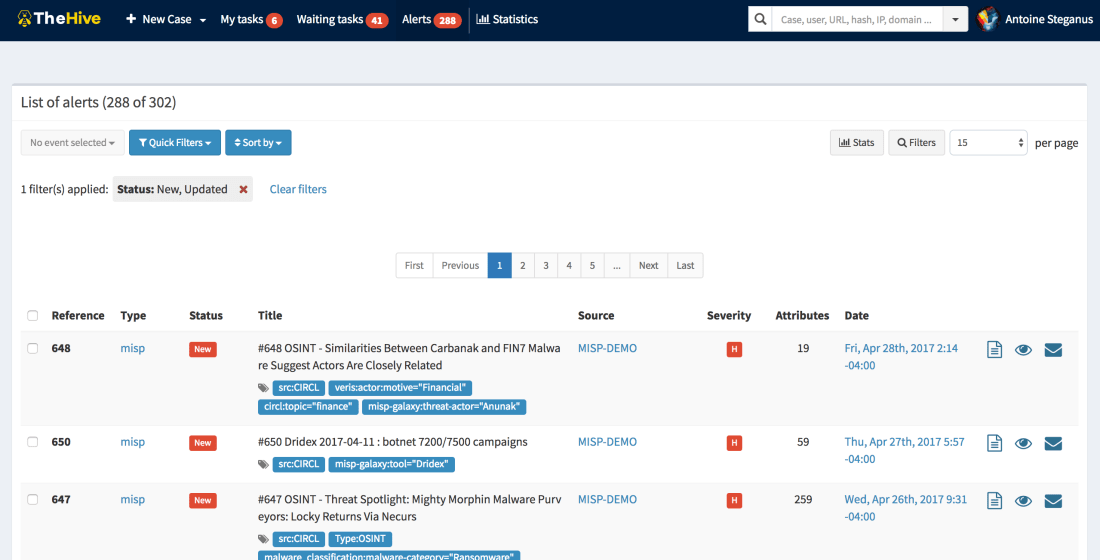
Any alert sent to TheHive will show up in its Alerts pane. In addition to the sources mentioned above, new or updated MISP events will show up as well in that area if you configured TheHive to connect to one or several MISP instances. If so, TheHive will poll those MISP instance(s) at every interval looking for new or updated events. If there are any, TheHive will generate an alert which will end up in the Alerts pane.
The Alerts Pane
Alerts can be ignored, mark as read, previewed and imported. When an alert is imported, it becomes a case that needs to be investigated.
Cases
The Workflow that is at the Heart of TheHive
A case can be generated from an alert or created from scratch. It is subdivided into tasks (think identification, containment, eradication, check proxy logs, and so on) and observables (IP addresses, hashes, email addresses, domain names, URLs…). When analysts are working on tasks, they add logs as they go. In TheHive’s terminology, logs are text entries which may contain attachments to help analysts record what they have been doing. Logs can be written using Markdown or a rich-text editor.
Case Templates
You don’t need to add the same tasks over and over when working on cases belonging to a given category (DDoS, Malspam, APT, …). You can create custom templates to which you add tasks as shown below. This is very useful when you are dealing with alerts so that when you import them, you can select which case template you’d like to apply and there you go!
A Sample Case Template
Observables
Observables can be tagged, flagged as IOCs, and analyzed. When the investigation is well in progress or completed, you may want to share the resulting IOCs or a subset of those with partners and peers. TheHive will support the ability to export that data to MISP in September 2017. Until then, you can still export your IOCs as text, CSV or as a MISP-compatible format that you can use to add them to your MISP instance using the freetext editor. TheHive can export IOCs/observables in protected (hxxps://www[.]somewhere[.]com/) or unprotected mode.
Every observable must have a TLP (Traffic Light Protocol) level. By default, any added observable is considered TLP:AMBER. Please note that the TLP is taken into account by some analyzers. Wait! Analyzers?
Cortex
Cortex is our standalone analysis engine and a perfect companion for TheHive and MISP. Analysts can use it to analyze observables using its Web UI, in which case they can be submitted only one at a time. The Web UI should really be limited to quick assessments of observables before creating a case in TheHive (or in an alternate SIRP). The power of Cortex really comes into play when you use its REST API. TheHive speaks natively to Cortex (as MISP does). Moreover, TheHive can leverage one or several Cortex servers.
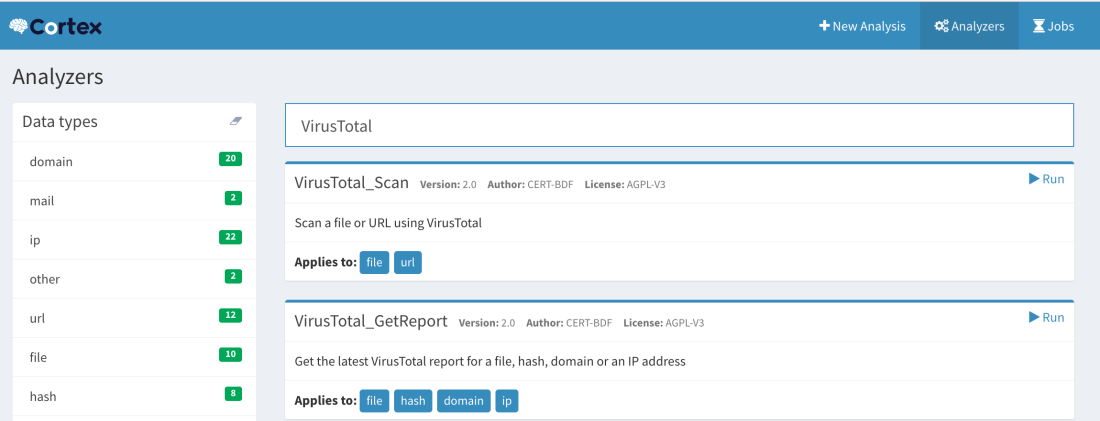
Observable Page and List of Analyzers
Analyzers
As of this writing, Cortex has 23 analyzers which come in a total of 39 flavors and more will be available soon.
An analyzer can be written in any programming language supported by Linux though all of our current analyzers are written in Python. This is because we provide a Python library called Cortexutils which contains a set of utility classes that make it easier to write an analyzer in Python.
Flavors
Analyzers such as VirusTotal, PassiveTotal or DomainTools can provide different analysis services. Let’s take VirusTotal as an example. You can scan a file or URL. That’s one flavor. You can also obtain the latest available report on VirusTotal.com for a file, hash, domain or IP address. That’s a second flavor. So the VirusTotal analyzer has two flavors.
How about PassiveTotal? It has 8 flavors: unique resolutions lookup, SSL certificate history lookup, malware lookup, passive DNS lookup, data enrichment lookup, SSL certificate details lookup, OSINT lookup and WHOIS data lookup.
The MISP Search Analyzer
At this point, we need to mention a special analyzer that may create some confusion if not understood correctly: the MISP Search analyzer. Thanks to it, Cortex has the ability to search observables within a MISP instance as represented by the arrow that goes from the Analyzers to MISP.
Search for MISP Events Containing a Given Observable
When an observable is found in an event, Cortex will return the number of records found (i.e. the number of events where the observable has been found) and a list of links to those events with additional data.
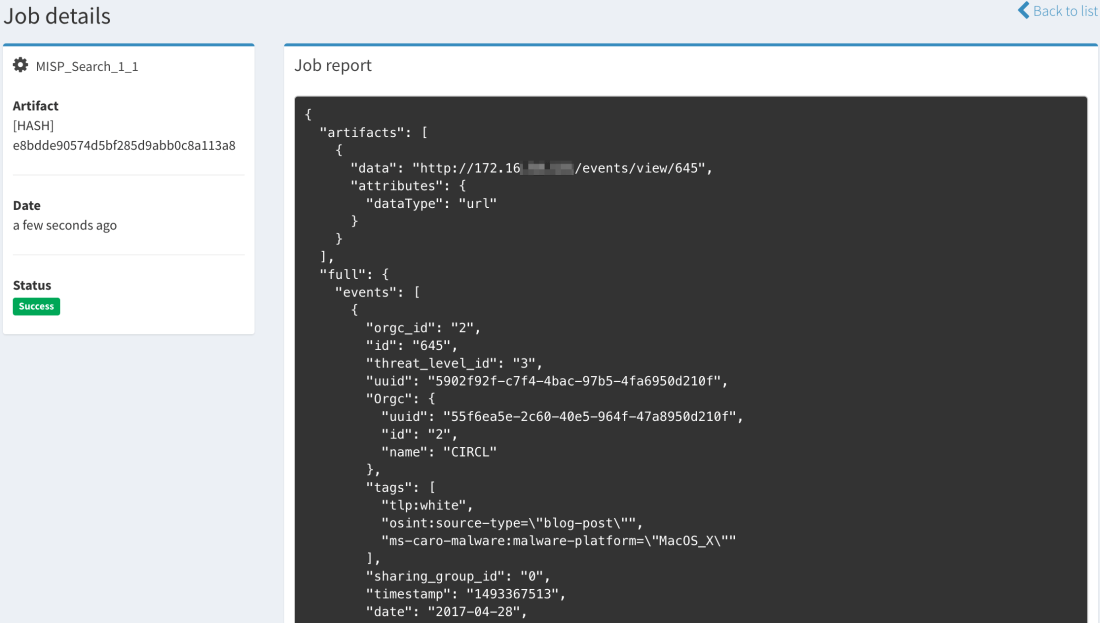
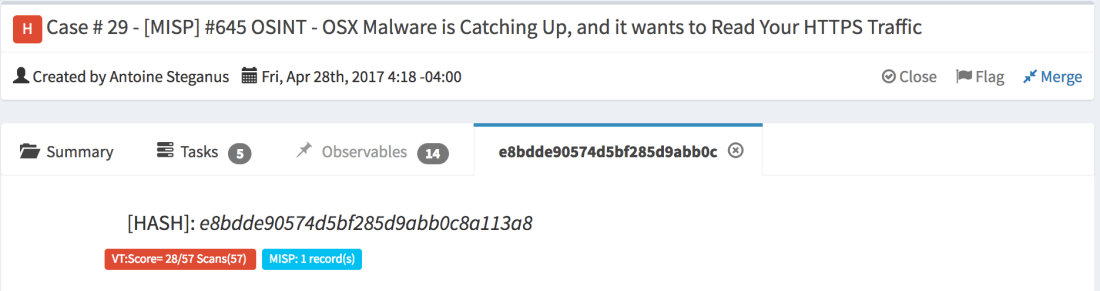
Searching for a Hash Using the MISP Search Analyzer from the Cortex Web UIThe Same Search Conducted from TheHive: Long ReportMini-Report
The current version of the MISP Search analyzer can only search within a single MISP instance but in the near future, it will be able to support multiple ones.
MISP Expansion Modules
Besides its own analyzers (which include MISP Search described above), Cortex can also invoke MISP expansion modules. These are normally used by MISP to enrich attributes within events but Cortex can also take advantage of them to analyze observables.
There is some overlap between the native Cortex analyzers and MISP expansion modules. When choosing between a native analyzer or an expansion module, we highly recommend you select the former. The expansion modules are deactivated in the default Cortex configuration.
Jobs
When you submit an observable for analysis, Cortex will create a job and, if successful, it will generate an analysis report in JSON format. TheHive has the ability to parse those results and present them in a human-friendly fashion thanks to report templates we offer for free. So when you’ll submit an observable to Cortex from TheHive, you’ll get back a short (or mini) report and a long one. The first can be thought of as a really tiny Exec Analyst Summary while the second provides more insight and details.
Calling Cortex from MISP
In addition to the expansion modules we have just mentioned, MISP 2.4.73 and up can enrich attributes using Cortex analyzers. The configuration is pretty straightforward. So if all you are concerned about is threat intelligence and sharing, you may augment your visibility into a given threat represented as a MISP event by leveraging all current 23 Cortex analyzers and any future ones.
Conclusion
TheHive, Cortex and MISP are three open source and free products that can highly aid you combat threats and keep the ‘monsters’ at bay.
TheHive, as a SIRP, allows you to investigate security incident swiftly in a collaborative manner. Several analysts can work simultaneously on tasks & cases . While cases can be created from scratch, TheHive can receive alerts from different sources thanks to alert feeders which consume security events generated by multiple sources and feed them into TheHive using TheHive4py Python library. TheHive can also sync to one or several MISP instances to receive new and updated events which will appear in the alert pane with all the other alerts generated by other sources. Analysts can then preview new alerts to decide whether they need to be acted upon. If so, they can transform them into investigation cases using templates.
To analyze the observables collected in the course of an investigation and/or imported from a MISP event, TheHive can rely on one or several Cortex analysis engines. Cortex is another standalone product that we have developed which sole purpose is to allow you to analyze observables at scale thanks to its large number of analyzers, MISP expansion modules and any analyzer you might have developed on the side. Cortex has a REST API that can be used to empower other security products such as ‘analytics’ software, alternate SIRPs or MISP.
The highly popular threat sharing platform can indeed enrich attributes thanks to Cortex as it has a native integration with it. And in a few months, you will also be able to export cases from TheHive as MISP events that you can share with peers and partners.
If you do share, you do care about our collective mission to defend thedigital assets that are under our watch from harm. So let us fight together as one.
A few days ago, we have been made aware of a bug in the way we pulled new or updated MISP events to inject them within Mellifera’s alerting panel. As a result, some events did not show up as intended. So you might have missed some of the action shared by peers and partners through MISP.
As true Frenchmen who care a lot about cuisine, TheHive Project’s Chefs went back to their code kitchen and figured out a more palatable recipe to make sure you won’t be left under the impression that you were seeing all new or updated MISP events while in fact you didn’t (we don’t want you to go too easy & lazy n’est-ce pas ?). Mellifera 11.3 (TheHive 2.11.3), a hotfix version has been released to that end and should fix the issue. Please note that you must use MISP 2.4.73 or better.
In addition, this new version of your favorite (or soon to be favorite) Security Incident Response Platform can be installed from a deb package on Ubuntu 16.04 without having to fiddle with OpenJDK. We have repackaged the software to avoid grabbing OpenJDK 9 (which TheHive does not support) and force the installation of version 8.
Finally, if an admin creates an empty case template, users can add tasks to it while previously this wasn’t possible.
Download & Get Down to Work
If you have an existing installation of TheHive, please follow the new migration guide.
If you are performing a fresh installation, read the installation guide corresponding to your needs and enjoy. Please note that you can install TheHive using an RPM or DEB package, deploy it using an Ansible script, use Docker, install it from a binary or build it from sources.
Support
Something does not work as expected? You have troubles installing or upgrading? No worries, please join our user forum, contact us on Gitter, or send us an email at support@thehive-project.org. We are here to help.
A new version of TheHive will be released by the end of June. We will take this opportunity to review our release naming and numbering from the ground up.
Months ago, we started giving ‘major’ versions (2.10, 2.11, …) the name of honey bee varieties. 2.10 was called Buckfast. 2.11, the current version, is called Mellifera. And we were supposed to give 2.12 yet another name. However, and after the few hiccups we’ve encountered with our QA as of late, we have decided to change things around in order to make sure new releases are as stable and well-maintained as you should expect them to be.
Starting from the next release (2.12), we will abide by the following numbering scheme:
Only major versions will have corresponding honey bee names. So long as we stay with v2, we’ll keep calling all the minor versions Mellifera N (2.12.0 = Mellifera 12). Version 3 will be called Cerana.
Mellifera 12 – June 29, 2017 (planned date)
Mellifera 12 (v 2.12) will succeed to Mellifera 2 (the current version) to comply with the new naming scheme. It will allow you to see how similar new alerts are to existing cases so you can decide whether you import them into an existing case, create a new one or ignore them altogether. Mellifera 12 will show you the status of all the related cases (#229) to the one you are working on. Finally, you’ll have the ability to change the default case template before importing an alert.
M12 will also support custom fields (#12), a feature that has been requested by numerous users. This version will also add mini-reports to the Observables tab. That way, once a Cortex analysis has been completed, analysts will be able to view part or all the resulting short report in that tab instead of having to navigate to the page of each observable to read the short report.
Mellifera 13 – September 14, 2017
TheHive 2.13 should be the last Mellifera version. It will complete TheHive’s integration with MISP by adding the ability to export all observables or a subset of them to a MISP instance. Please note that TheHive allowed you from the start to import events from multiple MISP instances but since sharing is caring, we wanted to add the ability to export to this very popular threat sharing platform from your Security Incident Response Platform (SIRP). We do not want to rush it though.
Cerana – October 12, 2017
Cerana or TheHive 3.0.0 will bring a complete UI overhaul to make it even easier to work on cases, perform analysis and get your job done, after the interface refreshments Mellifera brought. It will lay the ground for some nifty features we have in mind.
Cerana 1 – November 15, 2017
TheHive 3.1.0 will include dynamic dashboards: the ability to work with the statistics and metrics the way you want and generate customized dashboards to help you drive your activities.
Keep an eye on TheHive’s milestones on GitHub. There are other features and enhancements that we might add as we progress and we will reflect them on that page.
Correction: June 12, 2017
An earlier version mentioned GitHub issue #36 as pertaining to custom fields while it is a request for globally-defined tags that an analyst can choose from.
The Chefs behind TheHive Project’s delicious code are happy to announce the availability of Mellifera 2 (TheHive v2.11.2), the scalable, free and open source Security Incident Response Platform. This minor version fixes two irking issues related to MISP and adds a few enhancements detailed below.
Mellifera – The New Alerting Panel
Fixed Issues
#220: alerts related to MISP events are not properly updated.
#221: in some edge cases, alerts related to MISP events are created with no attribute.
Enhancements
#188: display the case severity in the My tasks and the Waiting tasks pages to let analysts prioritize their work.
#218: show the description of an alert in the alerting panel.
#224: visually distinguish between analyzed and non-analyzed observables.
Download & Get Down to Work
If you have an existing TheHive installation, please follow the new migration guide.
If you are performing a fresh installation, read the installation guide corresponding to your needs and enjoy. Please note that you can install TheHive using an RPM or DEB package, deploy it using an Ansible script, use Docker, install it from a binary or build it from sources.
Support
Something does not work as expected? You have troubles installing or upgrading? No worries, please join our user forum, contact us on Gitter, or send us an email at support@thehive-project.org. We are here to help.
Correction: May 26, 2017
A copy/paste error from a previous blog post was fixed.
We are glad to announce a new version of your favorite observable analysis engine which corrects bugs introduced by version 1.1.1 and adds a few enhancements. As a reminder, TheHive, our Security Incident Response Platform, can interact with one or several Cortex instances. Moreover, starting from version 1.1.1, Cortex has a two-way integration with MISP.
We highly advise you to upgrade your Cortex in to instance to 1.1.2.
Cortex 1.1.2 – Job Report Example with CERT-SG’s Abuse Finder
Fixed Issues
#27: fixed the daunting error 500 that many users of TheHive encountered when a job is submitted to Cortex.
#29: the MISP expansion modules are now disabled by default to avoid another error 500.
#31: the web interface was displaying SNAPSHOT (oops!) for the Cortex version. It now displays the correct version.
Enhancements
#28: when you enable the MISP expansion modules, Cortex will not be slowed down and starts without delay.
To update your current Cortex installation, follow the instructions of the installation guide. Before doing so, you may want to save the job reports that were not executed via TheHive. Cortex 1 has no persistence and restarting the service will wipe out any existing reports.
Please note that you can install Cortex using an RPM or DEB package, deploy it using an Ansible script, use Docker, install it from a binary or build it from sources.
Support
Something does not work as expected? You have troubles installing or upgrading? No worries, please join our user forum, contact us on Gitter, or send us an email at support@thehive-project.org. We are here to help.
Last week, we have released Mellifera (TheHive 2.11.0), a major version of your favorite (or soon to be favorite) Security Incident Response Platform. Sadly, some annoying bugs have slipped past our QA (n’est-ce pas Thomas ?).
We are happy to announce the availability of Mellifera 1 (TheHive 2.11.1) which corrects those bugs and adds a few enhancements detailed below.
Issues Corrected
#204: update case templates created with previous versions of TheHive.
#205: remove duplicate tags associated to an observable present in two cases upon a case merging operation.
#206: apply case templates when an alert is converted into a case.
Enhancements
We also took the opportunity of this hotfix to add the following enhancements:
#180: merge duplicate tasks during a case merge operation. Starting from this release, if you have waiting tasks (i.e. not assigned) with the same name in cases you’d like to merge, the new merged case will have only one task instead of two.
#211: show the number of available analyzer reports for each observable. If an observable has not been analyzed yet, say so.
Documentation
Please note that we have moved all the documentation of TheHive in a new repository. If you are not using TheHive4py 1.2.0 (or future versions), you can send alerts to Mellifera using the API as documented.
Download & Get Down to Work
If you have an existing TheHive installation, please follow the new migration guide.
If you are performing a fresh installation, read the installation guide corresponding to your needs and enjoy. Please note that you can install TheHive using an RPM or DEB package, deploy it using an Ansible script, use Docker, install it from a binary or build it from sources.
Support
Something does not work as expected? You have troubles installing or upgrading? No worries, please join our user forum, contact us on Gitter, or send us an email at support@thehive-project.org. We are here to help.
TheHive Project French chefs are very excited to announce the immediate availability of Mellifera, TheHive 2.11.0, the greatest and latest iteration of our flagship product.
We are thrilled to share this major version with the incident response community, for free as usual. Yes, you read that sentence right. You don’t have to cough up a single € or BTC for a platform that is as good as some commercial alternatives, unless your boss is hassling you about paying big bucks to get so-called professional support. If that’s the case, try us and you might prove them wrong.
Going through all the features and fixes of this significant overhaul will take forever (well, almost) so let us highlight a few that we feel worthy of your attention and time.
The Alerting Framework
If you need one reason to upgrade from Buckfast to Mellifera or to ditch your existing, clunky incident handling platform and use ours, then that should be its brand-new and powerful alerting framework.
With Buckfast (TheHive 2.10.x) and earlier versions, you can configure multiple MISP instances. TheHive will then poll those instances at regular intervals and display new or updated events in a specific area where analysts can preview them, import them as cases using configurable templates or ignore them altogether (and if they do so by mistake, there’s no way to go back). And if you needed to raise alerts from a SIEM, email reports or other sources of noteworthy security events, you had to rely on TheHive4py API client and create a case without having a chance to preview the events in TheHive prior to the case creation.
Mellifera does not have these limitations. It features an all new, fancy and efficient alerting framework which can be displayed using the Alerts button in the Web interface. This button was previously called MISP.
Within the Alerts area, you can preview not only new or updated MISP events but also any event that you have pushed through TheHive4py. The client has been modified to be compatible with Mellifera. If you have an existing TheHive4py package, please upgrade to the new 1.2.0 version using PIP.
The New Alerting Panel
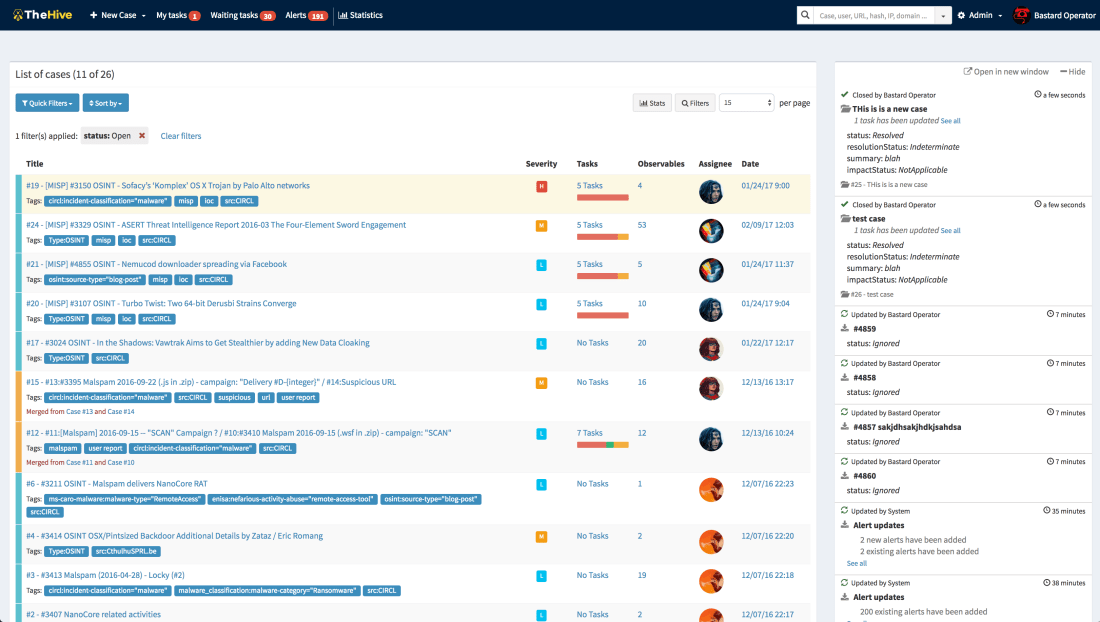
Using TheHive4py 1.2.0, you can send your SIEM alerts, user email reports and security events from various sources to Mellifera and your analysts will be able to preview and import them or simply ignore them. If they have ignored some events by mistake, they can use the quick actions on the top of the panel to retrieve them. Please note that you have to create programs that will bridge your event sources with Mellifera through TheHive4py.
Stats within the Alerting Panel
All New Skin
Mellifera has an all new skin with many refinements spread all over the interface. For example, you can now easily reorder the tasks within a case template. You can also sort task logs according to their creation date (oldest first, newest first). The flow (a.k.a live stream) is also collapsible. Moreover, when you create a case, Mellifera will suggest existing tags.
Mellifera’s Brand New Skin
Is MISP or Cortex There?
If you have configured Mellifera to interact with at least one MISP or Cortex instance, the Web interface will show their respective logos at the bottom of the page. Please note that you can now connect to MISP and Cortex even if you are behind a proxy which requires authentication.
New Installation Packages
Starting from this release, we no longer produce all-in-one binary packages and dockers containing TheHive and Cortex. Instead you can use dockers, binaries and RPM as well as DEB packages. Wink wink.
One More Thing
Mellifera has an all new logo and the project website has been completely redesigned. Now you can see who’s behind the project thanks to Alexandre Gohier, a close friend who also happens to be a professional photographer.
Download & Try
If you have an existing TheHive installation, please follow the new migration guide.
If you are performing a fresh installation, read the installation guide corresponding to your needs and enjoy!
Support
Something does not work as expected? You have troubles installing or upgrading? No worries, please join our user forum, contact us on Gitter, or send us an email at support@thehive-project.org. We are here to help.
Thanks to the invaluable contributions of our growing and thriving user community, Cortex has now 6 more analyzers, bringing the total to 21. The new analyzers, released under our usual AGPL v3 license, are:
CIRCLPassiveDNS
CIRCLPassiveSSL
GoogleSafebrowsing
Nessus
Virusshare
Yara
All but one have been submitted by Nils Kuhnert of CERT-Bund. The Nessus analyzer has been contributed by our long-time friend Guillaume Rousse.
Cortexutils 1.1.0
While reviewing the submissions, we realized that a new version of the Cortexutils library was needed in order to support both Python 2 and 3. Hence we released version 1.1.0. You can grab it through PIP. To update your existing installation, please run the following command:
sudo pip install cortexutils --upgrade
Note that Cortexutils 1.1.0 is required to benefit from these analyzers and future ones. If you are performing a fresh Cortex installation, follow the guide.
Installation
To install the new analyzers, grab the Cortex-Analyzers repository and unpack its content (or git pull the master branch) in your existing /path/to/cortex-analyzers. Then follow the Cortex analyzers guide.
New Short and Long Report Templates for TheHive
Short and long reports for TheHive were also created to parse and display the results produced by the new analyzers. We also bundled in the new package a URL analysis template for Joe Sandbox which was missing and improved some of the older short templates in order to follow a taxonomy.
To import the new report templates in your instance of TheHive:
click on Import templates button and select the downloaded package
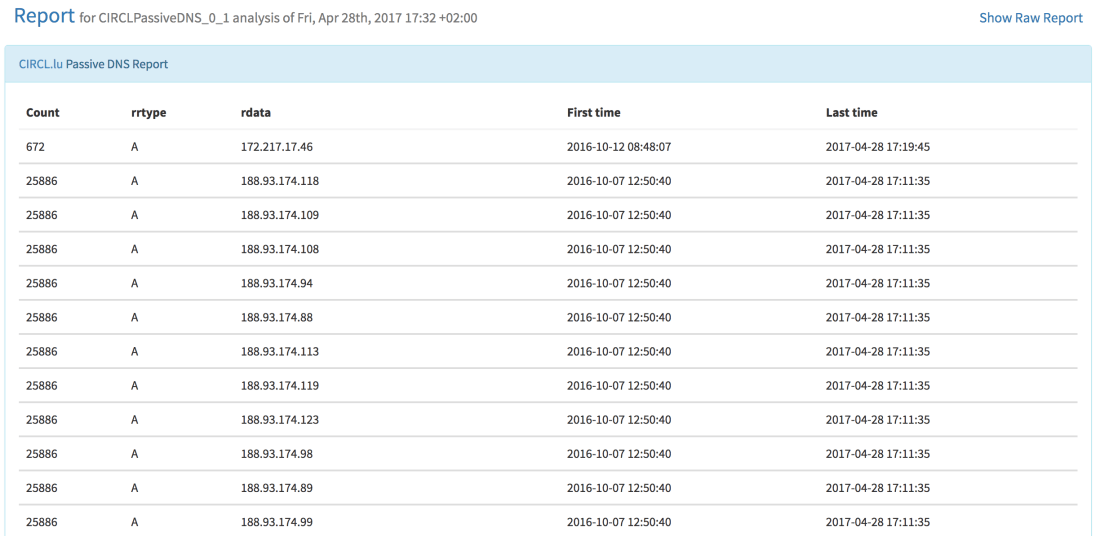
CIRCLPassiveDNS
The CIRCLPassiveDNS analyzer lets you check the CIRCL’s Passive DNS service for a given domain. It takes domains and URLs as input. Access to the service is allowed to trusted partners in Luxembourg and abroad. If you think you qualify, please contact the good CIRCL folks. To make it work, you’ll need the pypdns Python library.
In order to take advantage of CIRCLPassiveDNS, you need to add the following section to the Cortex configuration file (application.conf):
CIRCLPassiveDNS {
     user=""
     password=""
}
When called from TheHive, the following output is produced:
TheHive: CIRCLPassiveDNS Analyzer – Short and Long Report Samples
CIRCLPassiveSSL
The CIRCLPassiveSSL analyzer lets you check CIRCL’s Passive SSL service for a given IP address or certificate hash. Access to the service is restricted to partners and security researchers worldwide. If you think you qualify, please contact the good CIRCL folks. This analyzer needs the pypssl Python library to work properly.
To use it, please add the following section to the Cortex configuration file (application.conf):
CIRCLPassiveSSL {
     user=""
     password=""
}
When called from TheHive, the following output is produced:
TheHive: CIRCLPassiveSSL Analyzer – Short and Long Report Samples
To leverage GoogleSafebrowsing, add the following section to Cortex’ configuration file:
GoogleSafebrowsing{
key=""}
When you run the analyzer fromTheHive, you should see output similar to the samples below:
TheHive: GoogleSafebrowsing Analyzer — Short and Long Report Samples
Nessus
The Nessus analyzer lets you leverage Tenable’s Nessus Vulnerability Scanner to scan an IP address or a FQDN. Of course, you must not scan assets that do not belong to you, unless you really know what you are doing. That’s why safeguards were built in the analyzer’s configuration:
The nessrest Python library is needed to make REST API calls to Nessus. Analysts would use the analyzer to assess the vulnerabilities of potentially compromised machines or new, unknown assets that have been plugged into one of their constituency’s networks. Of course, penetration testers conducting large-scale reconnaissance can also benefit from this analyzer.
TheHive: Nessus Analyzer — Short and Long Report Samples
Virusshare
The Virusshare analyzer lets you verify whether a file or hash is available on VirusShare.com. It requires the progressbar2 Python library besides requests (which should be already installed if you have an existing Cortex installation). As stated by Nils:
This analyzer enables searching for md5 hashes in Virusshare.com hash list. It does not download samples for you nor links directly to the sample – the author of virusshare prohibits the automatic download/site scraping and I respect that. It provides a button to start the virusshare search, though, but you need an account for that. You can request an invitation to the platform through contacting the admin via mail, directly.
To use it, add the following section to your Cortex application.conf:
Virusshare {
   path="/path/to/download/directory"
}
Quoting Nils again, in order to download the newest available hash lists from virusshare.com, you can run the download_hashes.py script that comes with the analyzer.
Upon running the analyzer from TheHive, the report will contain a link to the corresponding Virusshare page if a match is found as shown below.
TheHive: Virusshare Analyzer — Long Report Sample
Yara
Last but not least, the Yara analyzer can check files against YARA rules using yara-python. To use it, add the following to your Cortex configuration file:
You can specify path to directories and files. If you supply a directory, the analyzer expects to find an index.yar or index.yas file. The index file can include other rule files. An example can be found in the Yara-rules repository.
TheHive: Yara Analyzer — Short and Long Report Samples
Running Into Trouble?
Shall you encounter any difficulty, please join our user forum, contact us on Gitter, or send us an email at support@thehive-project.org. We will be more than happy to help!
We are thrilled to announce that Cortex has two new analyzers: Joe Sandbox and MISP Search. Moreover, we have produced new analyzer report templates for TheHive and improved existing ones.
Joe Sandbox
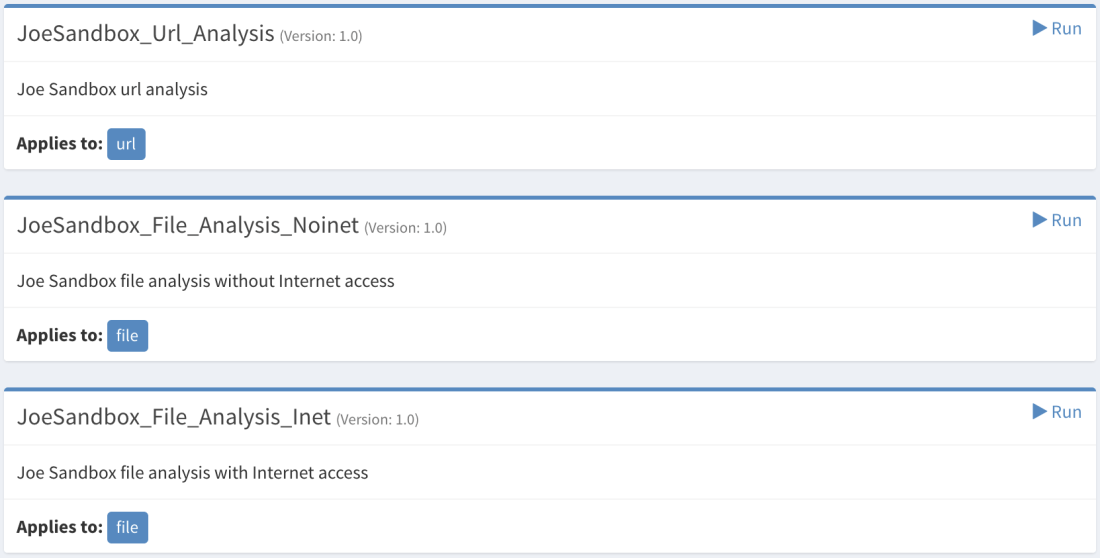
Cortex: New Joe Sandbox Analyzer
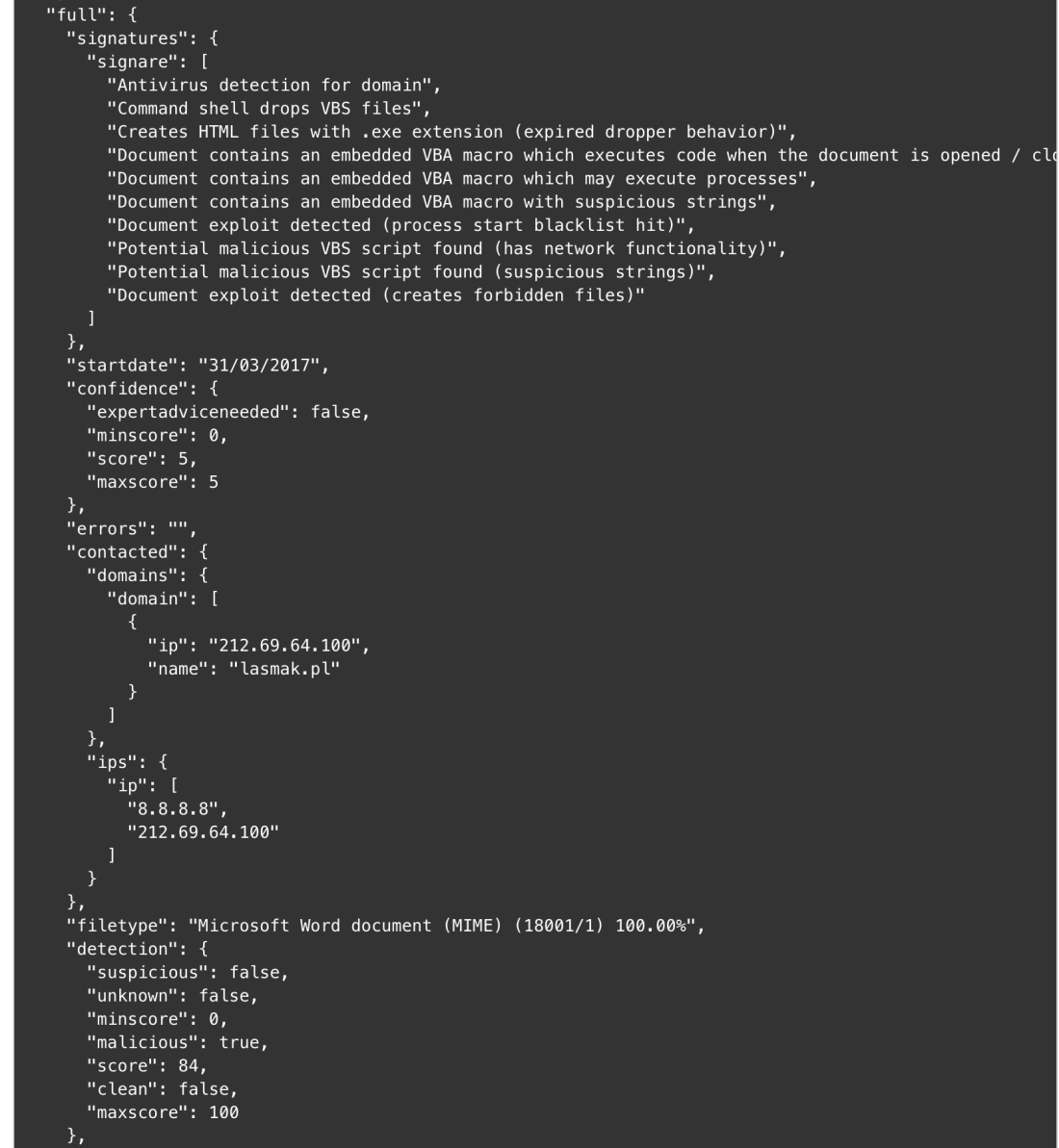
Joe Sandbox, by Joe Security LLC, is a very powerful malware analysis platform that has been around for many years and comes in two flavors: cloud and on-premises. The Joe Sandbox Cortex analyzer has been tested using an on-prem Joe Sandbox Ultimate version and can process URLs and files. The analyzer can process files with or without Internet access.
To use the analyzer, you must provide the API key of your Joe Sandbox instance. You must log in to Joe Sandbox, click on your account name, then on Settings and on the API Key tab.
Cortex: Joe Sandbox Output Example
We have produced a report template for the Joe Sandbox analyzer output resulting from file analysis. The URL analysis report template is not yet available but it should be in a few days.
TheHive: Joe Sandbox Analyzer – Short and Long Report Samples
MISP Search
Cortex: New MISP Search Analyzer
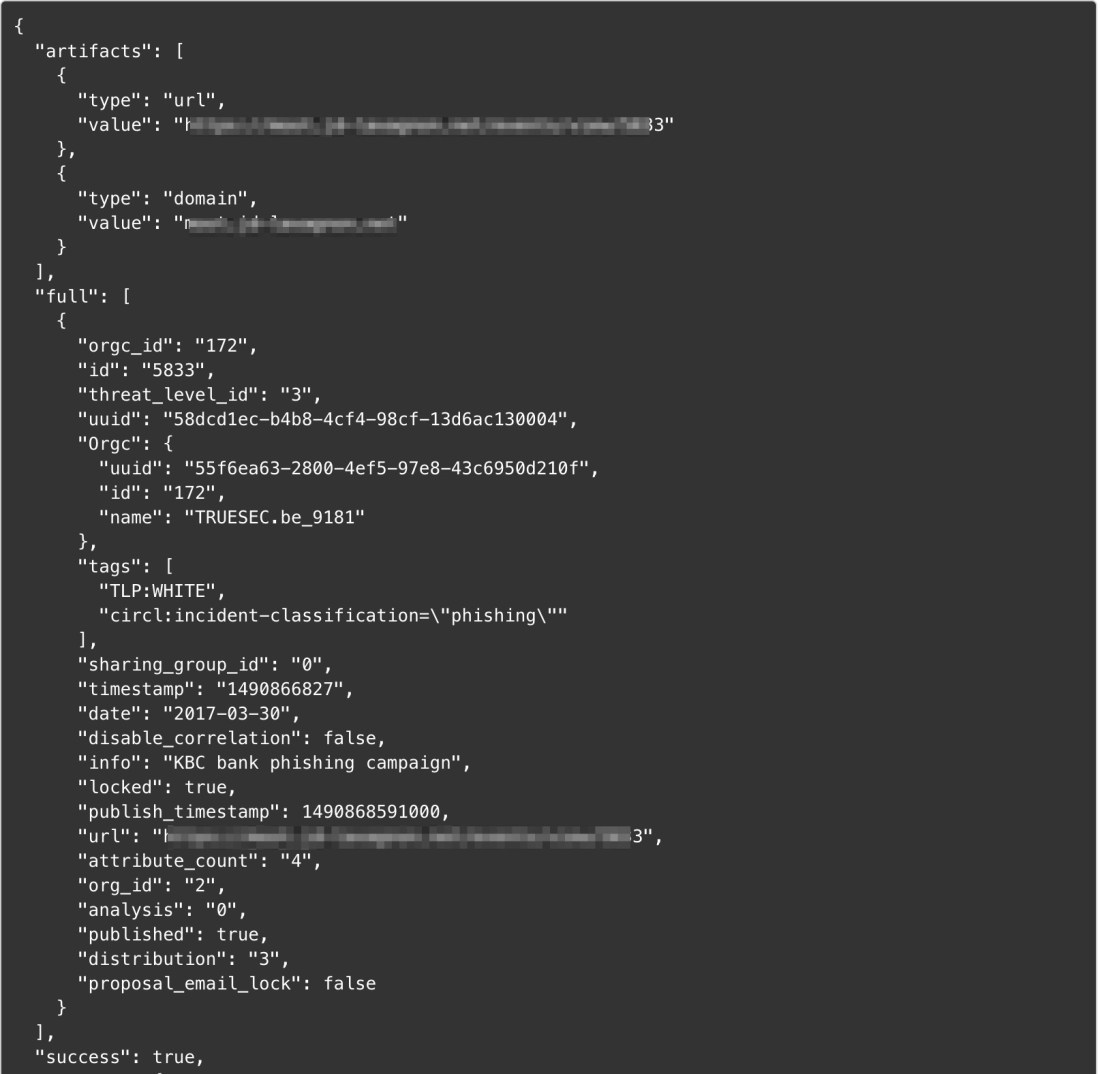
It is no longer necessary to present MISP, the de facto standard of threat sharing. The new MISP Search analyzer will let you search events containing the observable you provide as an input. It applies to a lot of observable types as you can see in the screenshot above.
To use it, you’ll need to supply the API key available in the MISP UI interface.
Cortex: MISP Analyzer Output Sample
Nils Kuhnert created an alternate MISP Search analyzer which has the ability to query multiple MISP instances. We are currently reviewing his submission along with several other analyzers he contributed before improving the newly released MISP Search analyzer.
PassiveTotal Report Templates
While we published the PassiveTotal analyzer weeks ago, TheHive didn’t have report templates for it at the time. We have now new, shiny short and long report templates for most of the services provided by the PT analyzer.
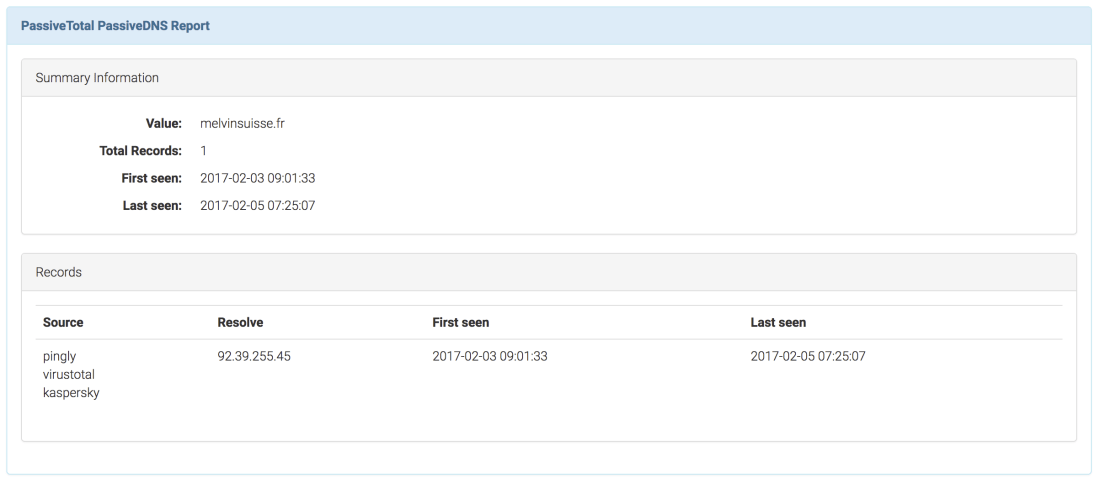
TheHive: PassiveTotal PassiveDNS – Long Report Sample
DomainTools Whois Lookup Report Template
The short report templates of the DomainTools Whois Lookup analyzer has been improved. We now use a taxonomy to provide more context and differentiate between the DomainTools and PassiveTotal Whois results.
VirusTotal Get Report and VirusTotal Scan Report Templates
The short report templates for both services have also been improved to use a taxonomy to provide additional context and distinguish their results from the PassiveTotal Malware service.
Get the new analyzers
To install the new analyzers, grab the Cortex-Analyzers repository and unpack its content (or git pull the master branch) in your existing /path/to/cortex-analyzers.
The Joe Sandbox analyzer does not need any additional Python library if you have already installed Cortex and the analyzers following the guide we provide. To use it, edit your Cortex configuration file (/path/to/cortex/application.conf) and add the following lines in the analyzer section:
 JoeSandbox {
     apikey="..."
     url="..."
 }
By default, Joe Sandbox will time out the analysis after 30*60 seconds (30 minutes). Additionally, the analyzer will wait for the Joe Sandbox server to respond within 30 seconds. If no response is received within this period, it will time out. If you want to override these values, you’ll need to add the following lines in the analyzer section:
The MISP Search analyzer requires pymisp. Use the following command line to install the required library:
sudo pip install pymisp
Then edit your Cortex configuration file (/path/to/cortex/application.conf) and add the following lines in the analyzer section:
MISP {
     api_key="..."
     url="..."
}
Please note that you must restart Cortex to take the changes into account. The current version has no persistence so you’ll lose all your existing jobs.
click on Import templates button and select the downloaded package
Running Into Trouble?
Shall you encounter any difficulty, please join our user forum, contact us on Gitter, or send us an email at support@thehive-project.org. We will be more than happy to help you!























 TheHive Project