Unveiling Synapse

When we’re not busy cooking new features, we go back to the trenches and face incidents like many of our fellow analysts who read our publications and use our tools. To do so, we swap our chef toques for firefighter helmets, not only because such shiny headwear is cool, but mainly because incident response (IR) is, at its very heart, firefighting (minus all the dangerous stuff).

If you think about it, when handling incidents you can see everything from cats in trees (spam) to major fire (APT). Thankfully, there are more cats to bring down than fire to extinguish. That being said, a big herd of cats could be a serious threat to your organization, to your mental health or both.

We tend to forget that incident handlers are humans, not robots. Unlike our metal cyberfriends, we need diversity. We can’t risk insanity like Charlie Chaplin in Modern Times if we can avoid it. Unfortunately IR can be highly repetitive, especially if you only have cats to deal with.

Some could say ‘Nah, this is minor, nothing critical here’ but at some point, an analyst brainwashed by the same tasks again and again will be led to fault. In the worst case scenario, one could see an alert and immediately categorize it as false positive without any further consideration. Because ‘this alert is always a false positive’, until the day it is not…

Automation, a Solution?

Intuitively, we look in the direction of automation in order to minimize what we call ‘zombie’ tasks: highly repetitive and brainless tasks that need to be done. We believe that doing so will allow incident handlers to focus on the analysis and not on the tedious side of IR. Ultimately, we hope it will keep analysts stimulated and in a state of alert. Also, it should reduce time and effort spent on the low-hanging fruits.

One of the most dreary tasks in our opinion is to record the context around an incident.
What is the problem? When did it happen? What’s the origin? Who are the victims? How many are there? Answers to these questions let you have an overview of what is happening and are valuable to correlate incidents. So it is worth taking some minutes to add this information to your case. Sadly, most of the time it will look like a succession of ‘Ctrl+C; Alt+Tab; Ctrl+V’ from your incident source to TheHive. Exactly the kind of tasks we want to forego.

Specifications

Having identified the threat that apathetic analysts pose, the root cause (highly repetitive tasks) and a solution (automate the recording of incident context), the question of the implementation has been raised.

The first challenge to solve is the number of incident sources. Almost everything can trigger an incident: a firewall, an IDS, antivirus, SIEM, users, etc… So the application must be designed to accept several sources and must permit to easily integrate new ones. And instead of having to configure multiple alert feeders to supply alerts to TheHive, we would have only one. To some extent, it can be assimilated to a meta feeder.

And if the application works as intended, we still have a second challenge. Let’s say you, dear reader, and ourselves use the galaxy renowned Stargazer IDS. Maybe you’d like to include the full packet capture in the case but we wouldn’t. Using the same product doesn’t mean using it the same way. So we have a variety of sources and for each source, we have a variety of configurations and workflows. Hence any app we design needs to accept multiple configurations and workflows for any given source.

Finally: the third challenge. We want to make the most out of TheHive. Creating cases, creating alerts, assigning cases, adding logs, adding observables … all those actions are not an option.

Synapse

After several trials and failures, we came up with Synapse. Basically it is a Python 3 app which sits between TheHive and your incident sources:

Screen Shot 2018-07-18 at 09.54.28.png
Synapse Overview

To solve the first and third challenge, we rely on connectors. A connector is a Python object dedicated to interact with a security device. In the picture above, you can see the Exchange Connector and TheHive Connector. To extend the number of sources, you just have to develop the connector that corresponds to your device.

Regarding the second challenge, we rely on workflows. Workflows are python scripts who use connectors to automate repetitive tasks when tracking a case. Not happy with the current workflow? Develop your own using the connectors.

At this point, you probably wonder why there’s an API in the picture above. Well, the API is the link between the user and the workflows. By hitting a specific endpoint of the Synapse’s API, the corresponding workflow will be launched. That way the user can choose what to launch, especially if they are only interested in a particular workflow. Moreover, using an API allows us to listen to TheHive’s real-time stream and initiate some actions like closing a QRadar offense when the related case is solved.

At the moment, Synapse includes the Exchange connector and the associated Ews2Case workflow. The workflow features:

  • Case creation from emails
  • Case assignment
  • Adding email bodies to task logs
  • Adding email replies to the case
  • Adding email attachments as observables

And of course, everything is done to minimize the number of clicks! Check the workflow documentation to understand how it works under the hood.

We’re still working on the QRadar connector and the associated workflows but if you can’t wait, have a look at the work done by the community like pierrebarlet’s script.

Check it Out

As usual, Synapse is an open source and free software released under the AGPL (Affero General Public License).

Synapse has its own repository. Start with the user guide and read about the workflow you want to use as you’ll need to configure it.

Troubles?

Shall you encounter any difficulty, please join our user forum, contact us on Gitter, or send us an email at support@thehive-project.org. We will be more than happy to help!
Cerana 0.9 and Cortex 2.0.4 are Out!

We are proud to announce the immediate availability of Cerana 0.9 (TheHive 3.0.9) and Cortex 2.0.4. These hotfix releases address a number of issues and we encourage you to update your current installation at your earliest opportunity. For your comfort and sanity. Seriously.

We also took this opportunity to update Cortex analyzers to fix issues with CIRCL Passive SSL, Hybrid Analysis, and the Joe Sandbox URL Analysis template. Moreover, we have updated the cortexutils library to set the taxonomy level to info if it is invalid. To upgrade cortexutils​ to 1.2.4:

sudo pip install -U cortexutils && sudo pip3 install -U cortexutils

To update your Cortex analyzers:

cd /path/to/Cortex-analyzers && git pull

Note: the Bluecoat analyzer was removed since it does not comply with the updated Terms of Service of Symantec Web Pulse SiteReview. Symantec does no longer permit programmatic querying of the service.

Fixes in Cerana 0.9

  • #527: display long reports when the analyst clicks on the corresponding short reports. Meh!
  • #541: make the drop-down menu for case templates scroll when there is a truckload of them.
  • #452: prevent WSAPI failure.
  • #531: fix naming inconsistencies in the Live Stream.
  • #530: correct an error when trying to analyze a filename using the Hybrid Analysis analyzer.
  • #543: generate an error if unable to contact Cortex.
  • #518: merge observable sightings when merging cases.
  • #535: fix the tag color of the PhishTank analyzer which was transparent under certain conditions.

Fixes in Cortex 2.0.4

  • #89: let a read,analyze user change or display their API key.
  • #91: sort analyzers by name.
  • #92: redirect users to the index page when they click on the Cortex logo.
  • #93: under the Organization > Configurations page, the UI displays wrong green checkmarks for empty configurations.
  • #94: orgadmin users are not able to update their organization’s users after the users are created. The UI doesn’t display any error message.
  • #95: avoid ‘lax programming’, Nabil style😜, and strictly filter the list of analyzers in the Run dialog.
  • #90: fix Python dependency errors in docker.

Support

Something does not work as expected? You have troubles installing or upgrading? Spotted new bugs? No worries, please open issues on GitHub or comment on existing ones, join our user forum, contact us on Gitter, or send us an email at support@thehive-project.org. We are here to help.

CorrectionApril 14, 2018
An earlier version of this post did not mention that the Bluecoat analyzer was removed in the latest Cortex Analyzers repository release.

Cerana 0.4: Hotfix & Way Beyond

Update: Cerana 0.5 (TheHive 3.0.5) was released on Feb 8, 2018 to fix a regression introduced by Cerana 0.4, pertaining to the observable mini-reports. Please install 3.0.5 instead.

Waiting for the menu, one of the numerous guests of TheHive Project’s world-renowned code restaurant grows impatient. He stands up and walks toward the kitchen, looking for a waiter to chastise. It’s certainly a free meal and, looking at the reviews on CodeAdvisor, a delicious one. But guests shouldn’t wait more than two minutes to get a copy of the menu, right?

As he approaches the door leading to the kitchen, it slams open and an all-smiling, all-French-looking man dressed in a bee costume comes out carrying hot plates. Peering at their content, the once angry guest cheers up as he stares down at Cerana 0.4 or TheHive 3.0.4 if you prefer. If the looks and smells of the dish match its taste, this will be a terrific meal.

As he sees how Cerana 0.4 prompted a change of heart of the guest, the waiter coming out of the kitchen where TheHive Chefs were busy creating this new recipe goes on describing its content.

Mon bon Monsieur‘, he starts in near-perfect Parisian-English accent, ‘this is the plat du jour, or the dish of the day if you prefer. Even though the mighty Chefs insist on calling it a hotfix, not only it fixes eleven bugs in previous versions but it adds four new features and two enhancements. Would you like me to describe them?’

dt010205.gif
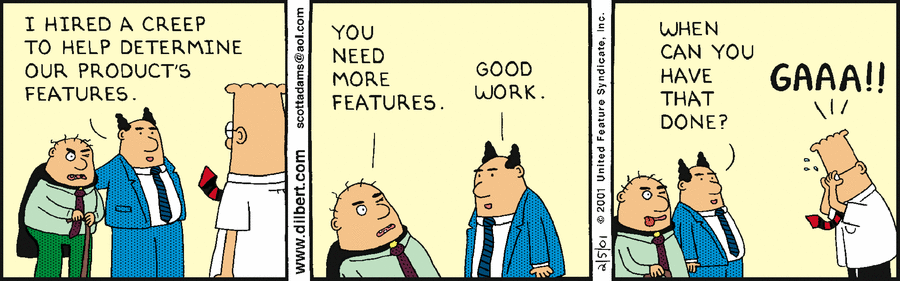
Source : dilbert.com © Scott Adams

The guest, feeling hungry, his mouth watery, but feeling bad about what he was about to say to the waiter just a few seconds ago nods. So the waiter goes on and describe how the latest release of TheHive will serve his hunger for efficient though free security incident response platforms even better.

Fixed Bugs

Enhancements

New Features

At this point, the guest cannot control his lust so he snatches one of the plates out the waiter’s hands, runs back to his table and start installing Cerana 0.4 to unleash its power and use it to fight cybercrime. Bon appétit !

Feeling Generous? Donate!

As you know, we are a FOSS project and donations are always welcome to make our products even better for the community.

All donations go to Creative Source, the non-profit organization we have created, and we will use them to improve TheHive, Cortex & Hippocampe but also to develop (even better) integrations with other FOSS solutions such as MISP.

So if you are feeling generous, please contact us at support@thehive-project.org.

Creative Source can also provide so-called professional, entreprise-grade support, help integrating the products, train your analysts before they drain or assist you in specific areas such as developing in-house analyzers for Cortex.

Download & Get Down to Work

If you have an existing installation of TheHive, please follow the migration guide.

If you are performing a fresh installation, read the installation guide corresponding to your needs and enjoy. Please note that you can install TheHive using an RPM or DEB package, use Docker, install it from a binary or build it from sources.

Support

Something does not work as expected? You have troubles installing or upgrading? No worries, please join our user forum, contact us on Gitter, or send us an email at support@thehive-project.org. We are here to help.

CorrectionFeb 6, 2018
An earlier version of this post contained an incomplete sentence.

Cerana 0.2: X-Pack Auth, Multi-source Dashboards

TheHive Chefs are happy to announce the immediate availability of their latest recipe: Cerana 0.2 (a.k.a. TheHive 3.0.2).

While TheHive 3.0.0 brought you dynamic dashboards among other niceties, the latest (and, of course, the greatest) version of your Mom’s favourite Security Incident Response Platform fixes a bug spotted by our longtime supporter Megan Roddie (merci !). Indeed, Nabil was running low on coffee so he didn’t make the necessary changes to support the new sighted toggle introduced by Cerana for file observables.

Cerana 0.2 also adds X-Pack authentication for Elasticsearch, a feature contributed by srilumpa. Thanks! To enable this functionality, and assuming the X-Pack plugin for Elasticsearch is installed, add the following section to /etc/thehive/application.conf:

search.username = "jessica"​​​​​

​search.password = "drink-beat-repeat"

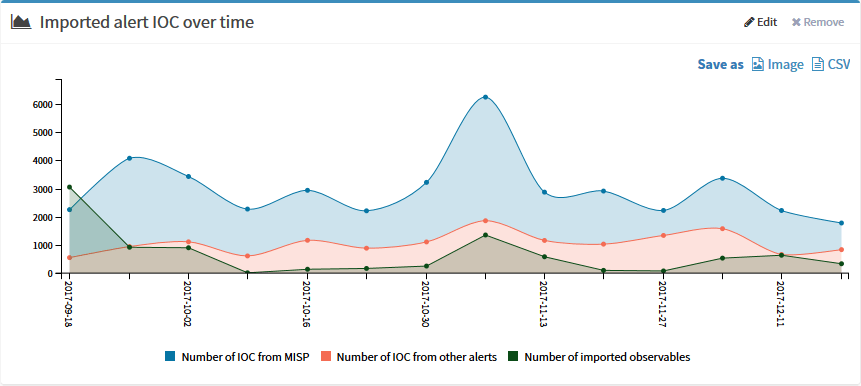
Last but not least, we decided to make dynamic dashboards even more powerful. You can now create new graphs that support multiple series from multiple entities (or sources).

multiline2
Multi-line Dashboards Example — Number of IOCs imported from MISP vs. those imported from other sources

As Christmas is approaching, go ahead and play with dynamic dashboards to impress your management as soon as 2018 rears its head or truly drive your CTI and DFIR activities and plan well ahead how you should improve automation or collaboration (or beg for additional headcount).

multiline1.png
Multi-line Dashboards Example — How to create one

Ain’t that nifty? Who said bees aren’t nice? Joyeux Noël !


Feeling Generous? Donate!

As you know, we are a FOSS project and donations are always welcome to make our products even better for the community.

All donations go to Creative Source, the non-profit organization we have created, and we will use them to improve TheHive, Cortex & Hippocampe but also to develop (even better) integrations with other FOSS solutions such as MISP.

So if you are feeling generous, contact us at support@thehive-project.org. Of course the funds may also be used to keep Nabil happy by providing a steady flow of caffeine. 😉

Creative Source can also provide so-called professional, entreprise-grade support, help integrating the products, train your analysts before they drain or assist you in specific areas such as developing in-house analyzers for Cortex.

Download & Get Down to Work

If you have an existing installation of TheHive, please follow the migration guide.

If you are performing a fresh installation, read the installation guide corresponding to your needs and enjoy. Please note that you can install TheHive using an RPM or DEB package, use Docker, install it from a binary or build it from sources.

Support

Something does not work as expected? You have troubles installing or upgrading? No worries, please join our user forum, contact us on Gitter, or send us an email at support@thehive-project.org. We are here to help.

Zerofox2TH: ZeroFOX Alert Feeder for TheHive

Earlier today, the French (but nonetheless happy) Chefs of TheHive’s code kitchen released DigitalShadows2TH, an alert feeder for TheHive that can consume incidents and intel-incidents from Digital Shadows, a Threat Intelligence provider and feed them as alerts to your favorite Security Incident Response Platform.

We are glad to do the same for ZeroFOX, a social media monitoring platform, with Zerofox2TH. If you are a ZeroFOX customer with a valid API subscription and use TheHive for managing your security incidents and investigating them, you can now feed alerts generated by ZeroFOX to TheHive. Ain’t that joli?

Zerofox2TH is released under an AGPLv3 license (read: free and open source). To use it, you’ll need Python 3, the requests and pillow libraries as well as TheHive4py. You also need TheHive 2.13 or better, with an account on your SIRP that can create alerts.

Please read the README file to learn how to install, configure and run this alert feeder.

Need Help?

Something does not work as expected? No worries, we got you covered. Please join our user forum, contact us on Gitter, or send us an email at support@thehive-project.org. We are here to help.

DigitalShadows2TH: Digital Shadows Alert Feeder for TheHive

Thanks to its REST API and alerting framework, TheHive can receive alerts from multiple sources: email notifications, SIEMs, IDS/IPS and, of course, one or several MISP instances.

While the integration with MISP is native and very easy to configure, teams need to develop their own code to feed alerts from other sources to TheHive, leveraging whenever possible TheHive4Py, a very handy Python library to interact with the API.

If you are a TheHive user and a Digital Shadows customer, you can now fetch any incident or intel-incident raised by their Searchlight service using DigitalShadows2TH, a free, open source alert feeder for TheHive freshly cooked by your friendly and so Frenchy Chefs behind TheHive Project.

To use DigitalShadows2TH, you’ll need Python 3, the requests library and TheHive4py. You also need a Digital Shadows subscription and TheHive 2.13 or better with an account on your SIRP that can create alerts.

Please read the README file to learn how to install, configure and run this alert feeder.

Need Help?

Something does not work as expected? No worries, we got you covered. Please join our user forum, contact us on Gitter, or send us an email at support@thehive-project.org. We are here to help.


TheHive4py 1.3.0 is Here

Version 1.3.0 of the Python API client for TheHive is now available. It is compatible with the freshly released Mellifera 13. This new release includes the changes outlined below.

To update your existing package:

$ sudo pip install thehive4py --upgrade

If you are just getting started with TheHive4py, you can forgo the --upgrade at the end of the command above.

New Features

  • Add more options to sort, filter and paginate case tasks and observables
  • Add a find_alerts method to allow querying alerts
  • Add support to API Key authentication mechanism

Bug Fixes

  • Added verify parameter to calls

Breaking Changes

  • The `get_case_tasks` method has been made consistent with all the other methods and now returns a `Response` object instead of a JSON dict.

Houston? Are you There?

Shall you encounter any difficulty, please join our  user forum, contact us on Gitter, or send us an email at support@thehive-project.org. As usual, we’ll be more than happy to help!

Mellifera 13: Export to MISP, Webhooks, API Keys & ES 5

TheHive Project French Chefs are very happy to announce Mellifera 13 (TheHive 2.13.0), a brand new, all shiny, major version of TheHive.

This new edition of your favorite Security Incident Response Platform (SIRP) has been cooked with great care to bring you a number of key features.

Mellifera 13 now uses ElasticSearch 5.x. We have tested it with v 5.5 but it should work just fine with ES 5.6.

Webhooks

TheHive has now basic support for webhooks. This allows your SIRP to post all the audit trail data to one or multiple webhooks defined in the configuration file. This way, you can listen to any change taking place on the platform and act on it as you see fit: create a ticket in an IT ticketing system, send a message to a Slack channel, display selected events of the audit trail on a screen, wake up your fellow analysts from sleep when a specific type of cases or a given alert is raised & so on. So get some elbow grease and code that Slack bot promptly 😉

Import and Export from Multiple MISP Servers

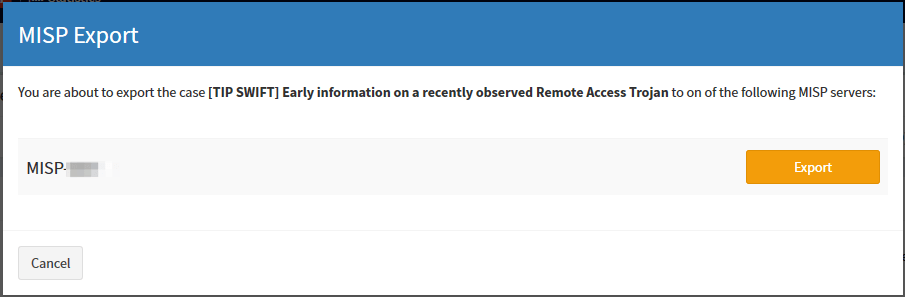
Mellifera 13 can not only import events from multiple MISP servers but also export cases as events to one or several MISP instances. The exported cases will not be published automatically though as they need to be reviewed prior to publishing.

Export_Case_1.png
Click on that Share button on the top right corner
Export_Case_2.png
Select the MISP server to which to export the case
Export_Case_3.png
See how the Share counter on the top right corner has now increased

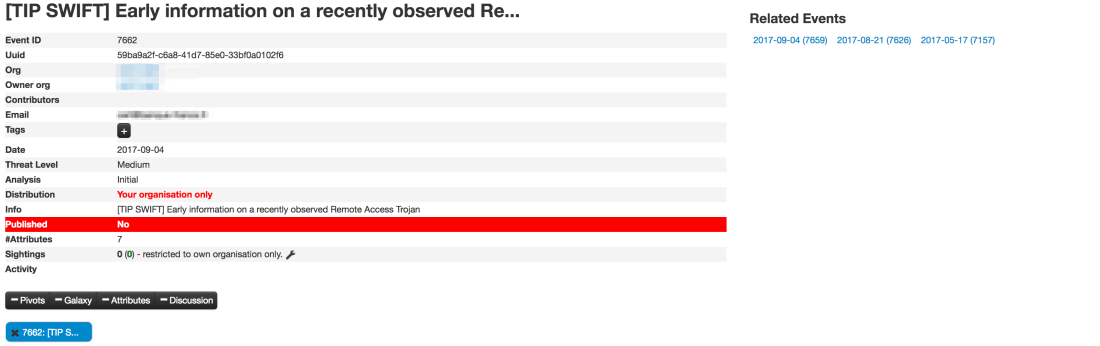
We strongly advise you to review the categories and types of attributes at least, before publishing the corresponding MISP events. Please also note that only and all the observables marked as IOCs will be used to create the MISP event. Any other observable will not be shared. This is not configurable. For further details, check the documentation.

Export_Case_4.png
Review and publish the event on MISP
Export_Case_5.png
Review the categories and types of your attributes


API Keys

Mellifera 13 introduce a new authentication mechanism: API keys. This auth method is recommended for all programs or scripts, including your SIEM, that raise alerts on TheHive. You can, as an administrator, generate and revoke as many API keys as you want. Existing software using the basic authentication method should be modified to use API keys. But do not panic, while the basic authentication mechanism has been disabled by default, you can still enable it in application.conf.

The ‘alert’ role

A new alert​ role has been added. Only users with this role can create an alert. All existing programs which create alerts must have this role. Otherwise they will no longer work.

Download & Get Down to Work

If you have an existing installation of TheHive, please follow the migration guide. This is paramount to ensure a good transition from earlier versions. You have been warned.

If you are performing a fresh installation, read the installation guide corresponding to your needs and enjoy. Please note that you can install TheHive using an RPM or DEB package, use Docker, install it from a binary or build it from sources.

Support

Something does not work as expected? You have troubles installing or upgrading? No worries, please join our  user forum, contact us on Gitter, or send us an email at support@thehive-project.org. We are here to help.

Mellifera 12.1 Released

About a month ago, we published Mellifera 12 which brought numerous features such as mini-reports on the observable page, custom fields, alert similarity or template selection during alert imports.

Great, palatable recipes, even if they are cooked by fine French chefs, need to be refined over time and may not be as savoury as intended when they are served in their early days. Quality takes time, although smokeware vendors would have you think otherwise.

Mellifera 12.1 (TheHive 2.12.1) has been released to fix a number of outstanding bugs:

  • #249: renaming of users does not work
  • #254: TheHive does not send the file’s name when communicating with Cortex
  • #255: merging an alert into an existing case does not merge the alert description into the case’s description
  • #257: while TheHive does not let you add multiple attachments to a single task log, the UI makes you believe otherwise
  • #259: fix an API inconsistency. GET /api/case/task/:id/log has been fixed.
    And a new API call POST /api/case/task/:taskId/log/_search  has been added, which accepts a “query” in the request body to filter logs of the task.
  • #268: cannot create an alert if the IOC field is set for a single alert’s attribute.
  • #269: closing a case with an open task does not dismiss it from ‘My Tasks’.

This new minor release adds the following enhancements:

  • #267: fix warnings in the DEB package.
  • #272: in alert preview, similar cases are shown regardless of their status. Merged or deleted ones should not appear in that list.

How About the Test VM?

The test VM has not been updated yet. It still contains Mellifera 12 (TheHive 2.12.0). We will update it in September, probably when Mellifera 13 is released. That version will bring the ability to export cases as MISP events.

Download & Get Down to Work

If you have an existing installation of TheHive, please follow the migration guide.

If you are performing a fresh installation, read the installation guide corresponding to your needs and enjoy. Please note that you can install TheHive using an RPM or DEB package, use Docker, install it from a binary or build it from sources.

Support

Something does not work as expected? You have troubles installing or upgrading? No worries, please join our  user forum, contact us on Gitter, or send us an email at support@thehive-project.org. We are here to help.

TheHive4py 1.2.2 is Here

It’s a sunny week in Paris, France (not Texas) barring the tropical rain that washed out the city earlier this morning. And when there’s sun in France, there’s happiness and… coding of course (what else?). The French Chefs of TheHive Project seem to be in a good mood (n’est-ce pas Jérôme ?), thanks to the vitamin D extra charge they got for free from the big star up above.

After updating CortexUtils and the analyzers, and releasing Mellifera 12, a new, major version of TheHive, why stop there when you can update TheHive4py as well?

Version 1.2.2 of the Python API client for TheHive is now available. It mainly fixes issues related to missing Python dependencies and adds support for creating alerts containing files for Python 3.

To update your existing package:

$ sudo pip install thehive4py --upgrade

If you are just getting started with TheHive4py, you can forgo the --upgrade at the end of the command above.

Houston? Are you There?

Shall you encounter any difficulty, please join our  user forum, contact us on Gitter, or send us an email at support@thehive-project.org. As usual, we’ll be more than happy to help!