A few days ago, we have been made aware of a bug in the way we pulled new or updated MISP events to inject them within Mellifera’s alerting panel. As a result, some events did not show up as intended. So you might have missed some of the action shared by peers and partners through MISP.
As true Frenchmen who care a lot about cuisine, TheHive Project’s Chefs went back to their code kitchen and figured out a more palatable recipe to make sure you won’t be left under the impression that you were seeing all new or updated MISP events while in fact you didn’t (we don’t want you to go too easy & lazy n’est-ce pas ?). Mellifera 11.3 (TheHive 2.11.3), a hotfix version has been released to that end and should fix the issue. Please note that you must use MISP 2.4.73 or better.
In addition, this new version of your favorite (or soon to be favorite) Security Incident Response Platform can be installed from a deb package on Ubuntu 16.04 without having to fiddle with OpenJDK. We have repackaged the software to avoid grabbing OpenJDK 9 (which TheHive does not support) and force the installation of version 8.
Finally, if an admin creates an empty case template, users can add tasks to it while previously this wasn’t possible.
Download & Get Down to Work
If you have an existing installation of TheHive, please follow the new migration guide.
If you are performing a fresh installation, read the installation guide corresponding to your needs and enjoy. Please note that you can install TheHive using an RPM or DEB package, deploy it using an Ansible script, use Docker, install it from a binary or build it from sources.
Support
Something does not work as expected? You have troubles installing or upgrading? No worries, please join our user forum, contact us on Gitter, or send us an email at support@thehive-project.org. We are here to help.
The Chefs behind TheHive Project’s delicious code are happy to announce the availability of Mellifera 2 (TheHive v2.11.2), the scalable, free and open source Security Incident Response Platform. This minor version fixes two irking issues related to MISP and adds a few enhancements detailed below.
Mellifera – The New Alerting Panel
Fixed Issues
#220: alerts related to MISP events are not properly updated.
#221: in some edge cases, alerts related to MISP events are created with no attribute.
Enhancements
#188: display the case severity in the My tasks and the Waiting tasks pages to let analysts prioritize their work.
#218: show the description of an alert in the alerting panel.
#224: visually distinguish between analyzed and non-analyzed observables.
Download & Get Down to Work
If you have an existing TheHive installation, please follow the new migration guide.
If you are performing a fresh installation, read the installation guide corresponding to your needs and enjoy. Please note that you can install TheHive using an RPM or DEB package, deploy it using an Ansible script, use Docker, install it from a binary or build it from sources.
Support
Something does not work as expected? You have troubles installing or upgrading? No worries, please join our user forum, contact us on Gitter, or send us an email at support@thehive-project.org. We are here to help.
Correction: May 26, 2017
A copy/paste error from a previous blog post was fixed.
We are glad to announce a new version of your favorite observable analysis engine which corrects bugs introduced by version 1.1.1 and adds a few enhancements. As a reminder, TheHive, our Security Incident Response Platform, can interact with one or several Cortex instances. Moreover, starting from version 1.1.1, Cortex has a two-way integration with MISP.
We highly advise you to upgrade your Cortex in to instance to 1.1.2.
Cortex 1.1.2 – Job Report Example with CERT-SG’s Abuse Finder
Fixed Issues
#27: fixed the daunting error 500 that many users of TheHive encountered when a job is submitted to Cortex.
#29: the MISP expansion modules are now disabled by default to avoid another error 500.
#31: the web interface was displaying SNAPSHOT (oops!) for the Cortex version. It now displays the correct version.
Enhancements
#28: when you enable the MISP expansion modules, Cortex will not be slowed down and starts without delay.
To update your current Cortex installation, follow the instructions of the installation guide. Before doing so, you may want to save the job reports that were not executed via TheHive. Cortex 1 has no persistence and restarting the service will wipe out any existing reports.
Please note that you can install Cortex using an RPM or DEB package, deploy it using an Ansible script, use Docker, install it from a binary or build it from sources.
Support
Something does not work as expected? You have troubles installing or upgrading? No worries, please join our user forum, contact us on Gitter, or send us an email at support@thehive-project.org. We are here to help.
We are pleased to announce the availability of 2 new Cortex analyzers and an update to 2 existing ones:
New: VMRay and FireHOL
Updated: Joe Sandbox and Fortiguard URL Category
We would like to thank Nils Kuhnert from CERT-BUND, CERT-BDF and Eric Capuano for their precious contributions.
To install the new analyzers, grab the Cortex-Analyzers repository and unpack its content (or git pull the master branch) in your existing /path/to/cortex-analyzers. Then follow the Cortex analyzers guide.
To import the new report templates in your instance of TheHive:
click on Import templates button and select the downloaded package
VMRay
The VMRay analyzer has been submitted by Nils Kunhert from CERT-BUND. It lets you run a file in a local or remote (cloud) VMRay sandbox. The analyzer also lets you check existing analysis reports.
The analyzer accepts files and hashes as input. VMRay is a commercial service and you need an API key to run the analyzer. To make it work, install the requestsPython library. It should already have been installed since it is used by other analyzers as well.
To use the analyzer, add the following section to the Cortex configuration file (application.conf):
VMRay {
 url = ""
 key = ""
 certpath = ""
 }
When called from TheHive, the following output is produced:
TheHive: VMRay Analyzer – Short and Long Report Samples
Important note: an analysis on VMRay, like on any other sandbox, can take a long time. That is why the analyzer tries to fetch the report until it is ready.
FireHOL
The FireHOL analyzer has been submitted by Nils Kuhnert from CERT-BUND. It lets you use the lists maintained by FireHOL project and check if an IP resides in one of them. FireHOL is an open source project. The analyzer reports the block lists in which an IP resides with the latest updated ones displayed first. To make it work, you’ll need to download the lists in a directory first (and it would be wise to do it on a regular fashion using a cron entry for example):
The ignoreolderthandays parameter lets you tell the analyzer to ignore matches found in lists that have not been refreshed in <int> days where <int> is an integer.
When called from TheHive, the following output is produced:
TheHive: FireHOL Analyzer – Short and Long Report Samples
Joe Sandbox
Thanks to CERT-BDF, the Joe Sandbox analyzer has been updated to support Joe Sandbox Cloud service beside the on-premises version (Ultimate). Like with other Joe Sandbox services, you need to add the following section to the Cortex configuration file (application.conf):
JoeSandbox {
 url = ""
 apikey = ""
 }
Fortiguard URL Category
Thanks to Eric Capuano, the Fortiguard URL Category analyzer is working again. Eric has modified it to handle the changes made by Fortiguard to their free online API.
Correction: May 23, 2017
An earlier version of this post used ignoredays instead of ignoreolderthandays for the FireHOL Blocklists analyzer. This parameter has also been described.
TheHive Project’s Chefs are thrilled to announce the immediate availability of Cortex 1.1.1.
Starting from this version, Cortex can be integrated in two ways with MISP as described below. We would like to thank Alexandre Dulaunoy for inviting us to the Open Source Security Software Hackathon which took place in Luxembourg during two days (May 2-3, 2017). Andras Iklody worked with us during the event in order to make this two way integration a reality. Merci !
Now in addition to TheHive, our Security Incident Response Platform which can connect to multiple MISP instances to receive new or updated events, let analysts preview then import them if they deem them worth investigating, Cortex can query MISP modules or be invoked from MISP to let an instance’s users leverage the power of its 21 analyzers. And in the near future, TheHive will also gain the ability to export observables to MISP.
Obviously, there are some overlap between Cortex native analyzers and MISP expansion modules. For example, you could query the CIRCL’s Passive DNS service using a native Cortex analyzer or a MISP expansion module. When there’s overlap, we highly recommend you rely on the Cortex analyzer. That way, we will be able to better help you in case you encounter issues or need help to make it work.
In order to invoke MISP expansion modules within Cortex, they need to be installed on the same host that Cortex runs on. Please read the MISP Integration guide.
Invoke Cortex Analyzers within MISP
Starting from version 2.4.73, a MISP instance can invoke Cortex analyzers. To do so, connect to the MISP Web UI with sufficient privileges, then go to Administration > Server settings > Plugin settings. Edit the Cortex section as follows:
set Plugin.Cortex_services_enable to true
set Plugin.Cortex_services_url to http://ip_address(replace ip_address with the IP address of Cortex)
set Plugin.Plugin.Cortex_services_port to port (replace port with the port on which Cortex is listening: 9000 by default)
Once this operation is completed, the Cortex analyzer list should appear in MISP’s Cortex section. The analyzers must be enabled to make them available to the instance users.
Documentation
Please note that we have moved all the documentation of Cortex to a new repository.
Download & Get Down to Work
To update your current Cortex installation, follow the instructions of the installation guide. Before doing so, you may want to save the job reports that were not executed via TheHive. Cortex 1 has no persistence and restarting the service will wipe out any existing reports.
Please note that you can install Cortex using an RPM or DEB package, deploy it using an Ansible script, use Docker, install it from a binary or build it from sources.
Support
Something does not work as expected? You have troubles installing or upgrading? No worries, please join our user forum, contact us on Gitter, or send us an email at support@thehive-project.org. We are here to help.
Correction: May 18, 2017
An earlier version of this post contained a few typos which were corrected.
Last week, we have released Mellifera (TheHive 2.11.0), a major version of your favorite (or soon to be favorite) Security Incident Response Platform. Sadly, some annoying bugs have slipped past our QA (n’est-ce pas Thomas ?).
We are happy to announce the availability of Mellifera 1 (TheHive 2.11.1) which corrects those bugs and adds a few enhancements detailed below.
Issues Corrected
#204: update case templates created with previous versions of TheHive.
#205: remove duplicate tags associated to an observable present in two cases upon a case merging operation.
#206: apply case templates when an alert is converted into a case.
Enhancements
We also took the opportunity of this hotfix to add the following enhancements:
#180: merge duplicate tasks during a case merge operation. Starting from this release, if you have waiting tasks (i.e. not assigned) with the same name in cases you’d like to merge, the new merged case will have only one task instead of two.
#211: show the number of available analyzer reports for each observable. If an observable has not been analyzed yet, say so.
Documentation
Please note that we have moved all the documentation of TheHive in a new repository. If you are not using TheHive4py 1.2.0 (or future versions), you can send alerts to Mellifera using the API as documented.
Download & Get Down to Work
If you have an existing TheHive installation, please follow the new migration guide.
If you are performing a fresh installation, read the installation guide corresponding to your needs and enjoy. Please note that you can install TheHive using an RPM or DEB package, deploy it using an Ansible script, use Docker, install it from a binary or build it from sources.
Support
Something does not work as expected? You have troubles installing or upgrading? No worries, please join our user forum, contact us on Gitter, or send us an email at support@thehive-project.org. We are here to help.
Thanks to the invaluable contributions of our growing and thriving user community, Cortex has now 6 more analyzers, bringing the total to 21. The new analyzers, released under our usual AGPL v3 license, are:
CIRCLPassiveDNS
CIRCLPassiveSSL
GoogleSafebrowsing
Nessus
Virusshare
Yara
All but one have been submitted by Nils Kuhnert of CERT-Bund. The Nessus analyzer has been contributed by our long-time friend Guillaume Rousse.
Cortexutils 1.1.0
While reviewing the submissions, we realized that a new version of the Cortexutils library was needed in order to support both Python 2 and 3. Hence we released version 1.1.0. You can grab it through PIP. To update your existing installation, please run the following command:
sudo pip install cortexutils --upgrade
Note that Cortexutils 1.1.0 is required to benefit from these analyzers and future ones. If you are performing a fresh Cortex installation, follow the guide.
Installation
To install the new analyzers, grab the Cortex-Analyzers repository and unpack its content (or git pull the master branch) in your existing /path/to/cortex-analyzers. Then follow the Cortex analyzers guide.
New Short and Long Report Templates for TheHive
Short and long reports for TheHive were also created to parse and display the results produced by the new analyzers. We also bundled in the new package a URL analysis template for Joe Sandbox which was missing and improved some of the older short templates in order to follow a taxonomy.
To import the new report templates in your instance of TheHive:
click on Import templates button and select the downloaded package
CIRCLPassiveDNS
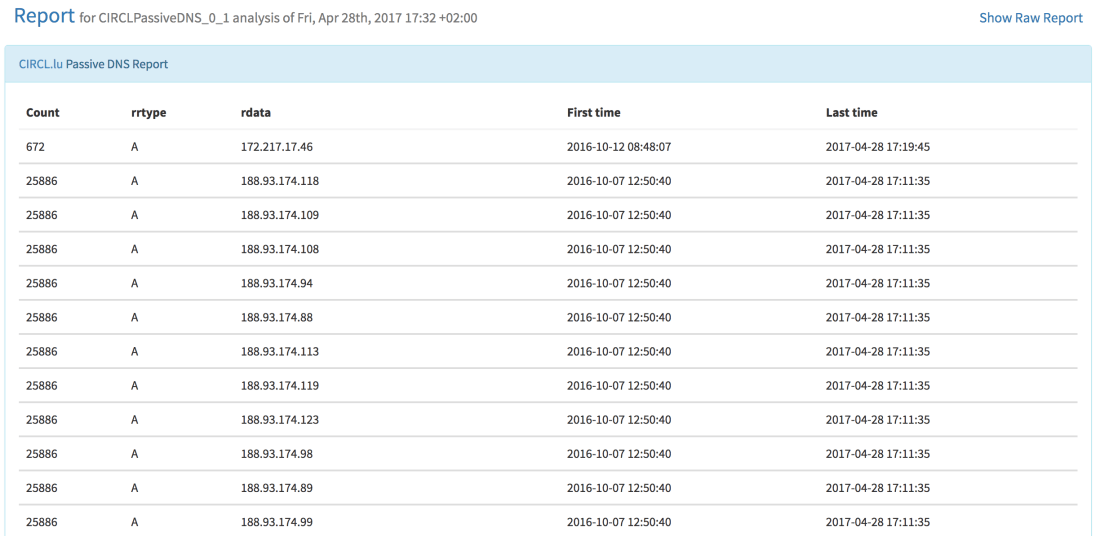
The CIRCLPassiveDNS analyzer lets you check the CIRCL’s Passive DNS service for a given domain. It takes domains and URLs as input. Access to the service is allowed to trusted partners in Luxembourg and abroad. If you think you qualify, please contact the good CIRCL folks. To make it work, you’ll need the pypdns Python library.
In order to take advantage of CIRCLPassiveDNS, you need to add the following section to the Cortex configuration file (application.conf):
CIRCLPassiveDNS {
     user=""
     password=""
}
When called from TheHive, the following output is produced:
TheHive: CIRCLPassiveDNS Analyzer – Short and Long Report Samples
CIRCLPassiveSSL
The CIRCLPassiveSSL analyzer lets you check CIRCL’s Passive SSL service for a given IP address or certificate hash. Access to the service is restricted to partners and security researchers worldwide. If you think you qualify, please contact the good CIRCL folks. This analyzer needs the pypssl Python library to work properly.
To use it, please add the following section to the Cortex configuration file (application.conf):
CIRCLPassiveSSL {
     user=""
     password=""
}
When called from TheHive, the following output is produced:
TheHive: CIRCLPassiveSSL Analyzer – Short and Long Report Samples
To leverage GoogleSafebrowsing, add the following section to Cortex’ configuration file:
GoogleSafebrowsing{
key=""}
When you run the analyzer fromTheHive, you should see output similar to the samples below:
TheHive: GoogleSafebrowsing Analyzer — Short and Long Report Samples
Nessus
The Nessus analyzer lets you leverage Tenable’s Nessus Vulnerability Scanner to scan an IP address or a FQDN. Of course, you must not scan assets that do not belong to you, unless you really know what you are doing. That’s why safeguards were built in the analyzer’s configuration:
The nessrest Python library is needed to make REST API calls to Nessus. Analysts would use the analyzer to assess the vulnerabilities of potentially compromised machines or new, unknown assets that have been plugged into one of their constituency’s networks. Of course, penetration testers conducting large-scale reconnaissance can also benefit from this analyzer.
TheHive: Nessus Analyzer — Short and Long Report Samples
Virusshare
The Virusshare analyzer lets you verify whether a file or hash is available on VirusShare.com. It requires the progressbar2 Python library besides requests (which should be already installed if you have an existing Cortex installation). As stated by Nils:
This analyzer enables searching for md5 hashes in Virusshare.com hash list. It does not download samples for you nor links directly to the sample – the author of virusshare prohibits the automatic download/site scraping and I respect that. It provides a button to start the virusshare search, though, but you need an account for that. You can request an invitation to the platform through contacting the admin via mail, directly.
To use it, add the following section to your Cortex application.conf:
Virusshare {
   path="/path/to/download/directory"
}
Quoting Nils again, in order to download the newest available hash lists from virusshare.com, you can run the download_hashes.py script that comes with the analyzer.
Upon running the analyzer from TheHive, the report will contain a link to the corresponding Virusshare page if a match is found as shown below.
TheHive: Virusshare Analyzer — Long Report Sample
Yara
Last but not least, the Yara analyzer can check files against YARA rules using yara-python. To use it, add the following to your Cortex configuration file:
You can specify path to directories and files. If you supply a directory, the analyzer expects to find an index.yar or index.yas file. The index file can include other rule files. An example can be found in the Yara-rules repository.
TheHive: Yara Analyzer — Short and Long Report Samples
Running Into Trouble?
Shall you encounter any difficulty, please join our user forum, contact us on Gitter, or send us an email at support@thehive-project.org. We will be more than happy to help!
The French chefs at TheHive Project’s code kitchen have released version 1.1.1 of TheHive4py. The API client for our Security Incident Response Platform has been updated to comply with Buckfast 2 (TheHive 2.10.2).
In April 20, 2017, Buckfast 2 was released to plug a number of vulnerabilities identified by our friends at Randorisec. Among other changes, Buckfast 2 implements a protection against CSRF attacks. As a result, API calls made by TheHive4py have been modified in order to support that protection. In essence, TheHive4py 1.1.1 submits authentication credentials for each call instead of a per-session authentication.
To update your existing package, please use PIP. Shall you encounter any difficulties, do not hesitate to ask on our user forum or contact us at support@thehive-project.org. You can also join our Gitter channel and have a chat with us.
A new, major version of TheHive4py (1.2.0) will be released in the upcoming days to be compatible with Mellifera, our next major release of TheHive, which will feature a brand new alerting framework.
As we have mentioned in the previous post, Randorisec reported to us that Cortex 1.0.0 is affected by the same Reflected XSS vulnerability as Buckfast 0 and 1 (respectively TheHive 2.10.0 and 2.10.1). This is due to the fact that both use the same angular-ui-notification service. The issue also affects Cortex 1.0.1.
We are happy to announce the immediate availability of Cortex 1.0.2 which fixes the vulnerability referenced as AP2 in Randorisec’s report. Moreover, this new release fixes 3 bugs:
Issue #11: jobs list API doesn’t take into account the limit parameter.
Issue #13: global section in configuration file is ignored.
Issue #16: redirect to jobs list when a job is not found.
To update your current Cortex installation, follow the instructions of the Installation Guide. Before doing so, you may want to save the job reports that were not executed via TheHive. Cortex 1 has no persistence and restarting the service will wipe out any existing reports.
We would like to thank again Davy Douhine, Randorisec’s CEO, ArtsSEC, Frédéric Cikala, Nicolas Mattiocco, Florent Montel and Mohamed Mrabah for devoting time and efforts for making our products more secure.
Correction: April 21, 2017
An earlier version of this article mentioned Maximilano Soler among the professionals who joined Randorisec to perform a pentest on our products. At his request, we have removed his name and replaced it by ArtsSEC.
Our good friends at Randorisec, joined by other pentesting professionals (see below), performed a fully fledged pentest of Buckfast 0 (TheHive 2.10.0) and Cortex 1.0.0 during 4 man-days spanning several weeks, starting from February 9, 2017 and ending on March 21, 2017.
They have identified several security issues detailed in their report which they privately shared with us prior to publication. As a result, we are happy to announce the immediate availability of Buckfast 2 (TheHive 2.10.2) which fixes the following vulnerabilities:
Stored XSS (ref. AP1 in the report) and Reflected XSS (AP2): malicious JavaScript code can be injected. It will be then executed on the victim’s browser. See issue #159 for more details.
Vertical privilege escalation (AP3): an authenticated simple user can have access to some admin menus. See issue #160 and issue #161.
CSRF (AP8): As no anti-CSRF tokens are used, TheHive is vulnerable to CSRF attacks. See issue #158.
Cortex 1.0.0 and 1.0.1 are also affected by AP2. A new Cortex version will be released very shortly to fix it.
Additionally, Buckfast 2 fixes the following bugs:
Issue #152: pagination does not work with 100 results per page.
Issue #169: error when importing some MISP events due to their unexpected JSON format. This has also been fixed in MISP v2.4.71.
We have also added the following features:
Issue #157: add persistence for task viewing options.
Issue #174: run all analyzers on multiple observables from the observables view.
Randorisec identified 4 more security issues rated low which aren’t fixed by this release:
Concurrent sessions allowed (AP4): we do not deem this a security vulnerability and hence we won’t fix it unless our user community request a patch.
No account lockout policy (AP5): if you use the local authentication system, it can be brute-forced. We are going to fix this in Mellifera 1 (TheHive 2.11.1) due at the end of May 2017. In the meantime, you can use LDAP, Active Directory or both and configure a password policy on those systems.
No password policy (AP6): as no password policy is enforced when using the local database for storing user credentials, users can set weak passwords (e.g.: containing only one character). We are going to fix this in Mellifera 1 (TheHive 2.11.1) due at the end of May 2017. In the meantime, you can use LDAP, Active Directory or both and configure a password policy on those systems.
Information leakage (AP7): information such as installed software versions (TheHive, ElasticSearch) is publicly available. TheHive should be not be publicly accessible and access should be filtered by a firewall or a similar device for authorized IP addresses only.
If you are running Buckfast 1 or a previous version, please follow the updating instructions to update to Buckfast 2. It is actually an extremely simple operation. If you are doing a fresh installation, we have you covered as well.
Please note that Randorisec and the pentesting professionals that joined it for this pentest have no contract with TheHive Project and did not receive any compensation of any sort to perform this work. They worked on their free time as a way to contribute to the security of Free, Open Source Software projects. We’d like to wholeheartedly thank Davy Douhine, Randorisec’s CEO, ArtsSEC, Frédéric Cikala, Nicolas Mattiocco, Florent Montel and Mohamed Mrabah for their invaluable contribution.
Correction: April 21, 2017
An earlier version of this article mentioned Maximilano Soler among the professionals who joined Randorisec to perform a pentest on our products. At his request, we have removed his name and replaced it by ArtsSEC.






 TheHive Project