On June 6, 2018, we released Cortex-Analyzers 1.10, which contained 11 new analyzers, bringing the total to 83 programs. You read that correctly: 83 ways to assess and gain insight on observables collected during the course of an investigation or while performing threat intelligence thanks to Cortex, our free & open source analysis engine. One day after, we published version 1.10.1 which fixed the name of the Anomali STAXX reports for TheHive. Since then we uncovered a few additional issues which version 1.10.2 corrects:
TheHive Project Chefs are pleased to announce the immediate availability of Cortex-Analyzers 1.10.1. To install this new release and benefit from 11 new analyzers and some fixes:
$ cd /path/to/Cortex-Analyzers
$ sudo git pull
$ for I in analyzers/*/requirements.txt; do sudo -H pip2 install -r $I; done && \
for I in analyzers/*/requirements.txt; do sudo -H pip3 install -r $I || true; done
After running these commands, read the Analyzer Requirements Guide, log into the Cortex 2 Web UI as an orgAdmin, click on the Refresh Analyzers button in the Cortex Web UI, configure the new analyzers and enjoy!
Cortex: click on Refresh Analyzers after updating to the latest Cortex-analyzers version
This analyzer comes in only one flavor. You need a valid FireEye iSIGHT Threat Intelligence subscription to use the analyzer. Retrieve the API key associated with your account and provide it as a value to the key parameter. Obtain the password associated with the API key and provide it as a value to the pwd parameter.
TheHive: FireEye iSIGHT — Long Report Sample (courtesy of Andrea Garavaglia)
GreyNoise
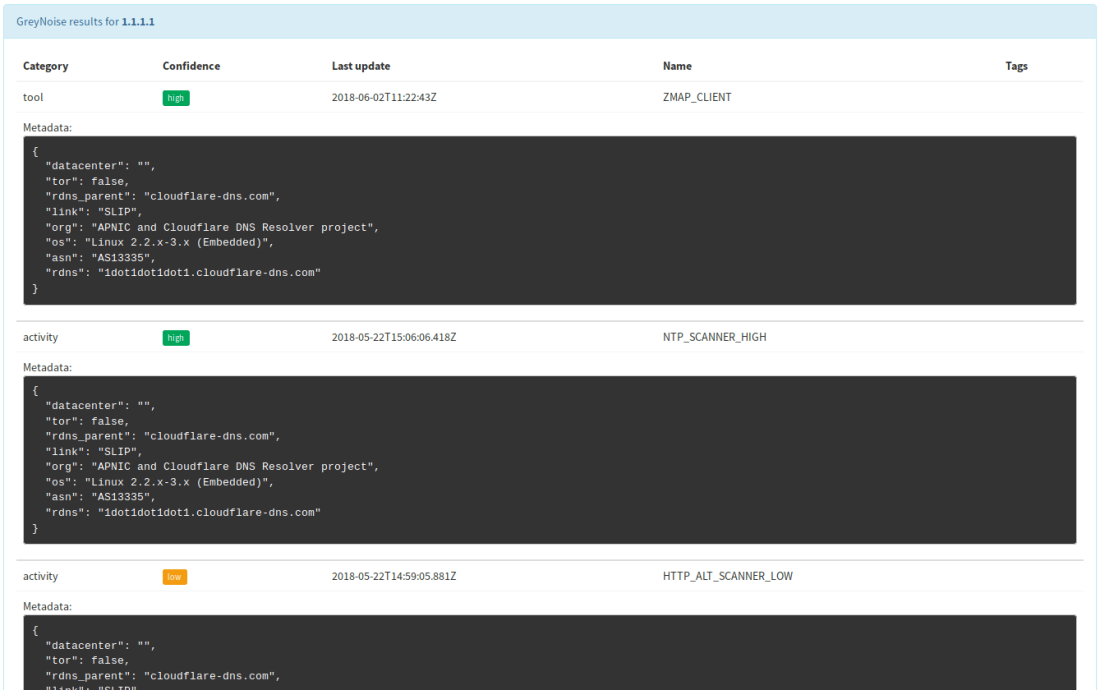
Determine whether an IP has known scanning activity using GreyNoise.
This analyzer comes in only one flavor. It can be used out of the box without configuration. However, if you make many requests, you need to obtain an API key. Please contact GreyNoise to ask for one. Once you get the API key, provide it as the value of the key parameter.
TheHive: GreyNoise — Short and Long Report Samples
IBM X-Force
Query domains, IPs, hashes and URLs against IBM X-Force Threat Intelligence sharing platform.
This analyzer comes in only one flavor. Access to IBM X-Force Threat Exchange requires an IBM ID. Once you have access to the service, supply the URL of the service as value for the url parameter, the API key associated with your account as value for the key parameter and the associated password as the value of the pwd parameter.
TheHive: IBM X-Force — Long Report Sample (courtesy of Andrea Garavaglia)
Malwares
Query Malwares.com and get reports on files, hashes, domain names and IP addresses.
The analyzer comes in two flavors:
– Malwares_pDNS_GetReport: get the latest Malwares report for a file,
hash, domain or an IP address.
– Malwares_pDNS_Scan: scan a file or URL.
You need to sign up for a Malwares.com account. An API key to use the service’s API should be associated with your account. Supply it as the value of the key parameter.
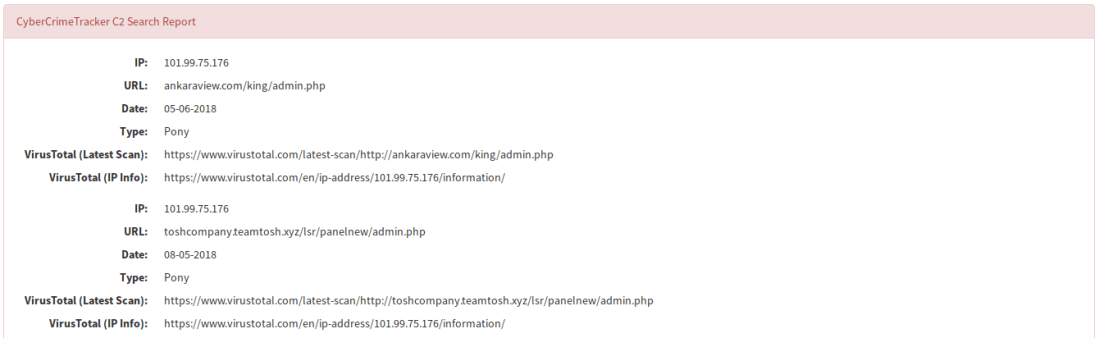
TheHive: Malwares_GetReport — Short and Long Report Samples
MnemonicPDNS
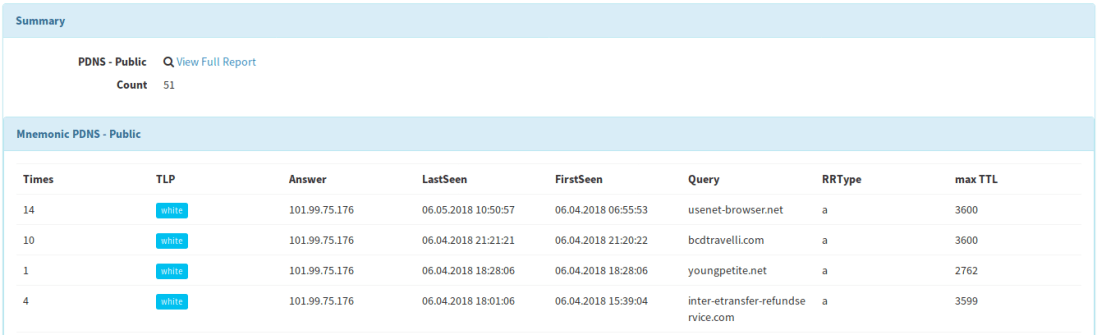
Query IP addresses and domain names against Mnemonic Passive DNS service.
This analyzer comes in two flavors:
Mnemonic_pDNS_Public: query Mnemonic’s public service.
When using the public service, the analyzer can be used out of the box with no further configuration. When using the closed service, you need to contact Mnemonic to get an API key which you’ll need to supply as the value of the key parameter.
TheHive: Mnemonic PDNS — Short and Long Report Samples
StaxxSearch
Fetch observable details from an Anomali STAXX instance.
This analyzer comes in only one flavor. You need to install an Anomali STAXX instance or to have access to one to use the analyzer. Supply the following parameters to the analyzer in order to use it:
auth_url: URL of the authentication endpoint.
query_url: URL of the intelligence endpoint.
username: the STAXX user name.
password: the STAXX password.
cert_check: boolean indicating whether the certificate of the endpoint must be checked or not.
cert_path: path to the CA on the system to validate the endpoint’s certificate if cert_check is true.
TheHive: StaxxSearch — Short and Long Report Samples (courtesy of Robert Nixon)
StopForumSpam
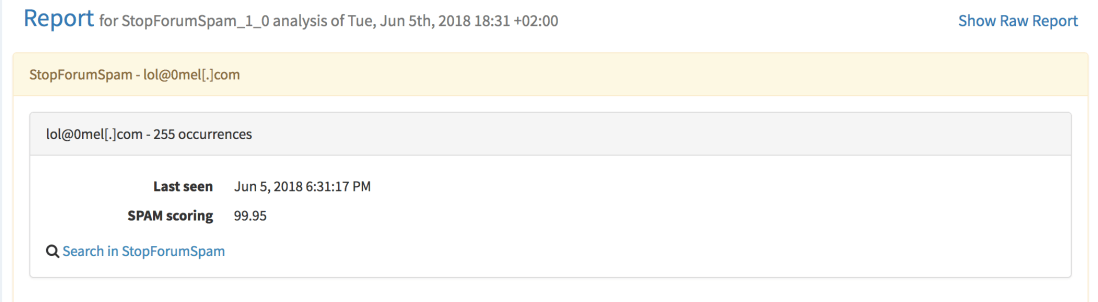
Query StopForumSpam to check if an IP or email address is a known spammer.
You need to define the thresholds above which the analyzed observable should be marked as suspicious or malicious.
TheHive: StopForumSpam — Short and Long Report Samples
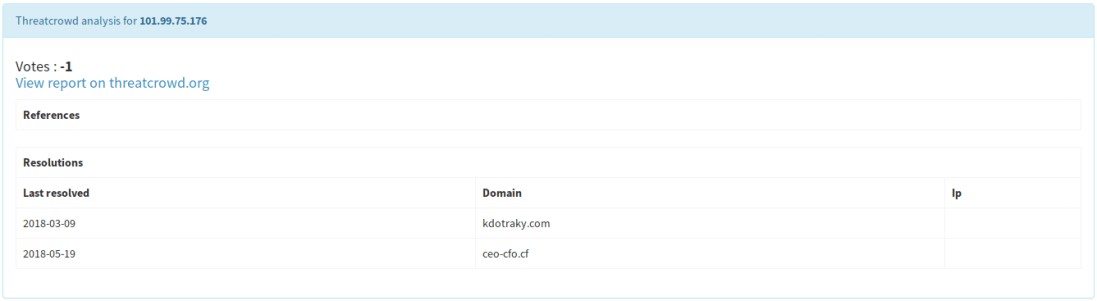
ThreatCrowd
Look up domains, mail and IP addresses on [ThreatCrowd(https://www.threatcrowd.org/), a service powered by AlienVault.
This analyzer comes in only one flavor. No configuration is needed. It can be used out of the box.
TheHive: Threatcrowd — Short and Long Report Samples
Unshortenlink
Follow redirects of shortened URLs to reveal the real ones.
This analyzer comes in only one flavor.
No configuration is required. It can be used out of the box.
Warning: using this analyzer without extra caution might lead to unexpected consequences. For example, if the URL you are seeking to unshorten is an attacker-controlled one, you may end up leaving undesired traces in the threat actor’s infrastructure logs. The TLP values Cortex allows you to configure to prevent the use of an analyzer if the TLP associated with an observable is above the authorized level won’t be of much help since Unshortenlink have to access the shortened URL. Please do not activate this analyzer unless you (and your fellow analysts) know what they are doing.
TheHive: Unshortenlink — Short and Long Report Samples
Additional Enhancements
YARA analyzer had a bug which was fixed in version 1.9.7 of the Cortex-analyzers repository. If you install 1.10, you’ll obviously benefit from the fix 😉
A permission problem that prevented using the Cuckoo Sandbox analyzer was corrected (thanks Felix Bauer!)
Correction: June 6, 2018 An earlier version of this post mentioned that GreyNoise needs an API key. That’s only necessary if a certain level of requests are made. Also, to configure analyzers, you need to be orgAdmin.
Rejoice DFIR fighters! Your favorite Security Incident Response Platform has just gotten better. TheHive 3.0.10 (codename Cerana 0.10) is just out of the oven. Thomas and Nabil, as the true code Chefs they are, have fixed a number of issues and added a few enhancements in this release. Read on, update and defend your constituency!
Fixes
#446: keep observable reports when performing a case merge operation
#592: fix the error message when an observable is created with invalid data
#579: rotate application.log to keep it from becoming huge
#564: when submitting a job to Cortex, send the case ID as well
#563: poll the status of connectors (MISP, Cortex) every minute and update the UX display accordingly
#548: sort related cases by the amount of shared observables
#546: display start and end times for closed tasks
Support
Something does not work as expected? You have troubles installing or upgrading? You have spotted new bugs? No worries, please join our user forum, contact us on Gitter, or send us an email at support@thehive-project.org. We are here to help.
We are proud to announce the immediate availability of Cerana 0.9 (TheHive 3.0.9) and Cortex 2.0.4. These hotfix releases address a number of issues and we encourage you to update your current installation at your earliest opportunity. For your comfort and sanity. Seriously.
We also took this opportunity to update Cortex analyzers to fix issues with CIRCL Passive SSL, Hybrid Analysis, and the Joe Sandbox URL Analysis template. Moreover, we have updated the cortexutils library to set the taxonomy level to info if it is invalid. To upgrade cortexutils to 1.2.4:
Note: the Bluecoat analyzer was removed since it does not comply with the updated Terms of Service of Symantec Web Pulse SiteReview. Symantec does no longer permit programmatic querying of the service.
Fixes in Cerana 0.9
#527: display long reports when the analyst clicks on the corresponding short reports. Meh!
#541: make the drop-down menu for case templates scroll when there is a truckload of them.
Something does not work as expected? You have troubles installing or upgrading? Spotted new bugs? No worries, please open issues on GitHub or comment on existing ones, join our user forum, contact us on Gitter, or send us an email at support@thehive-project.org. We are here to help.
Correction: April 14, 2018 An earlier version of this post did not mention that the Bluecoat analyzer was removed in the latest Cortex Analyzers repository release.
There’s a new version of your ultimate observable analysis engine in town : Cortex 2.0.3 is out!
Cortex 2.0.3 contains a few important enhancements over its predecessor and fixes a number bugs as described in the full changelog summarised below. So get it while it’s still hot out of the digital oven and let us know how tasty it is.
Source : Quickmeme.com
Implemented Enhancements
#81: reflect proxy changes in the global configuration at the analyzer level
#82: display invalid analyzers and let orgadmins delete them
#85: allow orgadmins to override the default global report cache.job period per analyzer through the Web UI
#75: a version upgrade of an analyzer makes all analyzers invisible in TheHive
#80: fix the analyzer configuration dialog to allow orgadmins to override the auto artifact extraction at the analyzer level
#83: hit Nabil on the head pretty hard until the analyzer refresh UI button works (well now it does so you can stop hitting poor Nabil’s head).
Analyzer Updates
We took the opportunity of a new release to make a few updates to the public analyzers. Cortex-Analyzers 1.9.3 contains the following changes:
Remove the Bluecoat analyzer to comply with the new ‘no scrapping’ ToS imposed by Symantec
Fix the default configuration of the Cymon Check IP analyzer
Fix the View all VT long template
Make the MISP Warning Lists Analyzer ignore case sensitivity when searching for hashes
Restrict the Abuse Finder and FileInfo analyzer dependencies to Python 2.7
You can read the full changelog if you like but if you want to enjoy the goods right away, git pull is your friend.
Support
Something does not work as expected? You have troubles installing or upgrading? Spotted new bugs? No worries, please open issues on GitHub or comment on existing ones, join our user forum, contact us on Gitter, or send us an email at support@thehive-project.org. We are here to help.
After announcing Cortex 2.0.0 and TheHive 3.0.7, the first version of your favorite SIRP that is (supposedly) compatible with the brand-new version of Cortex, last week, we thought it was time to relax and enjoy the upcoming, long Easter weekend, the sunny sky of Paris (if you can pierce the veil of the Forever Grey Cloud™ that is hanging over the city of lights), and great jazz music. Heck, I even tweeted about it … only to be proven wrong by Life (and Murphy).
We literally field tested Cortex 2 for 3 weeks, we squashed bugs here and there, until almost the very last minute before the release. And yet, our QA needs to be improved by leaps and bounds as we had to release Cortex 2.0.1 one day after unveiling 2.0.0 to correct some additional bugs. And then some members of the core team and of our growing user community took it for a spin. And all hell broke lose. Well, almost 🙂
Session collisions (when TheHive and Cortex 2 are used on the same machine), analyzer malfunctions, connectivity problems … issues that were not identified during the testing phase, even in a production environment, where everything worked as expected. And we call this ‘Computer Science’. Right, right…
So we worked hard, took out our Code Hammer (it’s like Thor’s but cyber) and blasted away all the bugs that we found out or that were reported to us (arigato gozaimasu!) and we are happy to announce the immediate availability of Cortex 2.0.2, TheHive 3.0.8, Cortexutils 1.2.3 and Cortex-Analyzers 1.9.2.
TL;DR Install or upgrade Cortex 2.0.2, update Cortexutils, git pull the Cortex-analyzers repo to get the latest version of the repository, upgrade to TheHive 3.0.8, follow the Quick Start Guide and have a drink.
If you have time (which is admittedly quite scarce nowadays), please read on the changelogs:
As stated in the previous post, we will release a new version of Cortex4py in order to make it compatible with Cortex 2, continue the work we started with our MISP Project friends to support MISP attribute enrichment through Cortex 2 (MISP currently only supports enrichment using Cortex 1), and perform a long-overdue overhaul of our documentation. We will also release a brand new version of TheHive4py.
Last but not least, we’ll take a hard look at ourselves and our QA. You expect us from us high quality and we hold ourselves to high standards. And we will deliver.
Support
Something does not work as expected? You have troubles installing or upgrading? Spotted new bugs? No worries, please open issues on GitHub or comment on existing ones, join our user forum, contact us on Gitter, or send us an email at support@thehive-project.org. We are here to help.
TheHive Project’s Master Chefs are extremely happy to share, for free their latest recipe with the Cyber Threat Intelligence, Digital Forensics and Incident Response communities: Cortex 2.
As its predecessor, Cortex 2 is published under an AGPL v3 license and it introduces many important features that we brushed upon in a Dec 2017 post.
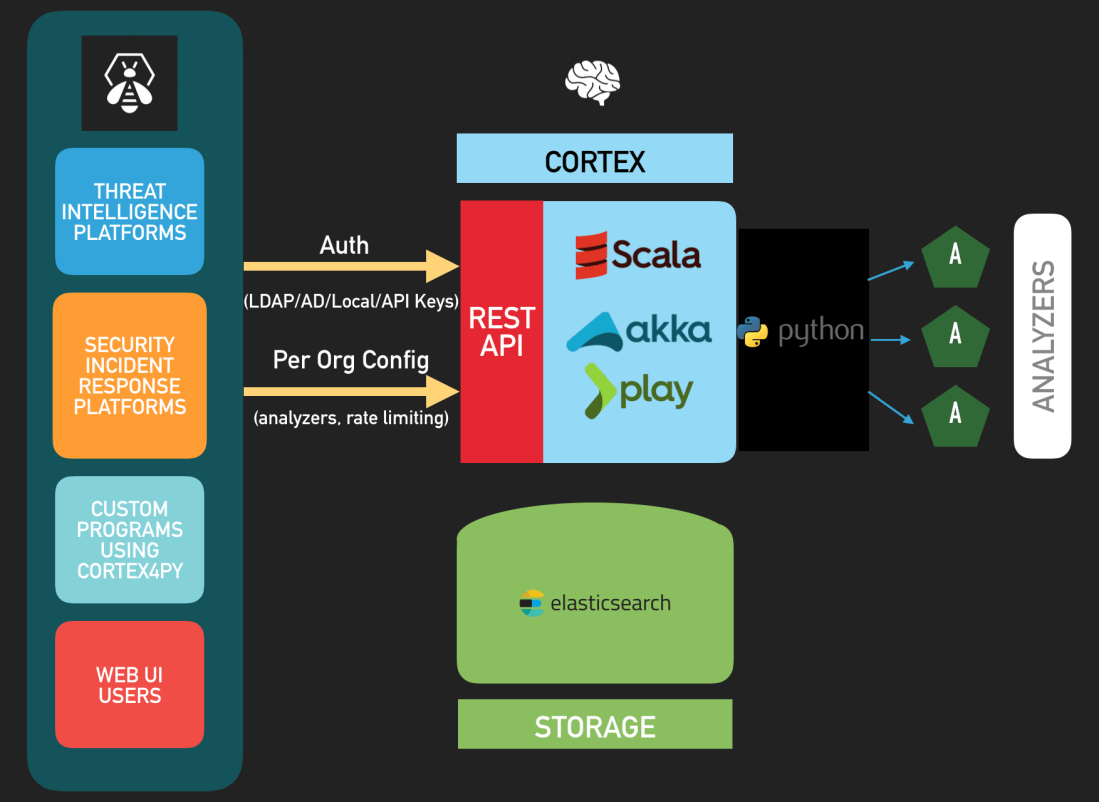
Cortex 2 — Architecture
Update: Cortex 2.0.1 was released since this post went live. It corrects a few bugs we uncovered in 2.0.0 as described in the changelog. Please install Cortex 2.0.1 instead of 2.0.0.
Authentication
Cortex 2 supports all the authentication methods that TheHive supports: LDAP, Active Directory, local accounts, API Keys, and X.509 SSO.
To connect your favorite Security Incident Response Platform with Cortex 2, you will need to update TheHive to Cerana 0.7 (TheHive 3.0.7) which was released today as well. This version fixes a regression pertaining to case templates introduced by Cerana 0.6 and is the first version to fully support Cortex 2’s API changes and authentication.
To make TheHive 3.0.7 analyze observables at scale through Cortex 2, you have to create an account on Cortex 2 with the read and analyze roles (see the next section) and generate the associated API Key. Next, feed the key in TheHive’s /etc/thehive/application.confas described in the documentationet voilà !
TheHive 3.0.7 remains compatible with Cortex 1 and you can connect it to a mixed set of Cortex 1 and/or Cortex 2 instances with no issues.
Organizations, Analyzers and Rate Limiting
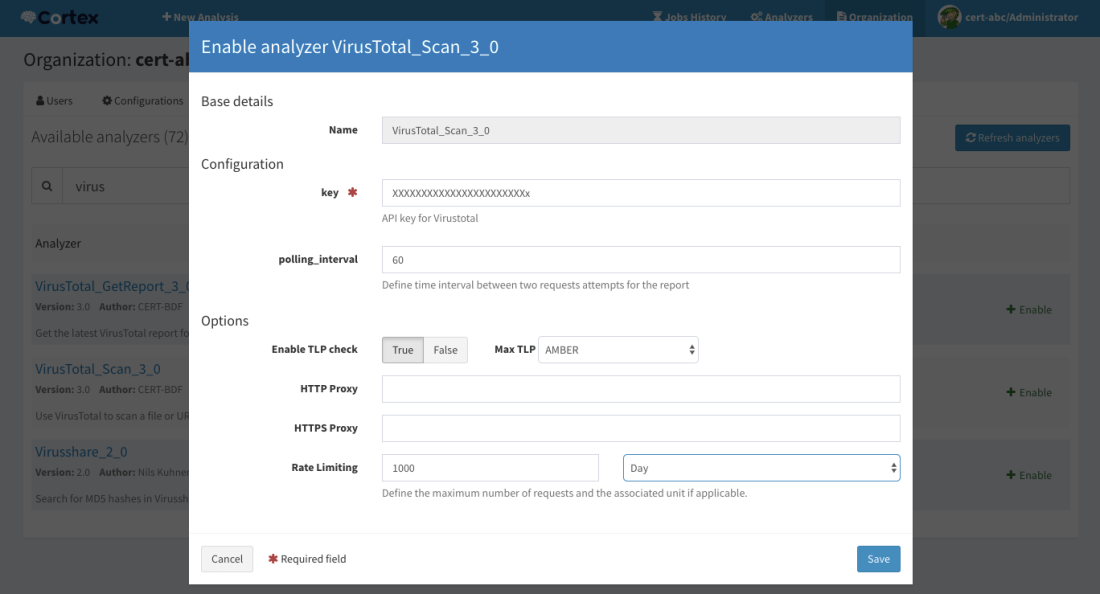
Cortex 2 introduces multi-tenancy through organizations and each organization can have its own set of users, with different roles, its own set of analyzers and, if necessary, rate limits that will prevent analysts from burning quotas.
Multi-tenancy has several interesting use cases. For instance, if you are the CSIRT or CERT of a large multinational organization with several regional teams, you can create an organization for each region within your constituency and enable the analyzers that they may need to use. Let’s assume that you bought a VirusTotal subscription that limits you to 5000 requests per month. You can configure the corresponding analyzers to give each region a fair share of that quota and keeping some requests for your own use.
In case you are a commercial CSIRT or an MSSP, you could do the same for your customers by installing only one Cortex 2 instance and creating an organization for each customer.
Configure an analyzer graphically and impose rate limits if necessary
User Roles
By default, Cortex 2 is shipped with the default cortex organization which sole purpose is to create other ones and manage the users within each organization and their associated powers. The cortex organization hosts all users with the superAdmin role and it cannot be used to configure or run analyzers.
As described in the new Quick Start Guide, after installing Cortex 2, updating its database and creating the first user who will have super admin powers, you’ll have to create your first organization and at least one user within that organization with orgAdmin rights.
Create an organization
You can then log out and log in using the orgAdmin account to create further users within that organization, enable and configure analyzers etc. Please note that no analyzer is enabled by default and you need at least v 1.9.0 of the cortex-analyzers repository. To update your set of analyzers to 1.9.0, please run git pull.
Manage users within an organization
Besides the superAdmin and orgAdmin roles, Cortex 2 introduces the read role which allows users to access analyzer reports and read them but not execute analyzers. For that, users need the analyze role (which implies the read role). orgAdmin users can also run analyzers. superAdmin users are limited to the default cortex organization. While they can create organizations and manage users within them, they cannot access analyzer configurations such as confidential API keys or job reports.
Job reports
Report Persistence and Caching
Cortex 2 relies on Elasticsearch 5.x to store many configuration items but also all the analyzer reports that have been generated. Unlike its predecessor, you won’t lose your existing reports should you need to restart the service or the host it is running on.
Cortex 2 also introduces report caching. By default the cache.job parameter is set to 10 minutes in /etc/cortex/application.conf. That means that if an analysis on a given observable with a defined TLP is requested and that a report has been previously generated in the last 10 minutes, Cortex 2 will serve that report instead of running a new analysis. This feature can help prevent soliciting analyzers, particularly those which require a subscription or have quotas, when there is no need to do so. Please note that this parameter is global to all the analyzers and all the organizations that are configured in the Cortex 2 instance. We do have plans to make it more granular in future versions.
Migrating from Cortex 1
If you are migrating from Cortex 1.x, we recommend that you:
Save the configuration of your analyzers (which ones are enabled and what their configuration items are, such as users/passwords or API keys).
Install Cortex 2.
Edit /etc/cortex/application.conf to add the secret key as shown in Step 1 of the Quick Start Guide and point Cortex to the location of the analyzers.
Follow the remaining steps of the Quick Start Guide to enable the analyzers you need and reinject their configuration.
What’s Next?
In the upcoming weeks, we will release a new version of Cortex4py in order to make it compatible with Cortex 2, continue the work we started with our MISP Project friends to support MISP attribute enrichment through Cortex 2 (MISP currently only supports enrichment using Cortex 1), and perform a long-overdue overhaul of our documentation.
Feeling Generous? Donate!
As you know, we are a FOSS project and donations are always welcome to make our products even better for the community.
All donations go to Creative Source, the non-profit organization we have created, and we will use them to improve TheHive, Cortex & Hippocampe but also to develop (even better) integrations with other FOSS solutions such as MISP.
Creative Source can also provide so-called professional, entreprise-grade support, help integrating the products, train your analysts before they drain or assist you in specific areas such as developing in-house analyzers for Cortex.
Support
Something does not work as expected? You have troubles installing or upgrading? No worries, please join our user forum, contact us on Gitter, or send us an email at support@thehive-project.org. We are here to help.
Correction: March 30, 2018 Instructions on how to update the cortex-analyzers have been added. Also, Cortex 2.0.1 was released to correct a few bugs in the previous version since this post went live.
Update: Cerana 0.5 (TheHive 3.0.5) was released on Feb 8, 2018 to fix a regression introduced by Cerana 0.4, pertaining to the observable mini-reports. Please install 3.0.5 instead.
Waiting for the menu, one of the numerous guests of TheHive Project’s world-renowned code restaurant grows impatient. He stands up and walks toward the kitchen, looking for a waiter to chastise. It’s certainly a free meal and, looking at the reviews on CodeAdvisor, a delicious one. But guests shouldn’t wait more than two minutes to get a copy of the menu, right?
As he approaches the door leading to the kitchen, it slams open and an all-smiling, all-French-looking man dressed in a bee costume comes out carrying hot plates. Peering at their content, the once angry guest cheers up as he stares down at Cerana 0.4 or TheHive 3.0.4 if you prefer. If the looks and smells of the dish match its taste, this will be a terrific meal.
As he sees how Cerana 0.4 prompted a change of heart of the guest, the waiter coming out of the kitchen where TheHive Chefs were busy creating this new recipe goes on describing its content.
‘Mon bon Monsieur‘, he starts in near-perfect Parisian-English accent, ‘this is the plat du jour, or the dish of the day if you prefer. Even though the mighty Chefs insist on calling it a hotfix, not only it fixes eleven bugs in previous versions but it adds four new features and two enhancements. Would you like me to describe them?’
The guest, feeling hungry, his mouth watery, but feeling bad about what he was about to say to the waiter just a few seconds ago nods. So the waiter goes on and describe how the latest release of TheHive will serve his hunger for efficient though free security incident response platforms even better.
Fix a nasty issue where the assignee list is not displayed when there are more than 20 users. This was impacting all drop down lists than contain dynamic data.
An alert is uniquely identified by a tuple: type; source; sourceRef. However, the type parameter was simply ignored. Nice fail (*cough*).
When a report template is not defined for a given analyzer, TheHive tries to load a default one that shows the raw job report. However, the path to that default template was broken.
Last but not least, filter MISP events using MISP tags & more before creating alerts. That way, you won’t have to deal with a mind-numbing number of alerts when you connect an event-loaded MISP instance to TheHive for the first time. Please check out the documentation to leverage this nifty feature.
At this point, the guest cannot control his lust so he snatches one of the plates out the waiter’s hands, runs back to his table and start installing Cerana 0.4 to unleash its power and use it to fight cybercrime. Bon appétit !
Feeling Generous? Donate!
As you know, we are a FOSS project and donations are always welcome to make our products even better for the community.
All donations go to Creative Source, the non-profit organization we have created, and we will use them to improve TheHive, Cortex & Hippocampe but also to develop (even better) integrations with other FOSS solutions such as MISP.
Creative Source can also provide so-called professional, entreprise-grade support, help integrating the products, train your analysts before they drain or assist you in specific areas such as developing in-house analyzers for Cortex.
Download & Get Down to Work
If you have an existing installation of TheHive, please follow the migration guide.
If you are performing a fresh installation, read the installation guide corresponding to your needs and enjoy. Please note that you can install TheHive using an RPM or DEB package, use Docker, install it from a binary or build it from sources.
Support
Something does not work as expected? You have troubles installing or upgrading? No worries, please join our user forum, contact us on Gitter, or send us an email at support@thehive-project.org. We are here to help.
Correction: Feb 6, 2018 An earlier version of this post contained an incomplete sentence.
George Abitbol* doesn’t feel well. Christmas is approaching at a fast pace and the gift he ordered days ago for his girlfriend didn’t find its way to his mailbox yet. He checked it out three times today and save for some spam catalogues on how to take care of his handsome silhouette, nothing resembling a gift showed up.
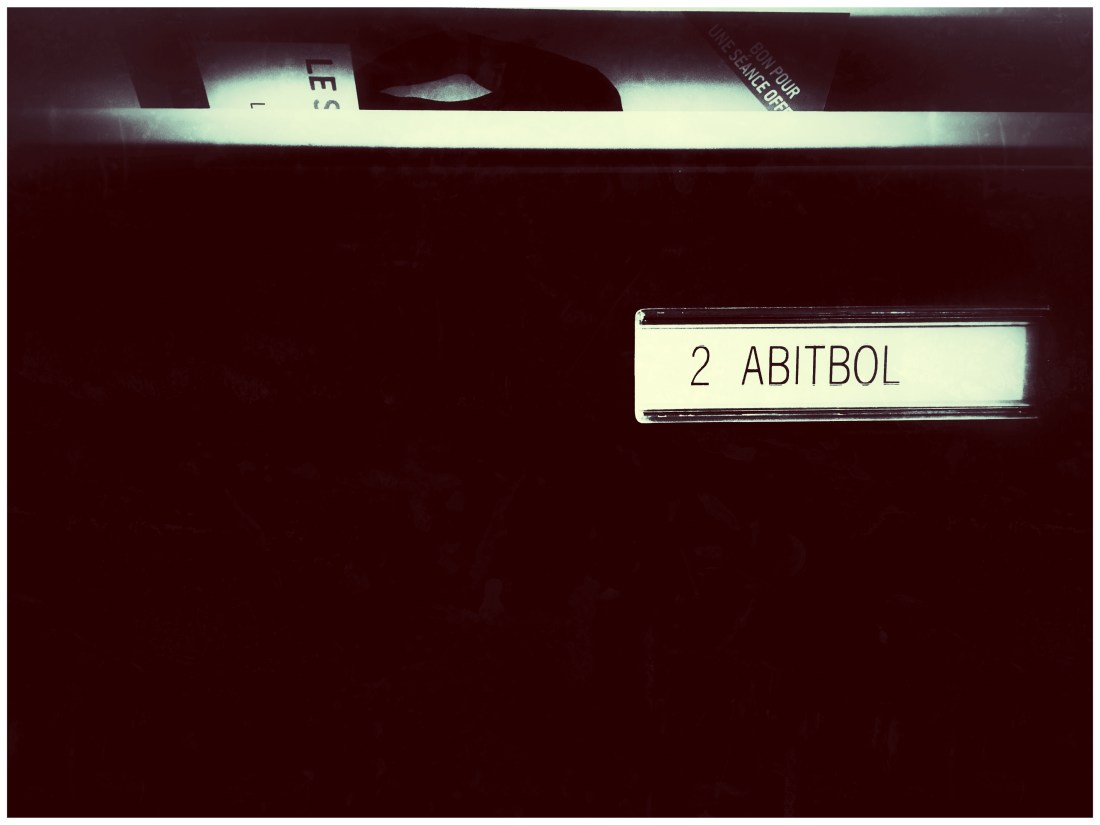
Picture by Saâd Kadhi
He tried to call the French parcel service to know the whereabouts of the luxurious, limited version of the organic sweet potato chips his lovely Jacqueline* likes so much, which sells for four times the regular price (to bear the cost of the enhanced packaging, certainly), but he couldn’t get hold of a living soul all day long. When he placed the order, the delivery was supposed to be lightning fast. It turned out to be a false promise.
With a sinking heart, he climbs back the stairs leading to his apartment, fetches his laptop and sits on his club chair. With his headphones on, immersed in the wonderful jazz of Christian Scott, he wanders randomly through online shopping sites trying to make out his mind on what other presents he could get for his dear Jacqueline, in time for Christmas.
In the middle of the track called Encryption, featuring the uncanny Elena Pinderhugues on flute, a Twitter notification resonates in his ears. He checks it out and learn that TheHive Chefs, as true and elegant gentlemen, have published a new training VM for Cerana 0.3 (a.k.a. TheHive 3.0.3), including Cortex 1.1.4 and the latest set of Cortex-Analyzers.
George loves bees in all shapes and forms, including digital ones so he swiftly downloads the new VM and as the cautious person he is, he verifies the file’s SHA256 hash: 86a87b70627e8db672c57cb57821461f2564ae9b8087cc22fdd1e7a599c16aed. Wonderful! Everything checks out beautifully. He then imports the file in his VM software, starts the virtual machine and logs in as thehive then types in thehive1234 when asked for the password.
He thoroughly reads the documentation to configure various analyzers and integrate his favourite Security Incident Response Platform with MISP. A few minutes later, his VM is ready for prime time and he starts playing with the new multi-source dashboards and interacting with fellow analysts on Gitter.
And he totally forgets about Jacqueline’s gift.
(*) Any resemblance to real and actual names is purely coincidental.
Correction: Dec 23, 2017 An earlier version of this post was referring to a previous training VM that included Cerana 0.2, a version affected by a privilege escalation vulnerability which was corrected in Cerana 0.3. Some typos were corrected as well.
Unless you’ve been living in a cave with no Internet connection during the last year or so, you certainly know a thing or two about Cortex, TheHive’s perfect sidekick, which allows you to analyze observables, at scale, using its 30+ analyzers.
As of this writing, the latest version of Cortex is 1.1.4. Cortex can be queried using its Web UI for quick assessment of an observable. But the true power of Cortex is unleashed when the engine is queried through its REST API, either from TheHive (which can leverage multiple Cortex instances), from alternative SIRPs (Security Incident Response Platforms), Threat Intelligence Platforms and programs thanks to Cortex4py. Indeed, when Cortex is called through the API, it can analyze large sets of observables. Each analysis generates a job. Jobs are queued on first-created, first-executed basis.
However, Cortex 1 has three limitations:
It does not support authentication. If you install it and don’t shield it from abuse (using a firewall for example), anyone can submit analysis jobs and consume your query quotas for subscription-based, commercial services, for example. Non-CSIRT/CERT/SOC personnel or threat actors can also view all the jobs you’ve executed (what observables you have analyzed, using which analyzers and what the associated results were).
It does not support rate-limiting. All it takes to ruin your quotas is an unexperienced analyst who’d create a case in TheHive from a MISP event containing thousands of attributes, select them all from the newly created case, and run them through various Cortex analyzers.
It has no persistence. If you restart the Cortex service or the host it runs on, all your analysis results will disappear. Please note that if you query Cortex from TheHive, the latter will keep a copy of all the reports generated by the analyzers.
Moreover, analyzer configuration is not as easy as we’d like it to be. Enters Cortex 2.
Authentication, Organizations, Configuration and Rate Limiting
Cortex 2, due for release in February 2018, almost a year after the release of the first version, will support all the authentication methods TheHive supports: LDAP, Active Directory, local accounts, API keys and/or SSO using X.509 certificates (an experimental feature as of this writing).
Once created, users will be associated to an organization. Each organization has its own configuration: which analyzers are enabled, associated API keys and/or authentication credentials for services (VirusTotal, PassiveTotal, MISP, …) and a query quota.
For example, if you have an overall quota on VT for 10,000 queries/month, you can limit the number of queries to 5000 for org A, 3000 for org B and leave 2000 for other uses. Rate limits can be configured per month or per day.
Cortex 2 — Architecture
More on Organizations
Organizations will be ideal for multi-tenant Cortex instances deployed, for a example, by the central CSIRT of a large company. They can then create orgs for their regional SOCs. Commercial teams such as MSSPs will also be able to use a single instance to serve all their customers.
Graphical Interface Enhancements
Administrators will not have to edit /etc/cortex/application.conf by hand to enable and configure analyzers per org. They will be able to do so from the Web UI. The Web UI will also allow them to manage users, orgs and authentication tokens when applicable.
Report Persistence and Freshness
Cortex 2 will use ES 5 for storage, like TheHive. That way, you will no longer lose your existing jobs when you reboot the Cortex host or restart the service. You will also be able to query historical results to monitor changes and so on. We will also add an optional parameter to make Cortex 2 to serve the latest report generated by an analyzer if it is called again, on the same observable in the last X seconds or minutes. That way, we’ll avoid running the same queries again and again for the same observable and thus consuming quotas and CPU and storage resources.
Pricing
Cortex 2 is a significant development over Cortex 1 … but it’ll still cost you nothing as it will remain free and open source. We could feel you itching when you started reading this paragraph. Chill out! But if you are willing to support the project, you can donate to Creative Source, the non-profit organization we have created to sustain TheHive, Cortex and Hippocampe in the long run. Interested? Contact us at support@thehive-project.org then.
















 TheHive Project