Mellifera 12.1 Released

About a month ago, we published Mellifera 12 which brought numerous features such as mini-reports on the observable page, custom fields, alert similarity or template selection during alert imports.

Great, palatable recipes, even if they are cooked by fine French chefs, need to be refined over time and may not be as savoury as intended when they are served in their early days. Quality takes time, although smokeware vendors would have you think otherwise.

Mellifera 12.1 (TheHive 2.12.1) has been released to fix a number of outstanding bugs:

  • #249: renaming of users does not work
  • #254: TheHive does not send the file’s name when communicating with Cortex
  • #255: merging an alert into an existing case does not merge the alert description into the case’s description
  • #257: while TheHive does not let you add multiple attachments to a single task log, the UI makes you believe otherwise
  • #259: fix an API inconsistency. GET /api/case/task/:id/log has been fixed.
    And a new API call POST /api/case/task/:taskId/log/_search  has been added, which accepts a “query” in the request body to filter logs of the task.
  • #268: cannot create an alert if the IOC field is set for a single alert’s attribute.
  • #269: closing a case with an open task does not dismiss it from ‘My Tasks’.

This new minor release adds the following enhancements:

  • #267: fix warnings in the DEB package.
  • #272: in alert preview, similar cases are shown regardless of their status. Merged or deleted ones should not appear in that list.

How About the Test VM?

The test VM has not been updated yet. It still contains Mellifera 12 (TheHive 2.12.0). We will update it in September, probably when Mellifera 13 is released. That version will bring the ability to export cases as MISP events.

Download & Get Down to Work

If you have an existing installation of TheHive, please follow the migration guide.

If you are performing a fresh installation, read the installation guide corresponding to your needs and enjoy. Please note that you can install TheHive using an RPM or DEB package, use Docker, install it from a binary or build it from sources.

Support

Something does not work as expected? You have troubles installing or upgrading? No worries, please join our  user forum, contact us on Gitter, or send us an email at support@thehive-project.org. We are here to help.

Mellifera 12: The MAGA Edition

TheHive Project French Chefs are very happy to announce Mellifera 12, a brand new, all shiny, major version of TheHive.

This MAGA (Make Analysis Great Again) edition of your (soon to be?) favorite Security Incident Response Platform (SIRP) contains an awful lot of changes and improvements. While you can read the full changelog while waiting in line for your burger at HopDoddy or for your turn for the latest Disney attraction, we’d like to concentrate on a few features that would make you enjoy Digital Forensics & Incident Response like never before 🙂

Go Short or Go North

The Observables tab can now display the short (a.k.a. mini) reports produced by analyzers. Whenever you run an analysis (or many), the mini-reports will be shown as soon as the corresponding analyzer jobs have successfully finished. That way, you no longer have to click on each observable to access the short report.

sc-Mellifera12-#131.png
Short Reports shown on the Observables Tab

In fact, you don’t even have to click on the observable to access the long reports. You must simply click on the corresponding short report and the long one will be displayed on top of the observables tab as shown in the following screencast. Ain’t that nifty?


sc-Mellifera12-#191-2.png
A Single Click on the Short Report Shows the Long One

The short reports have been also improved to follow a taxonomy. To get to this stage, we had to review all 24 analyzers and their flavors, add new functionality to the CortexUtils Python library and improve the analyzers to add a summary section to their JSON output which Mellifera 12 interprets and displays according to a color code as described in our previous post. Please make sure to read it as it contains important information on how to update your cortexutils version and the analyzers as well as the report templates.

Is This Alert New or What?

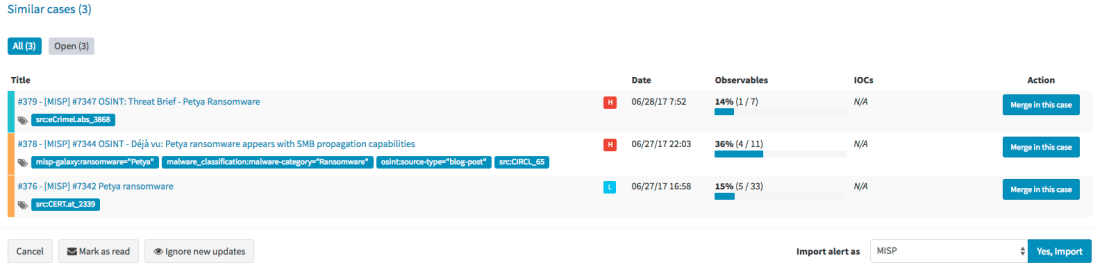
Mellifera 12 introduces an important feature pertaining to alerts. To put it simply, whenever you receive a new alert from MISP, email, SIEM or any other source that you have connected with TheHive, the alert preview page will tell you if there are similarities with existing cases and if so, Mellifera 12 will let you import the new alert in the existing case and any updates made to that alert (think of an ongoing MISP event) will be automatically added to the case.

sc-mellifera12-#232.png
Alert Preview Page with the new Similar cases Section

Template this, Template that

In addition to the ‘similarity’ feature outlined above, Mellifera 12 lets you choose the case template to use when importing a new alert instead of having to use only a specific case template per alert type/source.

sc-mellifera12-#232-2.png
Choose the Template You’d Like to Use to Import an Alert

Custom Fields

We heard our community and implemented a feature that was requested by several users: custom fields.

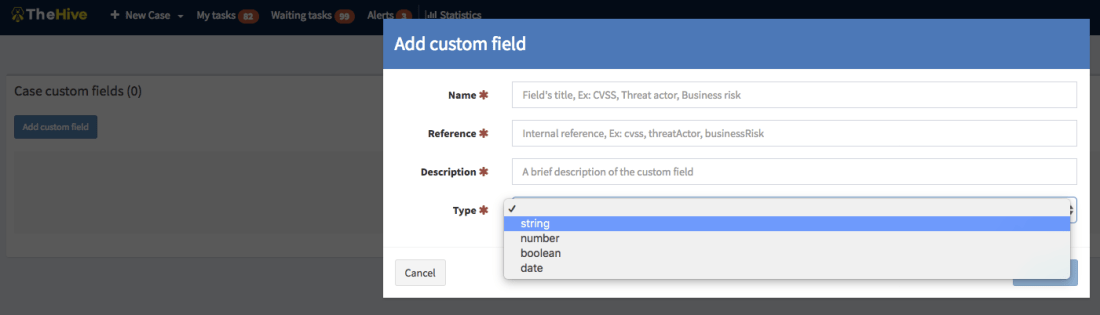
So you’d like to add a business impact to a specific type of cases? Or a set of TTPs? Or a Threat Actor? Or specify a Business Unit? No problem! Ask an admin to create a custom field, associate it with a case template and there you go.

sc-mellifera12-#12-customfields2.png
Add a Custom Field

Unlike metrics, custom fields must not be filled to close a case. You can also supercharge a case with custom fields that have not been associated to a case template. We currently support four types of custom fields: strings, numbers, booleans and dates. And you can create lists of acceptable values to limit your analysts’ choices to legitimate data.

Other New Features

Mellifera 12 gives you the ability to reopen closed tasks. And when viewing the related cases tab of the current case, you’ll see the resolution status of the ones that were closed (false positive, true positive, indeterminate). External links will also be opened in a new tab.  Moreover, files included in alerts are no longer limited to 32 KB so you have no longer an excuse to avoid sending user email reports with their attachments to TheHive 😉

Download & Get Down to Work

If you have an existing installation of TheHive, please follow the migration guide.

If you are performing a fresh installation, read the installation guide corresponding to your needs and enjoy. Please note that you can install TheHive using an RPM or DEB package, use Docker, install it from a binary or build it from sources.

Support

Something does not work as expected? You have troubles installing or upgrading? No worries, please join our  user forum, contact us on Gitter, or send us an email at support@thehive-project.org. We are here to help.