When you need to interact with TheHive’s REST API and you ain’t shy of working with Python, TheHive4py is the way to go. It’s a free, open source library we provide to allow you to easily create alert feeders, automate certain tasks like creating cases, assign them to analysts and much more. For example, Synapse, DigitalShadows2TH and Zerofox2TH leverage the library to send alerts to your favourite SIRP/SOAR.
Sometime ago, we decided that it was time to overhaul the whole library and we began working on version 2.0.0 which will be easier to use. It should also support the full set of TheHive’s REST API calls. In the meantime we decided to release version 1.5.0, shortly followed by version 1.5.1 to support some new functionality contributed by our user community and correct a few issues.
Important note: TheHive4py 1.5.1 does not work with TheHive 3.0.10 or earlier versions. Please stick with 1.5.0 if you are using those versions.
Updating/Installing
To update your existing package:
$ sudo pip install thehive4py --upgrade
If you are just getting started with TheHive4py, you can forgo the --upgrade at the end of the command above.
But I just Wanna Play!
If you’d like to play around with TheHive4py 1.5.1, TheHive 3.1.1., Cortex4py 2.0.1 and Cortex 2.1.1, please download the training VM.
Paris? Are you There?
Shall you encounter any difficulty, please join our user forum, contact us on Gitter, or send us an email at support@thehive-project.org. As usual, we’ll be more than happy to help!
Correction: October 12, 2018 As reported by Robin Hahling, TheHive 1.5.1 does not work with TheHive 3.0.10 or earlier versions.
We released Cortex 2.1.0 as a release candidate back in July 31, 2018 along with TheHive 3.1.0-RC1. By then, the power duo which makes digital forensics, incident response and, to an extent, cyber threat intelligence, better, faster, happier, regular exercising gained the ability to perform active response.
We ate our own dog food for a couple of months. We found bugs. We added enhancements and we listened to the early adopters of these new major versions. And today we are thrilled to announce the availability of the stable release of Cortex 2.1.0 along with TheHive 3.1.0.
Cortex 2.1.0 restores the ability to query the analysis and response engine from MISP for enrichment purposes. A new version of the de facto standard for threat sharing should be released shortly as there are also some API-related issues on its side to make the integration fully working again.
Cortex 2.1.0 also gives you the ability to see the PAP (Permissible Actions Protocol) values for each analyzer as well as any custom cache values you might have configured.
Shall you encounter any difficulty, please join our user forum, contact us on Gitter, or send us an email at support@thehive-project.org. We will be more than happy to help!
Pulsedive contributed by Nils Kuhnert (@3c7, TheHive Project)
FileInfo has been enhanced with Manalyze submodule for PE analysis ; by @lctrcl and Nils Kuhnert (@3c7)
Thanks to @silrumpa, the Fortiguard_URLCategory analyzer has been updated and let you configure categories and customize theirs maliciousness level
PhishingInitiative analyzer has been flavoured with a scan facility, thanks to Rémi Pointel
Huge thanks for the awesome work that has been performed by all our contributors!
Hunterio_DomainSearch
Hunter.io is a search engine that lets you find emails associated with a given domain name. The analyzer can be used to query the API and get a list of email addresses for a specific domain name. An API key is required to use this analyzer and can be obtained by registering on the website.
Results are displayed in TheHive in the following manner:
Hunterio_DomainSearch: short and long report samples
DShield_lookup
The analyzer lets you query the famous SANS Internet Storm Center (ISC) DShield API and look up IP address reputation. No API key is needed to run this analyzer.
Results are displayed in TheHive in the following manner:
DShield_lookup: short and long report templates
Pulsedive_GetIndicator
Pulsedive is a Threat Intelligence platform that allows you to enrich your observables. The analyzer can be used to query the API and get information about a domain name, hash, IP or URL. An API key is required to use this analyzer and can be acquired by creating an account on the webiste.
Results are displayed in TheHive in the following manner:
Pulsedive_GetIndicator: short and long report templates
Manalyze joins FileInfo
Manalyze is a tool developed by Ivan Kwiatkowski (@JusticeRage) that lets you analyze, operate PE (Portable Executable) and collect useful artifacts that help the analyst in determining its maliciousness.
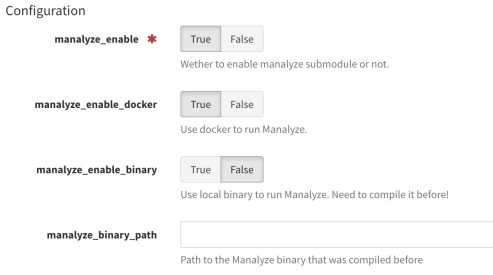
@lctrcl wrote an analyzer that triggers Manalyze on a PE file and gives the analyst a useful report. Nils Kuhnert (@3c7) from TheHive Project then included this analyzer as a submodule into our FileInfo meta-analyzer for files ; it can run Manalyze from compiled binary, or, if your Cortex server is ready for that, through the right docker. If you decide to use the compiled binary, please follow instruction from Manalyze github page.
This submodule is disabled by default. To use it, you have to set some configuration in Cortex:
FileInfo: configuration for Manalyze in Cortex
Results are displayed in TheHive in the following manner:
Manalyze submodule: short and long report templates
Fortiguard_URLCategory
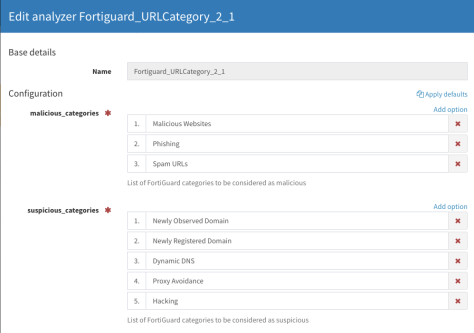
This analyzer has been enhanced to let analysts choose categories considered as malicious or suspicious. It comes with a default configuration but you can setup your own by selecting the categories from the Fortiguard website.
Fortiguard_URLCategory: default configuration for categories in Cortex
Select which categories you want to be considered malicious or suspicious, and others will be considered by the analyzer as info. Analyzed observables that are not categorised by Fortigard service is considered as safe.
PhishingInitiative_Scan
PhishingInitiative has been enhanced with a new scan flavor. This let the analyst submit an URL to the webservice. An API key is needed to run this analyzer and can be obtained by registering on the website.
Results are displayed in TheHive in the following manner:
PhishingInitiative_Scan: short and long report samples
#339 : fix short and mini reports for Domaintools Whois history flavor
Get It While Supply Lasts!
Each analyzer comes with its own, pip compatible requirements.txt file. To update your Cortex analyzers to 1.13.0, run the following commands:
cd path/to/Cortex-Analyzers

git pull

for I in analyzers//requirements.txt; do sudo -H pip2 install -r $I; done && \

for I in analyzers//requirements.txt; do sudo -H pip3 install -r $I || true; done
Once done, do not forget to login to Cortex as an orgadmin and click on the Refresh Analyzers button. Refer to the online Cortex documentation for further details.
Shall you encounter any difficulty, please join our user forum, contact us on Gitter, or send us an email at support@thehive-project.org. We will be more than happy to help!
Correction: September 25, 2018 The link to the report templates was incorrect.
Paris, France. The Sun is shining on the city of lights and temperatures are quite high, even for the summer season. Life is good. As a matter of fact, life is excellent.
TheHive Master Cooks are about to go on vacation for a few weeks. But before they pack up their Patagonia bags and leave the sandy beaches for those who enjoy them, preferring mountains, trails, walking and breathing fresh air with family and friends, they would like to make a significant contribution to help TheHive and Cortex users fight cyberattacks even better than they already do. And maybe convince those who don’t that free, open source software is not a joke or a geek fad.
We’d like to welcome to the stage our latest babies, which we are really proud of: TheHive 3.1 and Cortex 2.1, the new versions of the power duo which make digital forensics, incident response and, to an extent, cyber threat intelligence, better, faster, happier, regular exercising (well you know the Radiohead song so we’ll let you continue singing along) since early 2017.
While our project might seem very young, it is not. We’ve been working steadily on TheHive, using it (i.e. eating our own dog food) since early 2014 before releasing it at the end of 2016 once we were satisfied with it, as a token of gratitude to a community that helped us due our jobs in various ways. We then extracted what has become Cortex from its core to ship it as a separate product in February 2017. And we kept improving them at a steady piece for the collective benefit of incident responders, forensicators and threat analysts. And adoption has been rather spectacular. Thanks to all of our users for their love and support!
We believe we are at a moment where people could not brush us off anymore as amateurs. Try TheHive and Cortex, preferably with MISP and get a taste of what professional, free and open source software can be.
TheHive 3.1 and Cortex 2.1 are feature-packed and we won’t be able to cover them all in detail in a single blog post. Rather, we’d like to concentrate on a few important ones.
Stable, Pre-release Channels and New Repositories
We’d like to point out that, in order to improve our release process and given the number of features that we added, TheHive 3.1 and Cortex 2.1 are release candidates at this stage. So we encourage you to test them and report back any bugs or issues you encounter so we can address them and make the final releases as rock-solid as possible.
We have now two release channels: a stable one that should be used for production systems and a pre-release channel that should be used to try the release candidates such as TheHive 3.1-RC1 and Cortex 2.1-RC1, the subjects of this blog post, and help us iron out bugs before adding them to the stable channel. Those who love living on the bleeding edge may be tempted by running the release candidates on their production environment given all the candy and icing we added. They are at liberty of doing so but we don’t want to hear anyone one whining about an RC that broke everything and asking for their money back grin.
In previous releases of TheHive, whenever you configured a MISP instance, it was used to import events from and export cases to. Starting from TheHive 3.1.0, we added a purpose to the configuration file. By default, any added MISP instance will be used for import and export (ImportAndExport). However you can configure it to be used for importing events only (ImportOnly) or exporting cases only (ExportOnly).
Extended Events
When an analyst attempts to update a MISP event on which the account used by TheHive to connect to the MISP instance is not part of the original author’s organization, previous versions of TheHive will display a you do not have permission to do that error produced by MISP. Starting from TheHive 3.1, analysts have the ability to create a MISP extended event.
Task Grouping
Case tasks can now be associated with task groups. For example, you could create groups called Identification and Malware Analysis, Containment and Communication and add tasks to them. Of course, this new feature can be used when designing case templates as well.
Import Observables from Analyzer Output
If analyzers produce a set of artifacts in their output (which is the case of several existing ones), TheHive will give you the ability to select those artifacts very easily and add them to your case as observables.
ZIP File Upload
Austin Haigh contributed an important feature which will allow analysts to directly import password-protected ZIP files into a case. The code uses the supplied password when adding the archive to extract its contents and add them one by one to the existing set of observables. This is highly practical when you want to add suspicious files without risking an accidental click which would compromise your endpoint or having to unzip archives containing such files first then add them one by one to TheHive.
Revamped Search Page
The search page has been completely revamped as shown in the screenshot below:
The New Search Page
You can now select your search scope (cases, tasks, observables, alerts, analyser reports a.k.a. jobs or even the audit logs), apply filters and search TheHive without having to resort to complex, mind numbing Lucene syntax.
Responders and PAP
Last but not least, TheHive and Cortex offer you response capabilities (i.e. perform an action depending on the context) thanks to a new breed of programs called … wait for it … wait for it … responders. TADA!
Responders are very similar to analyzers. In fact we’ve taken the concept and extended it to apply to different elements in TheHive: alerts, cases, tasks, task logs, and observables of course.
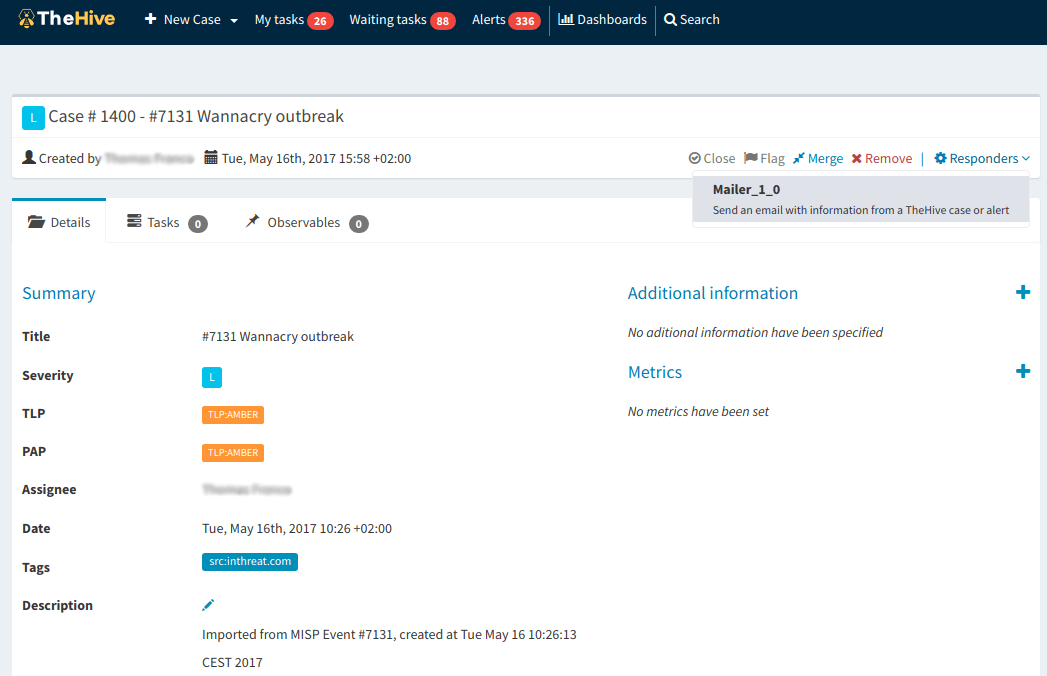
Responders in Action
You can reuse almost the same principles that apply to analyzers to write your own responders and if you are feeling generous, contribute them to the community. To give you a head start, we published a sample Mailer responder which, when customized for your environment, should allow you to send emails to inform your fellow analysts that a case has been created and that their help is required. Another example could be the ability to respond to a suspicious email report from a user, which is displayed as an alert, that they can safely ignore the corresponding email.
Like an analyzer, a responder can have two or more service interaction files (or flavors) to allow it to perform different actions. For example, a Mailer responder can send messages using several body templates.
Thanks to our long-time friend Andras Iklody from MISP Project who brought that to our attention, responders (and analyzers starting from Cortex 2.1) support PAP, the Permissible Actions Protocol.
Running into Troubles?
Something does not work as expected? You have troubles installing or upgrading? Spotted new bugs? No worries, please open issues on GitHub or comment on existing ones, join our user forum, contact us on Gitter, or send us an email at support@thehive-project.org. We are here to help.
We are happy to announce the immediate availability of a new major version of Cortex-Analyzers. Version 1.11.0 includes two brand new analyzers, several updates and a few bug fixes:
The Domaintools analyzer has been updated with two new flavors: Risk and Reputation
The VirusTotal analyzer can (finally!) get reports for URL observables
MsgParser and File_Info have been merged in a new, shiny, completely rewritten FileInfo analyzer
As we are approaching the 90 analyzers mark, we wholeheartedly thank our user community for continuously contributing new analyzers, testing them and helping us improve the existing ones.
Important Notice
We made significant changes in this release in the analyzers and short reports. Prior to Cortex-Analyzers 1.11.0, the summary() function in the analyzer code generates a result such as:
Double quotes were included in the resulting value. We decided to update the summary() function and make it generate the same result without double quotes :
hashdd.com is a search engine for file hashes which automatically queries 3rd party services like VirusTotal and enriches the information provided based on the 3rd party data. The analyzer includes two flavors: Status and Detail. The first one is used to query hashdd without an API key for the threat level only. The latter produces additional meta information about the sample, but requires an API key.
Results are displayed in TheHive in the following manner:
hashdd — short and long report samples
URLhaus
URLhaus, a service that shares the latest malware download URLs and reports those sites to their respective hosting companies, can now be queried for domains, URLs and hashes. If the observable is found, available information will be displayed as follows:
URLhaus – short and long report samples
Domaintools Risk and Reputation
New Risk and Reputation services from Domaintools have been added as new flavors to the existing Domaintools analyzer set.
Risk Evidence
The DomainTools Risk Score predicts the risk level and likely threats from a domain that has not been observed in malicious activities, by analyzing various properties of the domain as soon as it is registered.
Domaintools Risk Evidence – short and long report
Reputation
The Domaintools Reputation Score gives indications about how closely a domain is related to known bad domains, actors, and IPs.
Domaintools Reputation – short and long report samples
An All New FileInfo
FileInfo performs local static analysis of file observables. It has been completely rewritten from the ground up to be more flexible thus it can easily be enriched with new supported file types and analysis modules. We took this opportunity to merge MsgParser, in charge of extracting and displaying Outlook emails into FileInfo.
As of this release, FileInfo now supports PDF, PE, MS Office documents and Outlook .msg files. We also added support for DDE detection and link extraction in MS Office documents, thanks to Decalage who added this in Oletools since v0.52.
FileInfo – short and long report samples
Bug fixes
#286 : we updated the way MISP analyzer validates its SSL configuration
#292 : we fixed the API URL of malwares.comin the Malwares analyzer
Get It While Supply Lasts!
Each analyzer comes with its own, pip compatible requirements.txt file. To update your Cortex analyzers to 1.11.0, run the following commands:
cd path/to/Cortex-Analyzers

git pull

for I in analyzers/*/requirements.txt; do sudo -H pip2 install -r $I; done && \

for I in analyzers/*/requirements.txt; do sudo -H pip3 install -r $I || true; done
Once done, do not forget to login to Cortex as an orgadmin and click on the Refresh Analyzers button.
Shall you encounter any difficulty, please join our user forum, contact us on Gitter, or send us an email at support@thehive-project.org. We will be more than happy to help!
Cortex, a free, open source software allows security analysts and threat hunters to analyze and enrich observables (IP addresses, hashes, domains, …) collected in the course of an investigation or received from third parties, for example through MISP, the de facto standard for threat sharing.
On March 29, 2018, we released Cortex 2, a major improvement over the previous version which brought, among other cool features, authentication, caching, multi-tenancy (RBAC) and rate limiting. Instead of deploying several Cortex 1 instances behind reverse proxies which would implement authentification, administrators can deploy a single Cortex 2, create multiple organizations and serve the needs of various information security populations while enjoying extra features.
On May 31, 2018, we published a brand new API guide so that developers can take advantage of the powerful REST API of the product. Sadly, Cortex4py, the FOSS Python library we provide to interact with the API was not compatible with Cortex 2. Until today.
Thanks to the hard work of our dear Nabil Adouani, we are happy to announce the immediate availability of Cortex4py 2.0.0, a complete rewrite of the library in Python 3. Cortex4py 2.0.0 is fully compatible with Cortex 2. However, it doesn’t work with Cortex 1.
While TheHive, the highly popular free and open source Security Incident Response Platform (SIRP) we develop has native support for many Cortex 2 instances, Python developers can leverage Cortex4py to interact with Cortex 2, manage organizations, users, analyzer configurations and analyze observables at scale from alternative SIRPs, SIEMs or custom scripts thanks to the 83 analyzers Cortex 2 has as of June 18, 2018.
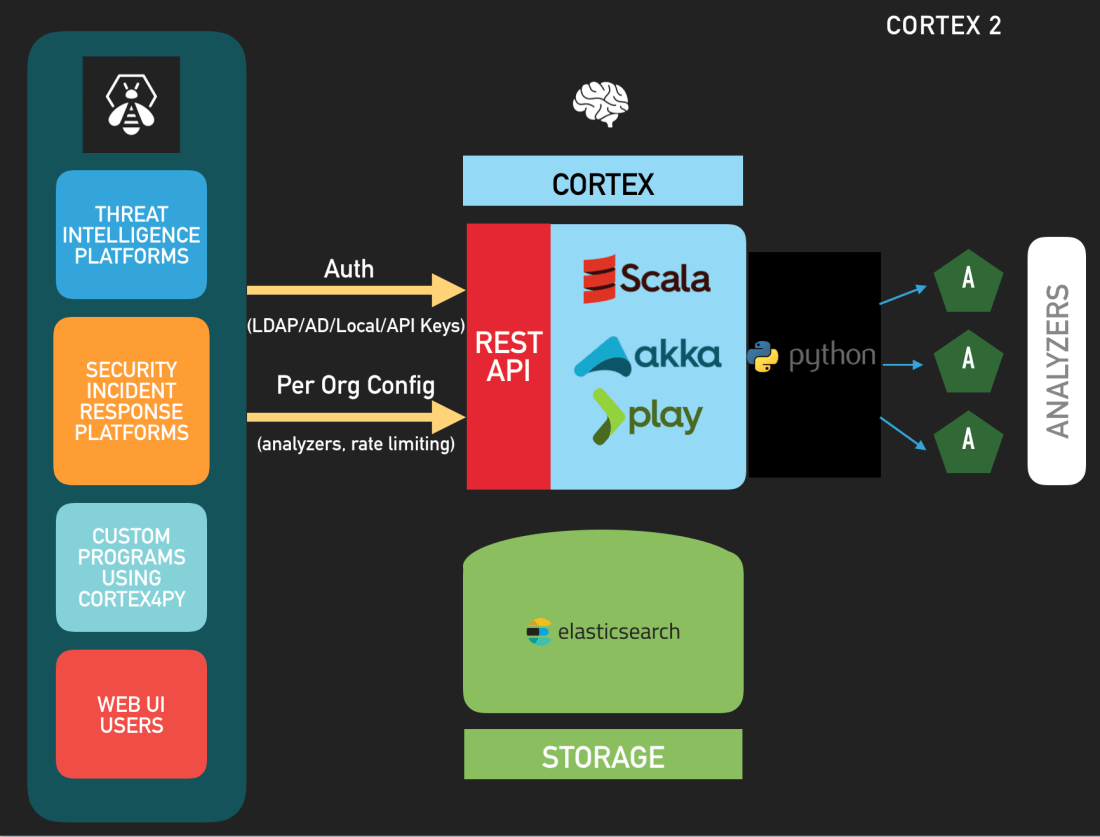
Cortex 2: there is more than one way to interact with it
Use It
To install Cortex4py, use PIP3:
$ sudo -H pip3 install cortex4py
If you are using Python on a Windows operating system, please forgo the sudo command.
Usage
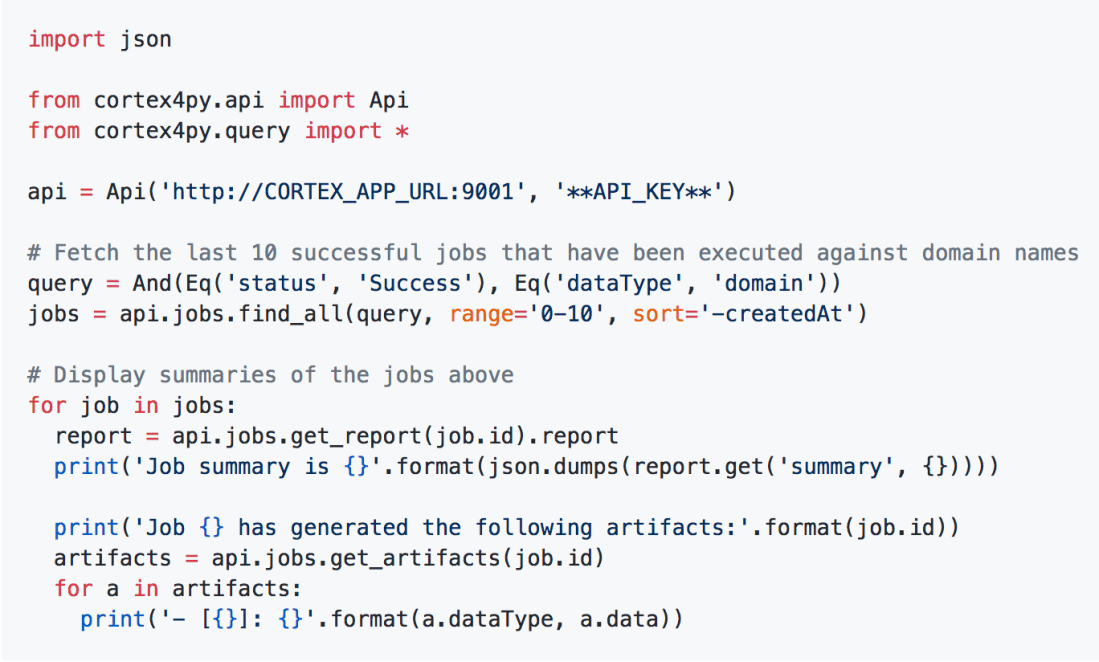
Cortex4py 2 comes with a usage guide which includes many examples. For example, if you want to fetch the last 10 successful jobs that have been executed against domain names and display the result summaries of those 10 jobs you could write something like:
Sample Python3 code to retrieve Cortex analyzer results
Migrating from Cortex4py 1
If you have already written scripts using Cortex4py 1.x (for Cortex 1), we tried to keep the already available methods. However, we recommend you adapt your code to leverage the new Cortex4py 2 classes and methods as soon as feasible. Moreover, the existing scripts must be updated to support authentication if you intend to use them with Cortex 2. Please read the Cortex4py 2 usage guide for more information.
Support
Cortex 2.0.0 is brand new software. As such, it might contain bugs and limitations. If you find any or encounter problems, please ask on our user forum, contact us on Gitter, or send us an email at support@thehive-project.org. We are here to help.
On June 6, 2018, we released Cortex-Analyzers 1.10, which contained 11 new analyzers, bringing the total to 83 programs. You read that correctly: 83 ways to assess and gain insight on observables collected during the course of an investigation or while performing threat intelligence thanks to Cortex, our free & open source analysis engine. One day after, we published version 1.10.1 which fixed the name of the Anomali STAXX reports for TheHive. Since then we uncovered a few additional issues which version 1.10.2 corrects:
We are proud to announce the immediate availability of Cerana 0.9 (TheHive 3.0.9) and Cortex 2.0.4. These hotfix releases address a number of issues and we encourage you to update your current installation at your earliest opportunity. For your comfort and sanity. Seriously.
We also took this opportunity to update Cortex analyzers to fix issues with CIRCL Passive SSL, Hybrid Analysis, and the Joe Sandbox URL Analysis template. Moreover, we have updated the cortexutils library to set the taxonomy level to info if it is invalid. To upgrade cortexutils to 1.2.4:
Note: the Bluecoat analyzer was removed since it does not comply with the updated Terms of Service of Symantec Web Pulse SiteReview. Symantec does no longer permit programmatic querying of the service.
Fixes in Cerana 0.9
#527: display long reports when the analyst clicks on the corresponding short reports. Meh!
#541: make the drop-down menu for case templates scroll when there is a truckload of them.
Something does not work as expected? You have troubles installing or upgrading? Spotted new bugs? No worries, please open issues on GitHub or comment on existing ones, join our user forum, contact us on Gitter, or send us an email at support@thehive-project.org. We are here to help.
Correction: April 14, 2018 An earlier version of this post did not mention that the Bluecoat analyzer was removed in the latest Cortex Analyzers repository release.
TheHive Project’s Master Chefs are extremely happy to share, for free their latest recipe with the Cyber Threat Intelligence, Digital Forensics and Incident Response communities: Cortex 2.
As its predecessor, Cortex 2 is published under an AGPL v3 license and it introduces many important features that we brushed upon in a Dec 2017 post.
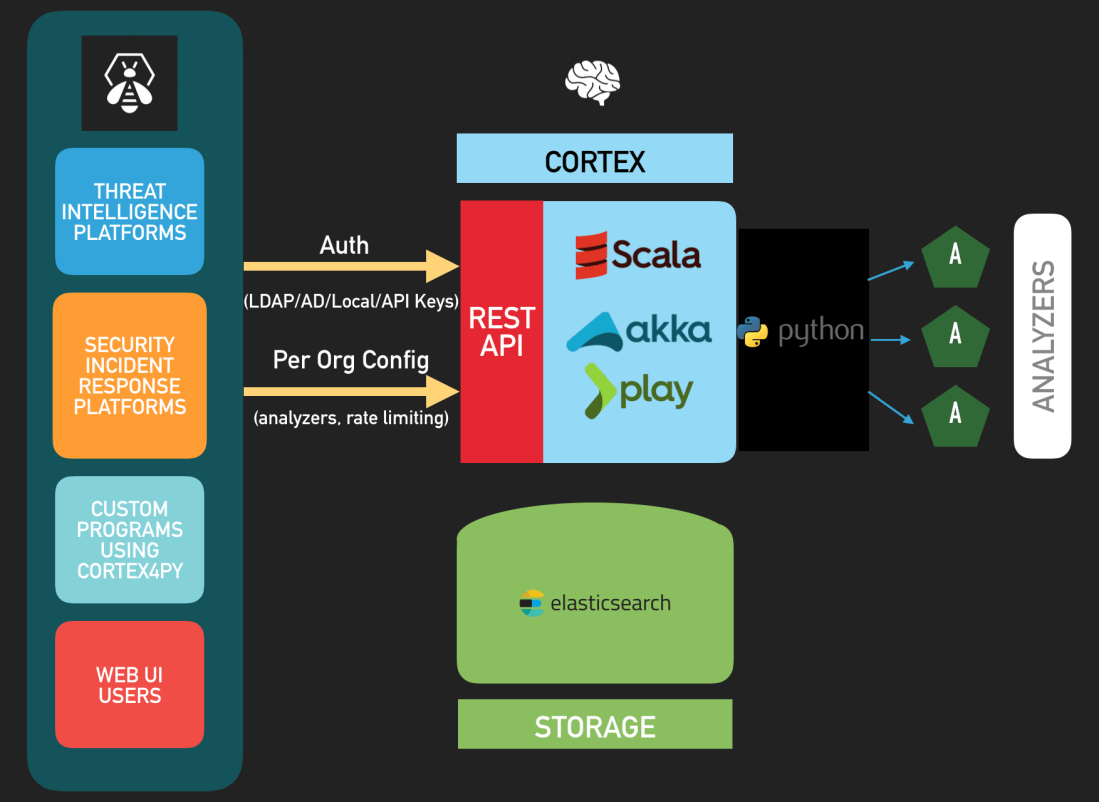
Cortex 2 — Architecture
Update: Cortex 2.0.1 was released since this post went live. It corrects a few bugs we uncovered in 2.0.0 as described in the changelog. Please install Cortex 2.0.1 instead of 2.0.0.
Authentication
Cortex 2 supports all the authentication methods that TheHive supports: LDAP, Active Directory, local accounts, API Keys, and X.509 SSO.
To connect your favorite Security Incident Response Platform with Cortex 2, you will need to update TheHive to Cerana 0.7 (TheHive 3.0.7) which was released today as well. This version fixes a regression pertaining to case templates introduced by Cerana 0.6 and is the first version to fully support Cortex 2’s API changes and authentication.
To make TheHive 3.0.7 analyze observables at scale through Cortex 2, you have to create an account on Cortex 2 with the read and analyze roles (see the next section) and generate the associated API Key. Next, feed the key in TheHive’s /etc/thehive/application.confas described in the documentationet voilà !
TheHive 3.0.7 remains compatible with Cortex 1 and you can connect it to a mixed set of Cortex 1 and/or Cortex 2 instances with no issues.
Organizations, Analyzers and Rate Limiting
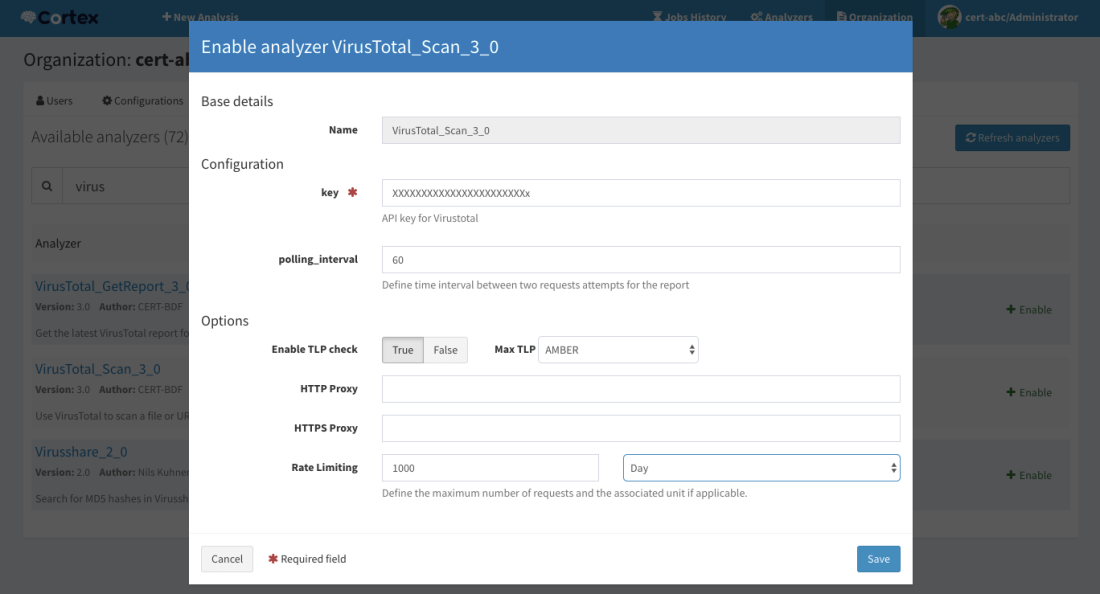
Cortex 2 introduces multi-tenancy through organizations and each organization can have its own set of users, with different roles, its own set of analyzers and, if necessary, rate limits that will prevent analysts from burning quotas.
Multi-tenancy has several interesting use cases. For instance, if you are the CSIRT or CERT of a large multinational organization with several regional teams, you can create an organization for each region within your constituency and enable the analyzers that they may need to use. Let’s assume that you bought a VirusTotal subscription that limits you to 5000 requests per month. You can configure the corresponding analyzers to give each region a fair share of that quota and keeping some requests for your own use.
In case you are a commercial CSIRT or an MSSP, you could do the same for your customers by installing only one Cortex 2 instance and creating an organization for each customer.
Configure an analyzer graphically and impose rate limits if necessary
User Roles
By default, Cortex 2 is shipped with the default cortex organization which sole purpose is to create other ones and manage the users within each organization and their associated powers. The cortex organization hosts all users with the superAdmin role and it cannot be used to configure or run analyzers.
As described in the new Quick Start Guide, after installing Cortex 2, updating its database and creating the first user who will have super admin powers, you’ll have to create your first organization and at least one user within that organization with orgAdmin rights.
Create an organization
You can then log out and log in using the orgAdmin account to create further users within that organization, enable and configure analyzers etc. Please note that no analyzer is enabled by default and you need at least v 1.9.0 of the cortex-analyzers repository. To update your set of analyzers to 1.9.0, please run git pull.
Manage users within an organization
Besides the superAdmin and orgAdmin roles, Cortex 2 introduces the read role which allows users to access analyzer reports and read them but not execute analyzers. For that, users need the analyze role (which implies the read role). orgAdmin users can also run analyzers. superAdmin users are limited to the default cortex organization. While they can create organizations and manage users within them, they cannot access analyzer configurations such as confidential API keys or job reports.
Job reports
Report Persistence and Caching
Cortex 2 relies on Elasticsearch 5.x to store many configuration items but also all the analyzer reports that have been generated. Unlike its predecessor, you won’t lose your existing reports should you need to restart the service or the host it is running on.
Cortex 2 also introduces report caching. By default the cache.job parameter is set to 10 minutes in /etc/cortex/application.conf. That means that if an analysis on a given observable with a defined TLP is requested and that a report has been previously generated in the last 10 minutes, Cortex 2 will serve that report instead of running a new analysis. This feature can help prevent soliciting analyzers, particularly those which require a subscription or have quotas, when there is no need to do so. Please note that this parameter is global to all the analyzers and all the organizations that are configured in the Cortex 2 instance. We do have plans to make it more granular in future versions.
Migrating from Cortex 1
If you are migrating from Cortex 1.x, we recommend that you:
Save the configuration of your analyzers (which ones are enabled and what their configuration items are, such as users/passwords or API keys).
Install Cortex 2.
Edit /etc/cortex/application.conf to add the secret key as shown in Step 1 of the Quick Start Guide and point Cortex to the location of the analyzers.
Follow the remaining steps of the Quick Start Guide to enable the analyzers you need and reinject their configuration.
What’s Next?
In the upcoming weeks, we will release a new version of Cortex4py in order to make it compatible with Cortex 2, continue the work we started with our MISP Project friends to support MISP attribute enrichment through Cortex 2 (MISP currently only supports enrichment using Cortex 1), and perform a long-overdue overhaul of our documentation.
Feeling Generous? Donate!
As you know, we are a FOSS project and donations are always welcome to make our products even better for the community.
All donations go to Creative Source, the non-profit organization we have created, and we will use them to improve TheHive, Cortex & Hippocampe but also to develop (even better) integrations with other FOSS solutions such as MISP.
Creative Source can also provide so-called professional, entreprise-grade support, help integrating the products, train your analysts before they drain or assist you in specific areas such as developing in-house analyzers for Cortex.
Support
Something does not work as expected? You have troubles installing or upgrading? No worries, please join our user forum, contact us on Gitter, or send us an email at support@thehive-project.org. We are here to help.
Correction: March 30, 2018 Instructions on how to update the cortex-analyzers have been added. Also, Cortex 2.0.1 was released to correct a few bugs in the previous version since this post went live.
















 TheHive Project