A few months ago, we released Synapse, our first “meta” alert feeder for TheHive in order to lower the burden of highly repetitive tasks on incident handlers. Thanks to a scalable and modular design, Synapse aims to make incident response easier by automating some of its tedious parts.
The first step towards this challenge was based on the integration of Microsoft Exchange with TheHive in Synapse 1.0.0. This way, user notifications pertaining to suspicious emails can be easily consumed and acted upon in TheHive.
Today, we are releasing version 1.1.0 which goes further by adding support for Microsoft Exchange O365 and the IBM QRadar SIEM.
Exchange O365
Theoretically, Exchange O365 was supposed to be functional in Synapse 1.0.0.
However, since we did not have an O365 account we could not fully test that feature. Thankfully with the help of one of our users we managed to solve a bug and finally validate the Exchange O365 integration.
For more details about Exchange and TheHive, have a lookhere.
IBM QRadar SIEM
Members of TheHive’s Core Team have practical experience with QRadar and we decided to make good use of it to the benefit of our fellow analysts.
With the Community Edition of QRadar in one hand and an instance of TheHive in the other, we managed to create alerts in TheHive out of QRadar offenses. Furthermore, when a case or alert related to a QRadar offense is closed in TheHive, it also closes it in QRadar automatically.
For more details about QRadar and TheHive, have a look here. Alternatively, you may also want to consider Pierre Barlet’s qradar2thehivescript.
Send your Ideas our Way
With this 1.1.0 release, the list of integrated products with TheHive goes up to three: Exchange, Exchange O365 and QRadar. However, we don’t really have a plan regarding the next candidate for integration so tweet us at @TheHive_Project and tell us what you want!
TheHive Project’s Code Chefs are glad to announce that, thanks to the precious contributions of the user community, Cortex has broken the one hundred analyzer mark.
Cortex-Analyzers version 1.14.0 is out and includes new analyzers, some improvements and some bug fixes.
New Analyzers
New and enhanced analyzers, described below, are:
Cisco Investigate by Cisco Umbrella Research @opendns
Datascan and Inetnum flavors in Onyphe analyzer by Pierre Baudry and Adrien Barchapt
Again, huge thanks for the awesome work that has been performed by all our contributors!
Investigate
Cisco Umbrella Investigate provides threat intelligence about domains and IP addresses accross the Internet. The analyzer can be used to query the Cisco Umbrella (formerly OpenDNS) API and get information about an IP or a domain name. An API key is required to use this analyzer.
Results are displayed in TheHive in the following manner:
Cisco Investigate: short and long reports
Proofpoint Forensics Lookup
According to Proofpoint’s website, the Forensics API allows insight in detailed forensic evidences about individual threats or compaigns. The analyzer can be used to check observables against given indicators of compromise stored in the ProofPoint service.
Unfortunately, there are currently no sample report screenshots available, because TheHive’s Core Team does not have access to Proofpoint services. Also, due to the same reason, this analyzer could not be tested by us. If you have access to the service and can test the analyzer and/or provide report screenshots, please let us know.
RecordedFuture
This analyzer lets you get the latest risk data from RecordedFuture for a hash, domain or an IP address. It can be used to query the API and get information. An API key is required to use this analyzer.
Results are displayed in TheHive in the following manner:
RecordedFuture: short and long reports
Urlscan.io search
Urlscan.io is a service that scans and analyzes websites. Submitted pages will be browsed like a regular user would do and every activity gets recorded. The analyzer submitted by ninoseki queries urlscan without initiating a scan which would be publicly visible on the website. Accepted datatypes for this analyzer are URL, domain, hash and IP.
The templates which display the results of the analyzer look like the following screenshots:
Urlscan.io: short and long reports
Google DNS over HTTP
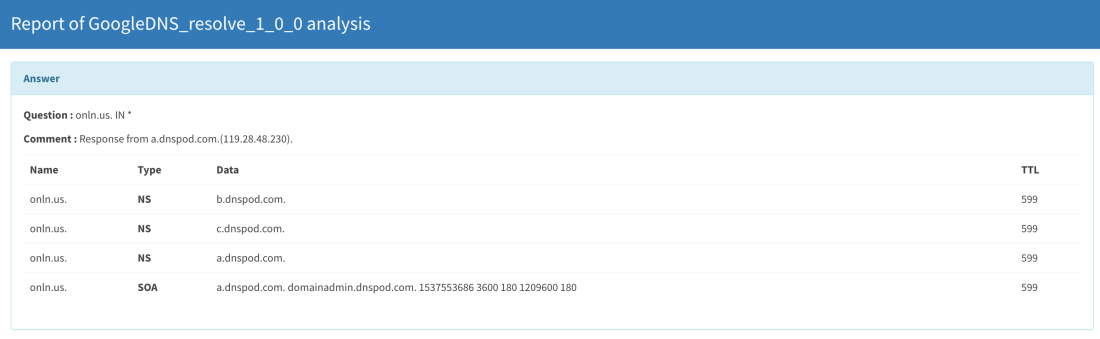
This analyzer provides DNS information for an IP, a domain or a FQDN by making calls to Google DNS-over-HTTP (DoH). No API key is required.
Results are displayed in TheHive in the following manner:
Google DNS: short and long reports
RTF files support in FileInfo
The FileInfo meta analyzer has been improved and now leverages the rtfobj tool provided in the Oletools suite by Decalage.
Results are displayed in TheHive in the following manner:
FileInfo with rtfobj: short and long reports
Datascan and Inetnum flavors in Onyphe analyzer
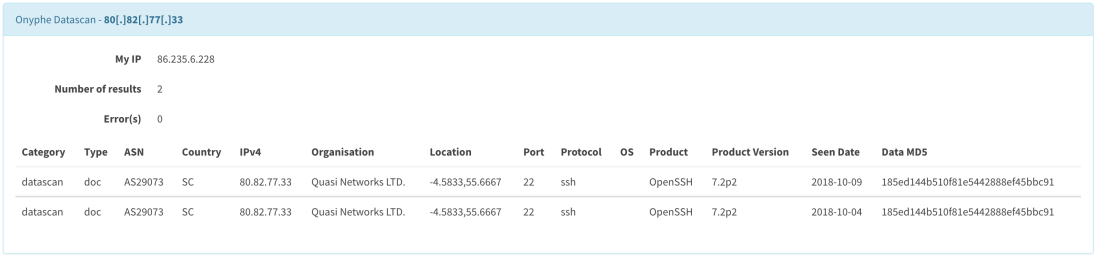
The Onyphe analyzer has been enhanced with two new flavors. Datascan provides information about known open ports on a specific IP, and Inetnum enumerates all known network information about the analyzed IP address.
An API key is required to use the analyzer and can be obtained by creating an account on the Onyphe website.
Results are displayed in TheHive in the following manner:
Onyphe Inetnum: short and long reports
Onyphe Datascan: long and short reports
Bug fixes and enhancements
#248: Improve error msg when VT Get Report does not have an entry for
#323: Fix an issue with HybridAnalysis analyzer filenames handler
#362: Fix file not found issue and empty result set in CERT.at passive DNS analyzer
Get It While Supply Lasts!
Each analyzer comes with its own, pip compatible requirements.txt file. To update your Cortex analyzers to 1.14.0, run the following commands:
cd path/to/Cortex-Analyzers

git pull

for I in analyzers/*/requirements.txt; do sudo -H pip2 install -U -r $I || true; done && \

for I in analyzers/*/requirements.txt; do sudo -H pip3 install -U -r $I || true; done
Once done, do not forget to login to Cortex as an orgadmin and click on the Refresh Analyzers button. Refer to the online Cortex documentation for further details.
Shall you encounter any difficulty, please join our user forum, contact us on Gitter, or send us an email at support@thehive-project.org. We will be more than happy to help!
We could not leave for the week-end without issuing a minor release or two so here we go.
TheHive 3.1.2
Starting from TheHive 3.0.1, an administrator has the ability to configure Cortex job polling by defining the time between two polls thanks to the cortex.refreshDelay parameter as well as the number of consecutive failures before giving up (via cortex.MaxRetryOnError). However, these settings prevent the service from starting correctly. TheHive 3.1.2 corrects this issue.
Cortex 2.1.2
When running a job in Cortex with the exact same details, the function findSimilarJob is called. It should return results from any previous jobs, but in the latest versions (2.1.0, 2.1.1) it does not because of a change that went past our QA.
In a similar fashion, the GUI search function was broken. Cortex 2.1.2 fixes both issues.
Excuse my French but I Need Help
Keep calm. We speak French. So if you encounter any difficulty to update TheHive or Cortex, please join our user forum, contact us on Gitter, or send us an email at support@thehive-project.org. We are always ready to help as does our user community.
When you need to interact with TheHive’s REST API and you ain’t shy of working with Python, TheHive4py is the way to go. It’s a free, open source library we provide to allow you to easily create alert feeders, automate certain tasks like creating cases, assign them to analysts and much more. For example, Synapse, DigitalShadows2TH and Zerofox2TH leverage the library to send alerts to your favourite SIRP/SOAR.
Sometime ago, we decided that it was time to overhaul the whole library and we began working on version 2.0.0 which will be easier to use. It should also support the full set of TheHive’s REST API calls. In the meantime we decided to release version 1.5.0, shortly followed by version 1.5.1 to support some new functionality contributed by our user community and correct a few issues.
Important note: TheHive4py 1.5.1 does not work with TheHive 3.0.10 or earlier versions. Please stick with 1.5.0 if you are using those versions.
Updating/Installing
To update your existing package:
$ sudo pip install thehive4py --upgrade
If you are just getting started with TheHive4py, you can forgo the --upgrade at the end of the command above.
But I just Wanna Play!
If you’d like to play around with TheHive4py 1.5.1, TheHive 3.1.1., Cortex4py 2.0.1 and Cortex 2.1.1, please download the training VM.
Paris? Are you There?
Shall you encounter any difficulty, please join our user forum, contact us on Gitter, or send us an email at support@thehive-project.org. As usual, we’ll be more than happy to help!
Correction: October 12, 2018 As reported by Robin Hahling, TheHive 1.5.1 does not work with TheHive 3.0.10 or earlier versions.
TheHive Project’s Master Cooks are happy to announce the immediate availability of TheHive 3.1.0. This is the first release of your favourite SIRP (Security Incident Response Platform) or, if you fancy new buzzwords, SOAR (Security Orchestration, Automation & Response) that we put out as a release candidate to give sufficient time for our ever growing user community to test it and report any outstanding bug before publishing a stable version.
Indeed, TheHive 3.1.0 brings significant new functionalities that we detailed in previous blog posts. One of the most prominent features of this new major version is the support of responders through Cortex 2.1, also released today as a stable version.
Responders are similar to analyzers but instead of analyzing stuff, they allow you to respond to stuff. Put otherwise, they give you the ability to implement specific actions by a simple click from different elements in TheHive: alerts, cases, tasks, task logs and observables.
For instance, imagine a user in your constituency reporting a suspicious email. Using Synapse or an alternative alert feeder, the email reported by the user will automatically show up as an alert in your alert pane. Before starting working on it as a case, you preview it only to realise it is a scam and it does not warrant your time & effort. Still, you’d like to reply to the user.
In such a case, you could implement a responder that will not only send an email back to the user asking them to ignore such a scam but that can mark the alert as read. Using. A. Simple. Click. C’est beau n’est-ce pas ?
Going through all 71 (yes, 71) issues that have been closed with this release and the 3 RCs we published since July 31, 2018 will be terribly boring but you can read the full changelog while dipping your croissant in your espresso cup.
We’d rather encourage you to install this new version, which is as usual, AI-free, machine learning free, cyberbullshit-free, gluten-free, organic (well as much as free, open source software can be anyway), vegan (if you can eat it), and most importantly made with huge love and care for the SOC, CSIRT & CERT communities and other fellow cybercrime fighters. So go ahead and try it out. It won’t cost you a dime (or a franc if you are a French old timer).
Need Help?
Shall you encounter any difficulty, please join our user forum, contact us on Gitter, or send us an email at support@thehive-project.org. We will be more than happy to help!
Pulsedive contributed by Nils Kuhnert (@3c7, TheHive Project)
FileInfo has been enhanced with Manalyze submodule for PE analysis ; by @lctrcl and Nils Kuhnert (@3c7)
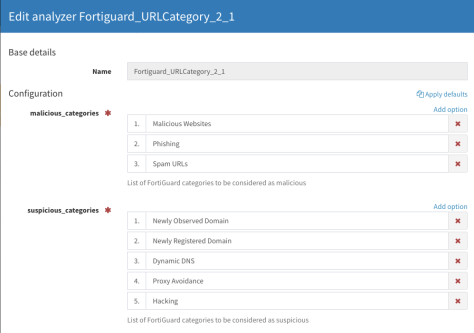
Thanks to @silrumpa, the Fortiguard_URLCategory analyzer has been updated and let you configure categories and customize theirs maliciousness level
PhishingInitiative analyzer has been flavoured with a scan facility, thanks to Rémi Pointel
Huge thanks for the awesome work that has been performed by all our contributors!
Hunterio_DomainSearch
Hunter.io is a search engine that lets you find emails associated with a given domain name. The analyzer can be used to query the API and get a list of email addresses for a specific domain name. An API key is required to use this analyzer and can be obtained by registering on the website.
Results are displayed in TheHive in the following manner:
Hunterio_DomainSearch: short and long report samples
DShield_lookup
The analyzer lets you query the famous SANS Internet Storm Center (ISC) DShield API and look up IP address reputation. No API key is needed to run this analyzer.
Results are displayed in TheHive in the following manner:
DShield_lookup: short and long report templates
Pulsedive_GetIndicator
Pulsedive is a Threat Intelligence platform that allows you to enrich your observables. The analyzer can be used to query the API and get information about a domain name, hash, IP or URL. An API key is required to use this analyzer and can be acquired by creating an account on the webiste.
Results are displayed in TheHive in the following manner:
Pulsedive_GetIndicator: short and long report templates
Manalyze joins FileInfo
Manalyze is a tool developed by Ivan Kwiatkowski (@JusticeRage) that lets you analyze, operate PE (Portable Executable) and collect useful artifacts that help the analyst in determining its maliciousness.
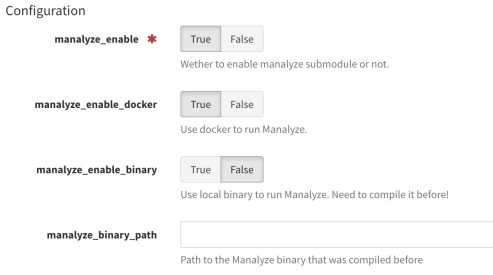
@lctrcl wrote an analyzer that triggers Manalyze on a PE file and gives the analyst a useful report. Nils Kuhnert (@3c7) from TheHive Project then included this analyzer as a submodule into our FileInfo meta-analyzer for files ; it can run Manalyze from compiled binary, or, if your Cortex server is ready for that, through the right docker. If you decide to use the compiled binary, please follow instruction from Manalyze github page.
This submodule is disabled by default. To use it, you have to set some configuration in Cortex:
FileInfo: configuration for Manalyze in Cortex
Results are displayed in TheHive in the following manner:
Manalyze submodule: short and long report templates
Fortiguard_URLCategory
This analyzer has been enhanced to let analysts choose categories considered as malicious or suspicious. It comes with a default configuration but you can setup your own by selecting the categories from the Fortiguard website.
Fortiguard_URLCategory: default configuration for categories in Cortex
Select which categories you want to be considered malicious or suspicious, and others will be considered by the analyzer as info. Analyzed observables that are not categorised by Fortigard service is considered as safe.
PhishingInitiative_Scan
PhishingInitiative has been enhanced with a new scan flavor. This let the analyst submit an URL to the webservice. An API key is needed to run this analyzer and can be obtained by registering on the website.
Results are displayed in TheHive in the following manner:
PhishingInitiative_Scan: short and long report samples
#339 : fix short and mini reports for Domaintools Whois history flavor
Get It While Supply Lasts!
Each analyzer comes with its own, pip compatible requirements.txt file. To update your Cortex analyzers to 1.13.0, run the following commands:
cd path/to/Cortex-Analyzers

git pull

for I in analyzers//requirements.txt; do sudo -H pip2 install -r $I; done && \

for I in analyzers//requirements.txt; do sudo -H pip3 install -r $I || true; done
Once done, do not forget to login to Cortex as an orgadmin and click on the Refresh Analyzers button. Refer to the online Cortex documentation for further details.
Shall you encounter any difficulty, please join our user forum, contact us on Gitter, or send us an email at support@thehive-project.org. We will be more than happy to help!
Correction: September 25, 2018 The link to the report templates was incorrect.
After a nice summer break which allowed us to rest and enjoy Real Life™ (mostly) away from keyboards, screens and constant distractions and interruptions, we set to take into account the bug reports and feedback on TheHive 3.1.0-RC1 which we released a day or so before packing up for the mountains and elsewhere.
We are pleased to announce the immediate availability of Release Candidate 2 for TheHive 3.1.0. It contains numerous bug fixes and enhancements. You can read the full change log if you have nothing better to do with your life.
Among the changes we introduce in this new RC, we would like to highlight the following:
#652: the ability to set custom fields as mandatory.
#685: the quick case search box on the top navigation bar has been restored as it is highly useful for quick lookups without having to resort to the revamped search page.
#667: use alternative authentication methods when certificate authentification is enabled and the client does not present a certificate.
We encourage you to take TheHive 3.1.0-RC2 for a spin as quickly as you can and report any bug or issue so we can address them for the final release, scheduled in a couple of weeks. Cortex 2.1.0 is still at RC1 and we should be able to make a stable release at the same date as TheHive 3.1.0.
Important Note
We would like to remind you that starting from these versions, we have two release channels: a stable one that should be used for production systems and a pre-release channel that should be used to try the release candidates such as TheHive 3.1-RC2 and Cortex 2.1-RC1, and help us iron out bugs before adding them to the stable channel. Those who love living on the bleeding edge may be tempted by running the release candidates on their production environment given all the candy and icing we added. They are at liberty of doing so but we don’t want to hear anyone one whining about an RC that broke everything and beyond.
Something does not work as expected? You have troubles installing or upgrading? Spotted new bugs? No worries, please open issues on GitHub or comment on existing ones, join our user forum, contact us on Gitter, or send us an email at support@thehive-project.org. We are here to help.
The new EmlParser analyzer which we included in Cortex-Analyzers 1.12.0 leverages the eml_parser python library written by GOVCERT-LU. It parses EML email, a MIME RFC 822 standard format, and extract all the information to help the analyst triage and investigate. EmlParser will prove very useful when analyzing observables imported from Synapse alerts.
You might notice that the analyzer’s requirements.txt installs the eml_parser library from one of our repositories. The original library dependencies contains file_magic library which brokes other analyzers that use python-magic. GOVCERT-LU is addressing this situation in their code but the installation process still considers file-magic as a mandatory library. We decided to consider it as an extra requirement.
EmlParser: short and long report samples
Get It While Supply Lasts!
To update your Cortex analyzers to 1.12.0, run the following commands:
cd path/to/Cortex-Analyzers

git pull

for I in analyzers/*/requirements.txt; do sudo -H pip2 install -r $I; done && \

for I in analyzers/*/requirements.txt; do sudo -H pip3 install -r $I || true; done
Once done, do not forget to login to Cortex as an orgadmin and click on the Refresh Analyzers button.
Shall you encounter any difficulty, please join our user forum, contact us on Gitter, or send us an email at support@thehive-project.org. We will be more than happy to help!
TheHive offers a powerful yet generic query API for all the data stored by the platform in the underlying Elasticsearch database.
Thanks to its DSL (Domain Specific Language), TheHive can handle complex search queries such as the following:
Among all the unassigned tasks, show me all those associated with cases which severity is high but also contain the highest number of observables which datatype is ‘mail’
When faced with such complex queries, TheHive translates them using its DSL and sends them over to Elasticsearch to obtain the results. TheHive’s dashboards draw their power from such querties.
And while such capability is highly desirable in our opinion, a capability that we will further leverage to add a completely revamped search module in the upcoming Cerana 1 (TheHive 3.1) release, it greatly complicates RBAC (or multi-tenancy) in TheHive.
A Sneak Peek at the New Search Module of the Upcoming Cerana 1 (TheHive 3.1) Release
Indeed, in the RBAC world, the conversion of any search queries submitted to TheHive into an Elasticsearch one is fully dependent on the user context. The user view must be kept within the boundaries of the group or groups to which they belong. Each search filter, each search parameter, must return only the results that the user can view.
The data scope needs to be clearly identified at the case level. To perform a search against task logs for example, TheHive will need to identify the parent task log, then identify the parent case and only then verify the scope. This is no small undertaking.
Similarities across cases or alerts, such as the Related Cases feature or the relationships between a given alert and existing cases, would need additional work that has not been clearly identified at this stage. But the difficulties do not stop there. Any element that has no clear relationship with case entities will have to be singled out and specific code would need to be added to limit access according to the RBAC rules. This will be clearly the case for the audit trail. Also, what should TheHive display when an analyst group is working on a case that shares observables with another one belonging to a different group? Shall it allow a limited view without any details so that groups may request from a super administrator to authorize both groups to collaborate on the investigation, something that distributed CERTs or SOCs in a large corporation may desire? Or shall it keep the data completely isolated as MSSPs which serve multiple customers with a single instance will require? We know the answer: make it configurable. But take a step back and think of the implications at the code (and security) level.
Contrary to the feature we added to Cortex 2, which allow multiple organizations to use a single Cortex instance, multi-tenancy in TheHive is a much more complex feature to implement and which is expected to have a significant impact on the platform’s performance. It will also need extreme caution to avoid blind spots that attackers (and not so innocent tenants) may exploit to circumvent scope limitations and extend their view to data they are not supposed to access. That’s why we had to delay it to Cerana 2 (TheHive 3.2), currently planned for the end of October 2018.
If you are well versed in Elasticsearch and Scala and willing to help implement this feature, please contact us at support@thehive-project.org.
Cortex, a free, open source software allows security analysts and threat hunters to analyze and enrich observables (IP addresses, hashes, domains, …) collected in the course of an investigation or received from third parties, for example through MISP, the de facto standard for threat sharing.
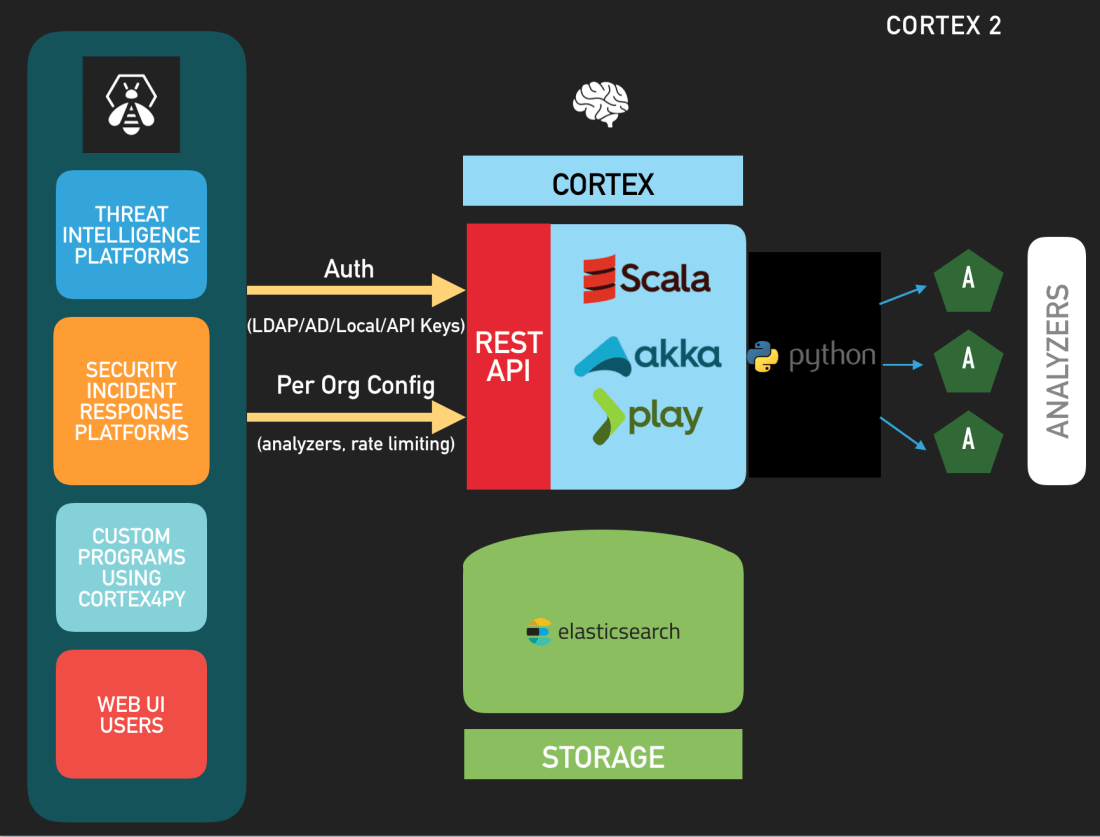
On March 29, 2018, we released Cortex 2, a major improvement over the previous version which brought, among other cool features, authentication, caching, multi-tenancy (RBAC) and rate limiting. Instead of deploying several Cortex 1 instances behind reverse proxies which would implement authentification, administrators can deploy a single Cortex 2, create multiple organizations and serve the needs of various information security populations while enjoying extra features.
On May 31, 2018, we published a brand new API guide so that developers can take advantage of the powerful REST API of the product. Sadly, Cortex4py, the FOSS Python library we provide to interact with the API was not compatible with Cortex 2. Until today.
Thanks to the hard work of our dear Nabil Adouani, we are happy to announce the immediate availability of Cortex4py 2.0.0, a complete rewrite of the library in Python 3. Cortex4py 2.0.0 is fully compatible with Cortex 2. However, it doesn’t work with Cortex 1.
While TheHive, the highly popular free and open source Security Incident Response Platform (SIRP) we develop has native support for many Cortex 2 instances, Python developers can leverage Cortex4py to interact with Cortex 2, manage organizations, users, analyzer configurations and analyze observables at scale from alternative SIRPs, SIEMs or custom scripts thanks to the 83 analyzers Cortex 2 has as of June 18, 2018.
Cortex 2: there is more than one way to interact with it
Use It
To install Cortex4py, use PIP3:
$ sudo -H pip3 install cortex4py
If you are using Python on a Windows operating system, please forgo the sudo command.
Usage
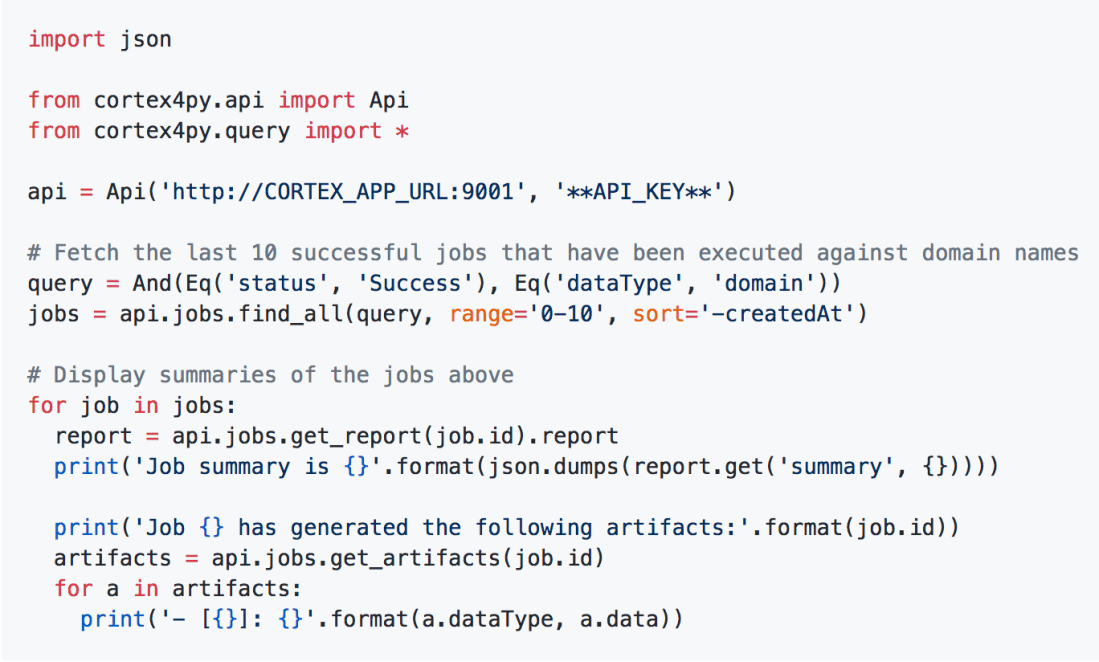
Cortex4py 2 comes with a usage guide which includes many examples. For example, if you want to fetch the last 10 successful jobs that have been executed against domain names and display the result summaries of those 10 jobs you could write something like:
Sample Python3 code to retrieve Cortex analyzer results
Migrating from Cortex4py 1
If you have already written scripts using Cortex4py 1.x (for Cortex 1), we tried to keep the already available methods. However, we recommend you adapt your code to leverage the new Cortex4py 2 classes and methods as soon as feasible. Moreover, the existing scripts must be updated to support authentication if you intend to use them with Cortex 2. Please read the Cortex4py 2 usage guide for more information.
Support
Cortex 2.0.0 is brand new software. As such, it might contain bugs and limitations. If you find any or encounter problems, please ask on our user forum, contact us on Gitter, or send us an email at support@thehive-project.org. We are here to help.












 TheHive Project