The new EmlParser analyzer which we included in Cortex-Analyzers 1.12.0 leverages the eml_parser python library written by GOVCERT-LU. It parses EML email, a MIME RFC 822 standard format, and extract all the information to help the analyst triage and investigate. EmlParser will prove very useful when analyzing observables imported from Synapse alerts.
You might notice that the analyzer’s requirements.txt installs the eml_parser library from one of our repositories. The original library dependencies contains file_magic library which brokes other analyzers that use python-magic. GOVCERT-LU is addressing this situation in their code but the installation process still considers file-magic as a mandatory library. We decided to consider it as an extra requirement.
EmlParser: short and long report samples
Get It While Supply Lasts!
To update your Cortex analyzers to 1.12.0, run the following commands:
cd path/to/Cortex-Analyzers

git pull

for I in analyzers/*/requirements.txt; do sudo -H pip2 install -r $I; done && \

for I in analyzers/*/requirements.txt; do sudo -H pip3 install -r $I || true; done
Once done, do not forget to login to Cortex as an orgadmin and click on the Refresh Analyzers button.
Shall you encounter any difficulty, please join our user forum, contact us on Gitter, or send us an email at support@thehive-project.org. We will be more than happy to help!
TheHive offers a powerful yet generic query API for all the data stored by the platform in the underlying Elasticsearch database.
Thanks to its DSL (Domain Specific Language), TheHive can handle complex search queries such as the following:
Among all the unassigned tasks, show me all those associated with cases which severity is high but also contain the highest number of observables which datatype is ‘mail’
When faced with such complex queries, TheHive translates them using its DSL and sends them over to Elasticsearch to obtain the results. TheHive’s dashboards draw their power from such querties.
And while such capability is highly desirable in our opinion, a capability that we will further leverage to add a completely revamped search module in the upcoming Cerana 1 (TheHive 3.1) release, it greatly complicates RBAC (or multi-tenancy) in TheHive.
A Sneak Peek at the New Search Module of the Upcoming Cerana 1 (TheHive 3.1) Release
Indeed, in the RBAC world, the conversion of any search queries submitted to TheHive into an Elasticsearch one is fully dependent on the user context. The user view must be kept within the boundaries of the group or groups to which they belong. Each search filter, each search parameter, must return only the results that the user can view.
The data scope needs to be clearly identified at the case level. To perform a search against task logs for example, TheHive will need to identify the parent task log, then identify the parent case and only then verify the scope. This is no small undertaking.
Similarities across cases or alerts, such as the Related Cases feature or the relationships between a given alert and existing cases, would need additional work that has not been clearly identified at this stage. But the difficulties do not stop there. Any element that has no clear relationship with case entities will have to be singled out and specific code would need to be added to limit access according to the RBAC rules. This will be clearly the case for the audit trail. Also, what should TheHive display when an analyst group is working on a case that shares observables with another one belonging to a different group? Shall it allow a limited view without any details so that groups may request from a super administrator to authorize both groups to collaborate on the investigation, something that distributed CERTs or SOCs in a large corporation may desire? Or shall it keep the data completely isolated as MSSPs which serve multiple customers with a single instance will require? We know the answer: make it configurable. But take a step back and think of the implications at the code (and security) level.
Contrary to the feature we added to Cortex 2, which allow multiple organizations to use a single Cortex instance, multi-tenancy in TheHive is a much more complex feature to implement and which is expected to have a significant impact on the platform’s performance. It will also need extreme caution to avoid blind spots that attackers (and not so innocent tenants) may exploit to circumvent scope limitations and extend their view to data they are not supposed to access. That’s why we had to delay it to Cerana 2 (TheHive 3.2), currently planned for the end of October 2018.
If you are well versed in Elasticsearch and Scala and willing to help implement this feature, please contact us at support@thehive-project.org.
On June 6, 2018, we released Cortex-Analyzers 1.10, which contained 11 new analyzers, bringing the total to 83 programs. You read that correctly: 83 ways to assess and gain insight on observables collected during the course of an investigation or while performing threat intelligence thanks to Cortex, our free & open source analysis engine. One day after, we published version 1.10.1 which fixed the name of the Anomali STAXX reports for TheHive. Since then we uncovered a few additional issues which version 1.10.2 corrects:
TheHive Project Chefs are pleased to announce the immediate availability of Cortex-Analyzers 1.10.1. To install this new release and benefit from 11 new analyzers and some fixes:
$ cd /path/to/Cortex-Analyzers
$ sudo git pull
$ for I in analyzers/*/requirements.txt; do sudo -H pip2 install -r $I; done && \
for I in analyzers/*/requirements.txt; do sudo -H pip3 install -r $I || true; done
After running these commands, read the Analyzer Requirements Guide, log into the Cortex 2 Web UI as an orgAdmin, click on the Refresh Analyzers button in the Cortex Web UI, configure the new analyzers and enjoy!
Cortex: click on Refresh Analyzers after updating to the latest Cortex-analyzers version
This analyzer comes in only one flavor. You need a valid FireEye iSIGHT Threat Intelligence subscription to use the analyzer. Retrieve the API key associated with your account and provide it as a value to the key parameter. Obtain the password associated with the API key and provide it as a value to the pwd parameter.
TheHive: FireEye iSIGHT — Long Report Sample (courtesy of Andrea Garavaglia)
GreyNoise
Determine whether an IP has known scanning activity using GreyNoise.
This analyzer comes in only one flavor. It can be used out of the box without configuration. However, if you make many requests, you need to obtain an API key. Please contact GreyNoise to ask for one. Once you get the API key, provide it as the value of the key parameter.
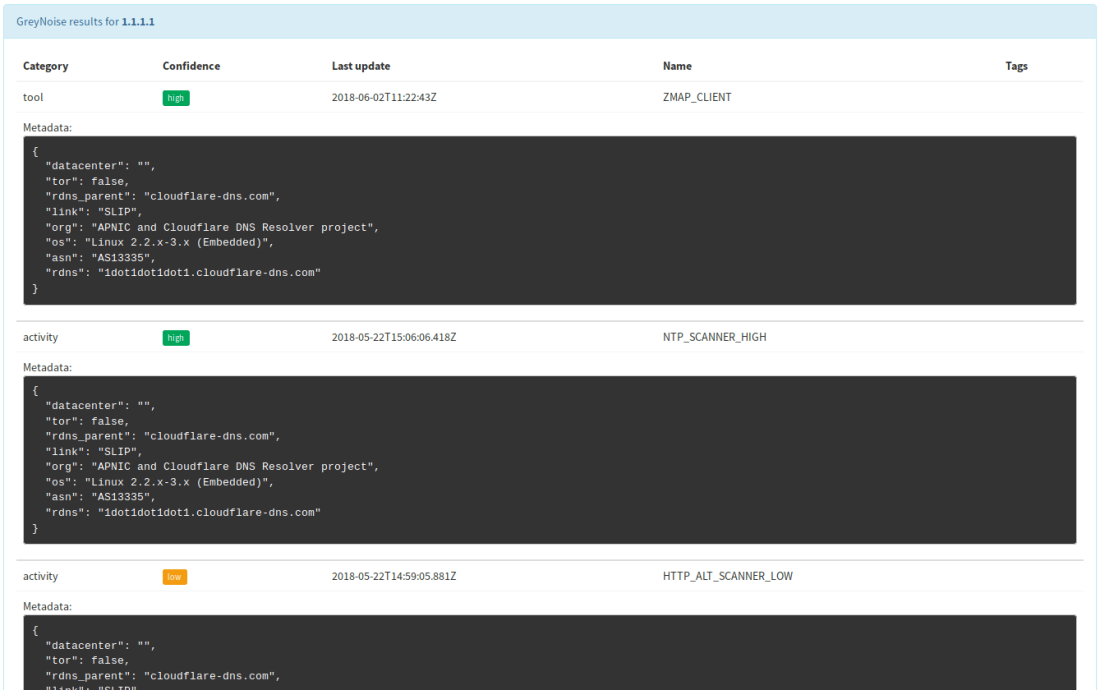
TheHive: GreyNoise — Short and Long Report Samples
IBM X-Force
Query domains, IPs, hashes and URLs against IBM X-Force Threat Intelligence sharing platform.
This analyzer comes in only one flavor. Access to IBM X-Force Threat Exchange requires an IBM ID. Once you have access to the service, supply the URL of the service as value for the url parameter, the API key associated with your account as value for the key parameter and the associated password as the value of the pwd parameter.
TheHive: IBM X-Force — Long Report Sample (courtesy of Andrea Garavaglia)
Malwares
Query Malwares.com and get reports on files, hashes, domain names and IP addresses.
The analyzer comes in two flavors:
– Malwares_pDNS_GetReport: get the latest Malwares report for a file,
hash, domain or an IP address.
– Malwares_pDNS_Scan: scan a file or URL.
You need to sign up for a Malwares.com account. An API key to use the service’s API should be associated with your account. Supply it as the value of the key parameter.
TheHive: Malwares_GetReport — Short and Long Report Samples
MnemonicPDNS
Query IP addresses and domain names against Mnemonic Passive DNS service.
This analyzer comes in two flavors:
Mnemonic_pDNS_Public: query Mnemonic’s public service.
When using the public service, the analyzer can be used out of the box with no further configuration. When using the closed service, you need to contact Mnemonic to get an API key which you’ll need to supply as the value of the key parameter.
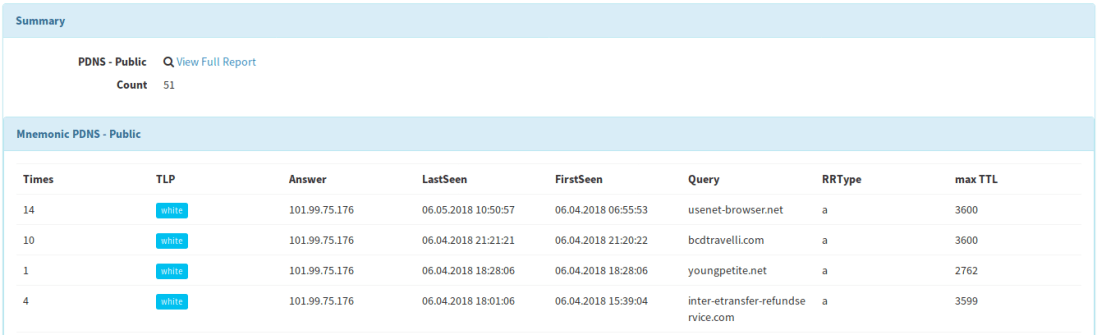
TheHive: Mnemonic PDNS — Short and Long Report Samples
StaxxSearch
Fetch observable details from an Anomali STAXX instance.
This analyzer comes in only one flavor. You need to install an Anomali STAXX instance or to have access to one to use the analyzer. Supply the following parameters to the analyzer in order to use it:
auth_url: URL of the authentication endpoint.
query_url: URL of the intelligence endpoint.
username: the STAXX user name.
password: the STAXX password.
cert_check: boolean indicating whether the certificate of the endpoint must be checked or not.
cert_path: path to the CA on the system to validate the endpoint’s certificate if cert_check is true.
TheHive: StaxxSearch — Short and Long Report Samples (courtesy of Robert Nixon)
StopForumSpam
Query StopForumSpam to check if an IP or email address is a known spammer.
You need to define the thresholds above which the analyzed observable should be marked as suspicious or malicious.
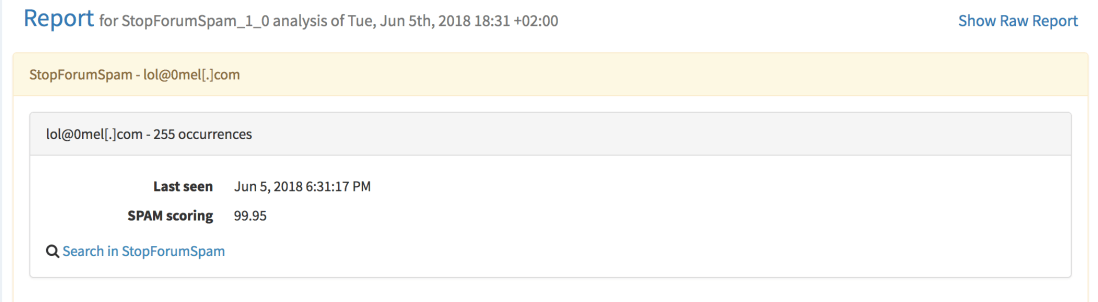
TheHive: StopForumSpam — Short and Long Report Samples
ThreatCrowd
Look up domains, mail and IP addresses on [ThreatCrowd(https://www.threatcrowd.org/), a service powered by AlienVault.
This analyzer comes in only one flavor. No configuration is needed. It can be used out of the box.
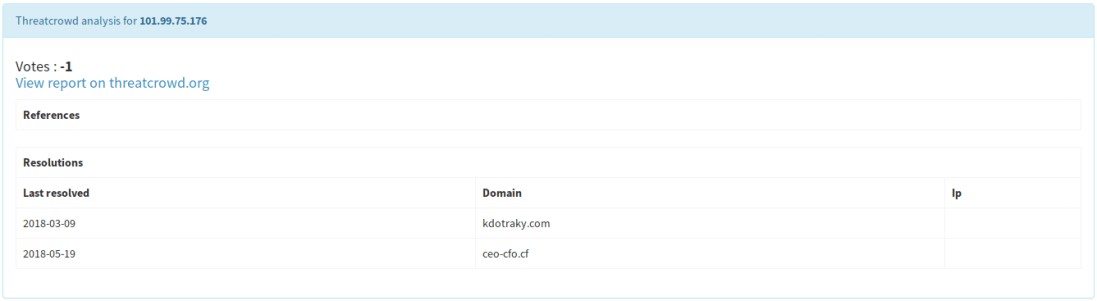
TheHive: Threatcrowd — Short and Long Report Samples
Unshortenlink
Follow redirects of shortened URLs to reveal the real ones.
This analyzer comes in only one flavor.
No configuration is required. It can be used out of the box.
Warning: using this analyzer without extra caution might lead to unexpected consequences. For example, if the URL you are seeking to unshorten is an attacker-controlled one, you may end up leaving undesired traces in the threat actor’s infrastructure logs. The TLP values Cortex allows you to configure to prevent the use of an analyzer if the TLP associated with an observable is above the authorized level won’t be of much help since Unshortenlink have to access the shortened URL. Please do not activate this analyzer unless you (and your fellow analysts) know what they are doing.
TheHive: Unshortenlink — Short and Long Report Samples
Additional Enhancements
YARA analyzer had a bug which was fixed in version 1.9.7 of the Cortex-analyzers repository. If you install 1.10, you’ll obviously benefit from the fix 😉
A permission problem that prevented using the Cuckoo Sandbox analyzer was corrected (thanks Felix Bauer!)
Correction: June 6, 2018 An earlier version of this post mentioned that GreyNoise needs an API key. That’s only necessary if a certain level of requests are made. Also, to configure analyzers, you need to be orgAdmin.
Rejoice DFIR fighters! Your favorite Security Incident Response Platform has just gotten better. TheHive 3.0.10 (codename Cerana 0.10) is just out of the oven. Thomas and Nabil, as the true code Chefs they are, have fixed a number of issues and added a few enhancements in this release. Read on, update and defend your constituency!
Fixes
#446: keep observable reports when performing a case merge operation
#592: fix the error message when an observable is created with invalid data
#579: rotate application.log to keep it from becoming huge
#564: when submitting a job to Cortex, send the case ID as well
#563: poll the status of connectors (MISP, Cortex) every minute and update the UX display accordingly
#548: sort related cases by the amount of shared observables
#546: display start and end times for closed tasks
Support
Something does not work as expected? You have troubles installing or upgrading? You have spotted new bugs? No worries, please join our user forum, contact us on Gitter, or send us an email at support@thehive-project.org. We are here to help.
We are proud to announce the immediate availability of Cerana 0.9 (TheHive 3.0.9) and Cortex 2.0.4. These hotfix releases address a number of issues and we encourage you to update your current installation at your earliest opportunity. For your comfort and sanity. Seriously.
We also took this opportunity to update Cortex analyzers to fix issues with CIRCL Passive SSL, Hybrid Analysis, and the Joe Sandbox URL Analysis template. Moreover, we have updated the cortexutils library to set the taxonomy level to info if it is invalid. To upgrade cortexutils to 1.2.4:
Note: the Bluecoat analyzer was removed since it does not comply with the updated Terms of Service of Symantec Web Pulse SiteReview. Symantec does no longer permit programmatic querying of the service.
Fixes in Cerana 0.9
#527: display long reports when the analyst clicks on the corresponding short reports. Meh!
#541: make the drop-down menu for case templates scroll when there is a truckload of them.
Something does not work as expected? You have troubles installing or upgrading? Spotted new bugs? No worries, please open issues on GitHub or comment on existing ones, join our user forum, contact us on Gitter, or send us an email at support@thehive-project.org. We are here to help.
Correction: April 14, 2018 An earlier version of this post did not mention that the Bluecoat analyzer was removed in the latest Cortex Analyzers repository release.
There’s a new version of your ultimate observable analysis engine in town : Cortex 2.0.3 is out!
Cortex 2.0.3 contains a few important enhancements over its predecessor and fixes a number bugs as described in the full changelog summarised below. So get it while it’s still hot out of the digital oven and let us know how tasty it is.
Source : Quickmeme.com
Implemented Enhancements
#81: reflect proxy changes in the global configuration at the analyzer level
#82: display invalid analyzers and let orgadmins delete them
#85: allow orgadmins to override the default global report cache.job period per analyzer through the Web UI
#75: a version upgrade of an analyzer makes all analyzers invisible in TheHive
#80: fix the analyzer configuration dialog to allow orgadmins to override the auto artifact extraction at the analyzer level
#83: hit Nabil on the head pretty hard until the analyzer refresh UI button works (well now it does so you can stop hitting poor Nabil’s head).
Analyzer Updates
We took the opportunity of a new release to make a few updates to the public analyzers. Cortex-Analyzers 1.9.3 contains the following changes:
Remove the Bluecoat analyzer to comply with the new ‘no scrapping’ ToS imposed by Symantec
Fix the default configuration of the Cymon Check IP analyzer
Fix the View all VT long template
Make the MISP Warning Lists Analyzer ignore case sensitivity when searching for hashes
Restrict the Abuse Finder and FileInfo analyzer dependencies to Python 2.7
You can read the full changelog if you like but if you want to enjoy the goods right away, git pull is your friend.
Support
Something does not work as expected? You have troubles installing or upgrading? Spotted new bugs? No worries, please open issues on GitHub or comment on existing ones, join our user forum, contact us on Gitter, or send us an email at support@thehive-project.org. We are here to help.
After announcing Cortex 2.0.0 and TheHive 3.0.7, the first version of your favorite SIRP that is (supposedly) compatible with the brand-new version of Cortex, last week, we thought it was time to relax and enjoy the upcoming, long Easter weekend, the sunny sky of Paris (if you can pierce the veil of the Forever Grey Cloud™ that is hanging over the city of lights), and great jazz music. Heck, I even tweeted about it … only to be proven wrong by Life (and Murphy).
We literally field tested Cortex 2 for 3 weeks, we squashed bugs here and there, until almost the very last minute before the release. And yet, our QA needs to be improved by leaps and bounds as we had to release Cortex 2.0.1 one day after unveiling 2.0.0 to correct some additional bugs. And then some members of the core team and of our growing user community took it for a spin. And all hell broke lose. Well, almost 🙂
Session collisions (when TheHive and Cortex 2 are used on the same machine), analyzer malfunctions, connectivity problems … issues that were not identified during the testing phase, even in a production environment, where everything worked as expected. And we call this ‘Computer Science’. Right, right…
So we worked hard, took out our Code Hammer (it’s like Thor’s but cyber) and blasted away all the bugs that we found out or that were reported to us (arigato gozaimasu!) and we are happy to announce the immediate availability of Cortex 2.0.2, TheHive 3.0.8, Cortexutils 1.2.3 and Cortex-Analyzers 1.9.2.
TL;DR Install or upgrade Cortex 2.0.2, update Cortexutils, git pull the Cortex-analyzers repo to get the latest version of the repository, upgrade to TheHive 3.0.8, follow the Quick Start Guide and have a drink.
If you have time (which is admittedly quite scarce nowadays), please read on the changelogs:
As stated in the previous post, we will release a new version of Cortex4py in order to make it compatible with Cortex 2, continue the work we started with our MISP Project friends to support MISP attribute enrichment through Cortex 2 (MISP currently only supports enrichment using Cortex 1), and perform a long-overdue overhaul of our documentation. We will also release a brand new version of TheHive4py.
Last but not least, we’ll take a hard look at ourselves and our QA. You expect us from us high quality and we hold ourselves to high standards. And we will deliver.
Support
Something does not work as expected? You have troubles installing or upgrading? Spotted new bugs? No worries, please open issues on GitHub or comment on existing ones, join our user forum, contact us on Gitter, or send us an email at support@thehive-project.org. We are here to help.
TheHive Project’s Master Chefs are extremely happy to share, for free their latest recipe with the Cyber Threat Intelligence, Digital Forensics and Incident Response communities: Cortex 2.
As its predecessor, Cortex 2 is published under an AGPL v3 license and it introduces many important features that we brushed upon in a Dec 2017 post.
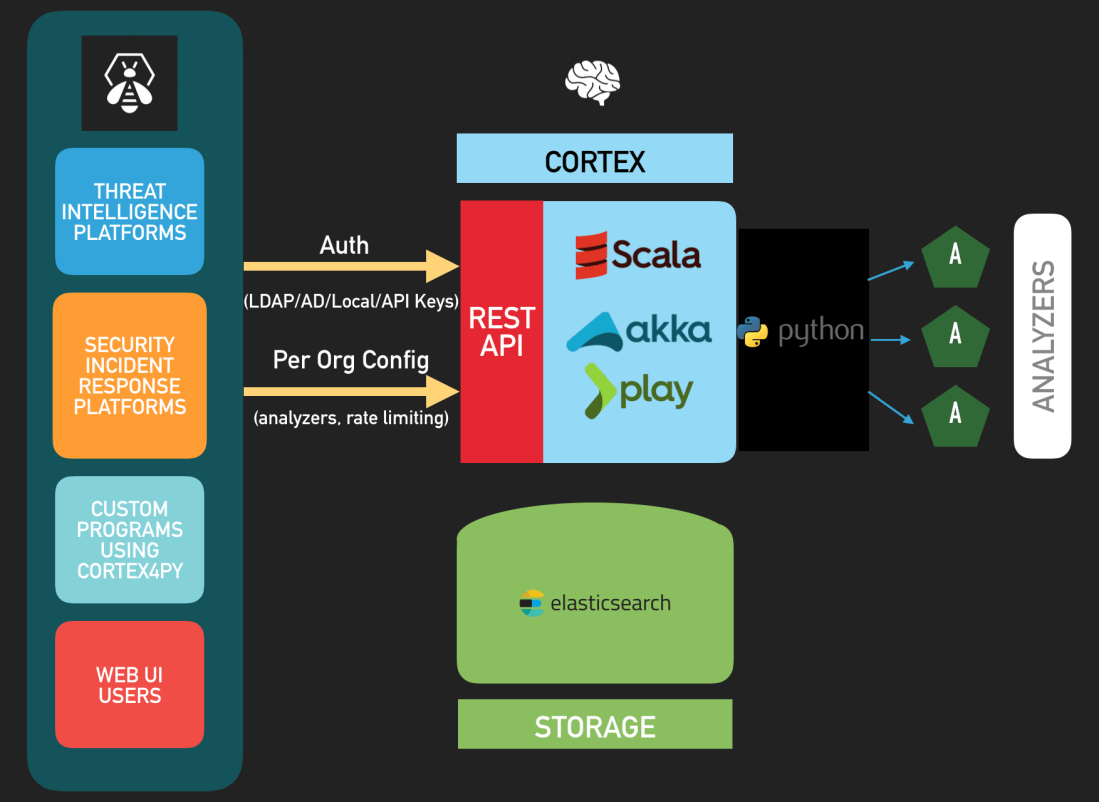
Cortex 2 — Architecture
Update: Cortex 2.0.1 was released since this post went live. It corrects a few bugs we uncovered in 2.0.0 as described in the changelog. Please install Cortex 2.0.1 instead of 2.0.0.
Authentication
Cortex 2 supports all the authentication methods that TheHive supports: LDAP, Active Directory, local accounts, API Keys, and X.509 SSO.
To connect your favorite Security Incident Response Platform with Cortex 2, you will need to update TheHive to Cerana 0.7 (TheHive 3.0.7) which was released today as well. This version fixes a regression pertaining to case templates introduced by Cerana 0.6 and is the first version to fully support Cortex 2’s API changes and authentication.
To make TheHive 3.0.7 analyze observables at scale through Cortex 2, you have to create an account on Cortex 2 with the read and analyze roles (see the next section) and generate the associated API Key. Next, feed the key in TheHive’s /etc/thehive/application.confas described in the documentationet voilà !
TheHive 3.0.7 remains compatible with Cortex 1 and you can connect it to a mixed set of Cortex 1 and/or Cortex 2 instances with no issues.
Organizations, Analyzers and Rate Limiting
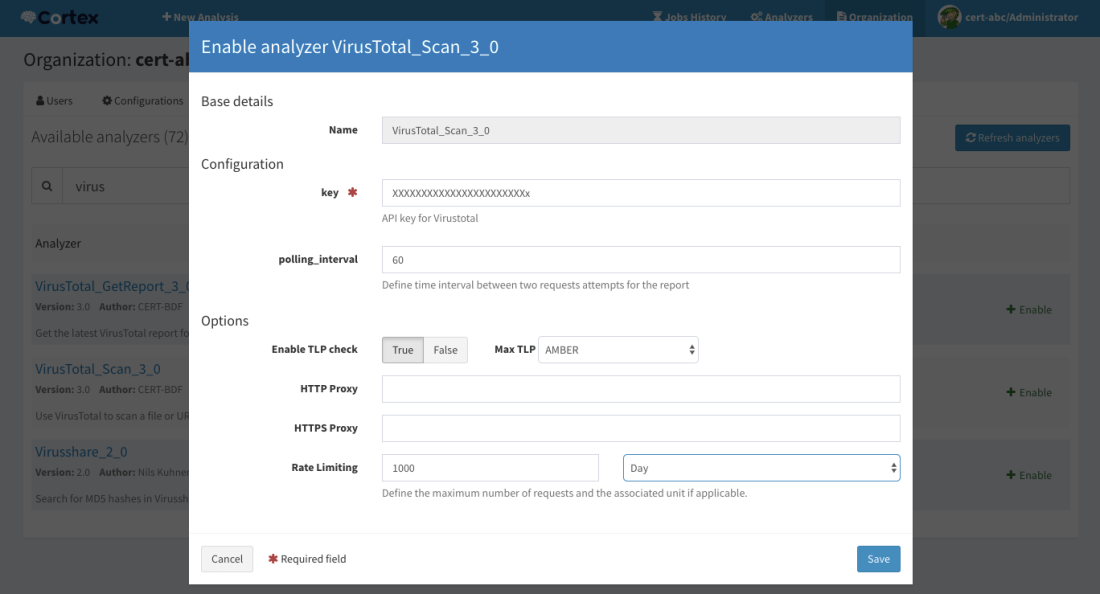
Cortex 2 introduces multi-tenancy through organizations and each organization can have its own set of users, with different roles, its own set of analyzers and, if necessary, rate limits that will prevent analysts from burning quotas.
Multi-tenancy has several interesting use cases. For instance, if you are the CSIRT or CERT of a large multinational organization with several regional teams, you can create an organization for each region within your constituency and enable the analyzers that they may need to use. Let’s assume that you bought a VirusTotal subscription that limits you to 5000 requests per month. You can configure the corresponding analyzers to give each region a fair share of that quota and keeping some requests for your own use.
In case you are a commercial CSIRT or an MSSP, you could do the same for your customers by installing only one Cortex 2 instance and creating an organization for each customer.
Configure an analyzer graphically and impose rate limits if necessary
User Roles
By default, Cortex 2 is shipped with the default cortex organization which sole purpose is to create other ones and manage the users within each organization and their associated powers. The cortex organization hosts all users with the superAdmin role and it cannot be used to configure or run analyzers.
As described in the new Quick Start Guide, after installing Cortex 2, updating its database and creating the first user who will have super admin powers, you’ll have to create your first organization and at least one user within that organization with orgAdmin rights.
Create an organization
You can then log out and log in using the orgAdmin account to create further users within that organization, enable and configure analyzers etc. Please note that no analyzer is enabled by default and you need at least v 1.9.0 of the cortex-analyzers repository. To update your set of analyzers to 1.9.0, please run git pull.
Manage users within an organization
Besides the superAdmin and orgAdmin roles, Cortex 2 introduces the read role which allows users to access analyzer reports and read them but not execute analyzers. For that, users need the analyze role (which implies the read role). orgAdmin users can also run analyzers. superAdmin users are limited to the default cortex organization. While they can create organizations and manage users within them, they cannot access analyzer configurations such as confidential API keys or job reports.
Job reports
Report Persistence and Caching
Cortex 2 relies on Elasticsearch 5.x to store many configuration items but also all the analyzer reports that have been generated. Unlike its predecessor, you won’t lose your existing reports should you need to restart the service or the host it is running on.
Cortex 2 also introduces report caching. By default the cache.job parameter is set to 10 minutes in /etc/cortex/application.conf. That means that if an analysis on a given observable with a defined TLP is requested and that a report has been previously generated in the last 10 minutes, Cortex 2 will serve that report instead of running a new analysis. This feature can help prevent soliciting analyzers, particularly those which require a subscription or have quotas, when there is no need to do so. Please note that this parameter is global to all the analyzers and all the organizations that are configured in the Cortex 2 instance. We do have plans to make it more granular in future versions.
Migrating from Cortex 1
If you are migrating from Cortex 1.x, we recommend that you:
Save the configuration of your analyzers (which ones are enabled and what their configuration items are, such as users/passwords or API keys).
Install Cortex 2.
Edit /etc/cortex/application.conf to add the secret key as shown in Step 1 of the Quick Start Guide and point Cortex to the location of the analyzers.
Follow the remaining steps of the Quick Start Guide to enable the analyzers you need and reinject their configuration.
What’s Next?
In the upcoming weeks, we will release a new version of Cortex4py in order to make it compatible with Cortex 2, continue the work we started with our MISP Project friends to support MISP attribute enrichment through Cortex 2 (MISP currently only supports enrichment using Cortex 1), and perform a long-overdue overhaul of our documentation.
Feeling Generous? Donate!
As you know, we are a FOSS project and donations are always welcome to make our products even better for the community.
All donations go to Creative Source, the non-profit organization we have created, and we will use them to improve TheHive, Cortex & Hippocampe but also to develop (even better) integrations with other FOSS solutions such as MISP.
Creative Source can also provide so-called professional, entreprise-grade support, help integrating the products, train your analysts before they drain or assist you in specific areas such as developing in-house analyzers for Cortex.
Support
Something does not work as expected? You have troubles installing or upgrading? No worries, please join our user forum, contact us on Gitter, or send us an email at support@thehive-project.org. We are here to help.
Correction: March 30, 2018 Instructions on how to update the cortex-analyzers have been added. Also, Cortex 2.0.1 was released to correct a few bugs in the previous version since this post went live.
Two months ago, TheHive Chefs announced that Cortex passed the 30 analyzers mark as they added HybridAnalysis, EmergingThreats and Shodan, all three contributed by our continuously growing user community.
It’s 2018 already and to wish you a very happy new DFIR year, Nils and Jérôme got out of their way and reviewed many outstanding pull requests for new analyzers and fixed several bugs. Kudos bees!
The latest release of Cortex-Analyzers, v 1.8.0, contains not one, not two, not even three but ten new analyzers! Isn’t that good omen for a fresh new year fighting cybercrime?
The ten new analyzers, described below, are:
Bluecoat: contributed by our longtime friends from CERT La Poste.
MISP WarningLists: Nils strikes again (watch out Jérôme! the youngster is gonna leave you way behind ;).
Onyphe: contributed by Pierre Baudry and Adrien Barchapt. It comes in five different flavors.
PayloadSecurity: submitted by Emmanuel Torquato. The analyzer comes in two flavors.
Robtex: added by… Nils again! It has three flavors.
SinkDB: guess who developed that one? Wow, impressive! How did you figure it out? Yes, Nils!
Tor Blutmagie: contributed by Marc-André Doll.
Tor Project: also contributed by Marc-André Doll.
We would like to wholeheartedly thank all the individuals and teams listed above for their invaluable contributions. So a big merci for your work!
Bluecoat
The Bluecoat analyzer queries the Symantec – previously known as Bluecoat – WebPulse site review API for the currently assigned site category of URLs or domains. The analyzer needs no further configuration. When executed through TheHive, the analyzer produces short and long reports as shown below:
TheHive: Bluecoat 1.0 Analyzer – Short and Long Report Samples
C1fApp
The C1fApp analyzer queries the C1fApp service, an Open Source threat feed aggregation application, using the API for IP addresses, domains and URL.
Before using the analyzer, you need to create an account on the C1fApp website and get the associated API key which you’ll need to provide as a value for the key parameter of the analyzer config section of /etc/cortex/application.conf as shown below. Once you’ve done so, you’ll need to restart Cortex.
 C1fApp {
     service="query"
     key="<insert API key here>"
     url="https://www.c1fapp.com/cifapp/api/"
 }
When launched using TheHive, the analyzer produces short and long reports such as the following:
TheHive: C1fApp 1.0 Analyzer – Short and Long Report Samples
Censys.io
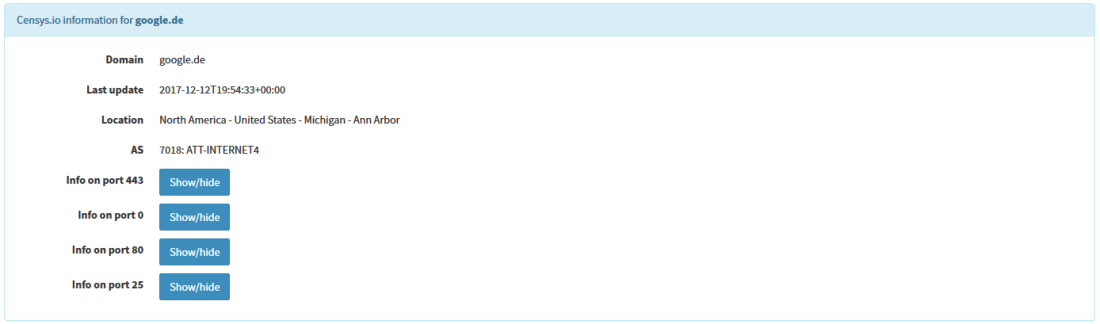
Censys.io continually monitors every reachable server and device on the Internet, so you can search for them and analyze them in real time. Using the corresponding analyzer, information about a website certificate can be obtained using the associated IP, domain or certificate hash.
In order to use this analyzer, an account at censys.io has to be registered and the API ID and secret need to be added to the Cortex configuration file:
Censys {
    uid="<Your ID here>"
    key="<Your secret here>"
}
Once done, you’ll have to restart Cortex. When ran from TheHive, the analyzer produces short and long reports such as the following:
TheHive: Censys 1.0 Analyzer – Short and Long Report Samples
Details about the ports can be obtained with a click on the specific button.
MISP WarningLists
In order to detect false positives soon enough in the analysis process, our good friends at the MISP Project published their so called warning lists which contain lists of well-known services or indicators.
This analyzer queries observables against the MISP warning lists. Observables can be an IP address, a hash, a domain, a FQDN or a URL.
To iterate through all the warning lists, the repository itself must be available on the Cortex instance:
We highly recommend you create a cron entry or use a similar mechanism to keep the lists fresh. While the default path for the lists is the misp-warninglists subdirectory it can be adjusted in the configuration file:
When called from TheHive, the analyzer produces short and long reports as shown below:
TheHive: MISP WarningLists 1.0 Analyzer – Short and Long Report Samples
As you can see, The MISP WarningLists analyzer checks if the repository is up-to-date 😉
Onyphe
The Onyphe analyzer leverages Onyphe’s API to query the service, which provides data about the IP address space and the publicly available information in a single, handy location.
The service comes in five flavors:
Onyphe_Forward: retrieves forward DNS lookup information we have for the given IPv4/IPv6 address with history of changes.
Onyphe_Geolocate: retrieves geolocation information for the given IPv4/IPv6 address.
Onyphe_Ports: retrieves synscan information we have for the given IPv4/IPv6 address with history of changes.
Onyphe_Reverse: retrieves reverse DNS lookup information we have for the given IPv4/IPv6 address with history of changes.
Onyphe_Threats: retrieves Onyphe threats information on anIPv4/IPv6 address with associated history.
To use the analyzer, you need to create an account on the Onyphe website. Provide the API key associated with your account as a value for the key parameter and add the lines below to the config section of /etc/cortex/application.conf then restart the cortex service.
Onyphe {
    key = "<insert API key here>"
}
When ran from TheHive, the analyzer produces short and long reports such as the following:
TheHive: Onyphe 1.0 Analyzer – Short and Long Report Samples
PayloadSecurity
The PayloadSecurity analyzer let you submit observables to a on-premises PayloadSecurity instance. To use it, you need to create an account on the PayloadSecurity service. Provide the API/secret pair as values for the key and secretparameters, collect the URL and environmentid of the service, and add the lines below to the config section of /etc/cortex/application.conf. Then restart the cortex service.
When launched through TheHive, the analyzer produces short and long reports such as the following:
TheHive: PayloadSecurity 1.0 Analyzer – Short and Long Report Samples
Robtex
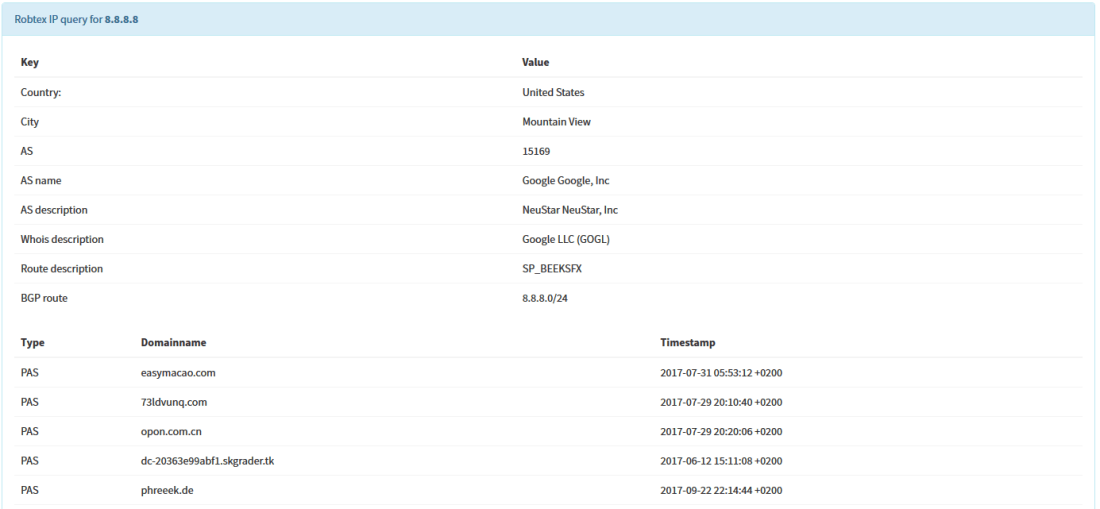
When collecting data about IPs, domains and FQDNs, Robtex can be a good source of information. According to their statistics, they logged over 20 billion DNS resource records. The corresponding analyzer comes in three flavors:
Robtex_Forward_PDNS_Query: checks domains/FQDNs using the Robtex Passive DNS API
Robtex_IP_Query: checks IPs using the Robtex IP API
Robtex_Reverse_PDNS_Query: checks IPs using the Robtex reverse Passive DNS API
The analyzer uses the free Robtex API which needs no subsequent configuration. However, the free API limits the rate and amount of returned data.
When executed using TheHive, the analyzer produces short and long reports such as the following:
TheHive: Robtex 1.0 Analyzer – Short and Long Report Samples
SinkDB
SinkDB is a private service provided by abuse.ch which collects sinkholed IPs. Access to the service is allowed to trusted partners only. If you think you qualify, you can request an access using the form available on the SinkDB website. This is most likely only granted to certain CSIRTs and CERTs and not to individuals.
Provide the API key associated with your account as a value for the key parameter and add the lines below to the config section of /etc/cortex/application.conf then restart the cortex service.
SinkDB {
    key="<insert API key here>"
}
When ran from TheHive, the analyzer produces short and long reports such as the following:
TheHive: SinkDB 1.0 Analyzer – Short and Long Report Samples
Tor Blutmagie
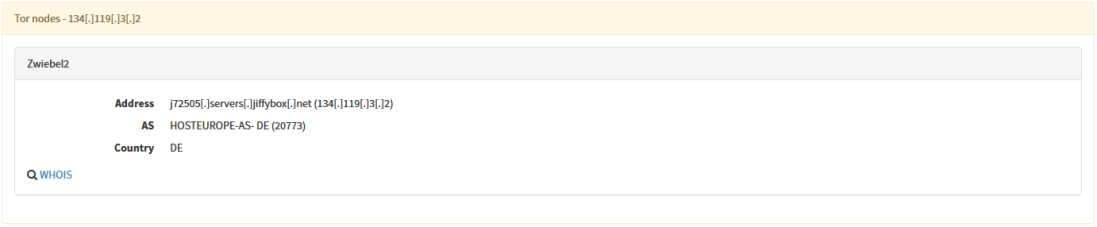
Tor Blutmagie analyzer extracts data from torstatus.blutmagie.de and checks if an observable is linked to a Tor node. The observable can be an IP address, a FQDN or a domain.
In order to check if an IP, domain or FQDN is a Tor exit node, this analyzer queries the Tor status service at Blutmagie.de. The analyzer uses a caching mechanism in order to save some time when doing multiple queries, so the configuration includes parameters for the cache directory and the caching duration.
Provide the lines below to the config section of /etc/cortex/application.conf then restart the cortex service.
When ran from TheHive, the analyzer produces short and long reports such as the following:
TheHive: Tor Blutmagie 1.0 Analyzer – Short and Long Report Samples
Tor Project
Tor Project analyzer has also been contributed by Marc-André Doll. As the above analyzer, this one checks if an observable is a Tor exit node. This time, however, the source of information is the official Tor network status which can be queried for IP addresses only.
The accepts another parameter, ttl, which is the threshold in seconds for exit nodes before they get discarded. Provide the lines below to the config section of /etc/cortex/application.conf then restart the cortex service.
Shall you encounter any difficulty, please join our user forum, contact us on Gitter, or send us an email at support@thehive-project.org. We will be more than happy to help!
Correction: January 12, 2018
The post was updated to add the full name of the author of the PayloadSecurity analyzer.































 TheHive Project