We are proud to announce the immediate availability of Cerana 0.9 (TheHive 3.0.9) and Cortex 2.0.4. These hotfix releases address a number of issues and we encourage you to update your current installation at your earliest opportunity. For your comfort and sanity. Seriously.
We also took this opportunity to update Cortex analyzers to fix issues with CIRCL Passive SSL, Hybrid Analysis, and the Joe Sandbox URL Analysis template. Moreover, we have updated the cortexutils library to set the taxonomy level to info if it is invalid. To upgrade cortexutils to 1.2.4:
Note: the Bluecoat analyzer was removed since it does not comply with the updated Terms of Service of Symantec Web Pulse SiteReview. Symantec does no longer permit programmatic querying of the service.
Fixes in Cerana 0.9
#527: display long reports when the analyst clicks on the corresponding short reports. Meh!
#541: make the drop-down menu for case templates scroll when there is a truckload of them.
Something does not work as expected? You have troubles installing or upgrading? Spotted new bugs? No worries, please open issues on GitHub or comment on existing ones, join our user forum, contact us on Gitter, or send us an email at support@thehive-project.org. We are here to help.
Correction: April 14, 2018 An earlier version of this post did not mention that the Bluecoat analyzer was removed in the latest Cortex Analyzers repository release.
Two months ago, TheHive Chefs announced that Cortex passed the 30 analyzers mark as they added HybridAnalysis, EmergingThreats and Shodan, all three contributed by our continuously growing user community.
It’s 2018 already and to wish you a very happy new DFIR year, Nils and Jérôme got out of their way and reviewed many outstanding pull requests for new analyzers and fixed several bugs. Kudos bees!
The latest release of Cortex-Analyzers, v 1.8.0, contains not one, not two, not even three but ten new analyzers! Isn’t that good omen for a fresh new year fighting cybercrime?
The ten new analyzers, described below, are:
Bluecoat: contributed by our longtime friends from CERT La Poste.
MISP WarningLists: Nils strikes again (watch out Jérôme! the youngster is gonna leave you way behind ;).
Onyphe: contributed by Pierre Baudry and Adrien Barchapt. It comes in five different flavors.
PayloadSecurity: submitted by Emmanuel Torquato. The analyzer comes in two flavors.
Robtex: added by… Nils again! It has three flavors.
SinkDB: guess who developed that one? Wow, impressive! How did you figure it out? Yes, Nils!
Tor Blutmagie: contributed by Marc-André Doll.
Tor Project: also contributed by Marc-André Doll.
We would like to wholeheartedly thank all the individuals and teams listed above for their invaluable contributions. So a big merci for your work!
Bluecoat
The Bluecoat analyzer queries the Symantec – previously known as Bluecoat – WebPulse site review API for the currently assigned site category of URLs or domains. The analyzer needs no further configuration. When executed through TheHive, the analyzer produces short and long reports as shown below:
TheHive: Bluecoat 1.0 Analyzer – Short and Long Report Samples
C1fApp
The C1fApp analyzer queries the C1fApp service, an Open Source threat feed aggregation application, using the API for IP addresses, domains and URL.
Before using the analyzer, you need to create an account on the C1fApp website and get the associated API key which you’ll need to provide as a value for the key parameter of the analyzer config section of /etc/cortex/application.conf as shown below. Once you’ve done so, you’ll need to restart Cortex.
 C1fApp {
     service="query"
     key="<insert API key here>"
     url="https://www.c1fapp.com/cifapp/api/"
 }
When launched using TheHive, the analyzer produces short and long reports such as the following:
TheHive: C1fApp 1.0 Analyzer – Short and Long Report Samples
Censys.io
Censys.io continually monitors every reachable server and device on the Internet, so you can search for them and analyze them in real time. Using the corresponding analyzer, information about a website certificate can be obtained using the associated IP, domain or certificate hash.
In order to use this analyzer, an account at censys.io has to be registered and the API ID and secret need to be added to the Cortex configuration file:
Censys {
    uid="<Your ID here>"
    key="<Your secret here>"
}
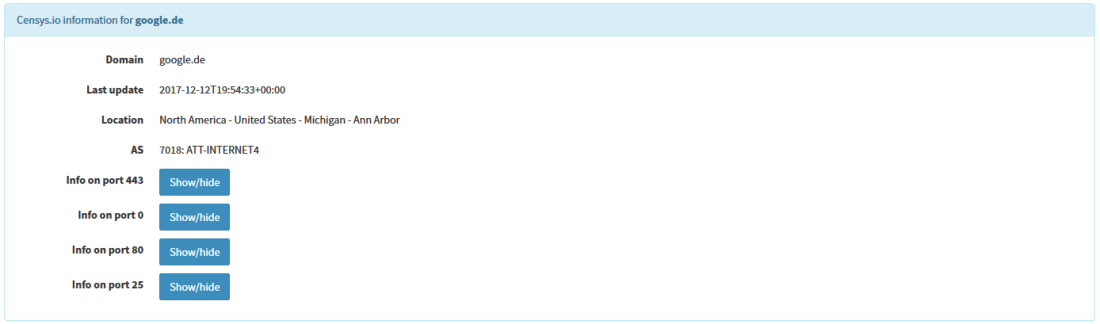
Once done, you’ll have to restart Cortex. When ran from TheHive, the analyzer produces short and long reports such as the following:
TheHive: Censys 1.0 Analyzer – Short and Long Report Samples
Details about the ports can be obtained with a click on the specific button.
MISP WarningLists
In order to detect false positives soon enough in the analysis process, our good friends at the MISP Project published their so called warning lists which contain lists of well-known services or indicators.
This analyzer queries observables against the MISP warning lists. Observables can be an IP address, a hash, a domain, a FQDN or a URL.
To iterate through all the warning lists, the repository itself must be available on the Cortex instance:
We highly recommend you create a cron entry or use a similar mechanism to keep the lists fresh. While the default path for the lists is the misp-warninglists subdirectory it can be adjusted in the configuration file:
When called from TheHive, the analyzer produces short and long reports as shown below:
TheHive: MISP WarningLists 1.0 Analyzer – Short and Long Report Samples
As you can see, The MISP WarningLists analyzer checks if the repository is up-to-date 😉
Onyphe
The Onyphe analyzer leverages Onyphe’s API to query the service, which provides data about the IP address space and the publicly available information in a single, handy location.
The service comes in five flavors:
Onyphe_Forward: retrieves forward DNS lookup information we have for the given IPv4/IPv6 address with history of changes.
Onyphe_Geolocate: retrieves geolocation information for the given IPv4/IPv6 address.
Onyphe_Ports: retrieves synscan information we have for the given IPv4/IPv6 address with history of changes.
Onyphe_Reverse: retrieves reverse DNS lookup information we have for the given IPv4/IPv6 address with history of changes.
Onyphe_Threats: retrieves Onyphe threats information on anIPv4/IPv6 address with associated history.
To use the analyzer, you need to create an account on the Onyphe website. Provide the API key associated with your account as a value for the key parameter and add the lines below to the config section of /etc/cortex/application.conf then restart the cortex service.
Onyphe {
    key = "<insert API key here>"
}
When ran from TheHive, the analyzer produces short and long reports such as the following:
TheHive: Onyphe 1.0 Analyzer – Short and Long Report Samples
PayloadSecurity
The PayloadSecurity analyzer let you submit observables to a on-premises PayloadSecurity instance. To use it, you need to create an account on the PayloadSecurity service. Provide the API/secret pair as values for the key and secretparameters, collect the URL and environmentid of the service, and add the lines below to the config section of /etc/cortex/application.conf. Then restart the cortex service.
When launched through TheHive, the analyzer produces short and long reports such as the following:
TheHive: PayloadSecurity 1.0 Analyzer – Short and Long Report Samples
Robtex
When collecting data about IPs, domains and FQDNs, Robtex can be a good source of information. According to their statistics, they logged over 20 billion DNS resource records. The corresponding analyzer comes in three flavors:
Robtex_Forward_PDNS_Query: checks domains/FQDNs using the Robtex Passive DNS API
Robtex_IP_Query: checks IPs using the Robtex IP API
Robtex_Reverse_PDNS_Query: checks IPs using the Robtex reverse Passive DNS API
The analyzer uses the free Robtex API which needs no subsequent configuration. However, the free API limits the rate and amount of returned data.
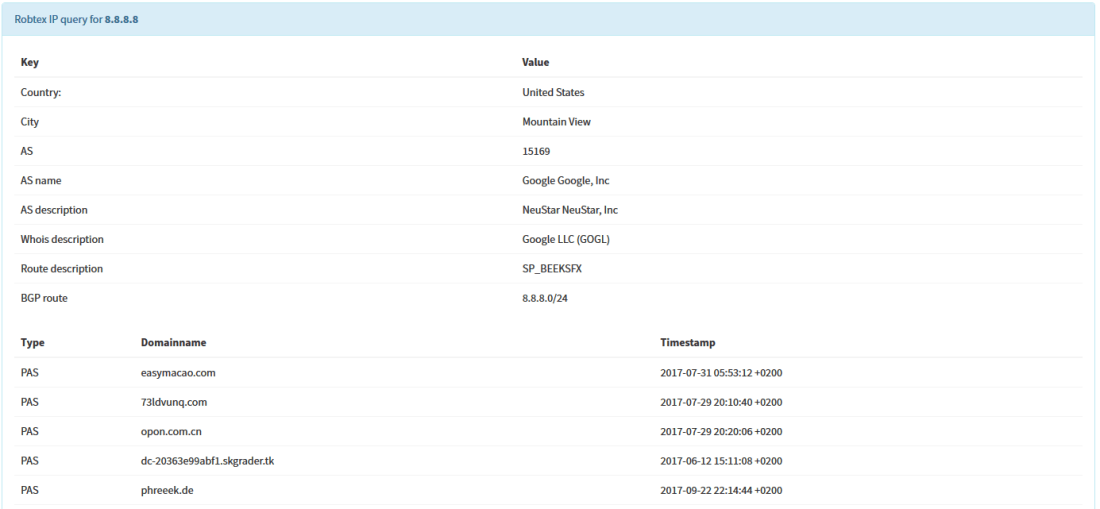
When executed using TheHive, the analyzer produces short and long reports such as the following:
TheHive: Robtex 1.0 Analyzer – Short and Long Report Samples
SinkDB
SinkDB is a private service provided by abuse.ch which collects sinkholed IPs. Access to the service is allowed to trusted partners only. If you think you qualify, you can request an access using the form available on the SinkDB website. This is most likely only granted to certain CSIRTs and CERTs and not to individuals.
Provide the API key associated with your account as a value for the key parameter and add the lines below to the config section of /etc/cortex/application.conf then restart the cortex service.
SinkDB {
    key="<insert API key here>"
}
When ran from TheHive, the analyzer produces short and long reports such as the following:
TheHive: SinkDB 1.0 Analyzer – Short and Long Report Samples
Tor Blutmagie
Tor Blutmagie analyzer extracts data from torstatus.blutmagie.de and checks if an observable is linked to a Tor node. The observable can be an IP address, a FQDN or a domain.
In order to check if an IP, domain or FQDN is a Tor exit node, this analyzer queries the Tor status service at Blutmagie.de. The analyzer uses a caching mechanism in order to save some time when doing multiple queries, so the configuration includes parameters for the cache directory and the caching duration.
Provide the lines below to the config section of /etc/cortex/application.conf then restart the cortex service.
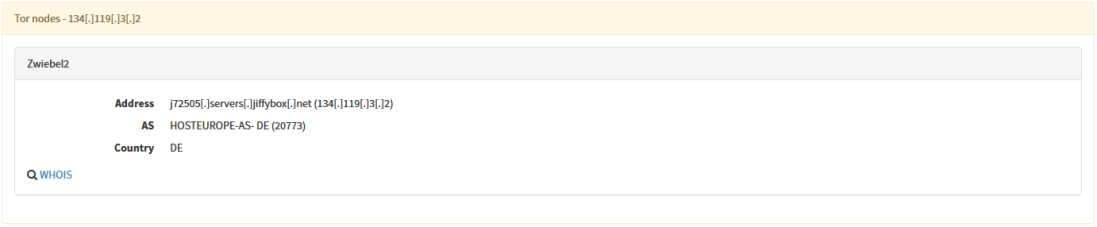
When ran from TheHive, the analyzer produces short and long reports such as the following:
TheHive: Tor Blutmagie 1.0 Analyzer – Short and Long Report Samples
Tor Project
Tor Project analyzer has also been contributed by Marc-André Doll. As the above analyzer, this one checks if an observable is a Tor exit node. This time, however, the source of information is the official Tor network status which can be queried for IP addresses only.
The accepts another parameter, ttl, which is the threshold in seconds for exit nodes before they get discarded. Provide the lines below to the config section of /etc/cortex/application.conf then restart the cortex service.
Shall you encounter any difficulty, please join our user forum, contact us on Gitter, or send us an email at support@thehive-project.org. We will be more than happy to help!
Correction: January 12, 2018
The post was updated to add the full name of the author of the PayloadSecurity analyzer.


















 TheHive Project