TheHive Project French Chefs are very happy to announce Mellifera 12, a brand new, all shiny, major version of TheHive.
This MAGA (Make Analysis Great Again) edition of your (soon to be?) favorite Security Incident Response Platform (SIRP) contains an awful lot of changes and improvements. While you can read the full changelog while waiting in line for your burger at HopDoddy or for your turn for the latest Disney attraction, we’d like to concentrate on a few features that would make you enjoy Digital Forensics & Incident Response like never before 🙂
Go Short or Go North
The Observables tab can now display the short (a.k.a. mini) reports produced by analyzers. Whenever you run an analysis (or many), the mini-reports will be shown as soon as the corresponding analyzer jobs have successfully finished. That way, you no longer have to click on each observable to access the short report.
Short Reports shown on the Observables Tab
In fact, you don’t even have to click on the observable to access the long reports. You must simply click on the corresponding short report and the long one will be displayed on top of the observables tab as shown in the following screencast. Ain’t that nifty?
A Single Click on the Short Report Shows the Long One
The short reports have been also improved to follow a taxonomy. To get to this stage, we had to review all 24 analyzers and their flavors, add new functionality to the CortexUtils Python library and improve the analyzers to add a summary section to their JSON output which Mellifera 12 interprets and displays according to a color code as described in our previous post. Please make sure to read it as it contains important information on how to update your cortexutils version and the analyzers as well as the report templates.
Is This Alert New or What?
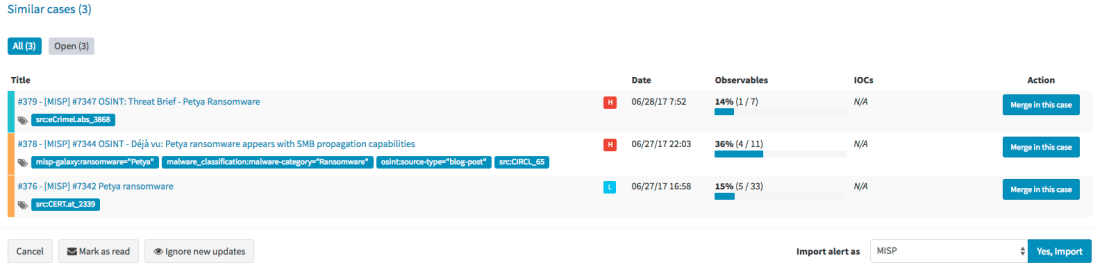
Mellifera 12 introduces an important feature pertaining to alerts. To put it simply, whenever you receive a new alert from MISP, email, SIEM or any other source that you have connected with TheHive, the alert preview page will tell you if there are similarities with existing cases and if so, Mellifera 12 will let you import the new alert in the existing case and any updates made to that alert (think of an ongoing MISP event) will be automatically added to the case.
Alert Preview Page with the new Similar cases Section
Template this, Template that
In addition to the ‘similarity’ feature outlined above, Mellifera 12 lets you choose the case template to use when importing a new alert instead of having to use only a specific case template per alert type/source.
Choose the Template You’d Like to Use to Import an Alert
Custom Fields
We heard our community and implemented a feature that was requested by several users: custom fields.
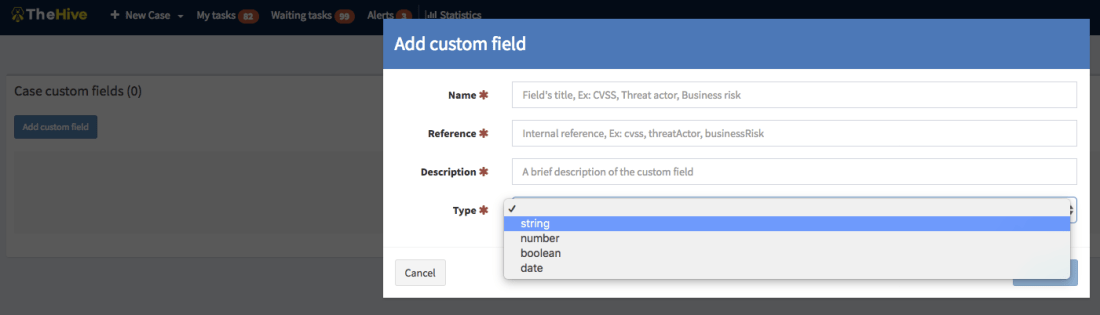
So you’d like to add a business impact to a specific type of cases? Or a set of TTPs? Or a Threat Actor? Or specify a Business Unit? No problem! Ask an admin to create a custom field, associate it with a case template and there you go.
Add a Custom Field
Unlike metrics, custom fields must not be filled to close a case. You can also supercharge a case with custom fields that have not been associated to a case template. We currently support four types of custom fields: strings, numbers, booleans and dates. And you can create lists of acceptable values to limit your analysts’ choices to legitimate data.
If you have an existing installation of TheHive, please follow the migration guide.
If you are performing a fresh installation, read the installation guide corresponding to your needs and enjoy. Please note that you can install TheHive using an RPM or DEB package, use Docker, install it from a binary or build it from sources.
Support
Something does not work as expected? You have troubles installing or upgrading? No worries, please join our user forum, contact us on Gitter, or send us an email at support@thehive-project.org. We are here to help.
TheHive, Cortex and MISP work nicely together and if you’ve read our June-Dec 17 roadmap post, the integration of our products with the de facto threat sharing platform will get better in a few months.
During the FIRST conference presentation we gave last week, we displayed a picture that we will use here to try to explain how these three open source and free products integrate with one another.
A Picture is Worth a Thousand Words…
TheHive
TheHive is a Security Incident Response Platform (SIRP). It can receive alerts from different sources (SIEM, IDS, email. etc.) via its REST API. This is where alert feeders come into play.
Alert Feeders
Think of an alert feeder as a specialized program which consumes a security event (SIEM alert, email report, IDS alert, and so on), parses it and outputs an alert that its sends to TheHive through TheHive4py, the Python library we provide to interact with TheHive’s REST API.
We do not supply such feeders but developing them should be straightforward. If not, let us know and we’ll do our best to help you out.
Alerts
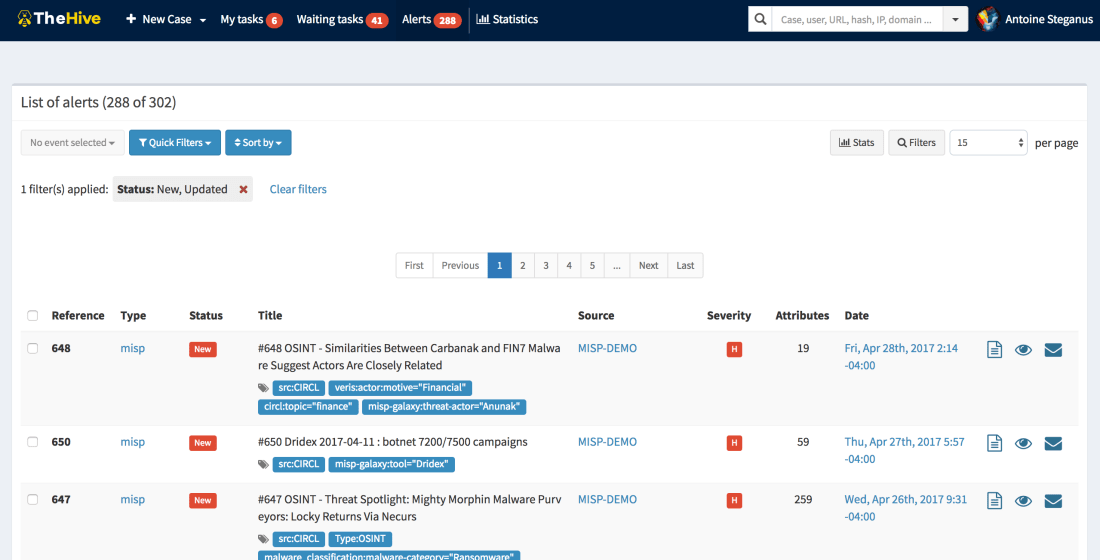
Any alert sent to TheHive will show up in its Alerts pane. In addition to the sources mentioned above, new or updated MISP events will show up as well in that area if you configured TheHive to connect to one or several MISP instances. If so, TheHive will poll those MISP instance(s) at every interval looking for new or updated events. If there are any, TheHive will generate an alert which will end up in the Alerts pane.
The Alerts Pane
Alerts can be ignored, mark as read, previewed and imported. When an alert is imported, it becomes a case that needs to be investigated.
Cases
The Workflow that is at the Heart of TheHive
A case can be generated from an alert or created from scratch. It is subdivided into tasks (think identification, containment, eradication, check proxy logs, and so on) and observables (IP addresses, hashes, email addresses, domain names, URLs…). When analysts are working on tasks, they add logs as they go. In TheHive’s terminology, logs are text entries which may contain attachments to help analysts record what they have been doing. Logs can be written using Markdown or a rich-text editor.
Case Templates
You don’t need to add the same tasks over and over when working on cases belonging to a given category (DDoS, Malspam, APT, …). You can create custom templates to which you add tasks as shown below. This is very useful when you are dealing with alerts so that when you import them, you can select which case template you’d like to apply and there you go!
A Sample Case Template
Observables
Observables can be tagged, flagged as IOCs, and analyzed. When the investigation is well in progress or completed, you may want to share the resulting IOCs or a subset of those with partners and peers. TheHive will support the ability to export that data to MISP in September 2017. Until then, you can still export your IOCs as text, CSV or as a MISP-compatible format that you can use to add them to your MISP instance using the freetext editor. TheHive can export IOCs/observables in protected (hxxps://www[.]somewhere[.]com/) or unprotected mode.
Every observable must have a TLP (Traffic Light Protocol) level. By default, any added observable is considered TLP:AMBER. Please note that the TLP is taken into account by some analyzers. Wait! Analyzers?
Cortex
Cortex is our standalone analysis engine and a perfect companion for TheHive and MISP. Analysts can use it to analyze observables using its Web UI, in which case they can be submitted only one at a time. The Web UI should really be limited to quick assessments of observables before creating a case in TheHive (or in an alternate SIRP). The power of Cortex really comes into play when you use its REST API. TheHive speaks natively to Cortex (as MISP does). Moreover, TheHive can leverage one or several Cortex servers.
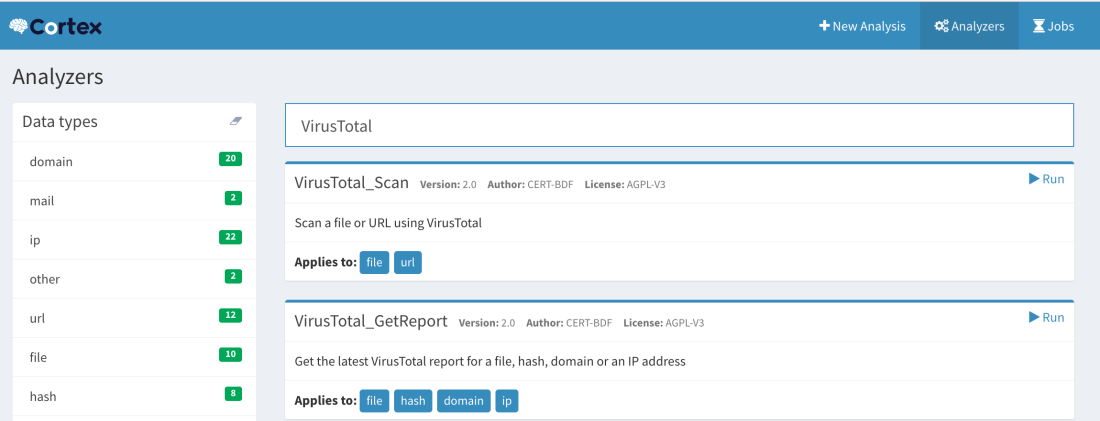
Observable Page and List of Analyzers
Analyzers
As of this writing, Cortex has 23 analyzers which come in a total of 39 flavors and more will be available soon.
An analyzer can be written in any programming language supported by Linux though all of our current analyzers are written in Python. This is because we provide a Python library called Cortexutils which contains a set of utility classes that make it easier to write an analyzer in Python.
Flavors
Analyzers such as VirusTotal, PassiveTotal or DomainTools can provide different analysis services. Let’s take VirusTotal as an example. You can scan a file or URL. That’s one flavor. You can also obtain the latest available report on VirusTotal.com for a file, hash, domain or IP address. That’s a second flavor. So the VirusTotal analyzer has two flavors.
How about PassiveTotal? It has 8 flavors: unique resolutions lookup, SSL certificate history lookup, malware lookup, passive DNS lookup, data enrichment lookup, SSL certificate details lookup, OSINT lookup and WHOIS data lookup.
The MISP Search Analyzer
At this point, we need to mention a special analyzer that may create some confusion if not understood correctly: the MISP Search analyzer. Thanks to it, Cortex has the ability to search observables within a MISP instance as represented by the arrow that goes from the Analyzers to MISP.
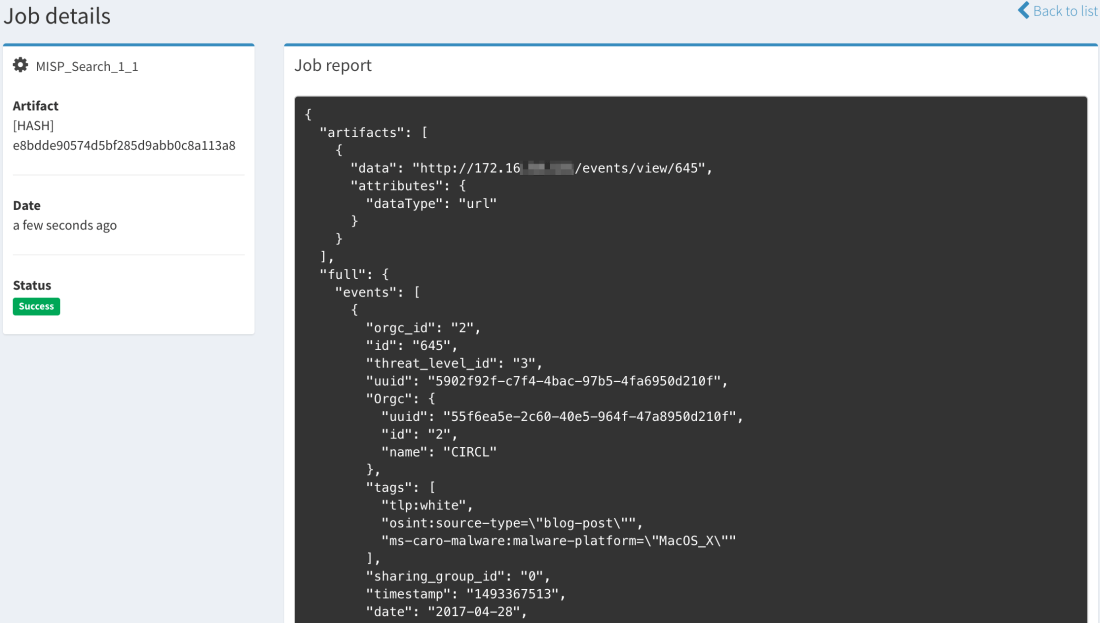
Search for MISP Events Containing a Given Observable
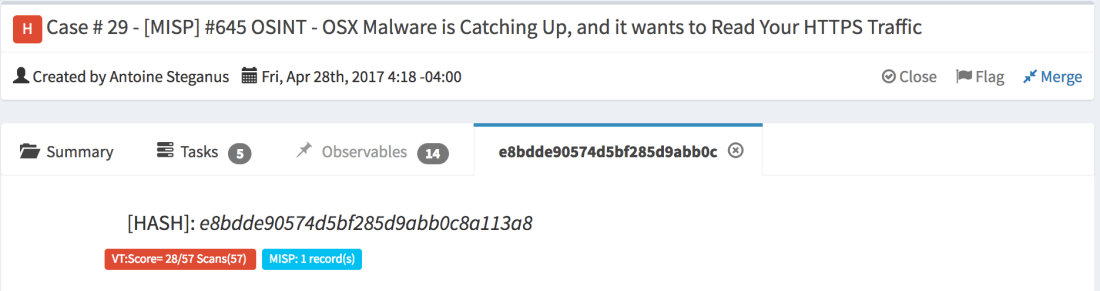
When an observable is found in an event, Cortex will return the number of records found (i.e. the number of events where the observable has been found) and a list of links to those events with additional data.
Searching for a Hash Using the MISP Search Analyzer from the Cortex Web UIThe Same Search Conducted from TheHive: Long ReportMini-Report
The current version of the MISP Search analyzer can only search within a single MISP instance but in the near future, it will be able to support multiple ones.
MISP Expansion Modules
Besides its own analyzers (which include MISP Search described above), Cortex can also invoke MISP expansion modules. These are normally used by MISP to enrich attributes within events but Cortex can also take advantage of them to analyze observables.
There is some overlap between the native Cortex analyzers and MISP expansion modules. When choosing between a native analyzer or an expansion module, we highly recommend you select the former. The expansion modules are deactivated in the default Cortex configuration.
Jobs
When you submit an observable for analysis, Cortex will create a job and, if successful, it will generate an analysis report in JSON format. TheHive has the ability to parse those results and present them in a human-friendly fashion thanks to report templates we offer for free. So when you’ll submit an observable to Cortex from TheHive, you’ll get back a short (or mini) report and a long one. The first can be thought of as a really tiny Exec Analyst Summary while the second provides more insight and details.
Calling Cortex from MISP
In addition to the expansion modules we have just mentioned, MISP 2.4.73 and up can enrich attributes using Cortex analyzers. The configuration is pretty straightforward. So if all you are concerned about is threat intelligence and sharing, you may augment your visibility into a given threat represented as a MISP event by leveraging all current 23 Cortex analyzers and any future ones.
Conclusion
TheHive, Cortex and MISP are three open source and free products that can highly aid you combat threats and keep the ‘monsters’ at bay.
TheHive, as a SIRP, allows you to investigate security incident swiftly in a collaborative manner. Several analysts can work simultaneously on tasks & cases . While cases can be created from scratch, TheHive can receive alerts from different sources thanks to alert feeders which consume security events generated by multiple sources and feed them into TheHive using TheHive4py Python library. TheHive can also sync to one or several MISP instances to receive new and updated events which will appear in the alert pane with all the other alerts generated by other sources. Analysts can then preview new alerts to decide whether they need to be acted upon. If so, they can transform them into investigation cases using templates.
To analyze the observables collected in the course of an investigation and/or imported from a MISP event, TheHive can rely on one or several Cortex analysis engines. Cortex is another standalone product that we have developed which sole purpose is to allow you to analyze observables at scale thanks to its large number of analyzers, MISP expansion modules and any analyzer you might have developed on the side. Cortex has a REST API that can be used to empower other security products such as ‘analytics’ software, alternate SIRPs or MISP.
The highly popular threat sharing platform can indeed enrich attributes thanks to Cortex as it has a native integration with it. And in a few months, you will also be able to export cases from TheHive as MISP events that you can share with peers and partners.
If you do share, you do care about our collective mission to defend thedigital assets that are under our watch from harm. So let us fight together as one.








 TheHive Project