Last week, we have released Mellifera (TheHive 2.11.0), a major version of your favorite (or soon to be favorite) Security Incident Response Platform. Sadly, some annoying bugs have slipped past our QA (n’est-ce pas Thomas ?).
We are happy to announce the availability of Mellifera 1 (TheHive 2.11.1) which corrects those bugs and adds a few enhancements detailed below.
Issues Corrected
#204: update case templates created with previous versions of TheHive.
#205: remove duplicate tags associated to an observable present in two cases upon a case merging operation.
#206: apply case templates when an alert is converted into a case.
Enhancements
We also took the opportunity of this hotfix to add the following enhancements:
#180: merge duplicate tasks during a case merge operation. Starting from this release, if you have waiting tasks (i.e. not assigned) with the same name in cases you’d like to merge, the new merged case will have only one task instead of two.
#211: show the number of available analyzer reports for each observable. If an observable has not been analyzed yet, say so.
Documentation
Please note that we have moved all the documentation of TheHive in a new repository. If you are not using TheHive4py 1.2.0 (or future versions), you can send alerts to Mellifera using the API as documented.
Download & Get Down to Work
If you have an existing TheHive installation, please follow the new migration guide.
If you are performing a fresh installation, read the installation guide corresponding to your needs and enjoy. Please note that you can install TheHive using an RPM or DEB package, deploy it using an Ansible script, use Docker, install it from a binary or build it from sources.
Support
Something does not work as expected? You have troubles installing or upgrading? No worries, please join our user forum, contact us on Gitter, or send us an email at support@thehive-project.org. We are here to help.
TheHive Project French chefs are very excited to announce the immediate availability of Mellifera, TheHive 2.11.0, the greatest and latest iteration of our flagship product.
We are thrilled to share this major version with the incident response community, for free as usual. Yes, you read that sentence right. You don’t have to cough up a single € or BTC for a platform that is as good as some commercial alternatives, unless your boss is hassling you about paying big bucks to get so-called professional support. If that’s the case, try us and you might prove them wrong.
Going through all the features and fixes of this significant overhaul will take forever (well, almost) so let us highlight a few that we feel worthy of your attention and time.
The Alerting Framework
If you need one reason to upgrade from Buckfast to Mellifera or to ditch your existing, clunky incident handling platform and use ours, then that should be its brand-new and powerful alerting framework.
With Buckfast (TheHive 2.10.x) and earlier versions, you can configure multiple MISP instances. TheHive will then poll those instances at regular intervals and display new or updated events in a specific area where analysts can preview them, import them as cases using configurable templates or ignore them altogether (and if they do so by mistake, there’s no way to go back). And if you needed to raise alerts from a SIEM, email reports or other sources of noteworthy security events, you had to rely on TheHive4py API client and create a case without having a chance to preview the events in TheHive prior to the case creation.
Mellifera does not have these limitations. It features an all new, fancy and efficient alerting framework which can be displayed using the Alerts button in the Web interface. This button was previously called MISP.
Within the Alerts area, you can preview not only new or updated MISP events but also any event that you have pushed through TheHive4py. The client has been modified to be compatible with Mellifera. If you have an existing TheHive4py package, please upgrade to the new 1.2.0 version using PIP.
The New Alerting Panel
Using TheHive4py 1.2.0, you can send your SIEM alerts, user email reports and security events from various sources to Mellifera and your analysts will be able to preview and import them or simply ignore them. If they have ignored some events by mistake, they can use the quick actions on the top of the panel to retrieve them. Please note that you have to create programs that will bridge your event sources with Mellifera through TheHive4py.
Stats within the Alerting Panel
All New Skin
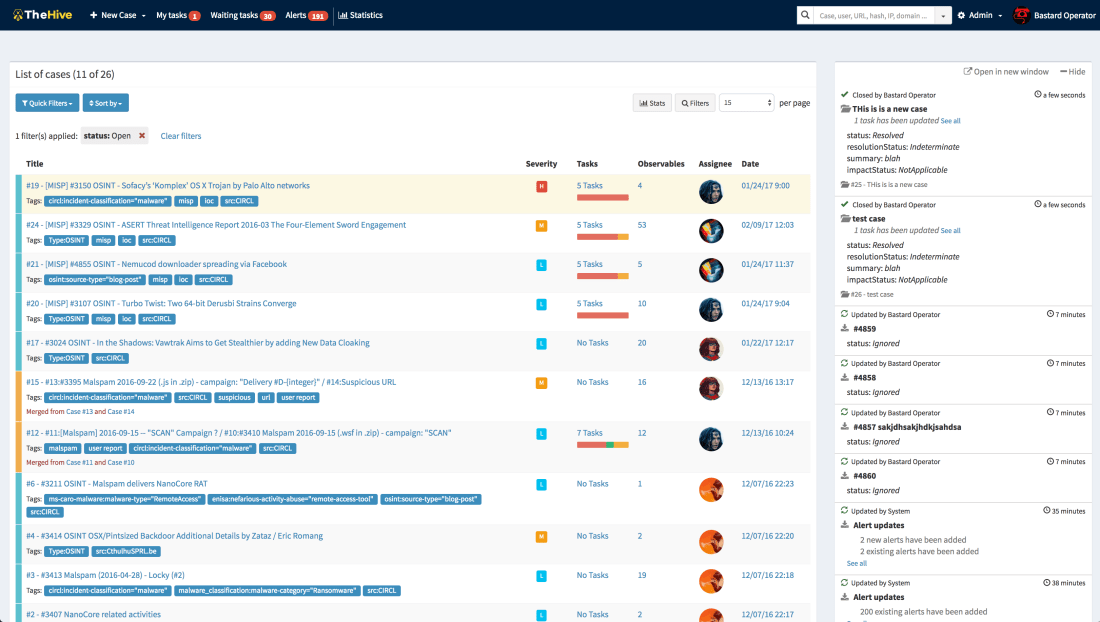
Mellifera has an all new skin with many refinements spread all over the interface. For example, you can now easily reorder the tasks within a case template. You can also sort task logs according to their creation date (oldest first, newest first). The flow (a.k.a live stream) is also collapsible. Moreover, when you create a case, Mellifera will suggest existing tags.
Mellifera’s Brand New Skin
Is MISP or Cortex There?
If you have configured Mellifera to interact with at least one MISP or Cortex instance, the Web interface will show their respective logos at the bottom of the page. Please note that you can now connect to MISP and Cortex even if you are behind a proxy which requires authentication.
New Installation Packages
Starting from this release, we no longer produce all-in-one binary packages and dockers containing TheHive and Cortex. Instead you can use dockers, binaries and RPM as well as DEB packages. Wink wink.
One More Thing
Mellifera has an all new logo and the project website has been completely redesigned. Now you can see who’s behind the project thanks to Alexandre Gohier, a close friend who also happens to be a professional photographer.
Download & Try
If you have an existing TheHive installation, please follow the new migration guide.
If you are performing a fresh installation, read the installation guide corresponding to your needs and enjoy!
Support
Something does not work as expected? You have troubles installing or upgrading? No worries, please join our user forum, contact us on Gitter, or send us an email at support@thehive-project.org. We are here to help.
Thanks to the invaluable contributions of our growing and thriving user community, Cortex has now 6 more analyzers, bringing the total to 21. The new analyzers, released under our usual AGPL v3 license, are:
CIRCLPassiveDNS
CIRCLPassiveSSL
GoogleSafebrowsing
Nessus
Virusshare
Yara
All but one have been submitted by Nils Kuhnert of CERT-Bund. The Nessus analyzer has been contributed by our long-time friend Guillaume Rousse.
Cortexutils 1.1.0
While reviewing the submissions, we realized that a new version of the Cortexutils library was needed in order to support both Python 2 and 3. Hence we released version 1.1.0. You can grab it through PIP. To update your existing installation, please run the following command:
sudo pip install cortexutils --upgrade
Note that Cortexutils 1.1.0 is required to benefit from these analyzers and future ones. If you are performing a fresh Cortex installation, follow the guide.
Installation
To install the new analyzers, grab the Cortex-Analyzers repository and unpack its content (or git pull the master branch) in your existing /path/to/cortex-analyzers. Then follow the Cortex analyzers guide.
New Short and Long Report Templates for TheHive
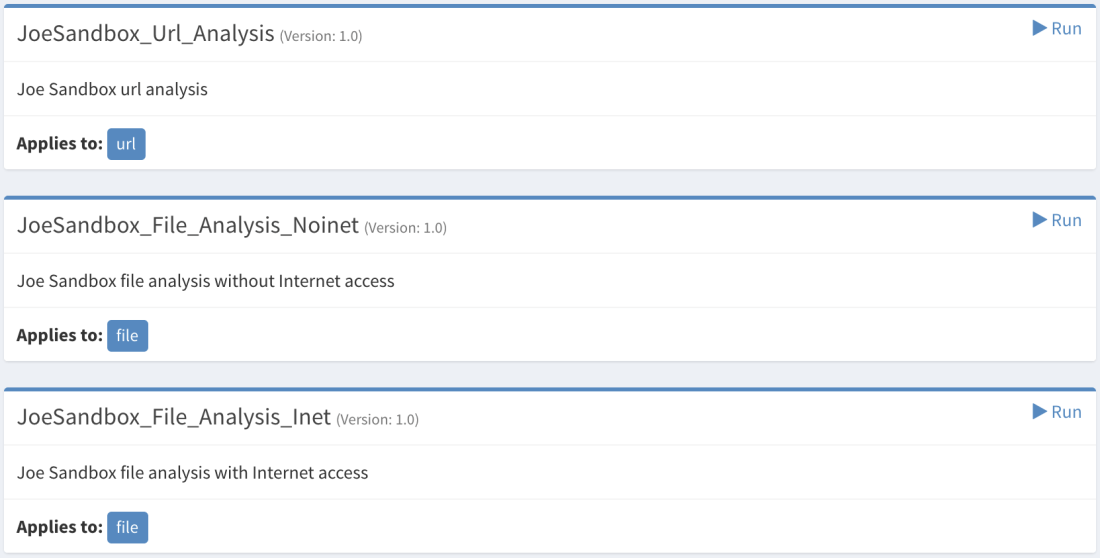
Short and long reports for TheHive were also created to parse and display the results produced by the new analyzers. We also bundled in the new package a URL analysis template for Joe Sandbox which was missing and improved some of the older short templates in order to follow a taxonomy.
To import the new report templates in your instance of TheHive:
click on Import templates button and select the downloaded package
CIRCLPassiveDNS
The CIRCLPassiveDNS analyzer lets you check the CIRCL’s Passive DNS service for a given domain. It takes domains and URLs as input. Access to the service is allowed to trusted partners in Luxembourg and abroad. If you think you qualify, please contact the good CIRCL folks. To make it work, you’ll need the pypdns Python library.
In order to take advantage of CIRCLPassiveDNS, you need to add the following section to the Cortex configuration file (application.conf):
CIRCLPassiveDNS {
     user=""
     password=""
}
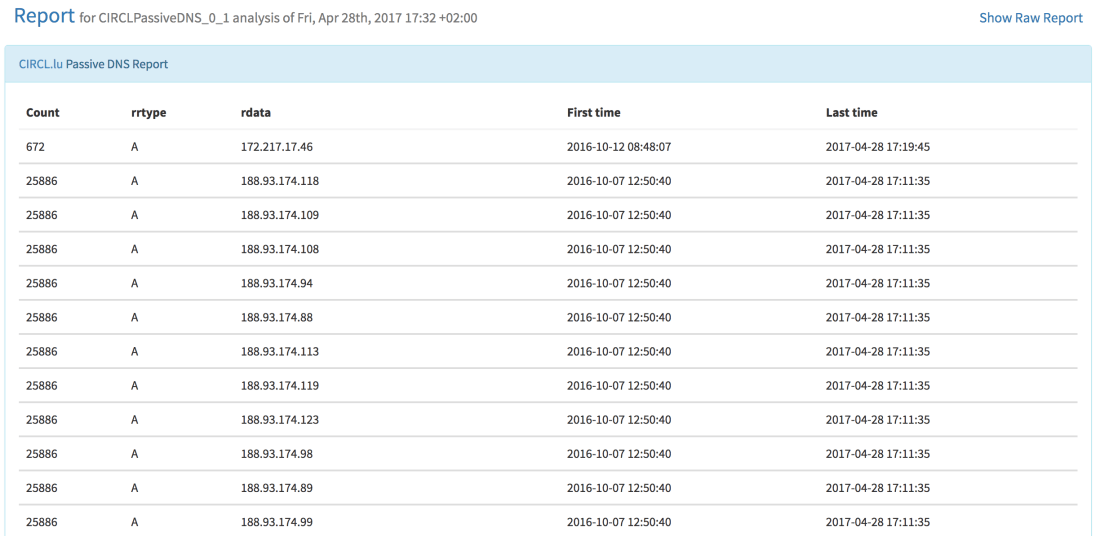
When called from TheHive, the following output is produced:
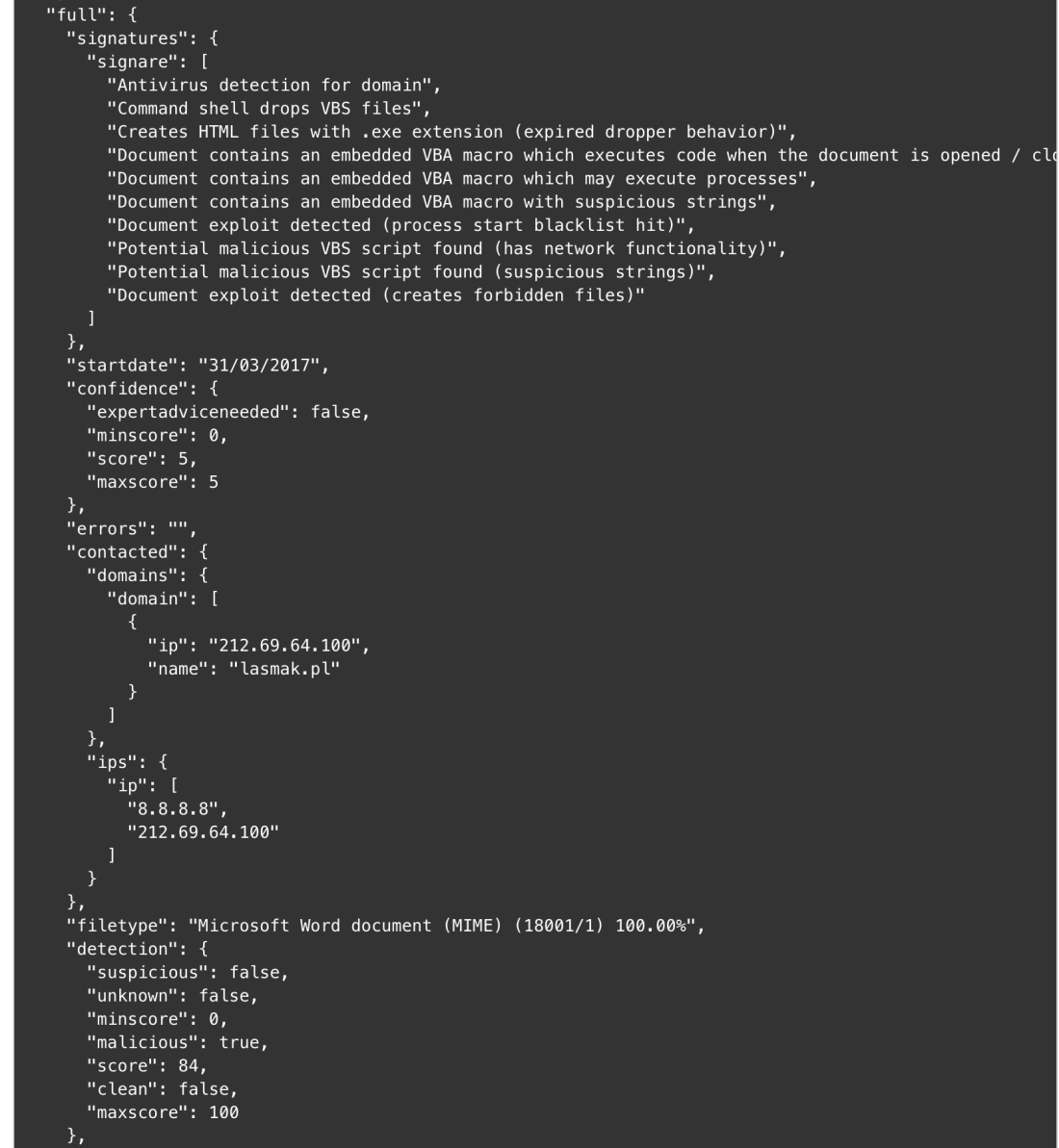
TheHive: CIRCLPassiveDNS Analyzer – Short and Long Report Samples
CIRCLPassiveSSL
The CIRCLPassiveSSL analyzer lets you check CIRCL’s Passive SSL service for a given IP address or certificate hash. Access to the service is restricted to partners and security researchers worldwide. If you think you qualify, please contact the good CIRCL folks. This analyzer needs the pypssl Python library to work properly.
To use it, please add the following section to the Cortex configuration file (application.conf):
CIRCLPassiveSSL {
     user=""
     password=""
}
When called from TheHive, the following output is produced:
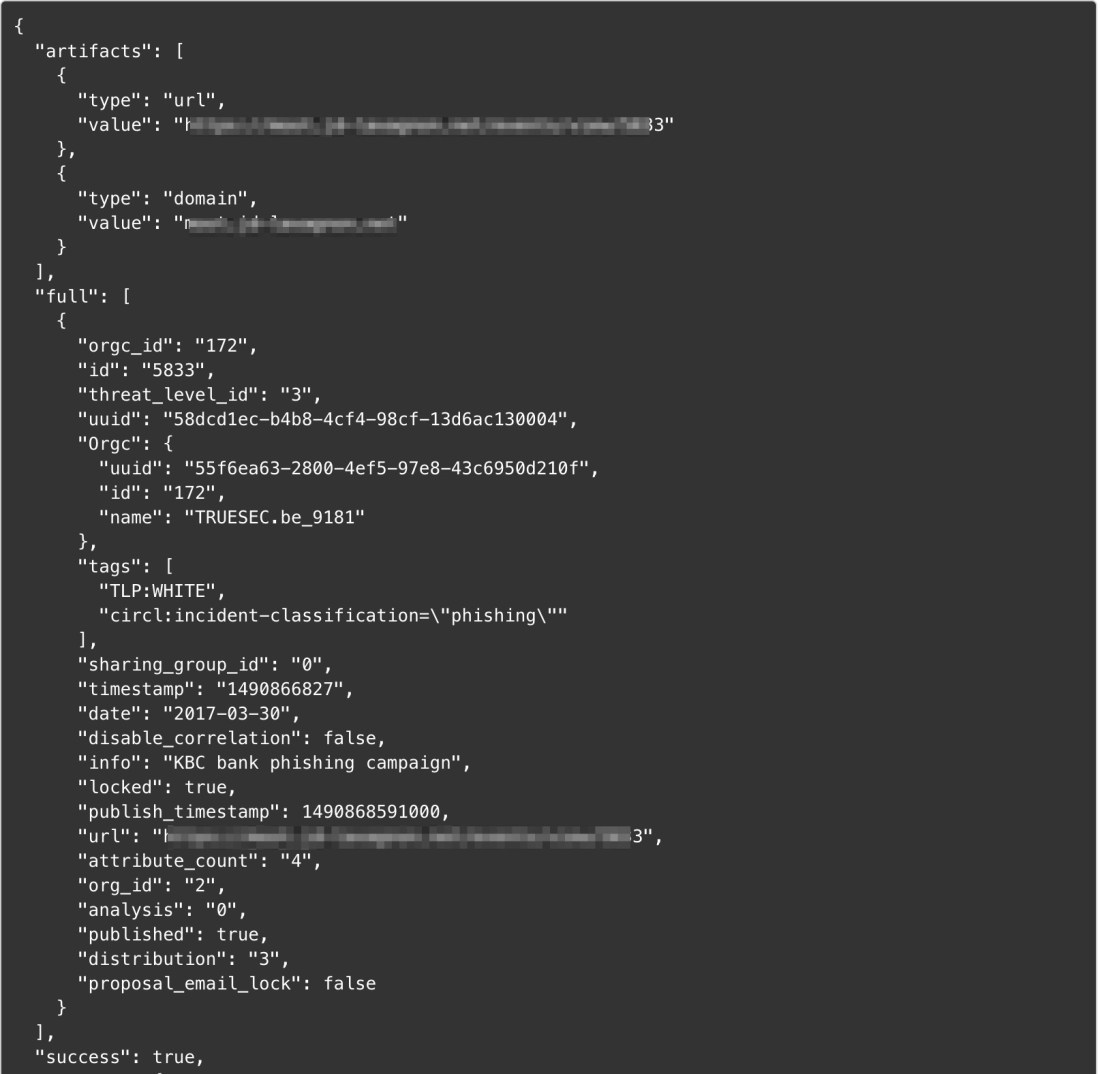
TheHive: CIRCLPassiveSSL Analyzer – Short and Long Report Samples
To leverage GoogleSafebrowsing, add the following section to Cortex’ configuration file:
GoogleSafebrowsing{
key=""}
When you run the analyzer fromTheHive, you should see output similar to the samples below:
TheHive: GoogleSafebrowsing Analyzer — Short and Long Report Samples
Nessus
The Nessus analyzer lets you leverage Tenable’s Nessus Vulnerability Scanner to scan an IP address or a FQDN. Of course, you must not scan assets that do not belong to you, unless you really know what you are doing. That’s why safeguards were built in the analyzer’s configuration:
The nessrest Python library is needed to make REST API calls to Nessus. Analysts would use the analyzer to assess the vulnerabilities of potentially compromised machines or new, unknown assets that have been plugged into one of their constituency’s networks. Of course, penetration testers conducting large-scale reconnaissance can also benefit from this analyzer.
TheHive: Nessus Analyzer — Short and Long Report Samples
Virusshare
The Virusshare analyzer lets you verify whether a file or hash is available on VirusShare.com. It requires the progressbar2 Python library besides requests (which should be already installed if you have an existing Cortex installation). As stated by Nils:
This analyzer enables searching for md5 hashes in Virusshare.com hash list. It does not download samples for you nor links directly to the sample – the author of virusshare prohibits the automatic download/site scraping and I respect that. It provides a button to start the virusshare search, though, but you need an account for that. You can request an invitation to the platform through contacting the admin via mail, directly.
To use it, add the following section to your Cortex application.conf:
Virusshare {
   path="/path/to/download/directory"
}
Quoting Nils again, in order to download the newest available hash lists from virusshare.com, you can run the download_hashes.py script that comes with the analyzer.
Upon running the analyzer from TheHive, the report will contain a link to the corresponding Virusshare page if a match is found as shown below.
TheHive: Virusshare Analyzer — Long Report Sample
Yara
Last but not least, the Yara analyzer can check files against YARA rules using yara-python. To use it, add the following to your Cortex configuration file:
You can specify path to directories and files. If you supply a directory, the analyzer expects to find an index.yar or index.yas file. The index file can include other rule files. An example can be found in the Yara-rules repository.
TheHive: Yara Analyzer — Short and Long Report Samples
Running Into Trouble?
Shall you encounter any difficulty, please join our user forum, contact us on Gitter, or send us an email at support@thehive-project.org. We will be more than happy to help!
The French chefs at TheHive Project’s code kitchen have released version 1.1.1 of TheHive4py. The API client for our Security Incident Response Platform has been updated to comply with Buckfast 2 (TheHive 2.10.2).
In April 20, 2017, Buckfast 2 was released to plug a number of vulnerabilities identified by our friends at Randorisec. Among other changes, Buckfast 2 implements a protection against CSRF attacks. As a result, API calls made by TheHive4py have been modified in order to support that protection. In essence, TheHive4py 1.1.1 submits authentication credentials for each call instead of a per-session authentication.
To update your existing package, please use PIP. Shall you encounter any difficulties, do not hesitate to ask on our user forum or contact us at support@thehive-project.org. You can also join our Gitter channel and have a chat with us.
A new, major version of TheHive4py (1.2.0) will be released in the upcoming days to be compatible with Mellifera, our next major release of TheHive, which will feature a brand new alerting framework.
We are thrilled to announce that Cortex has two new analyzers: Joe Sandbox and MISP Search. Moreover, we have produced new analyzer report templates for TheHive and improved existing ones.
Joe Sandbox
Cortex: New Joe Sandbox Analyzer
Joe Sandbox, by Joe Security LLC, is a very powerful malware analysis platform that has been around for many years and comes in two flavors: cloud and on-premises. The Joe Sandbox Cortex analyzer has been tested using an on-prem Joe Sandbox Ultimate version and can process URLs and files. The analyzer can process files with or without Internet access.
To use the analyzer, you must provide the API key of your Joe Sandbox instance. You must log in to Joe Sandbox, click on your account name, then on Settings and on the API Key tab.
Cortex: Joe Sandbox Output Example
We have produced a report template for the Joe Sandbox analyzer output resulting from file analysis. The URL analysis report template is not yet available but it should be in a few days.
TheHive: Joe Sandbox Analyzer – Short and Long Report Samples
MISP Search
Cortex: New MISP Search Analyzer
It is no longer necessary to present MISP, the de facto standard of threat sharing. The new MISP Search analyzer will let you search events containing the observable you provide as an input. It applies to a lot of observable types as you can see in the screenshot above.
To use it, you’ll need to supply the API key available in the MISP UI interface.
Cortex: MISP Analyzer Output Sample
Nils Kuhnert created an alternate MISP Search analyzer which has the ability to query multiple MISP instances. We are currently reviewing his submission along with several other analyzers he contributed before improving the newly released MISP Search analyzer.
PassiveTotal Report Templates
While we published the PassiveTotal analyzer weeks ago, TheHive didn’t have report templates for it at the time. We have now new, shiny short and long report templates for most of the services provided by the PT analyzer.
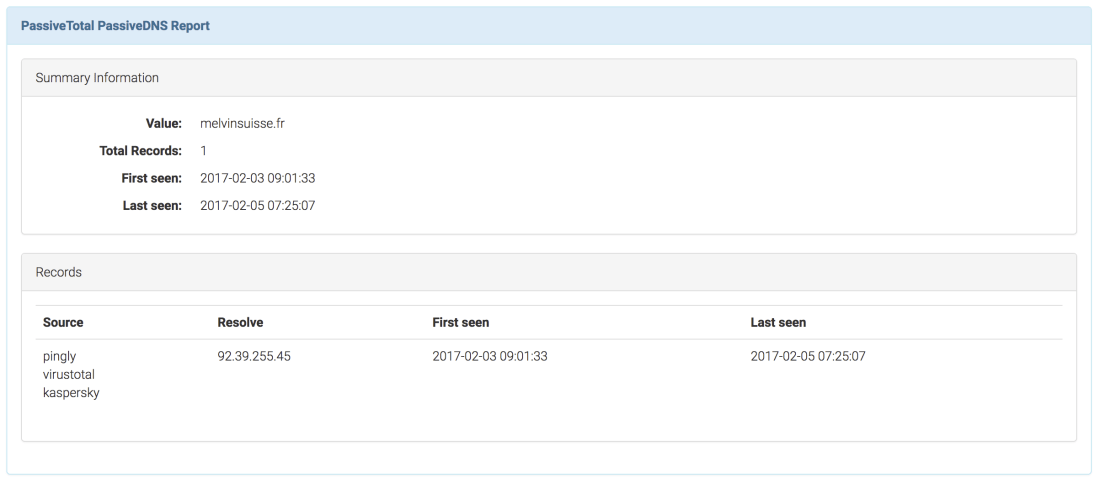
TheHive: PassiveTotal PassiveDNS – Long Report Sample
DomainTools Whois Lookup Report Template
The short report templates of the DomainTools Whois Lookup analyzer has been improved. We now use a taxonomy to provide more context and differentiate between the DomainTools and PassiveTotal Whois results.
VirusTotal Get Report and VirusTotal Scan Report Templates
The short report templates for both services have also been improved to use a taxonomy to provide additional context and distinguish their results from the PassiveTotal Malware service.
Get the new analyzers
To install the new analyzers, grab the Cortex-Analyzers repository and unpack its content (or git pull the master branch) in your existing /path/to/cortex-analyzers.
The Joe Sandbox analyzer does not need any additional Python library if you have already installed Cortex and the analyzers following the guide we provide. To use it, edit your Cortex configuration file (/path/to/cortex/application.conf) and add the following lines in the analyzer section:
 JoeSandbox {
     apikey="..."
     url="..."
 }
By default, Joe Sandbox will time out the analysis after 30*60 seconds (30 minutes). Additionally, the analyzer will wait for the Joe Sandbox server to respond within 30 seconds. If no response is received within this period, it will time out. If you want to override these values, you’ll need to add the following lines in the analyzer section:
The MISP Search analyzer requires pymisp. Use the following command line to install the required library:
sudo pip install pymisp
Then edit your Cortex configuration file (/path/to/cortex/application.conf) and add the following lines in the analyzer section:
MISP {
     api_key="..."
     url="..."
}
Please note that you must restart Cortex to take the changes into account. The current version has no persistence so you’ll lose all your existing jobs.
click on Import templates button and select the downloaded package
Running Into Trouble?
Shall you encounter any difficulty, please join our user forum, contact us on Gitter, or send us an email at support@thehive-project.org. We will be more than happy to help you!
While we released TheHive as a free, open source product in November 2016, it must not be chalked off quickly as a young, immature solution.
v1.0.0 was put into production in our environment in October 2014. Yes, October 2014. And we’ve been using it every day and refining it since then. Once we deemed it good enough, we decided to share it with the community under an AGPL license to help incident responders in their mission.
Make no mistake. TheHive is a field-tested, mature Security Incident Response Platform (SIRP) built by people who are passionate about Digital Forensics and Incident Response.
A few months after the first public release (v 2.9.0), we adopted bee-related codenames for new major versions and published Buckfast (v 2.10.0).Cortex, the analysis engine that allowed TheHive to analyze and assess observables at scale was shipped as a separate product. Buckfast can interface with one or several Cortex instances depending on your performance and OPSEC needs. For example, you may want to install a separate Cortex on your investigation, air-gapped network to interact with your sandbox as you don’t want to be firing those malicious samples on your corporate network.
Buckfast can also create cases out of MISP events. You can configure it to import them from a single or many MISP instances. And to prepare for the next major version, Mellifera, due in early May 2017, we have released TheHive4py, a Python API client for TheHive.
TheHive4py will be improved to fully support Mellifera’s alerting framework. To put it simply, Mellifera will not only let you preview MISP events and import them but also receive SIEM alerts, email incident reports and different other types of alerts depending on your environment thanks to TheHive4py. And if an analyst discards an alert by mistake in Mellifera’s notification area, they can go back to a ‘trash bin’ and fix their error. Mellifera will also allow you to export cases as MISP events to share IOCs with other teams.
Jigsaw Falling Into Place
Now lets’ get back to TheHive’s perfect companion: Cortex. As of this writing, Cortex features 13 analyzers. These analyzers can perform one type of analysis (such as Abuse Finder) or several (such as DomainTools which can do 6). In the very near future, we plan to add at least 10 more analyzers which are shown in the boxes with dotted borders in the picture above. All upcoming analyzers are contributed by our user community whom we wholeheartedly thank. One of the analyzers will allow you to check observables from TheHive against a MISP instance to search for events that may contain them.
We have also begun work on a Python API client for Cortex dubbed… Cortex4py (how creative wink wink). This will allow people who are not using TheHive to summon the power of Cortex from their SIRP, scripts or any other DFIR tool that can import or interact with Python code.
So in the few months since our project was born to the Internet, we have released a solid collaborative SIRP, a simple yet powerful analysis engine to analyze observables and aid teams in their investigations as well as a Python API client for our SIRP. We also have rather ambitious plans to make them even much more useful.
Oh and one more thing! We have released another piece of software around the same time as the first version of TheHive and on which we haven’t said much so far: Hippocampe. Hippocampe can regularly download feeds and exposes a REST API to let you query them from Cortex (or from other tools). You submit an observable and it’ll tell you if it appears in one or several feeds along with a score. The score takes into account the trust you put in the feed sources (which can be adjusted over time) and the number of sources which contain the observable. We’ll cover Hippocampe in more details in an upcoming post.
Before you run away from us
Before you’re lost between the notes
The beat goes round and round Jigsaw is falling into place
So there is nothing to explain
When you use TheHive, running an analyzer on an observable through Cortex will generate a long report and, in most cases, a short report as well.
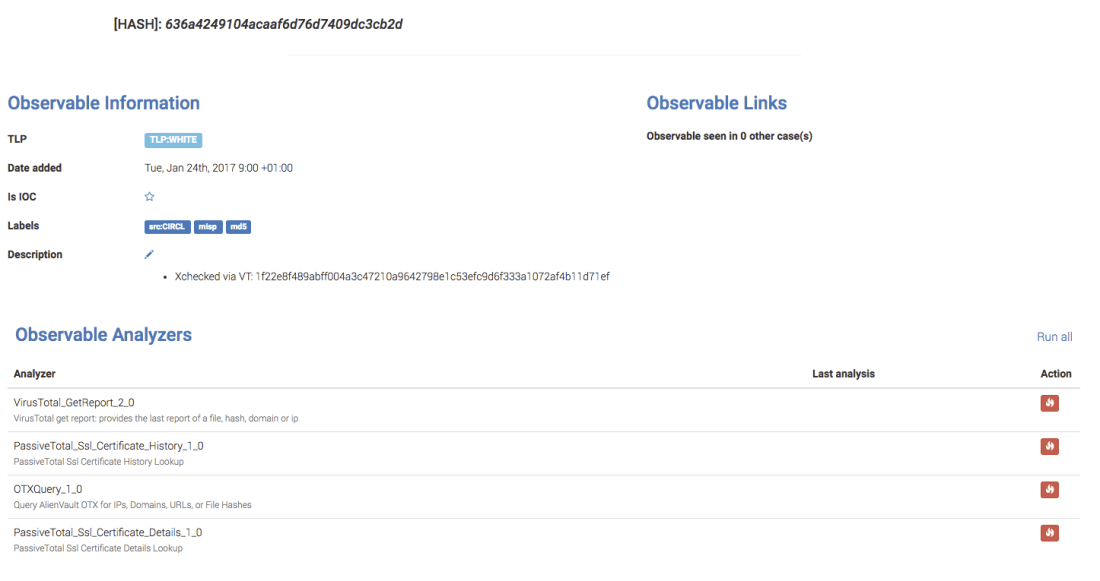
Let’s see how this works in practice through an example. Assume we are trying to assess whether the 636a4249104acaaf6d76d7409dc3cb2d MD5 hash is malicious or not:
We start by clicking on it, which will open a new tab:This TLP:WHITE hash was imported from a MISP event published by our good friends at CIRCL.lu sometimes ago. As you can see from the screenshot above, no analyzer was executed on it. Let’s check if it is known to VirusTotal (VT). To do so, we just need to click on the fire icon located at the right side of the VirusTotal_GetReport_2_0 row.
A blink of an eye later, the job has finished successfully as we can tell from the green checkmark. Clicking on the date will let us see the long report, presented according to a report template that we freely provide with most analyzers to the exception of PassiveTotal (but in a few days, PT will also get its own nifty templates).
Since we are checking whether VT knows a hash or not, it will give us the results if any corresponding to the last time the associated file was scanned on the service. In our case, this dates back to Dec 2, 2016.
When the analyzer was executed, it also produced a short report which TheHive displays below the observable:Short reports come in 4 colors. Red means danger (what else?). Orange means suspicious. Green means innocuous. And blue is informational. OK but what does this have to do with the title of this post?
A few days ago, while working on a new set of analyzers, Nils Kuhnert reported an issue in Buckfast 1 (2.10.1) pertaining to short reports on observables. When he ran some analyzers that should have produced short reports, he didn’t get any. When he reverted to Buckfast 0 (2.10.0), it worked. We tracked down the problem and found that our build process was the culprit. The all-in-one binary package which was supposed to contain Buckfast 1 and Cortex was in fact a 2.10.0 TheHive snapshot that had a regression. We have uploaded a fresh all-in-one binary package with Buckfast 1 instead of the development snapshot.
If you have grabbed the binary all-in-one package, please download it again and update your instance. If you are using a docker version or built Buckfast 1 from sources, you are fine. To make sure you are running the right version, click on your username once you are logged in then on About TheHive. You should see the following information:
We are going to review our release process from the ground up to ascertain such errors never occur again. We expect it to be ready for Mellifera, our next major release of TheHive. Please note that starting from that release, we will no longer provide all-in-one binary and docker packages. Instead, we’ll have separate packages for TheHive and Cortex. TheHive4py and the upcoming Cortex4py will be made available through PIP.

















 This TLP:WHITE hash was imported from a MISP event published by our good friends at

 Short reports come in 4 colors. Red means danger (what else?). Orange means suspicious. Green means innocuous. And blue is informational. OK but what does this have to do with the title of this post?
 TheHive Project