If you use Cortex and have been wondering why the Web UI kept scrolling to the bottom of a page once you run an analyzer, that’s because of a tiny but annoying oversight.
Cortex 1.0.1 has been released to fix this issue. To update your current Cortex installation, follow the instructions of the Installation Guide. Before doing so, you may want to grab any job reports that were not executed via TheHive. Cortex 1 has no persistence and restarting the service will wipe out any existing reports.
Following popular demand, the chefs at TheHive Project‘s code kitchen added some icing on an already tasty cake.
We are happy to announce the immediate availability of a Python API client for TheHive dubbed (surprise surprise!) TheHive4py.
What Is It?
TheHive4py allows analysts to create cases in TheHive out of different sources such as… drum roll…email.
For example, a SOC may ask its constituency to send suspicious email reports to a specific mailbox that a script polls at regular intervals. When a new email is received, the script parses it then calls TheHive4py to create a corresponding case in TheHive. Once the case has been created, SOC analysts will get a notification thanks to TheHive’s Flow so they can start investigating the new case.
Work in Progress
TheHive4py is a work in progress. It is considered beta software though we are using it on a regular basis for the use case outlined above. The client doesn’t leverage yet the richness of TheHive’s REST API (which is partially documented) but it should be sufficient in most situations. If not, please feel free to contribute and submit pull requests or request missing features if you are not comfortable with Python.
Use It
To install the client, PIP is your friend as indicated on the GitHub repository.
Mellifera and the Alerting Framework
TheHive4py will be enhanced in order to take advantage of the alerting framework that will be included in Mellifera, the next major version of TheHive (v 2.11).
The alerting framework will allow Mellifera and later releases to receive ‘alerts’ not only from multiple MISP instances, which is already possible with Buckfast and earlier, but also from mailboxes, SIEMs, and other services. Analysts will be able to develop programs that include TheHive4py in order to send an ‘alert’ to TheHive. Mellifera’s Web UI will then allow analysts to pick interesting ‘alerts’ and transform them into cases by a click of a button using pre-defined templates.
Our current target date for releasing Mellifera and the alerting framework is the end of April 2017.
How Much Does it Cost?
TheHive4py is released under an AGPL license as all the other products we publish to help the cyberdefense community fight the good fight.So apart from the effort it’ll cost you to install and use, the price of our software is nada, zero, rien. But if you are willing to contribute one way or another, do not hesitate to drop us an email at support@thehive-project.org or contact us via Twitter.
All existing analyzers have been updated and bugs have been fixed. In case you missed it, there’s a new PassiveTotal analyzer contributed by Antoine Brodin (Thanks!). This latest addition lets you query 8 PassiveTotal services such as Enrichment, Malware, Osint, Passive DNS, SSL Certificate details and history, Whois details and Unique resolutions.
If you are using TheHive in conjunction with Cortex, please note that there is no short or long report template for the PassiveTotal analyzer hence you’ll see the results in raw format. But don’t let your excitement wind down. Templates will be produced in the upcoming weeks. Word.
To install the new analyzers, grab the Cortex-Analyzers repository and unpack its content (or git pull the master branch) in your existing /path/to/cortex-analyzers.
The PassiveTotal analyzer requires the passivetotal Python library, a username and an API key. Use the following command lines to install the required library:
sudo pip install passivetotal
Then edit your Cortex configuration file (/path/to/cortex/application.conf) and add the following lines in the analyzer section:
 PassiveTotal {
     key="..."
     username="..."
 }
Please note that you must restart Cortex to take the changes into account. The current version has no persistence so you’ll lose all your existing jobs.
If you’d like to contribute new analyzers, please check whether somebody is already working on them. If not, get acquainted with some of the existing ones by reading their code and open an issue.
TheHive Project chefs have been busy at the code kitchen, working on a elaborate, very palatable recipe: Buckfast (v 2.10.0), the latest and greatest iteration of your security incident response platform.
Buckfast contains many new features that will hopefully prove useful for our collective fight against cybercrime and other evil. But instead of covering all of them in detail (which will make for a long, long read), we’d like to concentrate on a few ones that we deem very interesting.
Analysis just got better
When you wanted to analyze an observable with previous versions of TheHive, you had to create a case, add the observable to it then select the analyzer(s) you wanted to run. This was rather time-consuming if your purpose was to quickly assess a domain, URL or other types of observables. Sadly, that was the only way to do it as the analysis engine was embedded in the back-end of TheHive.
This also caused some OPSEC issues. For example, if TheHive is inside your corporate network, you may be reluctant to query some services from it as your IP address will be revealed to them. You also had to think carefully on how to implement an analyzer for your sandbox (or any other tool or service) that sits on a separate network.
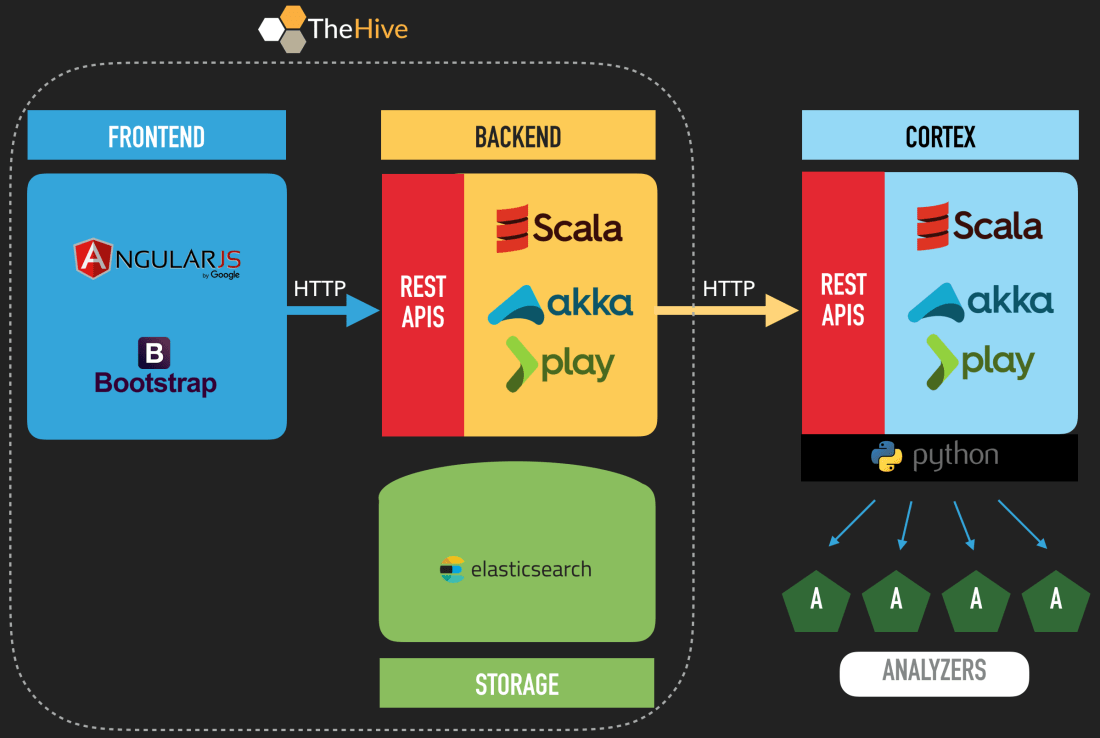
To address these issues but also allow fellow analysts to unleash the power of the analyzers using different security incident response platforms, we created Cortex.
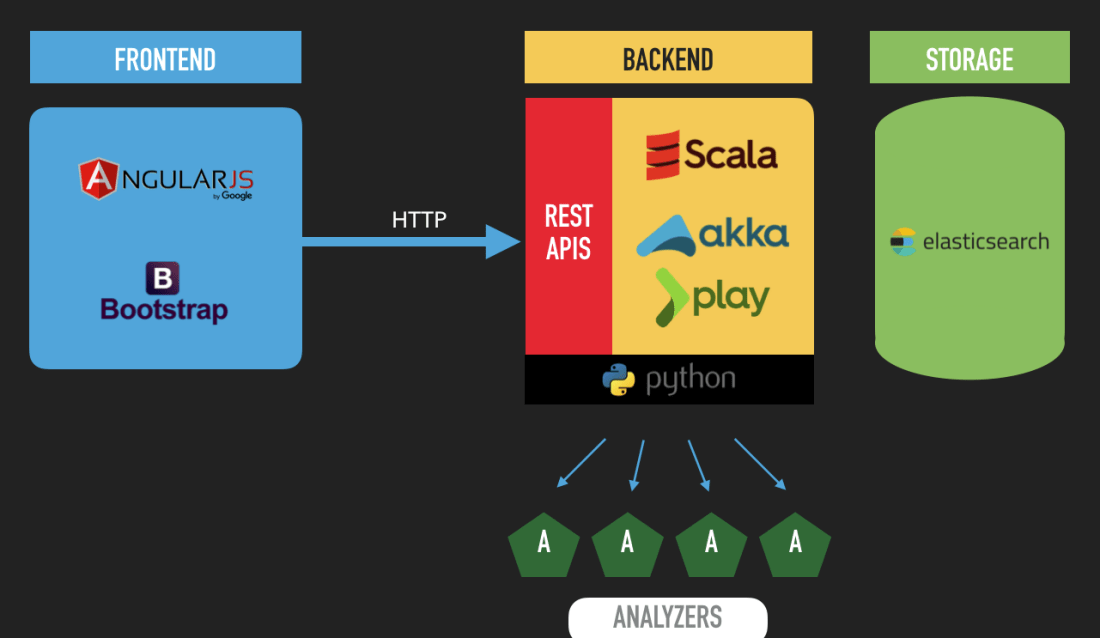
TheHive and Cortex Architecture
Besides MISP, Cortex is the perfect companion of TheHive. Starting from Buckfast, you may connect your instance to one or several Cortex servers depending on your OPSEC needs and security requirements.
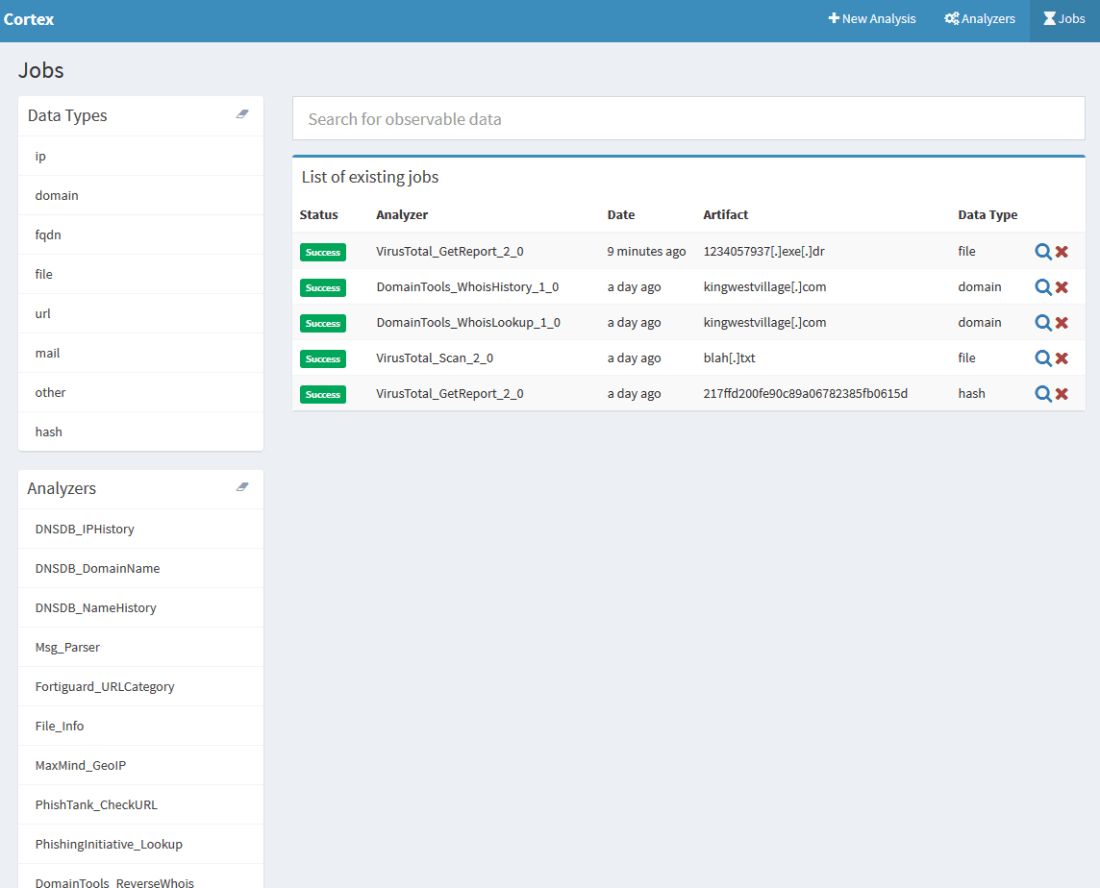
Available reports can be accessed using the magnifying glass
TheHive comes with a report template engine that allows you to adjust the JSON output of Cortex analyzers to your taste instead of having to create your own parsers. And to give you a head start, we provide templates for all 13 analyzers that Cortex 1.0.0 is shipped with. Ain’t that sweet?
We also made enhancements to the Observables tab in TheHive Web UI to allow you to run all applicable analyzers with a single click!
Analyzers
Since the previous release of TheHive, we have added 5 new analyzers, bringing the total to 13, that you can use by deploying a Cortex instance. We have also made improvements to existing ones. You’ll find the full list on Github. The new additions, some of which were contributed by our user community, are:
Abuse Finder: use CERT-SG’s Abuse Finder to find the abuse contact associated with domain names, URLs, IP and email addresses.
OTXQuery: query AlienVault Open Threat Exchange for IPs, domains, URLs, or file hashes.
PassiveTotal: leverage RiskIQ’s PassiveTotal service to gain invaluable insight on observables, identify overlapping infrastructure using Passive DNS, WHOIS, SSL certificates and more.
URLCategory: checks the Fortinet categories of URLs.
Phishing Initiative: queries Phishing Initiative to assess whether a URL has been flagged a phishing site.
PhishTank: queries PhishTank to assess whether a URL has been flagged a phishing site.
We have also largely improved the former Olevba analyzer and renamed it File_Info. It is in fact our first meta-analyzer as it leverages a collection of tools to parse files in several formats such as OLE and OpenXML to detect VBA macros, extract their source code, generate useful information on PE, PDF files and much more.
Sorting, Filtering and Statistics
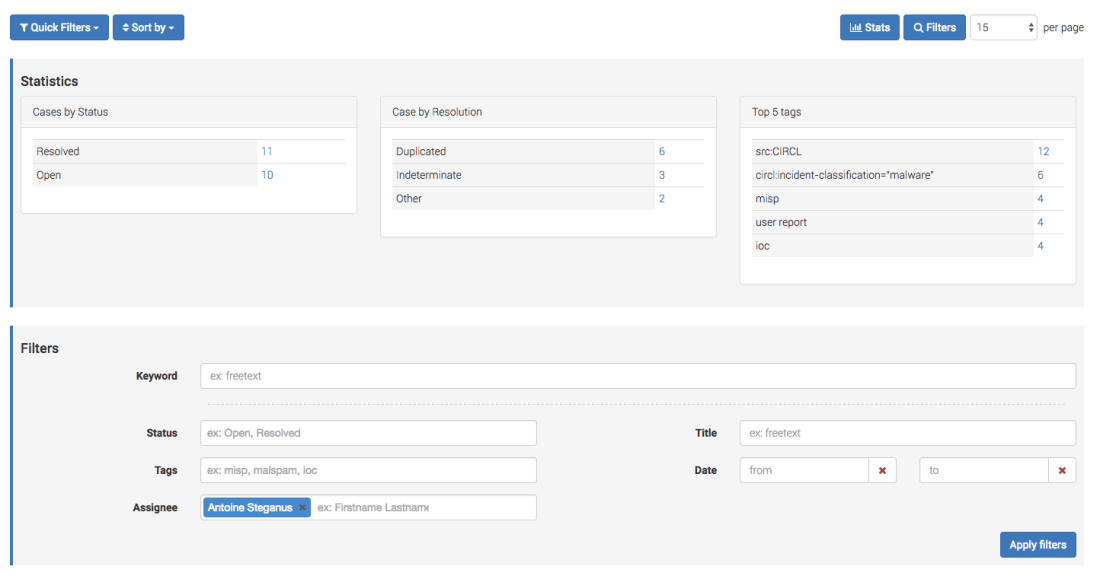
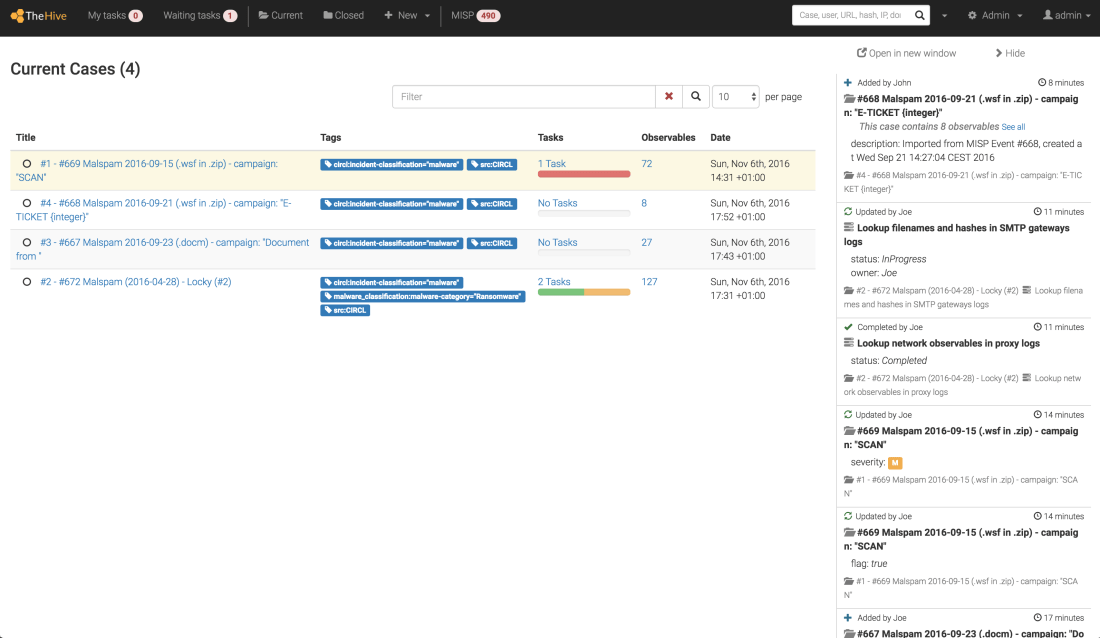
Instead of the latest open cases, Buckfast displays everything on the main page and lets you decide how you want to sort and filter the cases. For example, you can display only cases that contain specific tags or that were assigned to a particular incident handler. We have also added quick filters to display open or closed cases as well as the cases that were assigned to you.
Buckfast has also the ability to display simple statistics on cases without launching the Statistics module page.
Statistics and Filters
Avatars
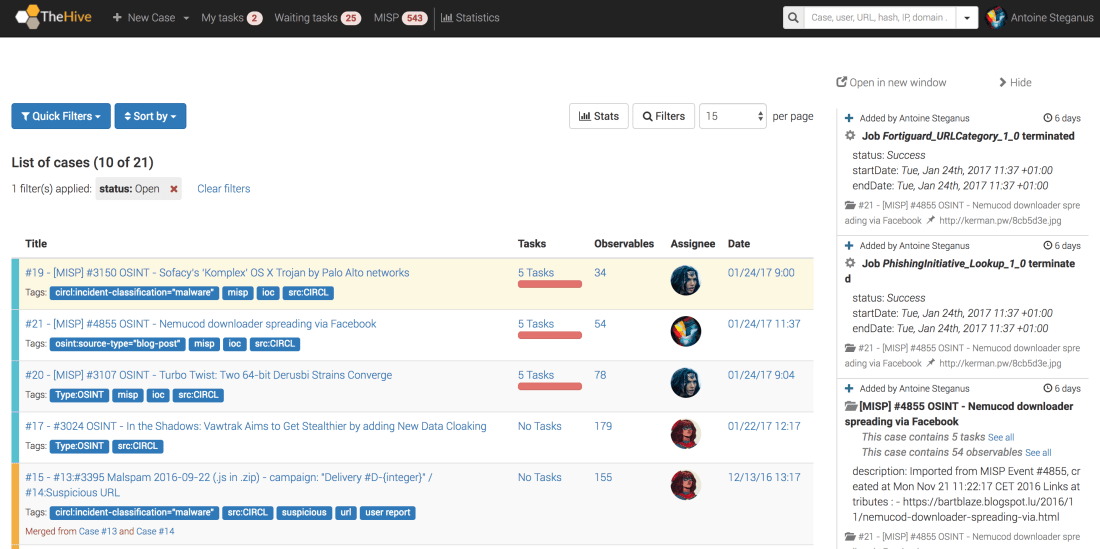
While previous TheHive versions allowed you to assign tasks to fellow handlers, Buckfast lets you also assign a case to a particular person which would ensure that all tasks are dealt with in a timely fashion and help analysts complete the investigation. The case assignees are now visible on the main page thanks to their avatars which they should provide in their user profile page. And before you ask for it, we won’t support animated GIFs. Seriously.
The New Main Screen of Buckfast
Download & Try
There are other interesting features that are worth detailing but we’ll keep those for another installment. In the meantime, we highly encourage you to try Buckfast, Cortex or both and let us know what you think.
If you are an existing TheHive 2.9.x user, we urge you to upgrade to Buckfast and deploy a Cortex instance to use the analyzers.
As this reporter informed you a few weeks ago, the fine cooks of TheHive Project were working hard on a new version of TheHive (TH) which most prominent feature is case merging. Put simply, starting from 2.9.1, TH lets you merge two cases together once you realize that they are similar to each other if not outright identical. This will save you from tearing your hair up and duplicating work on two separate investigations only to realize down the DFIR road that they should have been one right from the start.
When you perform a merge, the two original cases will be used to create a new one that is a union of all the observables of its parents. However, all the tasks of the parents will appear in the child, even if a task has the exact same name in the original cases. This might look as a shortcoming but pause a second and think about it. Tasks are basically worklogs and if we were to fuse a task, how would we collect the worklogs in each of them and put them back in an intelligible form? Got any effective ideas? Then what are you waiting for? Shoot them our way.
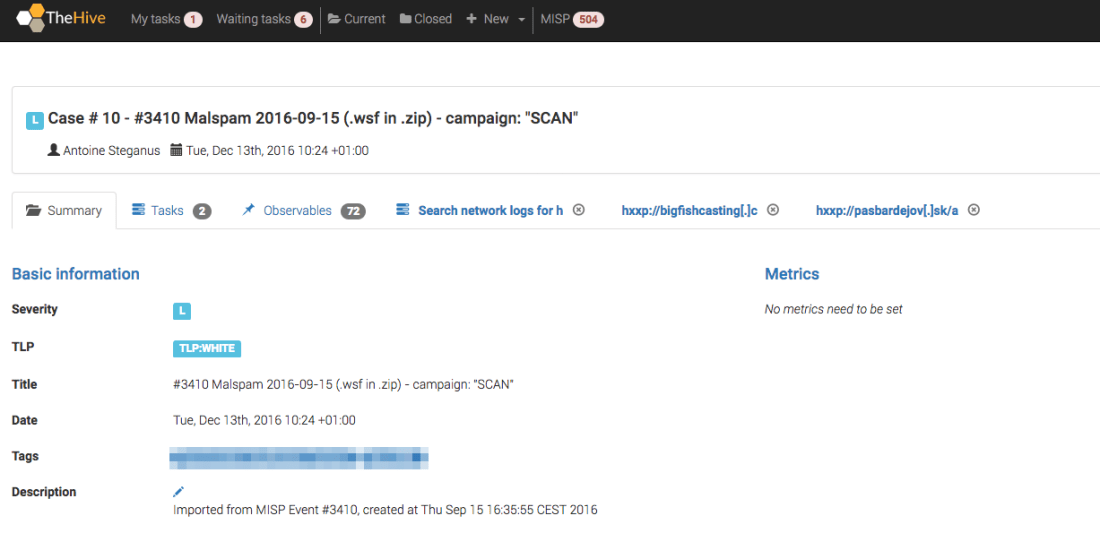
In the meantime, let’s see how this works in practice through an example. Earlier today*, Antoine, our intrepid security incident response lead of the StarGazer CSIRT imported a MISP event that looked interesting (to him at least):
Antoine imports a Malspam-related MISP event
While Antoine can import a MISP event as a TH case that has no associated tasks and create those by hand, he prefers automating as many things as possible. So he previously logged in as an administrator, then he created a case template for importing MISP events. The template contains the typical set of minimal tasks that need to be performed during the investigation of such events. He hasn’t supplied numerical metrics for the template at this time.
Meanwhile, Isabelle, his fellow analyst, was monitoring the CSIRT mailbox for user reports and notifications that may need to be acted upon. As it happens, Anthony Braco from the HR department forwarded a suspicious email which resembles a malspam:
Isabelle creates a new case upon receiving Anthony’s report
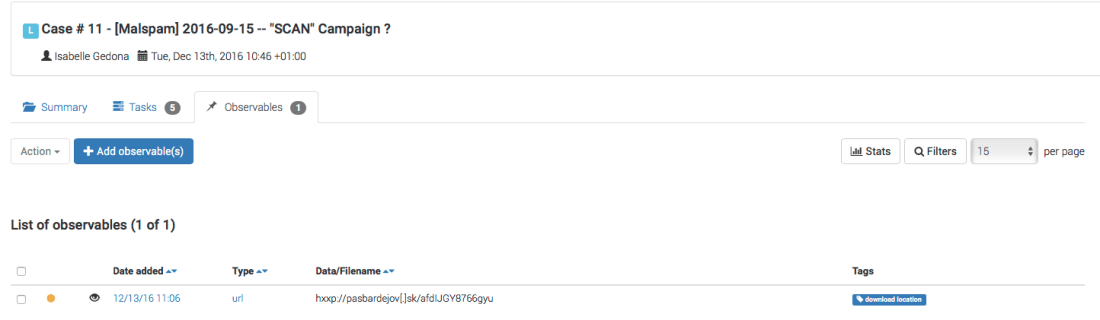
She extracts the suspicious attachment, fires it up in the team’s sandbox and extracts a number of observables which she starts adding to the case:
Isabelle adds a URL
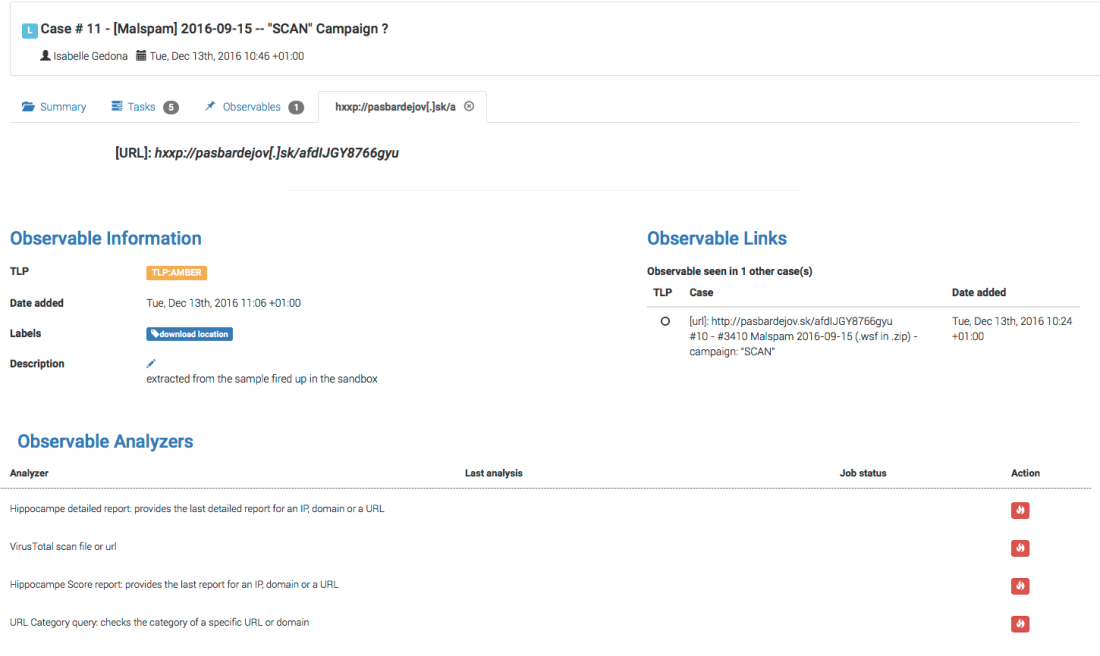
Interestingly, the URL she has just added has the eye icon which means it has already been seen somewhere else. She clicks on the observable to get the details:
The URL has already been added to another case
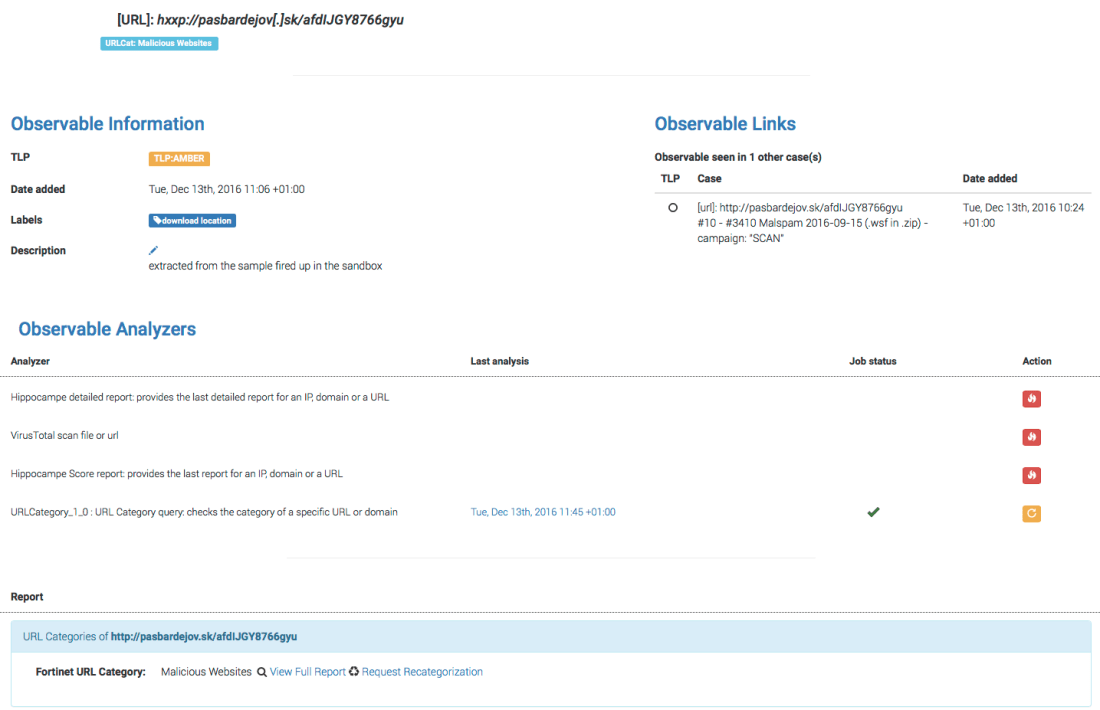
Under the Observable Links section, Isabelle observes that the URL was added to the case #10 that has been created a few minutes ago. She executes the URL Category analyzer that was kindly contributed by Eric Capuano and integrated to TH 2.9.1. The website is flagged as malicious:
URL Category shows that the URL is malicious
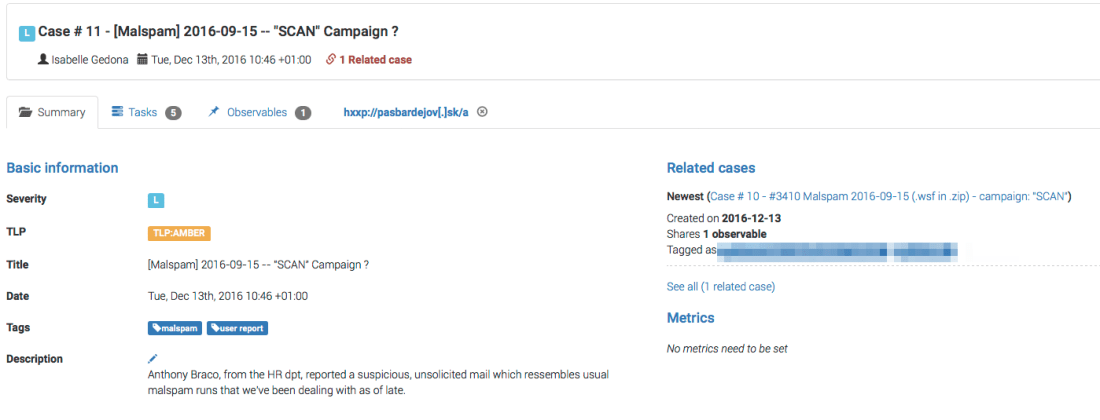
Isabelles then clicks on the Case Summary tab and makes sure that her case shares the observable with the one that was created by Antoine:
The Related cases section is of interest
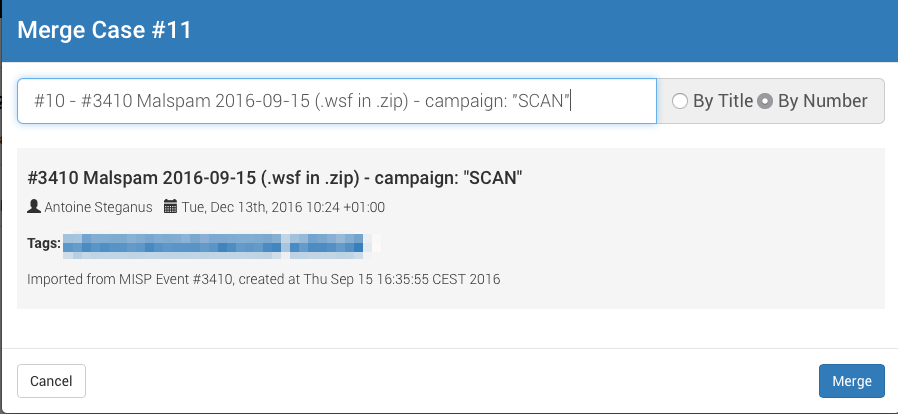
sabelle then decides to perform a merge of her case with Antoine’s. This will let the team avoid duplicating efforts and leverage the attributes from the MISP event that Antoine converted speed up the investigation and cover more ground during the identification, containment and eradication phases of incident response. To do that, she clicks on the facing arrows icon:
The facing arrowsIsabelle searches for the case to merge with hers by numberIsabelle selects case #10 and clicks on Merge
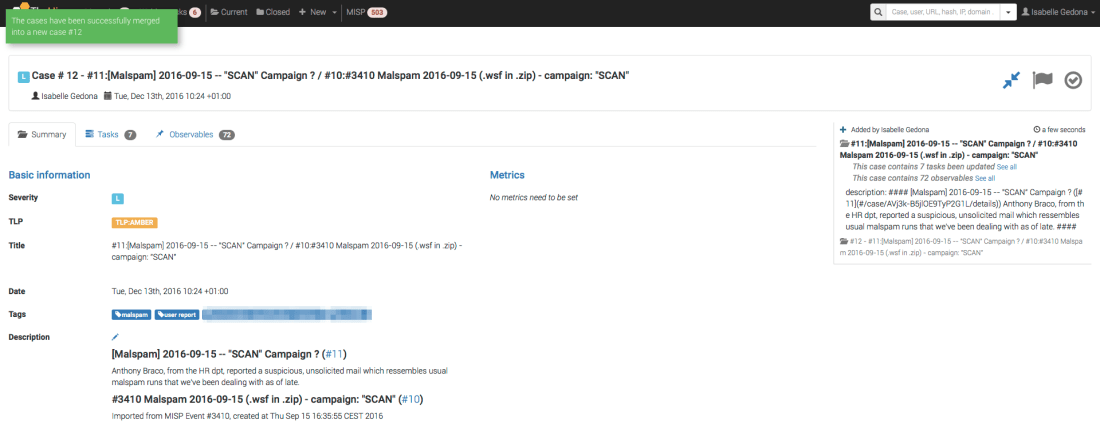
The two cases are then merged and a new one created, containing all the observables, analyzer results, cases and tags of the originals:
A new case is born
Once the merge operation is completed, the original cases are closed:
View of one of the original cases
Besides the case merge feature and the addition of the URL Category analyzer, 2.9.1 fixes a number of bugs and adds a few enhancements, many of which were brought to our attention by our user community. Please read the full changelog for additional details.
If you are a current 2.9.0 user, we highly recommend you update to 2.9.1.
* Please do not put too close an attention to the dates in some of the cases which are off by several weeks. We are intentionally using old data for the sake of demonstrating the feature.
The chefs behind TheHive authorized this reporter a sneak preview into their code kitchen as they were preparing a delicious recipe for an upcoming release: case merging.
Reading about someone else’s experience with food, wine, music or in this case code can be baffling but let us not shy away from a tedious task and call an example to the rescue.
Antoine is the security incident response lead of the StarGazer CSIRT which is using TheHive (TH) to handle incidents and keep the monsters at bay. Their TH instance is connected with their MISP server and Antoine has been keeping an eye on the top navigation bar of the application to spot new MISP event notifications that would need processing. Here comes one. Antoine clicks on the notification bubble and is taken as a result to the Import MISP events view.
The Import MISP events View
Indeed, a new MISP event showed up from a partner’s instance that is synced with StarGazer’s. Antoine previews the event, decides it worths an investigation and creates a TH case out of it with a number of associated tasks by clicking on import event. StarGazer CSIRT has indeed taken advantage of TH case template engine to match handling MISP events to their processes.
Preview a MISP event before importing it
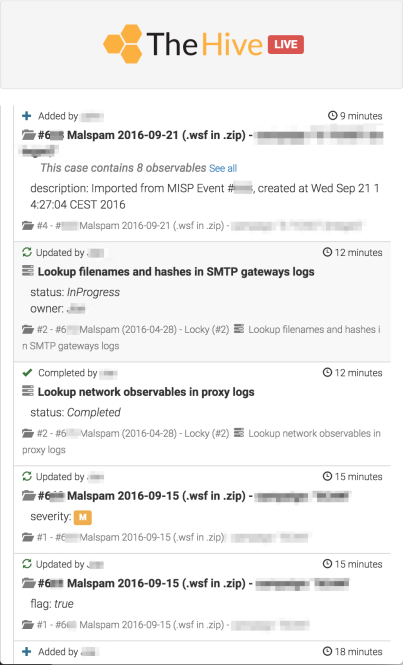
Isabelle, a StarGazer security analyst, has just wrapped up a task from a previous case, looking for suspicious activities in proxy logs. She completed her analysis, updated the task in TH and closed it. Since the Flow was open on her screen, she saw Antoine creates the new case and the related tasks. As it happens, one of them consists of searching URLs copied over from the MISP event in the proxy logs.
The Flow
Isabelle clicks on the new task, an action that automatically assigns it to her, and starts working on it. Antoine sees what Isabelle is up to thanks to the Flow and then moves on to deal with a different task.
A few minutes later, Antoine’s eyes are caught by a new MISP event notification. He can’t handle it right now so he reaches out to Sabine, the backup incident response lead, and asks her to take care of it. Sabine obliges and previews the new event which is from a different source than the first one. She decides that it deserves an investigation as well and there, she creates a new case. Time flies by and StarGazer analysts are buzzing along the two investigations only to realize that the two MISP events were in fact almost the same.
Here is what happened. The two events were published by two different sources who were subjected to a spear-phishing attack by the same threat actor. While the malicious attachments are unique for each recipient, they drop the same malware which beacons using HTTP to a small set of C2s that were successfully identified by both parties. The email addresses used by the attacker are different but not the MTA. Moreover, the email subjects have the same pattern.
In this situation, using the current TH version (2.9.0), the analysts’ hands are kind of tied. They may close the second case after manually copying the observables that were created out of the new MISP event to the case opened by Antoine for example. What a hassle. It kinds of defeat the productivity boost they were expecting by choosing TH.
In TH version 2.9.1, which will be released in a few days, the StarGazer team will be able to merge both cases very simply, creating a new one, without losing observables, tasks or their associated logs. So even if a new MISP event pops up hours or days later, they will be able to create a case out of it and merge the case right away with an existing one if similarities are found. And spotting similarities is quite easy with TH since when you create and update a case, the Web UI Case View will tell you if there are look-alike cases based on observables. You can also navigate to the observables tab of the new case, choose to display 100 at a time and see if most observables have an ‘eye’ icon associated with them (which means they have already been seen). Of course, this second method is not ideal and if you want be thorough you’d want to review if all the observables have an ‘eye’ icon.
Case merging will not be limited to cases created out of MISP events. You may use this feature for any case that you have created in TH.
But what happens if, after merging, the MISP event that was used to create one of the original cases is updated and new attributes have been added to it? As this reporter was pestering the chefs with questions, they asked him to leave the kitchen since they were putting the very last touches to the recipe so he complied.
Well, all we have to do is grab a nice table, put a napkin on our lap, and wait for the new version to be served. Maybe then our question will be answered.
As seasoned Digital Forensics & Incident Response practitioners, we have been looking for years for a solid, scalable platform to investigate and collaborate on information security incidents, store heterogeneous observables and analyze them one by one or in bulk.
Unsatisfied with what we found on the market, development started in earnest in early 2014 and a first usable version was put in production in October 2014. TheHive was born and it has been used since then on a daily basis by about a dozen analysts since then.
TheHive is a scalable 3-in-1 open source and free solution designed to make life easier for SOCs, CSIRTs, CERTs and any information security practitioner dealing with security incidents that need to be investigated and acted upon swiftly.
Collaborate
Collaboration is at the heart of TheHive. Multiple analysts can work on the same case simultaneously. For example, an analyst may deal with malware analysis while another may work on tracking C2 beaconing activity on proxy logs as soon as IOCs have been added by their coworker, thanks to the Flow (a Twitter-like stream that keeps everyone updated on what’s happening in real time).
Elaborate
Within TheHive, every investigation corresponds to a case. Cases can be created from scratch and tasks added on the go and dispatched to (or taken by) available analysts. They can also be created using templates with corresponding metrics to drive your team’s activity, identify the type of investigations that take significant time and seek to automate tedious tasks.
Each task can have multiple work logs where contributing analysts may describe what they are up to, what was the outcome, attach pieces of evidence or noteworthy files, etc. Markdown is supported.
Analyze
You can add one or hundreds if not thousands of observables to each case that you create. You can also create a case out of a MISP event since TheHive can be very easily linked to your MISP instance should you have one. TheHive will automatically identify observables that have been already seen in previous cases.
Observables can also be associated with a TLP and their source (using tags). You can also easily mark observables as IOCs and isolate those using a search query and export them for searching in your SIEM or other data stores.
TheHive comes also with an analysis engine. Analyzers can be written in any programming language supported by Linux such as Python or Ruby to automate observable analysis: geolocation, VirusTotal lookups, pDNS lookups, Outlook message parsing, threat feed lookups, …
Security analysts with a knack for scripting can easily add their own analyzers (and contribute them back to the community since sharing is caring) to automate boring or tedious actions that must be performed on observables or IOCs. They can also decide how analyzers behave according to the TLP. For example, a file added as observable can be submitted to VirusTotal if the associated TLP is WHITE or GREEN. If it’s AMBER, its hash is computed and submitted to VT but not the file. If it’s RED, no VT lookup is done.
Check it Out
TheHive is an open source and free software released under the AGPL (Affero General Public License). We, TheHive Project, are committed to ensure that TheHive will remain a free and open source project on the long-run.






 TheHive Project